
Miracase 8ad21a1b-09de-4df8-8689-16518fb3ae13
Miracase 3-in-1 Cell Phone Holder User Manual
Model: 8ad21a1b-09de-4df8-8689-16518fb3ae13
Производ је завршенview
The Miracase 3-in-1 Cell Phone Holder is a versatile mounting solution designed for your car. It offers three different installation methods: dashboard, air vent, and windshield, providing flexibility to suit various vehicle interiors and user preferences. This holder is engineered for secure grip and easy adjustability, ensuring your smartphone remains stable and accessible during your travels.

Figure 1: Miracase 3-in-1 Cell Phone Holder components.
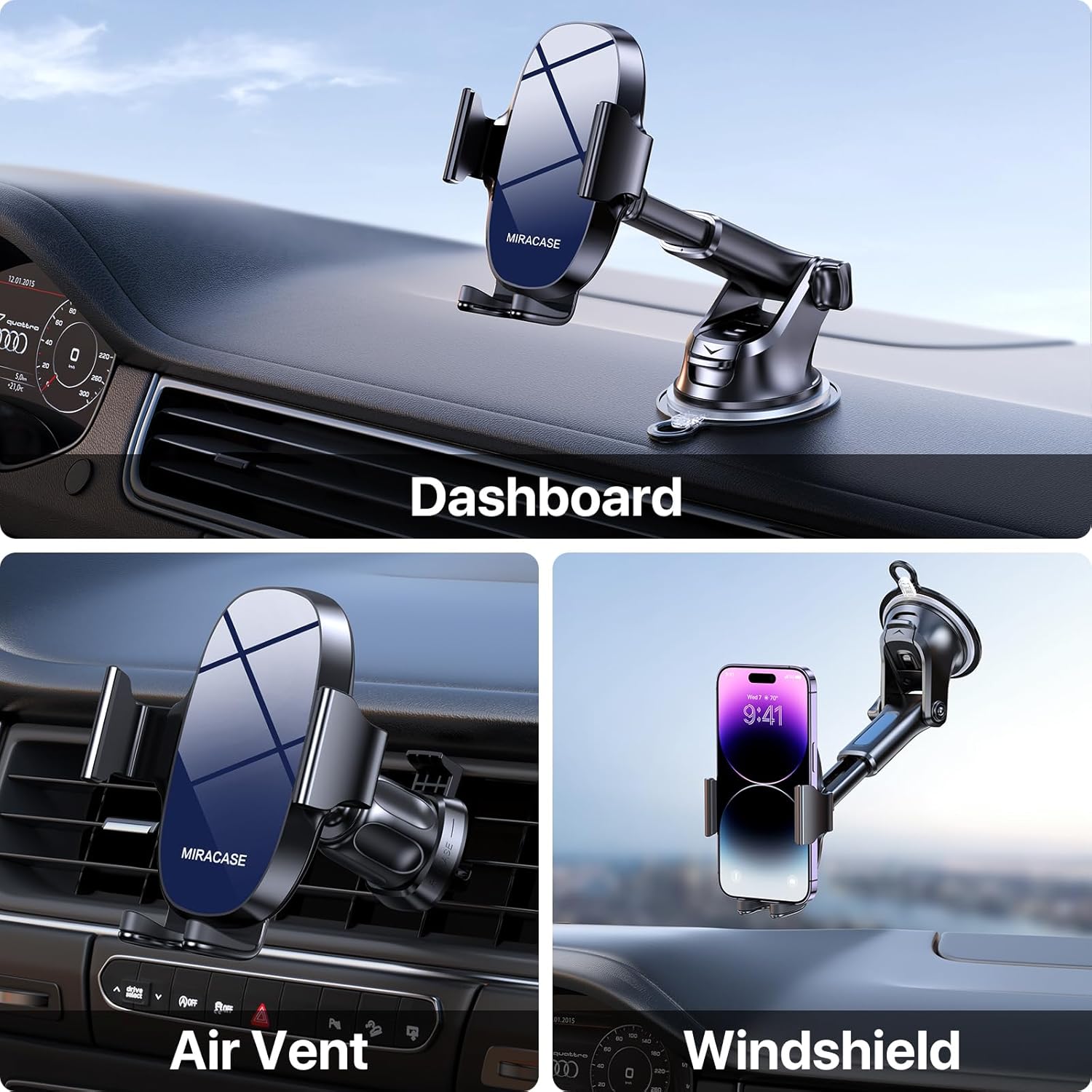
Figure 2: Demonstrating the three mounting options: Dashboard, Air Vent, and Windshield.
Подешавање и инсталација
1. Choosing Your Mounting Location
This holder provides options for dashboard, windshield, or air vent installation. Select the location that offers the best visibility and accessibility without obstructing your driving view или контроле возила.
2. Dashboard/Windshield Mount Installation
- Очистите површину: Ensure the chosen dashboard or windshield area is clean and free of dust or oils. Use an alcohol wipe if necessary and let it dry completely.
- Причврстите вакуумску чашицу: Press the suction cup firmly onto the desired smooth, flat surface.
- Закључајте усисавање: Push down the locking lever located at the base of the suction cup to create a strong vacuum seal.
- Подесите угао руке: Loosen the adjustment knob on the arm to set the desired angle, then tighten it securely.

Figure 3: The robust suction cup provides a secure hold, capable of withstanding various temperatures.
3. Air Vent Mount Installation
- Attach Vent Clip: Slide the upgraded metal hook of the vent clip onto one of your car's air vent blades.
- Осигурајте клип: Tighten the screw on the vent clip to firmly clamp it onto the vent blade, preventing wobbling.
- Обезбедите стабилност: Gently tug on the installed vent clip to confirm it is securely attached before mounting the phone holder.

Figure 4: Close-up of the upgraded vent clip with metal hook for enhanced stability.

Figure 5: Dimensions of the air vent clip for compatibility reference.
4. Attaching Phone Holder to Mount
Once your chosen mount (suction cup or vent clip) is securely installed, attach the phone holder cradle to the spherical joint on the mount. Tighten the collar around the joint to lock the cradle in place.
Упутство за употребу
1. Placing and Removing Your Phone
- Отворите Цлamps: Press the release button located on the back of the phone holder to open the side clampинг армс.
- Убаците телефон: Place your smartphone into the holder, ensuring it rests on the bottom support. The side clamps will automatically close to secure the phone.
- Remove Phone: Press the release button again to open the clamps and carefully remove your phone.
2. Подешавање Viewинг Англе
The Miracase phone holder features multiple adjustment points for optimal viewинг:
- Ротација за 360°: The phone cradle can rotate a full 360 degrees, allowing for both portrait and landscape viewинг модес.
- Подешавање угла од 270°: The arm of the holder can be adjusted up to 270 degrees, enabling you to find the perfect vertical angle.

Figure 6: The holder offers extensive adjustability for optimal viewинг углова.
3. Компатибилност са телефоном
This holder is designed to accommodate a wide range of smartphones, typically those with screen sizes between 4.0 and 7.0 inches. It is also compatible with various phone cases, including battery cases, wallet cases, OtterBox, and MagSafe cases, ensuring a secure fit without needing to remove your phone's protective cover.

Figure 7: Compatibility with various phone sizes and case types.
Одржавање
- Чишћење вакуумске чашице: If the suction cup loses its stickiness, rinse it with warm water and let it air dry. Do not use harsh chemicals or abrasive materials.
- Генерално чишћење: Wipe the phone holder with a soft, damp cloth to remove dust and grime. Avoid excessive moisture.
- Складиштење: When not in use for extended periods, store the holder in a cool, dry place away from direct sunlight to preserve the integrity of the materials.
Решавање проблема
- Вакуумска чаша се не лепи:
решење: Ensure the mounting surface is clean, smooth, and dry. Re-wet the suction cup slightly with water, press firmly, and then engage the locking lever. Avoid porous or textured surfaces. - Телефон не држи чврсто:
решење: Ensure the side clamping arms are fully closed around your phone. Press the release button and re-insert the phone, allowing the arms to auto-clamp. Check for any obstructions. - Vent Clip Wobbles:
решење: Make sure the metal hook is fully inserted into the vent blade and the tightening screw is securely fastened. Some vent designs may not provide optimal stability. - Тешкоће са подешавањем угла:
решење: Loosen the adjustment knobs sufficiently before attempting to change the angle or rotation. Tighten them firmly once the desired position is achieved.
Спецификације
| Феатуре | Детаљ |
|---|---|
| Бранд | Miracase |
| Број модела | 8ad21a1b-09de-4df8-8689-16518fb3ae13 |
| Тип монтаже | Dashboard / Air Vent / Windshield |
| Компатибилни уређаји | Паметни телефони (4.0-7.0 инча) |
| Тежина артикла | 9.1 унци |
| Димензије пакета | 5.04 к 4.76 к 2.64 инча |
| Посебне карактеристике | Adjustable, Upgraded Metal Hook Vent Clip |
| Боја | Плава |
| Земља порекла | Кина |
| Датум првог доступног | 1. августа 2023. године |
Гаранција и подршка
For warranty information and customer support, please refer to the official Miracase webсајт или директно контактирајте њихову корисничку службу. Конкретни гарантни услови могу се разликовати у зависности од региона и датума куповине.
Повезани документи - 8ad21a1b-09de-4df8-8689-16518fb3ae13
 |
Hama Universal Smartphone Holder "Flipper", Vent - User Manual Operating instructions and installation guide for the Hama Universal Smartphone Holder "Flipper", Vent. Learn how to safely install and use your smartphone holder in your car's ventilation system. |
 |
Universal Dashboard Magnetic Car Phone Holder User Guide Comprehensive guide for the Universal Dashboard Magnetic Car Phone Holder, covering product description, EU compliance, key features, usage instructions, care, maintenance, and safety warnings for secure smartphone mounting in vehicles. |
 |
NEXTECH универзални држач за телефон са вакуумском фиксацијом за аутомобиле - HS9039 Безбедно монтирајте свој паметни телефон или ГПС уређај у аутомобилу помоћу универзалног држача са вакуумском чашом NEXTECH (HS9039). Има подесиве руке, ротацију од 360° и јаку вакуумску чашицу за контролну таблу и ветробранско стакло. Компатибилан је са уређајима до 6.8 инча. |
 |
Magnetic Car Phone Holder User Manual Comprehensive user manual for the Magnetic Car Phone Holder, covering installation for air vent and dashboard mounts, usage instructions, safety cautions, and maintenance tips. |
 |
Magnetic Car Phone Holder - JBX-1 User Guide Discover the JBX-1 Magnetic Car Phone Holder, a universal air vent mount for smartphones. Made from durable aluminum alloy and ABS, it offers 360° rotation, easy installation, and compatibility with all mobile phones. Includes important safety warnings. |
 |
Humixx CTVK42 Car Mount User Manual - Installation and Usage Guide Comprehensive guide for the Humixx CTVK42 car mount, covering installation methods (suction cup and air vent clip), usage steps, and important safety precautions. Learn how to securely mount your smartphone in your vehicle. |
Ask a question about this manual
Ask about setup, troubleshooting, compatibility, parts, safety, or missing instructions. Manuals+ will review the question and use this page’s manual context to help answer it.