
Увод
The KAGO HDMI Audio Extractor Splitter (Model YZ-A022) is designed to enhance your home theater experience by allowing you to extract audio signals from an HDMI source device or an HDMI-ARC/eARC capable display. It converts the extracted HDMI audio signal into an analog stereo (3.5mm), digital optical (SPDIF), or HDMI Audio format for ultimate flexibility with various audio systems. Additionally, it functions as a 2-in-1 HDMI switch, enabling you to connect two HDMI source devices to a single display.
Садржај пакета
- 1x KAGO HDMI Audio Extractor Splitter (Model YZ-A022)
- 1к ИР даљински управљач
- 1x HDMI 2.0 кабл
- 1x SPDIF Optical Cable
- 1x USB Power Supply Cable
- 1к Водич за кориснике
Карактеристике производа
- HDMI Audio Extractor Splitter: De-embeds digital audio signals from your HDMI source device or HDMI-ARC/eARC capable display. Converts extracted audio to analog stereo (3.5mm), digital optical (SPDIF), or HDMI Audio.
- HDMI 2.0 8K@60Hz Support: Supports resolutions up to 8K@60Hz, with backward compatibility for 4K@120Hz, 2560x1440@120Hz, and 1920x1080@240Hz. Compatible with 3D, UHD, and HDCP2.2 signals.
- Fast and Stable Transmission: Features an industry-leading IC chip providing 18Gbps bandwidth. USB powered design ensures stable video transmission and optimal performance. Supports HDMI 2.0b, HDCP 2.2, and HDR10.
- Versatile Audio Output Options: HDMI audio extraction for 7.1CH, SPDIF for 5.1CH, and 3.5mm output for 2CH L/R stereo.
- HDMI Switch 2 in 1 Out: Allows switching between two HDMI source devices to a single display. Includes an IR remote control for convenient switching and manual button control. LED indicators show the active port.
- Широка компатибилност: Compatible with various HDMI source devices such as Blu-ray players, DVD players, HD players, cable/satellite boxes, Amazon Fire TV, Apple TV, PS3/PS4/PS4 Pro/PS5, Nintendo Switch, Xbox consoles, PCs/laptops, HD cameras, Fire Stick, Roku, and HD DVRs. Audio output is compatible with speakers, amplifiers, soundbars, and other sound systems.
Диаграм производа


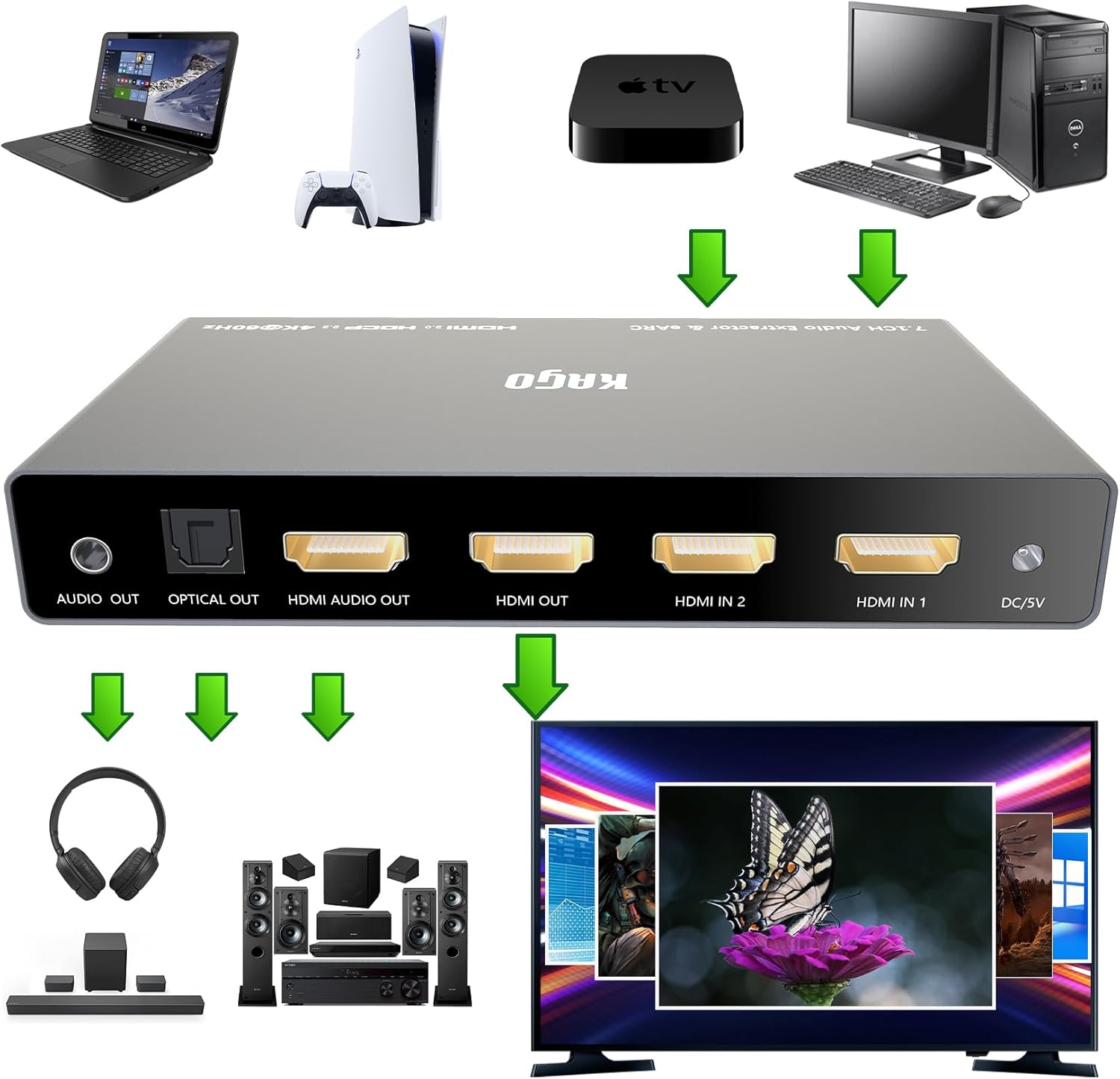
Упутства за подешавање
- Connect HDMI Source Devices: Connect your HDMI source devices (e.g., Blu-ray player, gaming console, streaming box) to the HDMI IN 1 and/or HDMI IN 2 ports on the KAGO HDMI Audio Extractor Splitter using high-quality HDMI cables.
- Повежи се са екраном: Connect the HDMI OUT port of the KAGO HDMI Audio Extractor Splitter to the HDMI input port of your TV or display using an HDMI cable.
- Connect Audio System: Choose one of the following audio output options to connect to your audio system:
- For 2.0CH stereo audio, connect a 3.5mm audio cable from the AUDIO OUT port to your headphones or stereo speakers.
- For 5.1CH digital audio, connect an optical (SPDIF) cable from the OPTICAL OUT port to your soundbar or AV receiver.
- For 7.1CH audio, connect an HDMI cable from the HDMI AUDIO OUT port to your AV receiver or home theater system.
- Прикључите напајање: Connect the included USB power supply cable to the DC/5V port on the KAGO HDMI Audio Extractor Splitter and plug the other end into a USB power adapter (not included) or a USB port on your TV/device. Ensure the device receives stable power for optimal performance.
- Укључено: Power on all connected devices (source, display, audio system, and the KAGO HDMI Audio Extractor Splitter).
Упутство за употребу

Switching HDMI Inputs
- Коришћење дугмета уређаја: Притисните тастер SW HDMI button on the front panel to cycle between HDMI IN 1 and HDMI IN 2. The corresponding LED indicator (IN 1 or IN 2) will illuminate.
- Using the IR Remote Control: Point the IR remote control at the device and press the 1 or 2 button to directly select HDMI IN 1 or HDMI IN 2, respectively.
Selecting Audio Output Modes

- Коришћење дугмета уређаја: Притисните тастер SW AUDIO button on the front panel to cycle through the audio output modes: 2.0CH, 5.1CH, and Pass. The corresponding LED will illuminate.
- Using the IR Remote Control: Притисните тастер 2.0, 5.1, или Пасс button on the remote to select the desired audio mode.
- Audio Mode Descriptions:
- 2.0ЦХ: Outputs stereo audio via the 3.5mm Audio Out.
- 5.1ЦХ: Outputs 5.1 channel audio via the Optical Out (SPDIF).
- Пасс: Passes through the original HDMI audio format to the HDMI Audio Out, supporting up to 7.1CH.
ARC/eARC Functionality


- To use ARC/eARC, connect your TV's HDMI-ARC/eARC output port to the ХДМИ ИН 1 port on the KAGO HDMI Audio Extractor Splitter.
- Ensure your TV's audio settings are configured to enable ARC/eARC.
- Притисните тастер еАРЦ/АРЦ дугме на предњој плочи или АРЦ button on the IR remote control to activate or deactivate the ARC/eARC function. The eARC/ARC Pass LED will indicate its status.
Решавање проблема
| Проблем | Могући узрок | Решење |
|---|---|---|
| Нема видео или аудио излаза. | Loose connections, no power, incorrect input selected. | Check all HDMI and power cable connections. Ensure the USB power supply is connected and providing power. Verify that the correct HDMI input (IN 1 or IN 2) is selected on the splitter. |
| Audio is not working or incorrect format. | Incorrect audio mode selected, incompatible audio system. | Притисните тастер SW AUDIO button or use the remote to select the appropriate audio mode (2.0CH, 5.1CH, Pass) for your audio system. Ensure your audio system supports the selected format. |
| ARC/eARC function is not working. | Incorrect connection, TV ARC/eARC not enabled. | Ensure your TV's HDMI-ARC/eARC output is connected to the ХДМИ ИН 1 port of the splitter. Check your TV's audio settings to confirm ARC/eARC is enabled. Activate ARC/eARC on the splitter using the dedicated button or remote. |
| Video quality issues (e.g., no HDR10, 8K@60Hz). | Non-certified HDMI cables, source/display incompatibility. | Use certified HDMI 2.0 or higher cables for 4K@60Hz, 8K@60Hz, and HDR10 compatibility. Ensure all connected devices (source, splitter, display) support the desired resolution and features. |
| IR remote control not responding. | Battery depleted, obstructed signal path. | Replace the remote control battery. Ensure there are no obstructions between the remote and the IR receiver on the splitter's front panel. |
Спецификације
- Број модела: YZ-A022
- Димензије производа: 5.4 к 2.55 к 0.86 инча (13.7 к 6.5 к 2.2 цм)
- Тежина артикла: 14.4 унце (408 грама)
- ХДМИ верзија: ХДМИ 2.0б
- ХДЦП верзија: ХДЦП 2.2
- Max Resolution Support: 8K@60Hz, 4K@120Hz, 2560x1440@120Hz, 1920x1080@240Hz
- пропусни опсег: 18Гбпс
- Аудио излаз: 3.5mm (2.0CH), Optical (5.1CH), HDMI Audio Out (7.1CH)
- Напајање: DC 5V (преко USB-а)
- Компатибилни уређаји: Blu-Ray Player, Camera, DVD Player, Gaming Console, Personal Computer, Projector, Television
- Number of HDMI Input Ports: 2
Одржавање
To ensure the longevity and optimal performance of your KAGO HDMI Audio Extractor Splitter, please follow these maintenance guidelines:
- Чишћење: Use a soft, dry cloth to clean the device. Avoid using liquid cleaners or abrasive materials, which can damage the surface or internal components.
- Окружење: Keep the device in a dry, well-ventilated area, away from direct sunlight, high temperatures, humidity, and dust.
- Руковање: Пажљиво рукујте уређајем. Избегавајте да га испустите или изложите јаким ударцима.
- Снага: Always disconnect the power supply before cleaning or if the device will not be used for an extended period.
Гаранција и подршка
KAGO provides lifetime technical support and friendly customer service for this product. If you encounter any issues or have questions, please contact our customer support team. We are committed to resolving your problem within 24 hours.
For support, please refer to the contact information provided in your product packaging or visit the official KAGO webсајту.