
Увод
This manual provides detailed instructions for the installation, operation, and maintenance of your EBTOOLS 4.3-inch 1080P Mirror Dash Cam. This device is designed to record video footage from both the front and rear of your vehicle, offering features such as parking monitoring and loop recording for enhanced driving safety and evidence collection. Please read this manual thoroughly before using the product to ensure proper functionality and to avoid any damage.
Карактеристике производа
- Издржљива конструкција: Manufactured from high-quality ABS material for robustness and extended durability.
- Wide-Angle Lenses: Equipped with wide-angle lenses to minimize blind spots and capture comprehensive road details.
- Лооп Рецординг: Ensures continuous recording by automatically overwriting the oldest video files when the memory card reaches its capacity.
- Перформансе у свим временским условима: Capable of recording clear video footage even in adverse weather conditions such as rain or fog.
- Дизајн прилагођен кориснику: Features a straightforward installation process and intuitive controls for ease of use.
Садржај пакета
Молимо вас да проверите да ли су све следеће ставке укључене у ваш пакет:
- EBTOOLS 4.3-inch Mirror Dash Cam Unit
- Позадиview Камера
- Цар Цхаргер
- Кабл за повезивање задње камере
- Mounting Straps/Adhesive
- Упутство за употребу (овај документ)

Сетуп
1. Монтажа камере
Secure the mirror dash cam over your vehicle's existing rearview mirror using the provided mounting straps. Ensure it is firmly attached and does not obstruct your view.
2. Повезивање задње камере
Route the rear camera cable from the dash cam to the desired mounting location at the rear of your vehicle. Connect the rear camera to the AV IN port on the main dash cam unit. For optimal performance, ensure the cable is neatly tucked away and secured.


3. Прикључак за напајање
Connect the provided car charger to the dash cam's power input port and then plug the other end into your vehicle's 12V power outlet (cigarette lighter socket). The device will typically power on automatically with the vehicle's ignition.
4. Уметните меморијску картицу
Insert a compatible Micro SD card (not included) into the TF CARD slot on the dash cam. Ensure the card is inserted correctly until it clicks into place. A high-speed Class 10 or higher card is recommended for reliable recording.

Упутство за употребу
Укључивање/искључивање
- аутоматски: The dash cam will power on and begin recording automatically when your vehicle's ignition is turned on.
- Упутство: Press and hold the Power button (usually marked with a power symbol) to manually turn the device on or off.
Навигација кроз мени
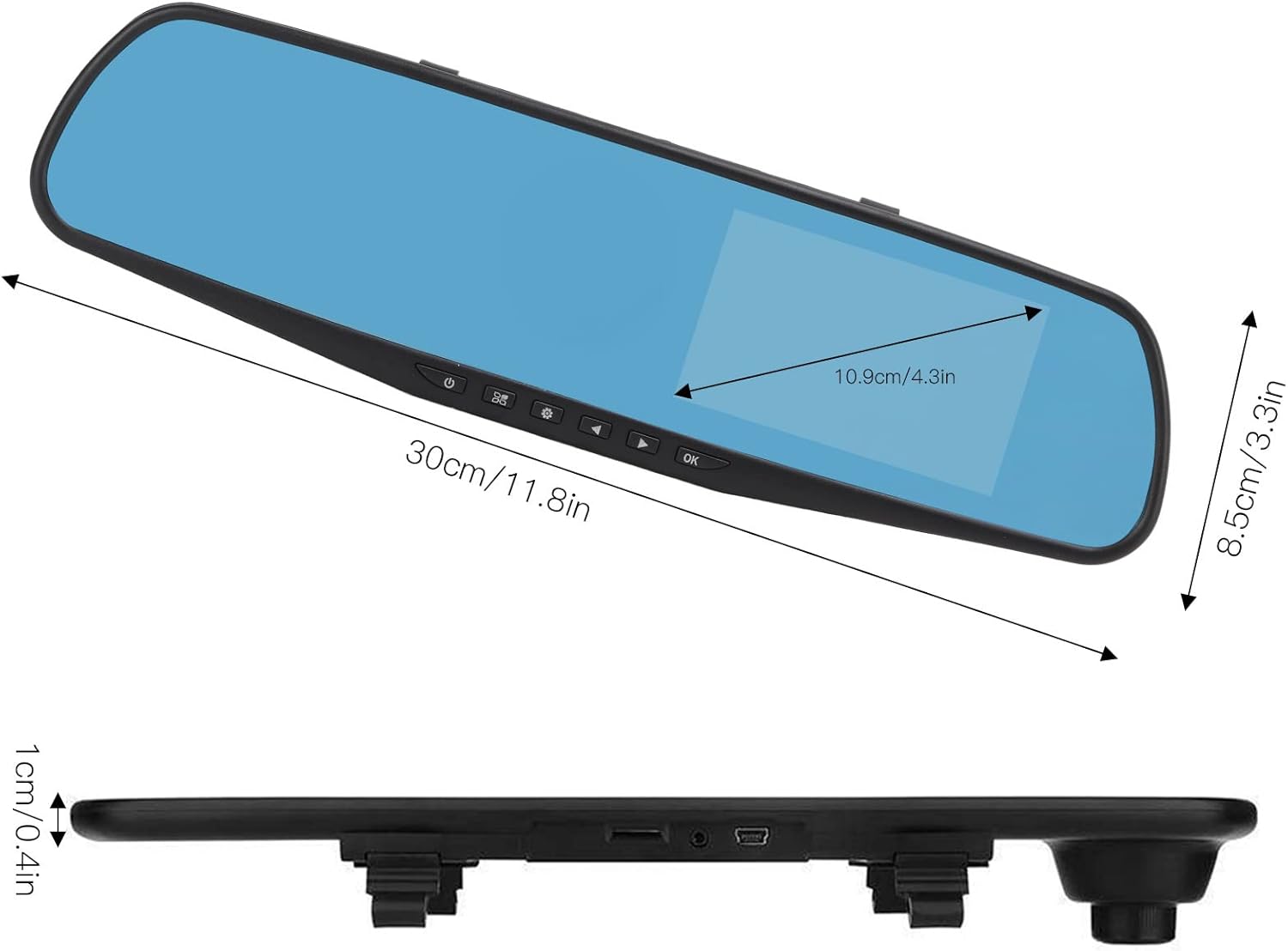
Use the physical buttons located on the bottom of the mirror unit to navigate through the menu options:
- Дугме менија: Притисните да уђете у мени подешавања.
- Дугмад за горе/доле: Користите за кретање кроз опције менија.
- Дугме ОК: Press to confirm a selection or setting.
Режими снимања
- Лооп Рецординг: This feature records video in continuous segments (e.g., 1, 2, 3, or 5 minutes). When the memory card is full, the oldest fileсе аутоматски преписују како би се направио простор за нове снимке.
- Детекција покрета: When enabled, the dash cam will automatically start recording if it detects movement in front of the vehicle while parked. This feature is useful for parking surveillance.
Подешавања видео резолуције
You can adjust the video resolution for both front and rear cameras in the settings menu:
- Предња камера: Select between 1080P (FHD 1400x1080) or 720P (HD 1280x720).
- Задња камера: Records at 720P resolution.
Подешавања језика
The device supports multiple languages. Navigate to the language settings in the menu to select your preferred language, including English, German, French, Italian, Japanese, Korean, and Simplified Chinese.

Одржавање
- Чишћење: Use a soft, dry cloth to clean the dash cam screen and lenses. Avoid using abrasive cleaners or solvents.
- меморијска картица: Regularly format your Micro SD card (at least once a month) to ensure optimal performance and prevent data corruption. Back up any important footagе пре форматирања.
- температура: Avoid exposing the device to extreme temperatures, both hot and cold, as this can affect battery life and component integrity.
Решавање проблема
- Уређај се не укључује:
- Ensure the car charger is properly connected to both the dash cam and the vehicle's 12V power outlet. Check if the vehicle's ignition is on. Test the charger in another port or with another device if possible.
- Проблеми са снимањем (нпр. зауставља снимање, оштећен fileс):
- Verify that a compatible, high-speed Micro SD card (Class 10 or higher) is inserted correctly. Format the memory card through the dash cam's settings menu. If issues persist, try a different memory card.
- Screen display problems (e.g., black screen, distorted image):
- Check all cable connections, especially for the rear camera. Try resetting the device to factory settings via the menu. If the problem continues, contact customer support.
- Задња камера не приказује:
- Ensure the rear camera cable is securely connected to both the rear camera and the AV IN port on the main unit. Check for any damage to the cable or connectors.
Спецификације
| Врста ставке | 4.3-inch Mirror Dash Cam |
| Материјал | АБС |
| Величина екрана | 4.3 инча |
| Дисплаи Типе | ТФТ ЛЦД |
| Угао предње камере | 110 степени |
| Угао задње камере | 90-110 degrees (Adjustable) |
| Резолуција предњег видеа | 1080P (FHD 1400x1080), 720P (HD 1280x720) |
| Резолуција задњег видеа | 720П |
| Loop Recording Intervals | 1 минут, 2 минута, 3 минута, 5 минута |
| Детекција покрета | Подржано |
| Резолуција слике | 12МП, 10МП, 5МП, 3МП, 2МП, 1.3МП |
| Видео Формат | АВИ |
| Формат слике | ЈПЕГ |
| Ленс Типе | F2.78 glass resolution multi-layer filter wide-angle lens |
| Подржани језици | English, German, French, Italian, Japanese, Korean, Simplified Chinese |
| Видео Оутпут | Читач УСБ картица |
| Начин монтаже | Адхезивни тип |
| Димензије производа | Approx. 30cm (11.8in) L x 8.5cm (3.3in) W x 1cm (0.4in) T |
| Димензије пакета | КСНУМКС к КСНУМКС к КСНУМКС цм; КСНУМКС г |
Гаранција и подршка
For warranty information or technical assistance, please refer to the warranty card included with your product or contact EBTOOLS customer support through the retailer's platform where the product was purchased. Our support team is available to help with any questions or issues you may encounter.