
1. Производ је готовview
The AZDOME M330 is a compact and feature-rich dash camera designed to record your journeys and provide surveillance for your vehicle. It features a 0.96-inch monitor, 1080P Full HD recording, WiFi connectivity, 24-hour parking surveillance, WDR technology, night vision, G-sensor, and loop recording, all powered by a durable supercapacitor.

Figure 1: AZDOME M330 Dash Cam mounted near a rearview mirror, highlighting its compact size and 0.96-inch monitor.
2. Садржај пакета
Молимо вас да проверите пакет за следеће ставке:
- АЗДОМЕ М330 Дасх Цам
- Type-C Cigarette Lighter Power Cord
- Статиц Стицкер
- Wiring Clips
- Алат за уклањање обрезивања
- Упутство за употребу (јапански)

Figure 2: Layout of the AZDOME M330 Dash Cam package contents.
3. Подешавање
3.1 Инсталација
- Очистите подручје ветробранског стакла где намеравате да монтирате камеру за аутомобил.
- Attach the static sticker to the cleaned area on the windshield.
- Peel off the protective film from the adhesive mount and firmly press the dash cam onto the static sticker. Ensure the camera lens has a clear view на путу.
- Adjust the camera angle. The M330 allows for 150-degree rotation to achieve the optimal recording angle.
3.2 Прикључак за напајање
- Connect the Type-C cigarette lighter power cord to the dash cam's power input.
- Plug the other end of the power cord into your vehicle's cigarette lighter socket.
- Route the power cable neatly along the windshield and dashboard using the provided wiring clips and trim removal tool to avoid obstructing your view.
- The dash cam will automatically power on and begin recording when your vehicle starts.
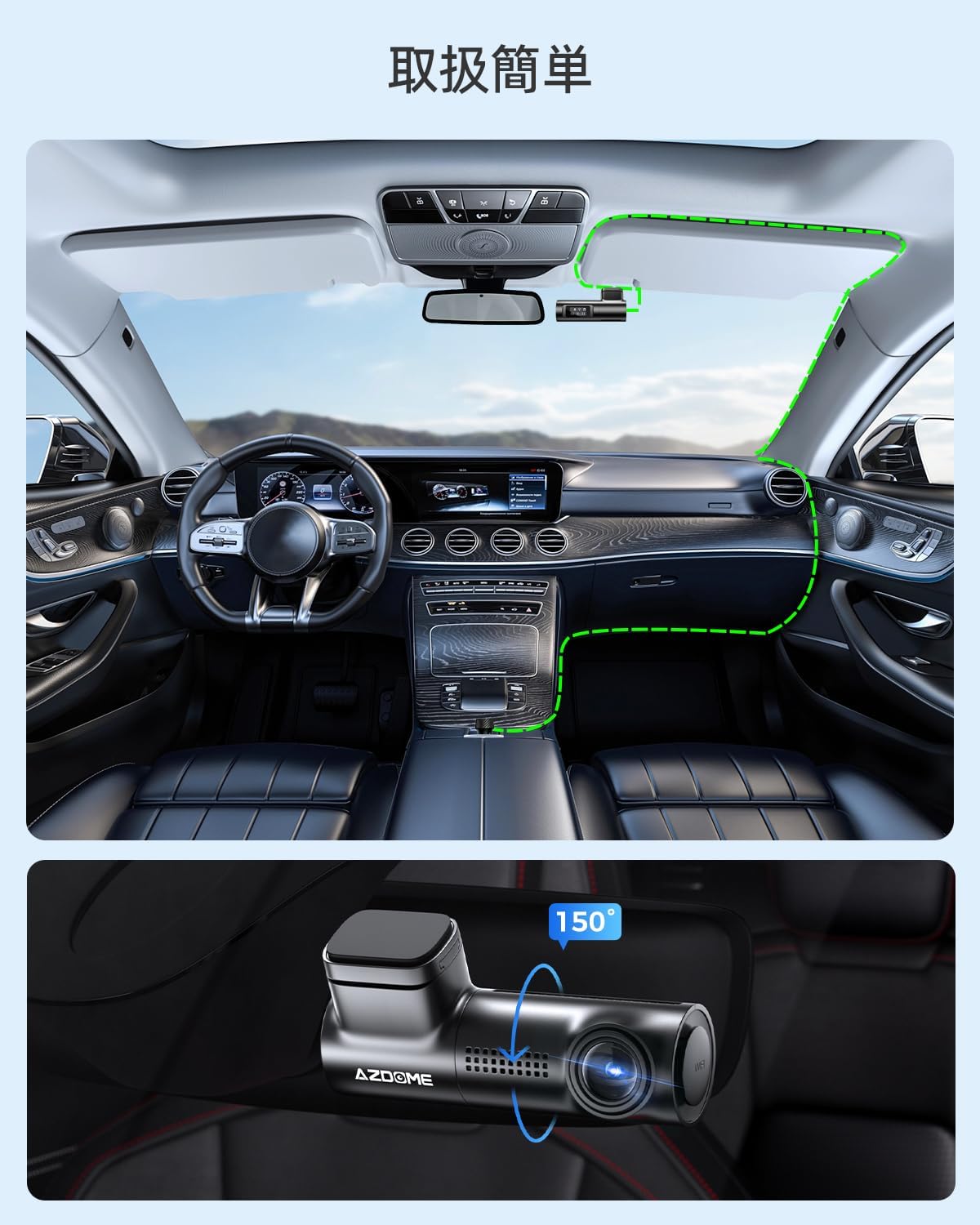
Figure 3: Recommended cable routing for AZDOME M330 Dash Cam installation. The inset shows the camera's 150-degree rotation capability.
4. Упутство за употребу
4.1 Основни рад
- Аутоматско снимање: The dash cam automatically starts recording when the vehicle's ignition is turned on and stops when the ignition is turned off.
- 0.96-inch Monitor: The small monitor displays the current recording status and WiFi connection status.
- Г-сензор: In case of sudden impact or collision, the built-in G-sensor will automatically lock the current video file да би се спречило његово преписивање.
- Лооп Рецординг: When the memory card is full, the dash cam will automatically overwrite the oldest unlocked video fileс да бисте наставили снимање.
4.2 WiFi Connectivity and App Usage
The AZDOME M330 features built-in WiFi, allowing you to connect it to your smartphone via the dedicated AZDOME app for easy video management and settings adjustments.
- Download and install the AZDOME app from your smartphone's app store (available on App Store and Google Play).
- Turn on WiFi on your smartphone and connect to the dash cam's WiFi network (usually named 'AZDOME_M330_XXXX').
- Отворите апликацију AZDOME. Можете view ливе фооtagе, репродукција снимљених видео записа, преузимање files to your phone, and adjust various settings.
- Ensure your smartphone is within 3 meters of the dash cam for a stable WiFi connection.

Figure 4: Using the AZDOME app to manage your dash cam via WiFi.
5. Карактеристике
5.1 1080P Full HD Recording & Wide Angle
The M330 records in 1080P Full HD, capturing clear and detailed footage. Its ultra-wide-angle lens provides a broad field of view, minimizing blind spots and ensuring comprehensive coverage of the road.

Слика 5: Прample of 1080P Full HD recording quality, clearly capturing license plates.
5.2 WDR and Night Vision
Equipped with Wide Dynamic Range (WDR) technology and enhanced night vision capabilities, the M330 automatically balances exposure in varying light conditions, ensuring clear images even in low-light environments or when transitioning between bright and dark areas.

Figure 6: Illustration of Super Night Vision and WDR technology providing balanced exposure in challenging night conditions.
5.3 G-Sensor and Loop Recording
The high-sensitivity G-sensor detects sudden movements or impacts and automatically locks the current video file, preventing it from being overwritten. Loop recording ensures continuous recording by automatically deleting the oldest unlocked files when the memory card reaches its capacity.

Figure 7: G-sensor automatically locks video files during impacts, while loop recording manages storage space.
5.4 24-Hour Parking Surveillance
The M330 offers 24-hour parking surveillance to protect your vehicle even when parked. This feature requires a separate Type-C step-down cable (not included) for continuous power supply.
- Impact Detection Parking Surveillance: The G-sensor detects impacts and automatically records a short video.
- Time-Lapse Parking Surveillance: Записи фуtage at a low frame rate to save storage space while providing continuous monitoring.
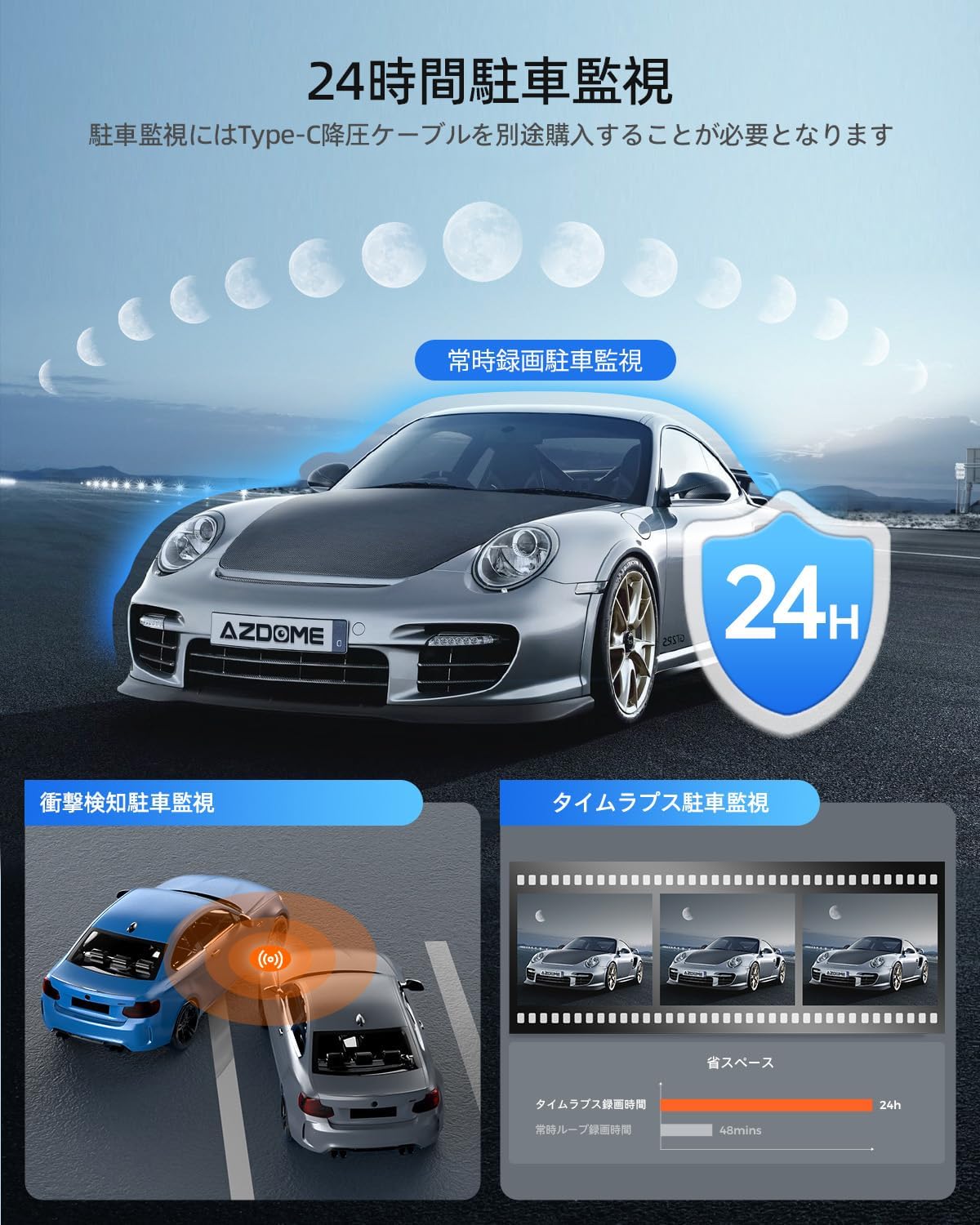
Figure 8: The M330 offers various parking surveillance modes for continuous vehicle protection.
5.5 Суперкондензатор
The M330 uses a supercapacitor instead of a traditional lithium battery. This provides enhanced safety and durability, especially in extreme temperatures (-20°C to 70°C), eliminating concerns about battery leakage or explosion. Supercapacitors also offer a longer lifespan and faster charging capabilities.

Figure 9: Supercapacitor technology ensures long life, high temperature resistance, and environmental safety.
6. Одржавање
6.1 Управљање СД картицом
- The M330 supports Micro SD cards up to 128GB (Class 10, U3, A2 speed rating recommended). A memory card is not included with the product.
- Format the SD card regularly (e.g., once a month) using the AZDOME app or the dash cam's settings to ensure optimal performance and prevent data corruption.
- Use high-quality, reputable brand SD cards to avoid recording issues.
6.2 Чишћење
- Wipe the camera lens with a soft, lint-free cloth to ensure clear video quality.
- Очистите спољашњост камере за аутомобил сувом или благо навлаженом крпомamp тканина. Немојте користити јаке хемикалије.
КСНУМКС. Решавање проблема
7.1 Dash Cam Not Powering On
- Check if the power cable is securely connected to both the dash cam and the vehicle's cigarette lighter socket.
- Ensure the vehicle's cigarette lighter socket is receiving power. Test with another device if possible.
- Verify that the power adapter provides 5V/2.5A output.
7.2 Recording Issues (e.g., no recording, corrupted files)
- Ensure a compatible Micro SD card (Class 10, U3, A2) is inserted correctly.
- Format the SD card using the AZDOME app or dash cam settings.
- Ако проблем и даље постоји, покушајте са другом, висококвалитетном SD картицом.
- Check if loop recording is enabled and if the G-sensor sensitivity is set appropriately.
7.3 WiFi Connection Problems
- Уверите се да је WiFi мрежа на камери за аутомобил омогућена.
- Confirm your smartphone is within 3 meters of the dash cam.
- Restart both the dash cam and your smartphone, then try connecting again.
- Ensure mobile data is turned off on your smartphone when connecting to the dash cam's WiFi.
8. Спецификације
| Бранд | АЗДОМЕ |
| Број модела | М330 |
| Видео Ресолутион | КСНУМКСП Фулл ХД |
| Величина монитора | 0.96 инча |
| Viewинг Англе | 170 степени |
| Складиштење | Supports Micro SD card up to 128GB (Class 10, U3, A2 recommended) |
| Извор напајања | Суперцапацитор |
| Повезивање | Уграђени ВиФи |
| Посебне карактеристике | 24-hour Parking Surveillance, WDR, Night Vision, G-Sensor, Loop Recording |
| Контролни метод | Апп |
| Тип монтаже | Адхесиве |
| Димензије производа | 10 Д x 5 Ш x 5 В цм |
| Тежина производа | 0.26 кг |
| Боја | Црно |
9. Гаранција и подршка
AZDOME M330 камера за аутомобил долази са 1 година гаранције од датума куповине. Ова гаранција покрива производне недостатке и обезбеђује поуздан рад вашег уређаја.
For any questions, concerns, or technical support regarding your product, please contact AZDOME customer service. Our team is dedicated to providing prompt assistance.
Please refer to your purchase documentation or the official AZDOME webсајт за конкретне контакт податке.