
1. Увод
This manual provides essential information for the safe and efficient use of your CUBOT P80 smartphone. Please read it carefully before using the device and keep it for future reference.
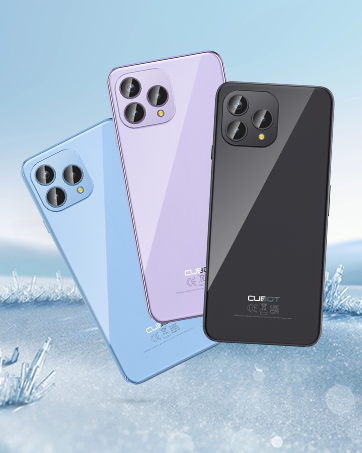
The CUBOT P80 is available in multiple color options.
2. Шта је у кутији
Проверите да ли су све ставке присутне у паковању вашег производа:
- ЦУБОТ П80 Смартпхоне
- Phone protective case
- Phone protection film (pre-applied or separate)
- Charger (9V2A)
- УСБ кабл (тип-Ц)
- Type-C headphone
- SIM pin ejector tool
- Водич за брзи почетак
- Compliance regulation document

Included accessories with the CUBOT P80 smartphone.
3. Device Layout and Physical Features
The CUBOT P80 features a sleek design with a 6.58-inch FHD+ display and a triple camera system on the rear.
Димензије и тежина
- дебљина: 9.75 мм
- Тежина: 217 г

The CUBOT P80's slim profile и лаган дизајн.
Скенер отиска прста
The device includes a side-mounted fingerprint scanner for secure and quick unlocking.

Fingerprint sensor location for convenient unlocking.
4. Подешавање
Inserting SIM Cards and TF Card
The CUBOT P80 supports dual SIM functionality or one SIM card with a TF (microSD) card for expanded storage.
- Пронађите лежиште за СИМ картицу са стране телефона.
- Уметните алат за избацивање СИМ картице у мали отвор поред лежишта и чврсто притисните док лежиште не искочи.
- Place your Nano SIM card(s) and/or TF card into the designated slots on the tray. Ensure the gold contacts are facing down.
- Пажљиво гурните лежиште назад у телефон док се не уклопи у тело уређаја.

SIM and TF card installation options.
Почетно укључивање
Press and hold the power button located on the side of the device until the CUBOT logo appears. Follow the on-screen instructions to complete the initial setup, including language selection, Wi-Fi connection, and Google account login.
5. Упутство за употребу
Оперативни систем Андроид 13
The CUBOT P80 runs on Android 13, offering a user-friendly interface, enhanced privacy controls, and access to the Google Play Store for applications.

Готовоview of the Android 13 operating system.
Дисплаи Феатурес
The device features a 6.58-inch FHD+ Capacitive Touch Screen with a resolution of 2408x1080 pixels, 400 nits peak brightness, and a 20:9 aspect ratio.

Key features of the CUBOT P80 display.
6. Карактеристике камере
The CUBOT P80 is equipped with an AI Quad Camera System on the rear and a high-resolution front camera.
Спецификације камере
- Главна камера: 48МП
- Предња камера: 24МП
- Макро камера: 2МП

The CUBOT P80's AI Quad Camera System.
Главна камера
The 48MP main camera captures images with high detail and clarity.

High-resolution capture with the 48MP main camera.
Предња камера
The 24MP front camera is designed for clear selfies and video calls, featuring beauty modes.

Selfie capabilities of the 24MP front camera.
Макро камера
The 2MP macro lens allows for detailed close-up photography of small objects.

Detailed close-up shots with the 2MP macro camera.
Multiple Camera Modes
The camera application includes various modes such as Night View, Portrait, and Panorama to enhance your photography experience.

Explore various photography modes.
7. Повезивање
Мрежа и Ви-Фи
The CUBOT P80 supports Dual 4G Dual VoLTE for cellular connectivity and 2.4/5GHz Dual Wi-Fi for stable and faster internet access.
- ГСМ: 850/900/1800/1900МХз
- ВЦДМА: B1/2/4/5/6/8/19
- ФДД: B1/2/3/4/5/7/8/12/13/17/18/19/20/26/28A/28B/66
- ТДД: 38/39/40/41
Cellular and Wi-Fi network support.
NFC and GPS
The device includes Multifunctional NFC for cash-free mobile payments and supports GPS, GLONASS, and Galileo for accurate global satellite positioning.
NFC for payments and advanced GPS for navigation.
8. Батерија и пуњење
The CUBOT P80 is equipped with a 5200mAh battery, providing extended usage times. It supports 18W fast charging and OTG (On-The-Go) functionality.
- Стандби: До 26 дана
- Позиви: До 29 сати
- Репродукција музике: До 26 сати
- Видео репродукција: До 7 сати

Battery life and charging features.
9. Складиштење и перформансе
The CUBOT P80 is powered by an MT8788 Octa-core processor and features ample memory and storage.
- процесор: MediaTek MT8788 Octa-core (12nm process, 2.0 GHz clock speed)
- РАМ: 8GB + 8GB Expansion RAM (total 16GB)
- Интерна меморија (ROM): 256ГБ
- Прошириво складиште: До 1TB преко TF картице

Processor and memory details.

RAM expansion technology for enhanced performance.

Internal and expandable storage options.
10. Важна обавештења
Компатибилност оператера
The CUBOT P80 smartphone does not support AT&T, Cricket, or Verizon networks in the United States. Please confirm your carrier's compatibility before purchasinг или коришћењем овог уређаја.

Important information regarding network compatibility.
11. Спецификације
| Феатуре | Спецификација |
|---|---|
| Број модела | P80-schwarz-US |
| Оперативни систем | Андроид 13.0 |
| Процесор | MediaTek MT8788 Octa-core |
| РАМ | 16 GB (8 GB + 8 GB проширење) |
| Интерна меморија | 256 ГБ |
| Екпандабле Стораге | До 1TB (TF картица) |
| Величина екрана | 6.58 инча |
| Резолуција | 1920 x 1080 (FHD+) |
| Главна камера | 48МП |
| Предња камера | 24МП |
| Макро камера | 2МП |
| Капацитет батерије | 5200 мАх |
| Пуњење | 18В брзо пуњење |
| Повезивање | 4G LTE, Dual SIM, Wi-Fi (2.4/5GHz), NFC, Bluetooth |
| Навигација | ГПС, ГЛОНАСС, Галилео |
| Аудио Јацк | 3.5 мм |
| Димензије | 9.29 x 7.17 x 1.81 инча (паковање) |
| Тежина артикла | 7.7 унци |
КСНУМКС. Решавање проблема
Уобичајени проблеми и решења
- Уређај се не укључује: Уверите се да је батерија напуњена. Прикључите телефон на пуњач и сачекајте неколико минута пре него што покушате поново да га укључите.
- Слаб мрежни сигнал: Check SIM card insertion. Ensure you are within your carrier's coverage area. Note that the CUBOT P80 is not compatible with AT&T, Cricket, or Verizon.
- Рушење апликација: Clear the cache of the problematic app (Settings > Apps > [App Name] > Storage > Clear Cache). If the issue persists, try reinstalling the app or performing a factory reset (backup data first).
- Батерија се брзо празни: Reduce screen brightness, close unused apps running in the background, disable unnecessary notifications, and limit location services.
- Скенер отиска прста не ради: Уверите се да вам је прст чист и сув. Поново региструјте отиске прстију у безбедносним подешавањима.
13. Гаранција и подршка
За информације о гаранцији и техничку подршку, обратите се званичном CUBOT-у. webсајт или контактирајте продавца. Сачувајте доказ о куповини за потребе гаранције.
Онлине ресурси:
- Посетите CUBOT продавница на Амазону за информације о производу и ажурирања.
14. Видео производа прекоview
Званична видео презентација производаasing the CUBOT P80's features and design.