
Увод
Thank you for choosing the XREXS Digital Kitchen Timer, Model 093. This versatile timer is designed for various applications, including cooking, studying, exercise, and meetings. It features a large 5-inch LED display, adjustable brightness and volume, and multiple placement options for convenience. This manual provides detailed instructions for setup, operation, maintenance, and troubleshooting to ensure optimal performance.
Слика: Фронт view of the XREXS Digital Kitchen Timer, Model 093, displaying a time.
Сетуп
1. Charging the Timer
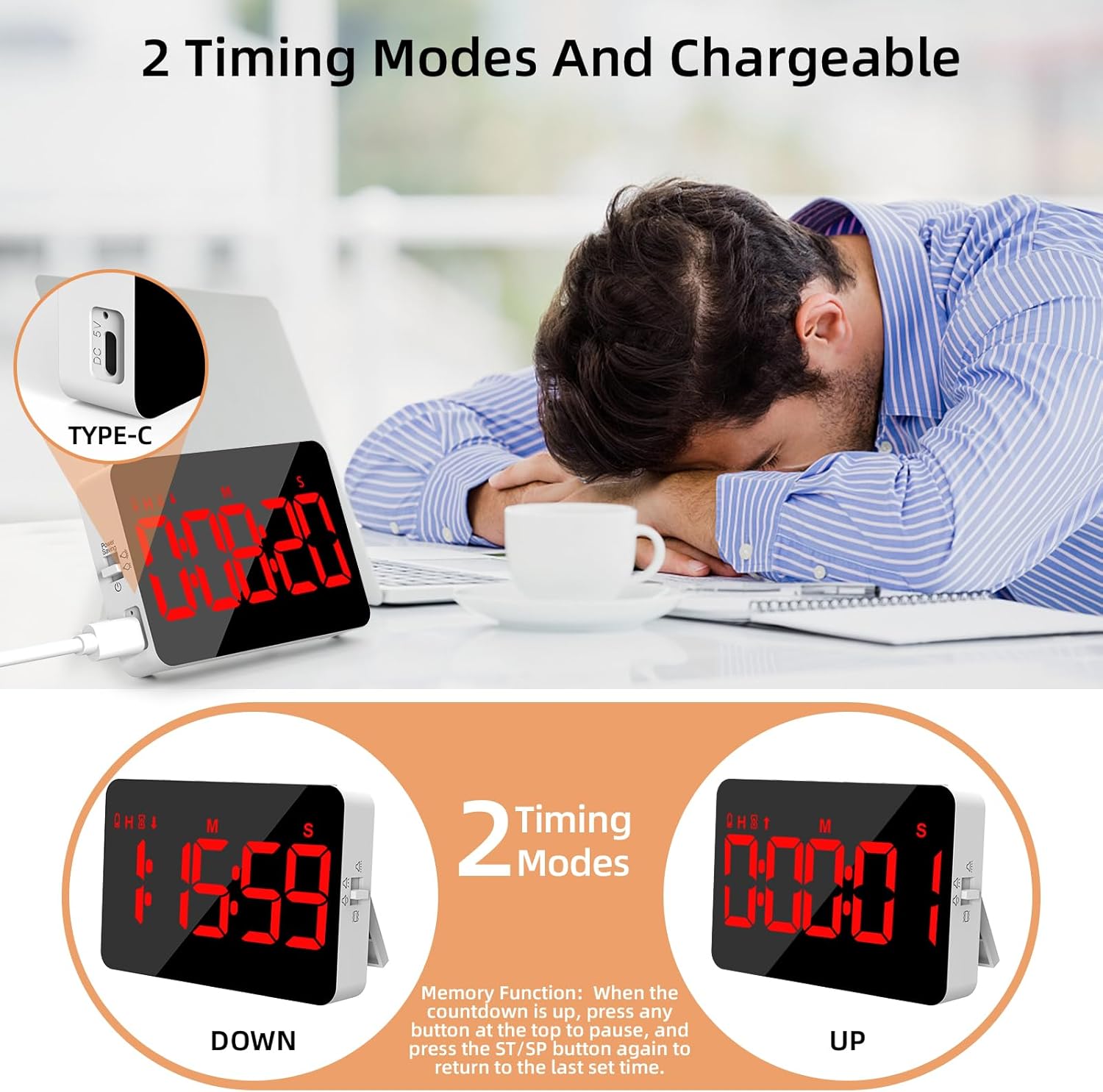
The XREXS Digital Kitchen Timer is rechargeable. When the battery power is low, a low battery icon will appear on the screen. Connect the included charging cable to the Type-C port on the side of the timer and to a suitable USB power source to charge the device. Ensure the timer is fully charged before first use for optimal battery life.

Image: The timer showing its Type-C charging port and examples of count-down and count-up modes.
2. Укључивање/искључивање
Locate the power switch on the side of the timer. Slide the switch to the 'ON' position to power on the device. To conserve battery, slide the switch to 'OFF' when not in use. If the timer is inactive for 5 minutes, the screen will automatically turn off. Press any button on the top to wake it up.
3. Опције пласмана
The timer offers versatile placement methods:
- Магнетна леђа: Attach the timer to any metallic surface, such as a refrigerator or oven.
- Склопиви сталак: Use the integrated foldable stand to place the timer on a countertop or desk.
- Рупа за вешање: Utilize the hidden hanging hole (located under the foldable tab) to hang the timer on a hook.

Image: The timer displayed in various settings, demonstrating its hanging, magnetic, and stand placement options.
Упутство за употребу
1. Setting Time (Count Down Mode)
- Притисните тастер HR дугме за подешавање сати.
- Притисните тастер МИН дугме за подешавање минута.
- Притисните тастер СЕЦ button to set seconds.
- Притисните тастер СТ/СП (Start/Stop) button to begin the countdown.
- Да бисте паузирали одбројавање, притисните СТ/СП поново. Притисните га још једном да бисте наставили.
- To clear the set time, press the ЦЛЕАР дугме.
2. Count Up Mode
When the timer display shows 00:00:00, press the СТ/СП button to start counting up. The timer will count up from zero. Press СТ/СП да паузирате/наставите, и ЦЛЕАР to reset to 00:00:00.
3. Функција меморије
After a countdown expires and the alarm sounds, press any button on the top to stop the alarm. To quickly recall the last set countdown time, press the СТ/СП дугме поново.
4. Подешавање осветљености
The timer features 3 adjustable brightness modes. Use the brightness switch on the side of the timer to cycle through low, medium, and high brightness settings to suit your environment. The screen automatically turns off after 5 minutes of inactivity to save power; press any button to reactivate.

Image: The timer highlighting its 5-inch LED screen and illustrating low light, high light, and power-saving modes.
5. Подешавање јачине звука
The timer offers 4-level volume adjustment, including a mute mode with flashing lights. Use the volume adjustment switch on the side of the timer to select your preferred alert level:
- Хигх Волуме
- Лов Волуме
- Mute (with flashes)
- Вибрирај

Image: The timer demonstrating its four volume settings: high, low, mute with flashes, and vibrate, shown in different usage scenarios.

Image: Close-up of the timer's controls (HR, MIN, SEC, ST/SP, CLEAR buttons) and back features (hanging hole, reset, magnets, stand, volume adjustment).
Одржавање
- Чишћење: Wipe the timer with a soft, dry cloth. Avoid using abrasive cleaners or solvents that may damage the surface or screen.
- Одржавање батерије: Recharge the timer promptly when the low battery icon appears to maintain battery health. Avoid prolonged storage with a completely depleted battery.
- Складиштење: Чувајте тајмер на хладном и сувом месту, даље од директне сунчеве светлости и екстремних температура.
Решавање проблема
| Проблем | Решење |
|---|---|
| Screen turns off automatically. | This is the power-saving feature. Press any button on the top to wake the timer. |
| Timer is not functioning normally. | Locate the hidden reset hole under the hanging tab. Press this hole to restore factory settings. |
| Low battery icon appears. | The battery is low. Connect the timer to a power source using the included Type-C charging cable. |
Спецификације
- Број модела: 093
- Бренд: КСРЕКСС
- Величина екрана: 5 инча
- Временски опсег: Up to 9 hours, 59 minutes, 59 seconds
- батерија: 1 литијум-полимер (укључена)
- Тежина артикла: 150 грама
- Димензије пакета: 11.5 к 9.6 к 2.7 цм
- Произвођач: Blueekin
Гаранција и подршка
For warranty information or technical support, please refer to the product packaging or contact XREXS customer service through the retailer where the product was purchased. Please have your model number (093) and purchase details ready when contacting support.