
1. Увод
Хвала вам на куповиниasing the Dpofirs LMD-750 Portable DVD Player. This device is designed to provide versatile entertainment on the go, at home, or in the office. Featuring a 270° rotating HD LCD screen, multi-format disc support, USB/SD card playback, analog TV function, FM radio, and game capabilities, it offers a comprehensive multimedia experience. Please read this manual carefully to ensure proper use and to maximize the performance and longevity of your device.
2. Безбедносне информације
- Не излажите уређај киши, влази или екстремним температурама.
- Избегавајте постављање уређаја у близини извора топлоте или на директном сунцу.
- Use only the provided power adapter and car adapter.
- Не покушавајте сами да растављате или поправљате уређај. Обратите се квалификованом сервисеру.
- Држите уређај даље од јаких магнетних поља.
- Обезбедите одговарајућу вентилацију приликом рада уређаја.
- Remove discs when transporting the player to prevent damage.
3. Садржај пакета
Молимо вас да проверите пакет за следеће ставке:
- 1 x Dpofirs LMD-750 Portable DVD Player
- 1 к даљински управљач
- 1 x Адаптер за напајање (ЕУ утикач)
- 1 к адаптер за аутомобил
- КСНУМКС к АВ кабл
- КСНУМКС к антена
- 1 к Гамепад
- 1 x Game Disc
- 1 к Упутство за употребу
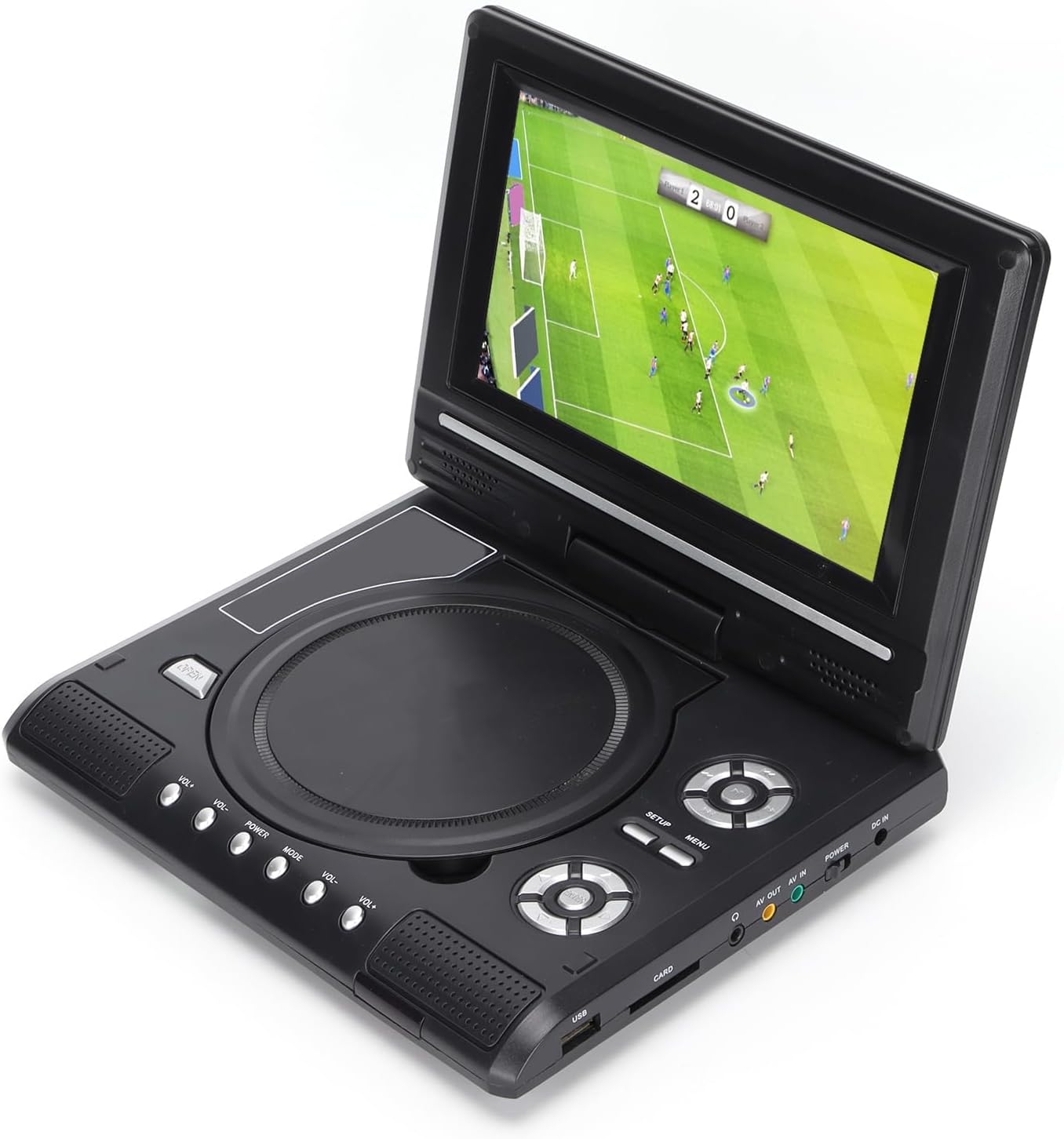
Image: All accessories included with the Dpofirs LMD-750 Portable DVD Player.
4. Производ је готовview
The Dpofirs LMD-750 features a compact design with intuitive controls and multiple connectivity options.

Слика: Фронт view of the Dpofirs LMD-750 Portable DVD Player with the screen open.

Слика: Са стране view detailing the input/output ports.

Слика: Врх view of the player when closed.
Контроле и портови:
- Екран: 6.8"/8.5" HD LCD, 270° rotatable.
- Лежиште за диск: For DVD/CD media.
- Контролна дугмад: Play/Pause, Stop, Fast Forward/Rewind, Next/Previous, Setup, Menu, Volume +/-.
- УСБ порт: За повезивање УСБ флеш дискова.
- CARD Slot: For inserting memory cards (e.g., SD card).
- Слушалице: За приватно слушање.
- АВ ОУТ: Audio/Video output to external display.
- АВ ИН: Audio/Video input from external source.
- Прекидач: Да бисте укључили/искључили уређај.
- ДЦ ИН: Power input for adapter.
5. Подешавање
5.1 Пуњење батерије
Before first use, fully charge the built-in 1500mAh lithium battery. Connect the power adapter to the DC IN port on the player and plug it into a wall outlet (110-240V 50/60Hz). The charging indicator will illuminate. Once fully charged, the indicator may change color or turn off. A full charge provides approximately 30-60 minutes of continuous playback, depending on usage.
5.2 Повезивање напајања
- Кућна употреба: Connect the AC power adapter to the DC IN port and a wall socket.
- Употреба аутомобила: Connect the car adapter to the DC IN port and your vehicle's cigarette lighter socket.
5.3 Connecting to an External Display (AV OUT)
То view садржај на већем екрану:
- Connect one end of the AV cable to the AV OUT port on the DVD player.
- Connect the other end of the AV cable to the corresponding AV IN ports (Yellow for Video, White/Red for Audio) on your TV or monitor.
- Select the correct AV input source on your external display.
5.4 Connecting External Devices (AV IN)
To display content from an external source on the DVD player's screen:
- Connect one end of the AV cable to the AV IN port on the DVD player.
- Connect the other end of the AV cable to the AV OUT ports of your external device (e.g., another DVD player, game console).
- Switch the DVD player to AV IN mode (refer to Operating Instructions).
6. Упутство за употребу
6.1 Укључивање/искључивање
Померите ПОВЕР switch to the "ON" position to turn on the player. Slide it to "OFF" to power down.
6.2 Ротација екрана
The LCD screen can rotate up to 270 degrees. Gently adjust the screen to your desired viewing angle. This allows for flexible viewинг у различитим окружењима.
6.3 Контрола јачине звука
Користите ВОЛ+ и ВОЛ- buttons on the player or remote control to adjust the audio volume.
6.4 Навигација кроз мени
Притисните тастер МЕНУ button to access the main menu. Use the directional buttons (up, down, left, right) to navigate and the OK дугме за потврду избора. Притисните СЕТУП да бисте приступили подешавањима система.
7. Репродукција медија
7.1 Репродукција диска (DVD/CD)
- Отворите поклопац диска.
- Carefully place a compatible disc (DVD, DVD±R, DVD±RW, VCD, CD, CD±R, CD±RW) onto the spindle with the label side facing up.
- Чврсто затворите поклопац диска.
- The player will automatically detect and begin playback. If not, press the ПЛАИ дугме.

Image: Player displaying video content.

Image: Player displaying a sports event.
7.2 Репродукција са USB/SD картице
- Уметните УСБ флеш диск у УСБ port or a memory card into the ЦАРД слот.
- The player will automatically switch to USB/Card mode or prompt you to select the source.
- Крећите се кроз своје files using the directional buttons and press OK играти се.
Подржани формати: DIVX, AV/VOB, MPG, MP3, MP4, WMA, JPEG, TXT, RMVB.
The player features an intelligent power-off memory function, resuming playback from where it stopped after a power interruption.
8. TV Function
The Dpofirs LMD-750 includes an analog TV tuner.
- Connect the included antenna to the antenna port on the player.
- Switch the player to TV mode (usually via the МОДЕ button or menu selection).
- Perform an automatic channel scan in the TV settings menu to find available analog channels.
- Channel reception quality depends on local signal strength.
Supported TV Standards: PAL, NTSC, SECAM (optional).
9. Game Function
Enjoy gaming with the included gamepad and game disc.
- Connect the gamepad to the designated game port on the player.
- Insert the game disc into the disc tray.
- Select the game function from the main menu.
- Choose from the available games on the disc (up to 300 games).
10. Одржавање
10.1 Чишћење уређаја
- Обришите спољашњост плејера меком, сувом крпом.
- Не користите течна средства за чишћење или абразивне материјале.
- For the screen, use a soft, lint-free cloth specifically designed for LCD screens.
10.2 Нега диска
- Држите дискове за ивице како бисте избегли отиске прстију.
- Очистите дискове меком крпом која не оставља влакна, бришући од средине ка споља.
- Store discs in their cases to prevent scratches.

Image: Internal disc mechanism.
КСНУМКС. Решавање проблема
| Проблем | Могући узрок | Решење |
|---|---|---|
| Нема струје | Battery drained; Power adapter not connected; Power switch OFF. | Charge the battery; Connect power adapter; Slide POWER switch to ON. |
| Нема репродукције диска | Disc inserted incorrectly; Disc dirty or scratched; Incompatible disc format. | Insert disc correctly (label up); Clean or replace disc; Use supported disc format. |
| Нема звука | Volume too low; Mute function active; Headphone connected. | Increase volume; Deactivate mute; Disconnect headphones if using speakers. |
| Лош ТВ пријем | Weak signal; Antenna not positioned correctly. | Adjust antenna position; Rescan channels; Check local signal strength. |
| Даљински управљач не ради | Батерије су испражњене или неправилно уметнуте; Препрека између даљинског управљача и плејера. | Replace batteries (2x AAA); Ensure correct polarity; Remove obstructions. |
12. Спецификације
| Број модела | LMD-750 (Dpofirsrgi5bmonx0-13) |
| Материјал | АБС |
| Боја | Црно |
| Величина екрана | 6.8" / 8.5" (diagonal, depending on variant) |
| Дисплаи Типе | ЛЦД |
| Резолуција екрана | 234 x 480 x RGB (native), supports up to 1280 x 720, 1366 x 768 |
| Улазни волtage | 110-240В 50/60Хз |
| Оутпут Волtage | 12В |
| Капацитет батерије | 1500mAh Lithium Battery (built-in) |
| Батерија за даљински управљач | 2 к ААА батерије (нису укључене) |
| Подржани формати дискова | DVD, DVD±R, DVD±RW, VCD, MP3, MP4, CD±R, CD±RW |
| Supported Media Formats (USB/Card) | DIVX, AV/VOB, MPG, MP3, MP4, WMA, JPEG, TXT, RMVB |
| ТВ систем | PAL, NTSC, SECAM (full system) |
| Пријемни канали | LHF1-5, VHF6-12, UHF13-69, ATV |
| Технологија аудио кодирања | 96кХз/24бит |
| Динамиц Ранге | ≥ 80дБ |
| Однос сигнала и шума | ≥ 70дБ |
| Изолација канала | ≥ 70дБ |
| Технологија повезивања | USB, Composite Video |
| Произвођач | Дпофирс |
| Земља порекла | Кина |
13. Гаранција и подршка
За информације о гаранцији и корисничку подршку, погледајте документацију коју сте добили уз куповину или контактирајте продавца. Сачувајте доказ о куповини за евентуалне рекламације у вези са гаранцијом.