
1. Производ је готовview
The LCLCTC LC108 is an intelligent PID temperature controller designed for precise temperature regulation in various industrial and scientific applications. It features a clear LCD display, supports multiple thermocouple (TC) and RTD inputs, and provides SSR output for control. Equipped with RS-485 Modbus-RTU communication, it allows for integration into larger control systems. This manual provides essential information for the safe and effective installation, operation, and maintenance of your LC108 temperature controller.

Figure 1: LCLCTC LC108 PID Temperature Controller, Solid State Relay (SSR), and K-Type Thermocouple Sensor.
2. Кључне карактеристике
- Напајање: Operates on 85~265VAC, 50~60Hz.
- Величина панела: Compact 48x48mm design for easy integration.
- Типови улаза: Supports various Thermocouple (K, J, E, T, S) and RTD (PT100, Cu100, Cu50) inputs, selectable via menu.
- Излаз: SSR (Solid State Relay) output for precise control.
- Алармс: Features up to 2 configurable alarms.
- Комуникација: Integrated RS-485 Modbus-RTU for data exchange and remote control.
- тачност: High precision with 0.2% F.S. (Full Scale) accuracy.
- Sampлинг време: Fast 0.5 second sampлинг рате.
- Окружење: Designed for operation in 0-50℃ with humidity less than 85% (non-condensing).

Figure 2: The LC108 controller supports RS485 communication, making it compatible with various upstream equipment for integrated control systems.
3. Садржај пакета
Проверите да ли су сви предмети присутни и неоштећени приликом отварања пакета:
- 1 x LCLCTC LC108 PID Temperature Controller
- 1 x SSR 40DA Solid State Relay
- 1 x K-Type Thermocouple Sensor
- 1 x Упутство за употребу (овај документ)
4. Спецификације
| Атрибут | Валуе |
|---|---|
| Дисплаи Типе | ЛЦД |
| Радна температура | 0-50 степени Целзијуса |
| УПЦ | 735373853112 |
| Произвођач | ЛЦЛЦТЦ |
| Product Dimensions (Controller) | 1.89"L x 1.89"W x 1.89"H (48x48x48mm) |
| Item Weight (Controller) | 5.75 унци (163 г) |
| ASIN | B0CCKQPQCS |
| Земља порекла | Кина |
| Волtage | 85-265 волти АЦ |
| Боја | Греи |
| Укључене компоненте | Controller, SSR, Sensor |
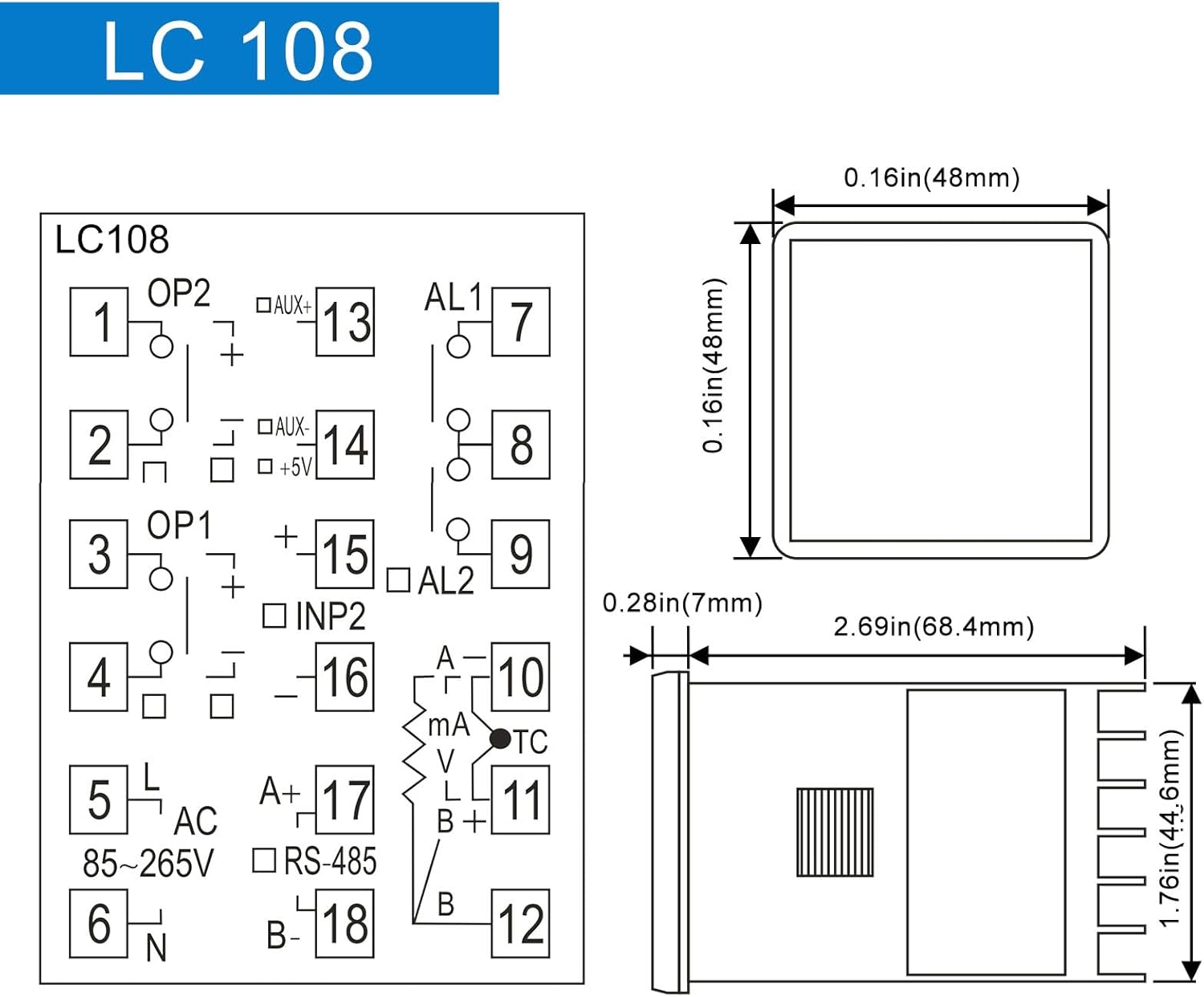
Figure 3: LC108 Controller Dimensions and Basic Pinout Diagram.

Figure 4: Dimensions and Specifications for the Solid State Relay (SSR) and K-Type Thermocouple Probe.
5. Подешавање и инсталација
Безбедност на првом месту: Ensure all power is disconnected before attempting any wiring or installation. Improper wiring can lead to electric shock or damage to the device.
5.1 Монтажа контролера
The LC108 controller is designed for panel mounting. Cut a square opening of 45x45mm (1.77x1.77 inches) in your control panel. Insert the controller from the front and secure it using the provided mounting brackets from the rear.
5.2 Дијаграм ожичења
Refer to the wiring diagram below for connecting the power supply, sensor, SSR, and alarm outputs. Ensure correct polarity and secure connections for reliable operation.
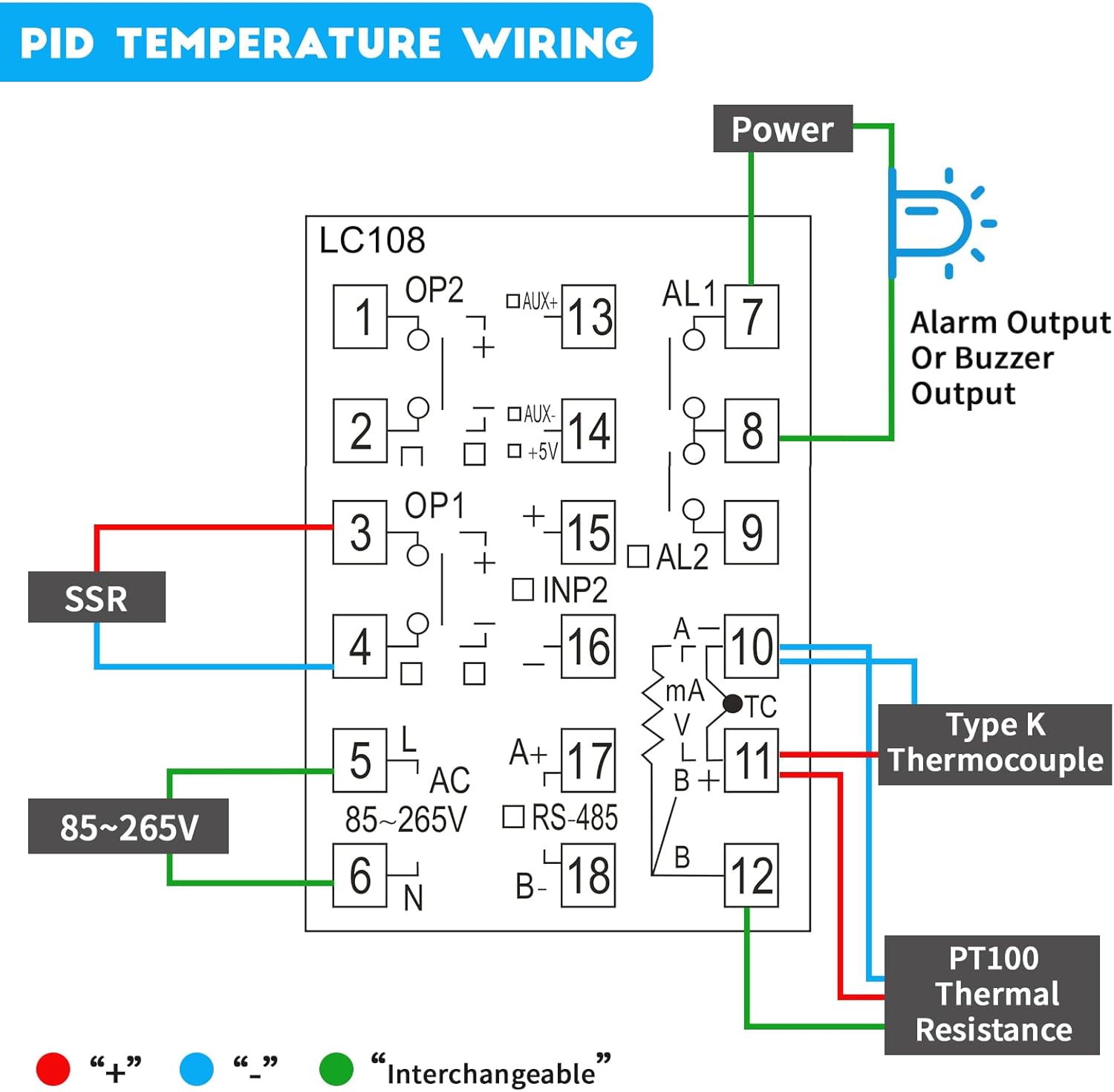
Figure 5: Detailed PID Temperature Controller Wiring Diagram. Connect power to terminals 5 and 6 (85-265V AC). Connect the SSR to terminals 3 and 4. Connect the Type K Thermocouple to terminals 10 and 11. PT100 Thermal Resistance connects to terminals 10, 11, and 12. Alarm output connects to terminals 7 and 8.
- Power Input (AC 85-265V): Connect to terminals 5 (L) and 6 (N).
- SSR Output: Connect the control terminals of the Solid State Relay to terminals 3 (OP1+) and 4 (OP1-).
- Thermocouple/RTD Input:
- For K-Type Thermocouple: Connect to terminals 10 (TC+) and 11 (TC-).
- For PT100 RTD: Connect to terminals 10, 11, and 12 (refer to diagram for specific connections).
- Излаз аларма: Connect alarm devices (e.g., buzzer, indicator light) to terminals 7 (AL1) and 8 (AL1).
- РС-485 комуникација: Connect A+ to terminal 17 and B- to terminal 18 for Modbus communication.
6. Упутство за употребу
6.1 Power On and Initial Display
Once wired correctly, apply power. The controller will perform a self-test and then display the Process Value (PV) and Set Value (SV) on the LCD. PV indicates the current measured temperature, and SV is the desired temperature setpoint.
6.2 Setting the Temperature Setpoint (SV)
- Притисните тастер СЕТ button briefly. The SV display will start flashing.
- Користите ▲ (Горе и ▼ (down) arrow buttons to adjust the SV to your desired temperature.
- Притисните СЕТ again to confirm the new setpoint. The SV display will stop flashing.
6.3 Конфигурација параметара
The LC108 has various parameters for advanced configuration (e.g., input type, control mode, alarm settings, PID parameters). To access these:
- Притисните и држите СЕТ button for approximately 3-5 seconds to enter the parameter setting menu.
- Користите СЕТ button to cycle through different parameters.
- Користите ▲ и ▼ buttons to change the value of the selected parameter.
- Притисните и држите СЕТ again to save changes and exit the parameter menu, or wait for the controller to automatically exit after a period of inactivity.
Note: Refer to the detailed parameter list in the full technical manual (if available) for specific parameter codes and their functions. Incorrect parameter settings can lead to improper operation.
7. Одржавање
The LC108 PID Temperature Controller is designed for long-term, reliable operation with minimal maintenance. However, periodic checks can ensure optimal performance:
- Чишћење: Gently wipe the display and panel with a soft, dry cloth. Do not use abrasive cleaners or solvents.
- Везе: Periodically check all wiring connections to ensure they are secure and free from corrosion. Loose connections can cause erratic readings or control issues.
- Окружење: Ensure the operating environment remains within specified temperature and humidity ranges to prevent damage to internal components. Avoid excessive dust or moisture.
- Провера сензора: If temperature readings become inaccurate, inspect the thermocouple or RTD sensor for physical damage or degradation.
КСНУМКС. Решавање проблема
| Проблем | Могући узрок | Решење |
|---|---|---|
| Контролер се не укључује. | Нема напајања; неисправно ожичење. | Check power connections (terminals 5 & 6) and ensure voltage is within 85-265VAC. Verify power source is active. |
| Inaccurate temperature reading (PV). | Incorrect sensor type selected; faulty sensor; loose sensor connection. | Verify the input type setting matches your sensor (K, PT100, etc.). Check sensor wiring to terminals 10, 11, 12. Replace sensor if damaged. |
| Output (SSR) not activating. | Incorrect control mode; SV not set correctly; faulty SSR; incorrect SSR wiring. | Check control mode settings. Ensure SV is set appropriately. Verify SSR wiring to terminals 3 & 4. Test SSR functionality. Note: Some SSRs require an external power supply for their control circuit if the controller's output is insufficient. |
| RS-485 communication issues. | Incorrect wiring (A+/B-); wrong communication parameters (baud rate, parity); address conflict. | Verify A+ and B- connections to terminals 17 & 18. Check communication settings in the controller and master device. Ensure unique Modbus addresses. |
| Controller displays "HHHH" or "LLLL". | Sensor open circuit (HHHH) or short circuit (LLLL) / out of range. | Check sensor wiring for breaks or shorts. Ensure sensor is within its specified temperature range. Replace sensor if necessary. |
9. Гаранција и подршка
LCLCTC products are manufactured to high quality standards. For warranty information, technical support, or service inquiries, please contact your original point of purchase or the manufacturer directly through their official website. Please have your product model number (LC108) and purchase details ready when contacting support.
For further assistance, you may refer to the manufacturer's online resources or contact their customer service department.