
1. Увод
Хвала вам на куповиниasing the Cuifati HiFi MP3 Player. This compact and portable music player is designed for high-fidelity audio playback, offering a convenient way to enjoy your music on the go. This manual provides essential information for the proper setup, operation, and maintenance of your device.
2. Производ је готовview
2.1 Компоненте уређаја
The Cuifati HiFi MP3 Player features a minimalist design with essential controls and ports for ease of use.
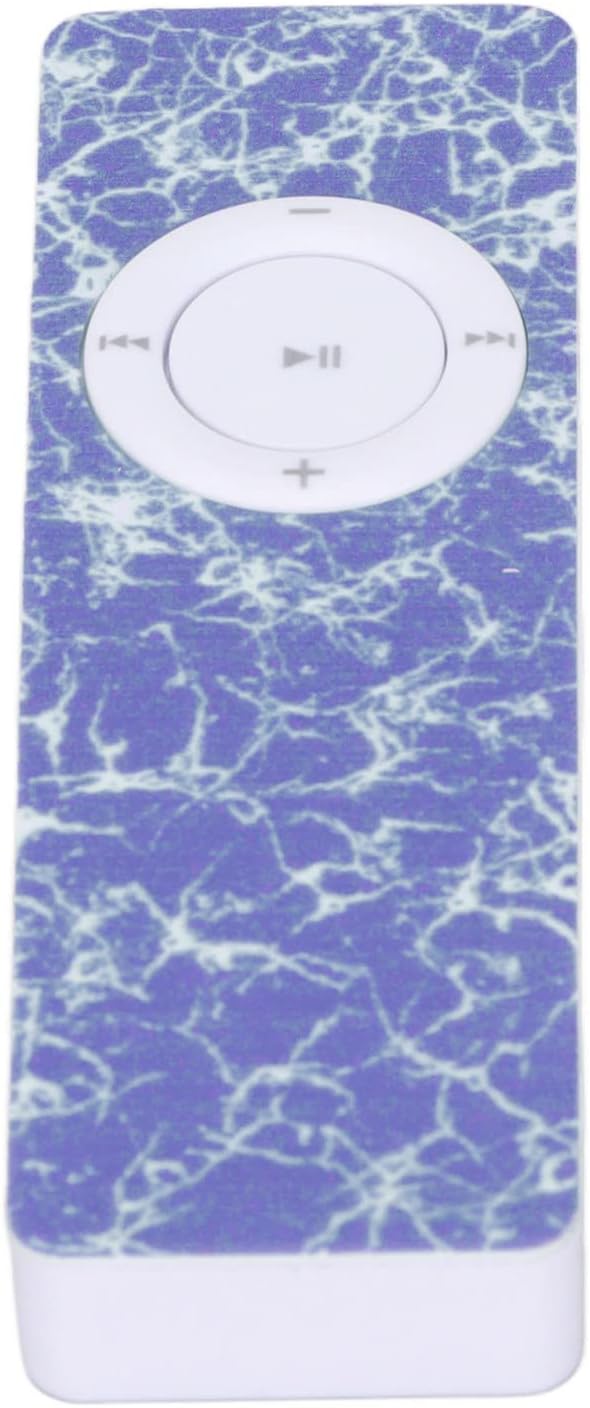
Слика 1: Предња страна view of the MP3 Player, highlighting the central control pad.
The device includes a central control pad for playback and volume adjustments. On its side, you will find the memory card slot and charging port, while the back features a power switch and a small speaker.

Слика 2: Страна view of the MP3 Player, illustrating the memory card slot and USB port.

Слика 3: Позади view of the MP3 Player, showing the power switch and speaker.
2.2 Распакивање и почетни преглед
Upon unboxing, ensure all components are present and inspect the device for any physical damage. The package typically includes the MP3 player. Please note that a memory card is not included and must be purchased separately.
Video 1: This video demonstrates the physical appearance and USB connection of a similar MP3 player, providing a visual guide to its form factor and how to access the USB port.
3. Подешавање
3.1 Пуњење уређаја
Before first use, fully charge the MP3 player. Connect the device to a USB power source (e.g., computer USB port or USB wall adapter) using a compatible USB cable. The built-in 180mAh battery provides approximately 5 hours of playback on a full charge.
3.2 Installing a Memory Card
The MP3 player does not have internal storage for music files. A memory card (MicroSD, up to 64GB, not included) is required to store and play music. Insert the memory card into the designated slot on the side of the device until it clicks into place.
3.3 Повезивање слушалица
Plug your 3.5mm headphones into the headphone jack located on the device. The player does not have a built-in screen, so audio output is primarily through headphones or a connected Bluetooth device.
Video 2: This video illustrates how to connect headphones and charge a mini MP3 player, demonstrating the physical connections.
4. Упутство за употребу
4.1 Укључивање/искључивање
To power on the device, slide the 'on/off' switch located on the back of the player to the 'on' position. To power off, slide the switch to the 'off' position.
4.2 Пренос музике Files
Connect the MP3 player to your computer using a USB cable. The device will appear as a removable disk. Drag and drop your MP3 audio files directly onto the memory card. Ensure the memory card is formatted correctly (e.g., FAT32) for optimal compatibility.
4.3 Основне контроле репродукције
- Пусти/паузирај: Press the central button on the control pad.
- Следећа нумера: Press the right arrow button.
- Претходни запис: Press the left arrow button.
- Појачавање звука: Притисните дугме „+“.
- Смањивање јачине звука: Притисните дугме '-'.
4.4 Shuffle Playback
The device supports shuffle playback for your music library. Refer to the video below for a demonstration of how to activate this feature.
Video 3: This video demonstrates how to enable shuffle playback on an MP3 player, showing the menu navigation for this setting.
4.5 Блуетоотх упаривање
If your model supports Bluetooth, you can pair it with compatible Bluetooth speakers or headphones for wireless audio. Follow the instructions in the video to pair your device.
Video 4: This video demonstrates the process of pairing an MP3 player with Bluetooth speakers or headphones, showing the menu options for Bluetooth connectivity.
5. Одржавање
5.1 Чишћење
Use a soft, dry cloth to clean the exterior of the MP3 player. Avoid using liquid cleaners or abrasive materials, as these can damage the device. Keep the ports free of dust and debris.
5.2 Складиштење
Store the MP3 player in a cool, dry place away from direct sunlight and extreme temperatures. If storing for an extended period, ensure the battery is partially charged (around 50%) to prolong its lifespan.
5.3 Одржавање батерије
To maximize battery life, avoid fully discharging the battery frequently. Charge the device regularly, even if it's not in constant use. The built-in lithium battery is not user-replaceable.
КСНУМКС. Решавање проблема
6.1 Уређај се не укључује
- Ensure the battery is charged. Connect the player to a power source and allow it to charge for at least 30 minutes before attempting to power it on again.
- Verify the 'on/off' switch is in the 'on' position.
6.2 No Music Playback
- Memory Card Required: This MP3 player requires a memory card (MicroSD) to store music. It does not have built-in storage for media files. Ensure a memory card with music files is properly inserted.
- Check if the memory card is correctly inserted and contains compatible MP3 files.
- Ensure headphones are properly connected or Bluetooth is successfully paired.
- Подесите ниво јачине звука.
6.3 Computer Does Not Recognize Device
- Покушајте са другим УСБ портом на рачунару.
- Користите други УСБ кабл.
- Ensure the device is powered on when connected to the computer.
7. Спецификације
| Врста ставке | МП3 плејер |
| Бранд | Цуифати |
| Број модела | CUIFATIn7gdw43smz-13 |
| Материјал | АБС |
| Капацитет батерије | 180 мАх (уграђено) |
| Трајање батерије | Приближно 5 сати |
| Подршка за меморијску картицу | Up to 64GB (MicroSD, not included) |
| Подржани тип медија | SD Card, SDHC, SDXC |
| Подржани стандарди | МП3 |
| Дисплаи Тецхнологи | Нема приказа |
| Компатибилни уређаји | Лаптоп, лични рачунар |
| Димензије парцеле | 13.6 к 7.5 к 1.5 цм |
| Тежина | 20 г |
| Земља порекла | Кина |
8. Гаранција и подршка
For warranty information and customer support, please refer to the documentation provided at the time of purchase or contact your retailer. The manufacturer, CUIFATI, is committed to providing quality products. For further assistance, please visit the official Cuifati store or contact their customer service.
Произвођач: CUIFATI
Бренд: Цуифати
Cuifati Store: Visit the Cuifati Store on Amazon