
1. Производ је готовview
The GOLOZA LA-C337 is a versatile digital alarm clock featuring a 180° rotatable projection, a large curved LED display, and a convenient USB charging port. It is designed for clear time display and easy operation.

Image 1.1: The GOLOZA Digital Projection Alarm Clock, showcasing its curved display and compact design, placed on a nightstand.
2. Садржај пакета
Молимо вас да проверите пакет за следеће ставке:
- GOLOZA Digital Projection Alarm Clock (LA-C337)
- Мицро УСБ кабл
- Повер Адаптер
- Упутство за употребу
3. Карактеристике производа
- Curved LED Display: Large, clear digital time display with adjustable brightness.
- Пројекција од 180°: Projects time onto a wall or ceiling with adjustable brightness and rotation.
- Двоструки аларми: Set two independent alarms with progressive volume.
- Одгода функција: Allows for extra sleep time after the alarm sounds.
- УСБ пуњач: Conveniently charge your mobile devices.
- Меморијска батерија: Built-in button battery maintains time settings during power outagес.
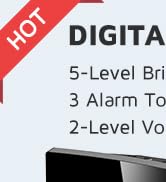
Слика 3.1: Крупни план view of the GOLOZA Digital Projection Alarm Clock's clear, blue LED display, showing the time.
4. Почетно подешавање
4.1 Прикључак за напајање
- Connect the Micro USB cable to the power input port on the back of the alarm clock.
- Укључите други крај УСБ кабла у приложени адаптер за напајање.
- Insert the power adapter into a standard electrical outlet. The clock display will light up.
Напомена: The built-in button battery serves as a backup for time and alarm settings during a power interruption. It does not power the main display or projection.
4.2 Подешавање времена и датума
Specific button names are not provided, but typically these clocks have 'TIME SET', 'MODE', or similar buttons. Refer to the physical unit for exact button labels.
- Притисните и држите Тиме Сет button (or similar) to enter time setting mode. The hour digits will flash.
- Користите +/- or Горе/Доле дугмад за подешавање сата.
- Притисните тастер Тиме Сет поново притисните дугме да бисте потврдили сат и прешли на подешавање минута. Цифре за минуте ће трептати.
- Користите +/- or Горе/Доле дугмад за подешавање минута.
- Притисните тастер Тиме Сет button again to confirm minutes and exit time setting mode.
- Follow similar steps to set the date if your model supports it (usually by pressing the Time Set button multiple times to cycle through year, month, day).
5. Упутство за употребу
5.1 Подешавање аларма
The clock supports two independent alarms (Alarm 1 and Alarm 2).
- Притисните и држите Аларм 1 button (or similar) to enter Alarm 1 setting mode. The alarm hour digits will flash.
- Користите +/- or Горе/Доле дугмад за подешавање сата аларма.
- Притисните тастер Аларм 1 button again to confirm the hour and move to minute setting. The alarm minute digits will flash.
- Користите +/- or Горе/Доле дугмад за подешавање минута аларма.
- Притисните тастер Аларм 1 button again to confirm minutes and select the alarm sound (e.g., Beep, Chord, Bird Song).
- Притисните тастер Аларм 1 button one more time to activate/deactivate Alarm 1 and exit setting mode. An alarm icon will appear on the display when active.
- Repeat the process for Аларм 2 using the corresponding button.
5.2 Подешавање осветљености екрана
The main LED display typically has multiple brightness levels.
- Притисните тастер Осветљеност button (or a dedicated dimmer button) repeatedly to cycle through the available brightness levels (e.g., High, Medium, Low, Off).
5.3 Using Projection Feature
Функција пројекције вам омогућава да view the time on a wall or ceiling.
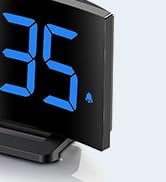
Image 5.1: The GOLOZA Digital Projection Alarm Clock actively projecting the time onto a surface, demonstrating its projection capability.
- Activating/Deactivating Projection: Притисните тастер Пројектор button (or similar) to turn the projection on or off.
- Подешавање осветљености пројекције: While the projector is on, press the Projector Brightness button (or the same Projector button repeatedly) to cycle through brightness levels (e.g., High, Medium, Low).
- Ротирајућа пројекција: The projector lens can be physically rotated 180° to adjust the projection angle. Some models may also have a button to flip the projected image.
5.4 USB Charging Port Usage
The integrated USB port allows you to charge external devices.
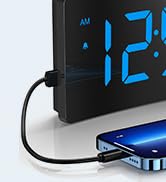
Image 5.2: The GOLOZA Digital Projection Alarm Clock with a smartphone connected to its USB charging port, illustrating its charging capability.
- Connect your device's USB charging cable to the USB output port on the alarm clock.
- Ensure the alarm clock is powered on.
- The clock's USB port provides power to charge your device.
5.5 Функција одлагања
Када се огласи аларм, притисните дугме Одложи button (often a large button on top) to temporarily silence the alarm. The alarm will sound again after a preset interval (e.g., 9 minutes).
5.6 Alarm Volume Adjustment
The alarm volume is progressive, meaning it starts soft and gradually increases. Some models may offer adjustable volume levels.
- Ако је доступно, притисните Волуме button (or a dedicated switch) to adjust the alarm volume to your preferred level.
6. Одржавање
- Чишћење: Обришите сат меком, сувом крпом. Не користите абразивна средства за чишћење или раствараче.
- Пласман: Place the clock on a stable, flat surface away from direct sunlight, heat sources, and moisture.
- батерија: The internal button battery is for memory backup. If the clock consistently loses settings after a power outage, the battery may need replacement by a qualified technician.
КСНУМКС. Решавање проблема
| Проблем | Могући узрок | Решење |
|---|---|---|
| Приказ сата је искључен. | Нема прикључка за напајање. | Ensure the power adapter is securely plugged into the clock and a working electrical outlet. |
| Пројекција је слаба или нејасна. | Incorrect brightness setting; dirty lens; too much ambient light. | Adjust projection brightness. Clean the projector lens with a soft cloth. Reduce ambient light in the room. |
| Аларм се не оглашава. | Alarm is not activated; alarm volume is too low. | Ensure the alarm icon is visible on the display. Check and adjust alarm volume. |
| Time settings are lost after power outage. | Internal backup battery is depleted or faulty. | The internal button battery may need replacement. Contact customer support. |
| УСБ пуњење не ради. | Clock not powered; faulty USB cable; device not compatible. | Ensure the clock is powered. Try a different USB cable. Check device compatibility. |
8. Спецификације
| Феатуре | Детаљ |
|---|---|
| Број модела | LA-C337 |
| Димензије (Д к Ш к В) | 17.7 к 3.81 к 7.8 цм |
| Тежина | 310 грама |
| Бранд | ГОЛОЗА |
| Боја | Плава |
| Стиле | Modern/Elegant/Minimalist |
| Посебне карактеристике | Integrated Design, Built-in Button Battery (for memory), USB Charging Port, Super Clear Projection, Progressive Volume, Curved Display |
| Извор напајања | Електрични (напајање преко УСБ-а) |
| Облик | Rectangular, Curved Screen |
| Батерије укључене | No (Internal button battery for memory backup is pre-installed but not user-replaceable) |
| УПЦ/ГТИН | 647697054284 |
9. Гаранција и подршка
GOLOZA is committed to providing quality products and customer satisfaction.
- Политика враћања: 6 Months Return period.
- гаранција: 24 Months Warranty from the date of purchase.
- Подршка: Lifetime Support is provided for this product.
For any questions, technical assistance, or warranty claims, please contact GOLOZA customer service through your purchase platform or the official GOLOZA webсајту.