
Увод
This manual provides detailed instructions for the safe and efficient operation of your CAIWEI X99+ 4K Smart Projector. Please read this manual thoroughly before using the projector and retain it for future reference.
Безбедносне информације
Да бисте осигурали безбедан рад и спречили оштећења, придржавајте се следећих мера предострожности:
- Do not place the projector in boxes or cabinets with poor ventilation properties. Ensure adequate airflow around the device to prevent overheating.
- Avoid direct exposure of the projector lens to sunlight.
- Не блокирајте отворе за вентилацију.
- Користите само адаптер за напајање који се испоручује са пројектором.
- Држите пројектор даље од воде или других течности.
- Do not attempt to disassemble or repair the projector yourself. Contact qualified service personnel for assistance.
Садржај пакета
Проверите да ли су све ставке присутне у пакету:
- CAIWEI X99+ Smart Projector
- Ремоте Цонтрол
- ХДМИ кабл
- Power Cable (UK-plug)
- АВ кабл
- Торба за пројектор
- Кориснички приручник (овај документ)
Производ је завршенview
The CAIWEI X99+ is a smart projector designed for versatile entertainment and presentation needs. It features a native 1080P resolution with 4K support, 800 ANSI lumens brightness, and an integrated Android 9.0 operating system.

Figure 1: CAIWEI X99+ Smart Projector front view, емисијаasinг његов компактан дизајн и кључне карактеристике.
Кључне карактеристике:
- Технологија приказа: Native 1920x1080P resolution, 4K support, 800 ANSI lumens, 15500:1 contrast ratio.
- Смарт ОС: Android 9.0 with access to over 6000 authorized apps (Netflix, YouTube, Prime Video, etc.).
- Меморија: 2GB RAM + 16GB ROM.
- Бежична повезаност: Dual 2.4G/5G WiFi, Airplay/DLNA/Miracast support, Bluetooth 5.0.
- аудио: Integrated 10W high-power stereo speakers, Dolby Audio support, 3.5mm audio output.
- Побољшање слике: HDR10 processing, MEMC technology for smoother motion.
- Подешавања: 4D and ±50° vertical/horizontal electronic keystone correction, 40% digital image zoom.
- Трајност: Fully sealed optical engine for dust protection and extended lifespan.

Figure 2: Visual representation of the projector's color accuracy, brightness, and image quality in various lighting conditions.
Сетуп
КСНУМКС. Постављање
Position the projector on a stable, flat surface or mount it to the ceiling using the four screw holes. Ensure the projector is placed at an appropriate distance from the projection surface to achieve the desired screen size. Maintain adequate ventilation around the unit.
2. Прикључак за напајање
- Прикључите кабл за напајање на улазни порт за напајање пројектора.
- Укључите други крај кабла за напајање у одговарајућу електричну утичницу.
- Притисните дугме за напајање на пројектору или даљинском управљачу да бисте укључили уређај.
3. Initial Focus and Keystone Adjustment
Upon initial power-on, the projected image may appear blurry or distorted. Adjust these settings for optimal clarity:
- Фокус: Окрећите прстен за фокусирање на објективу пројектора док слика не постане оштра и јасна.
- Кеистоне Цоррецтион: Use the remote control to access the keystone correction settings. The projector supports 4D keystone correction and ±50° vertical/horizontal electronic correction to square the image if the projector is not perfectly perpendicular to the screen.
- Дигитални зум: Adjust the image size without moving the projector using the digital zoom function (40% zoom out/in).
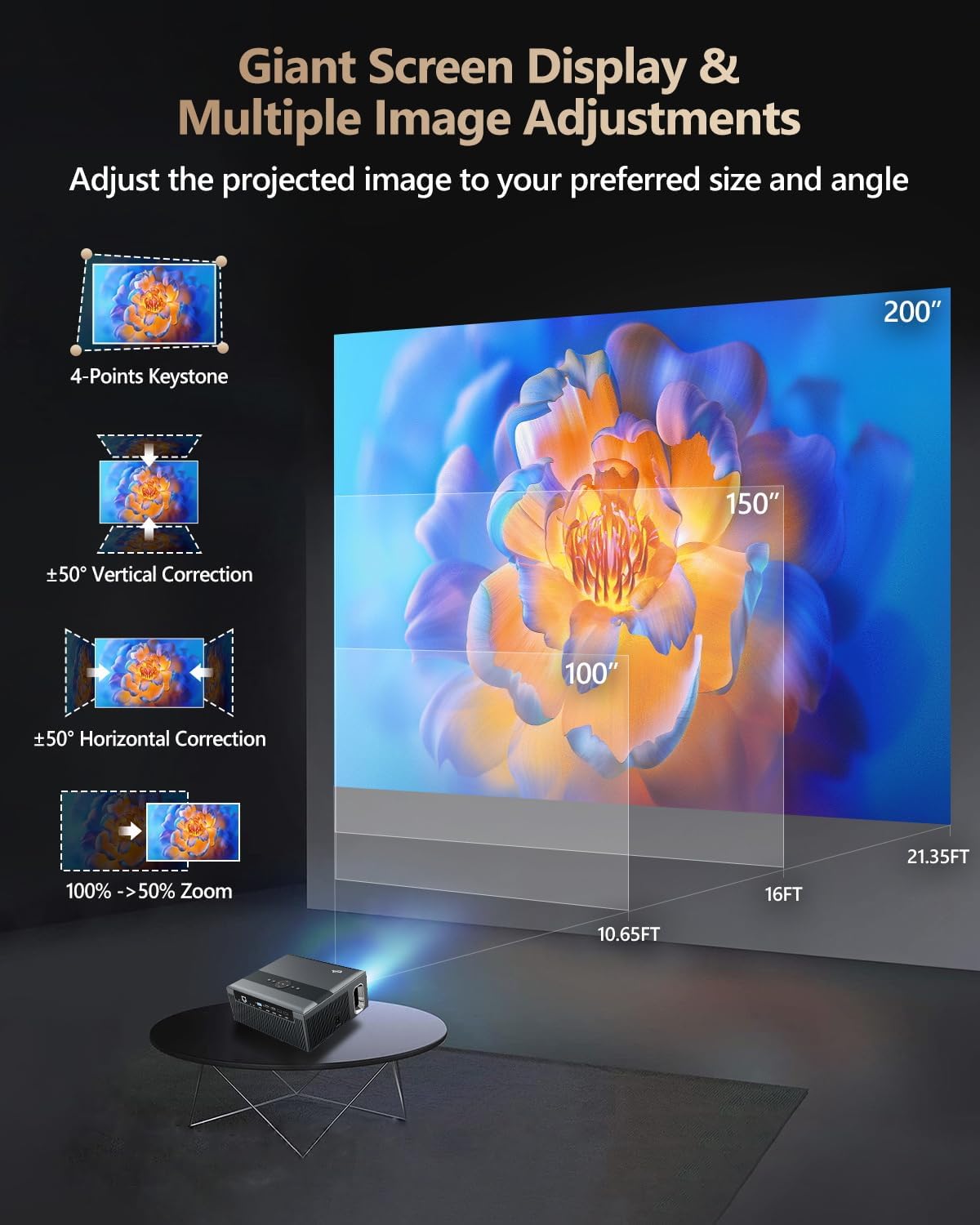
Figure 3: Image adjustment options including keystone correction and digital zoom.
4. Мрежна веза
Connect the projector to the internet for access to streaming apps and online content.
- Ви-Фи: Navigate to the network settings in the Android OS. Select your desired 2.4G or 5G Wi-Fi network and enter the password.
- ЛАН (Етернет): Connect an Ethernet cable from your router to the RJ45 port on the projector for a wired internet connection.
5. Блуетоотх упаривање
Pair Bluetooth devices such as external speakers, headphones, mice, keyboards, or gamepads.
- Уверите се да је Блуетоотх уређај у режиму упаривања.
- On the projector, go to Bluetooth settings within the Android OS.
- Select the desired device from the list and confirm pairing.

Figure 4: Wireless connectivity for streaming and audio.
Упутство за употребу
1. Android TV OS Navigation
Use the remote control to navigate the Android 9.0 interface. The home screen provides access to installed applications, settings, and input sources.

Figure 5: Android TV 9.0 interface with pre-installed and accessible applications.
2. App Installation and Usage
The projector comes with pre-installed apps like Netflix, YouTube, and Prime Video. You can download additional authorized applications from the app store within the Android OS.
- Select an app icon from the home screen to launch it.
- Follow on-screen prompts for login or content selection.
3. Screen Mirroring (Airplay/DLNA/Miracast)
Synchronize your smartphone, tablet, or laptop screen wirelessly to the projector.
- Ensure your device and the projector are connected to the same Wi-Fi network.
- Select the appropriate mirroring function (Airplay for iOS, Miracast for Android/Windows, DLNA for compatible devices) on the projector's interface.
- Initiate screen mirroring from your source device.
4. Повезивање спољних уређаја
The projector offers multiple ports for connecting various external devices.

Figure 6: Available input and output ports for external devices.
- ДВИ: Connect Blu-ray/DVD players, TV sticks, game consoles (PS5), PCs, or laptops using an HDMI cable. Select the corresponding HDMI input from the projector's source menu.
- УСБ: Insert USB flash drives or hard drives into the USB ports to play media fileс директно.
- ВГА: Connect older PCs or laptops using a VGA cable.
- АВ: Use the AV cable to connect devices with composite video and stereo audio outputs.
5. Аудио излаз
The projector features built-in 10W stereo speakers. For alternative audio experiences:
- Блуетоотх: Pair with external Bluetooth speakers or headphones as described in the Setup section.
- 3.5 мм аудио излаз: Connect wired headphones or external speakers using a 3.5mm audio cable.

Figure 7: Projector's integrated audio system.
Одржавање
1. Чишћење
- Објектив: Користите меку крпу без влакана, посебно дизајнирану за оптичка сочива. Не користите абразивна средства за чишћење.
- Екстеријер: Wipe the projector's exterior with a soft, dry cloth. For stubborn marks, slightly dampу крпу са водом.
- Вентилациони отвори: Periodically check and gently clean the ventilation openings to ensure unobstructed airflow.
2. Dust Protection
The CAIWEI X99+ features a fully sealed optical engine and an air purifier filter, which significantly reduces dust accumulation and light decay, contributing to a longer service life.

Figure 8: Dust-proof design of the CAIWEI X99+ projector.
3. Складиштење
When not in use for extended periods, store the projector in a cool, dry place, preferably in its original packaging or the provided projector bag, to protect it from dust and physical damage.
Решавање проблема
Ако наиђете на проблеме са пројектором, погледајте следеће уобичајене проблеме и решења:
| Проблем | Могући узрок | Решење |
|---|---|---|
| No image or "No Signal" message | Изабран је погрешан улазни извор; лабава кабловска веза; уређај није укључен. |
|
| Мутна слика | Focus not adjusted; keystone correction needed. |
|
| Нема звука | Volume too low; incorrect audio output selected; external device audio issue. |
|
| Проблеми са Ви-Фи везом | Нетачна лозинка; ван домета; проблеми са рутером. |
|
| Даљински управљач не ради | Празне батерије; препрека; проблем са упаривањем. |
|
Спецификације
| Бранд | ЦАИВЕИ |
| Модел | Кс99+ |
| Резолуција екрана | Native 1920 x 1080 (Supports 4K) |
| Осветљеност | 800 ANSI Lumens (12000 LED Lumens) |
| Однос контраста | 15500:1 |
| Оперативни систем | Андроид 9.0 |
| Меморија | 2ГБ РАМ + 16ГБ РОМ |
| Технологија повезивања | Bluetooth 5.0, Dual-band Wi-Fi (2.4G/5G), USB, HDMI, VGA, AV, LAN (RJ45) |
| Посебне карактеристике | Built-In Wi-Fi, Portable, Wireless, HDR10, MEMC, Dolby Audio, Sealed Optical Engine, 4D Keystone Correction, Digital Zoom |
| Аудио | 10W High Power Stereo Speakers, 3.5mm Audio Output |
| Димензије производа | 10.55 к 9.25 к 4.92 инча |
| Тежина артикла | 7.48 фунти |
Гаранција и подршка
For warranty information and technical support, please refer to the warranty card included with your product or visit the official CAIWEI webсајт. За помоћ у вези са свим проблемима који нису обухваћени овим упутством обратите се корисничкој служби.
Произвођач: ЦАИВЕИ
Webсајт: CAIWEI Official Store on Amazon