1. Увод
Thank you for choosing the ANKEWAY Double Din Car Stereo. This advanced car audio receiver features a 7-inch touchscreen, integrating wireless CarPlay and Android Auto for seamless smartphone connectivity. Equipped with Bluetooth, WiFi, RDS/FM radio, GPS navigation, and support for a backup camera, this unit provides a comprehensive in-car entertainment and navigation solution. This manual provides detailed instructions for installation, operation, and troubleshooting to ensure optimal performance and user experience.

Image: The ANKEWAY 7-inch Double Din Car Stereo, highlighting its compatibility with CarPlay and Android Auto.
2. Безбедносне информације
Please read all safety instructions carefully before installation and operation. Failure to follow these guidelines may result in injury or damage to the device or vehicle.
- Always consult a professional for installation if you are unsure about any wiring or electrical connections.
- Не користите уређај на начин који вас одвлачи од вожње. Увек дајте приоритет безбедности у саобраћају.
- Уверите се да су сви прикључци безбедни и правилно изоловани како бисте спречили кратки спојеви.
- Избегавајте излагање уређаја екстремним температурама, директној сунчевој светлости током дужег периода или прекомерној влази.
- Одржавајте јачину звука на нивоу који вам омогућава да чујете спољне звукове саобраћаја.
3. Садржај пакета
Пре почетка инсталације проверите да ли су све ставке присутне у пакету:
- ANKEWAY Double Din Car Stereo Unit
- Кабелски свежањ
- ГПС антена
- USB каблови (дуални)
- Ектернал Мицропхоне
- Позади View Камера
- РЦА каблови
- Монтажни носачи и завртњи
- Кориснички приручник (овај документ)

Слика: Прекоview of the main unit and included accessories.
4. Карактеристике производа
The ANKEWAY AW1010 Car Stereo is designed with a range of features to enhance your driving experience:
- Андроид систем: Runs on an Android operating system with 2GB RAM and 32GB internal storage, allowing app installation via the Play Store.
- Бежични CarPlay и Android Auto: Seamlessly integrate your iPhone or Android smartphone for navigation, music, calls, and voice commands. Supports both wired and wireless connections.
- 7.0-inch HD 1080P IPS Touch Screen: High-definition, sensitive, and transparent display with 2.5D curved edge for clear visuals and responsive interaction.
- Миррор Линк: Project your phone's display directly onto the car stereo screen.
- Повезивање: Dual USB ports, Bluetooth for hands-free calls and music streaming, WiFi for internet access, and support for external steering wheel controls (SWC).
- ГПС навигација: Built-in GPS module with pre-installed navigation software (e.g., TomTom, Here WeGO).
- Аудио/Видео излаз: 4x60W audio output and 1080P HD video support. Features an equalizer for sound customization (Pop, Rock, Jazz, etc.).
- Улаз за задњу камеру: Includes a backup camera for enhanced safety during reversing.
- Радио: RDS/FM radio tuner for clear reception.

Image: Visual representation of the car stereo's core features.

Image: Detail of the HD Full Touch Screen technology.
5. Подешавање и инсталација
Proper installation is crucial for the performance and longevity of your car stereo. It is recommended to have the unit installed by a qualified professional.
5.1 Дијаграм ожичења
Refer to the following diagram for correct wiring connections. Ensure all wires are connected to their corresponding terminals in your vehicle's wiring harness.

Image: Main Cable Wiring Diagram.
- Speaker Connections (RL/RR/FL/FR): Connect to your vehicle's 4 speakers.
- АНТ-ЦОНТ: Connect to the antenna control wire (if applicable).
- Lamp Control (ILL): Connect to the car's front small light wire.
- Back (REVERSE): Connect to the rear camera signal input cable.
- КЕИ1(КЕИ2): Use one of these cables to connect to the signal output cable of your car's Steering Wheel Control (SWC). If KEY1 is not compatible, select KEY2.
- ГНД: Connect to the battery negative/iron/ground.
- Б+: Connect to the car battery positive.
- АЦЦ: Connect to the car ignition detection cable.
5.2 Физичка инсталација
- Пажљиво уклоните постојећи ауто стерео.
- Connect the ANKEWAY stereo's wiring harness to your vehicle's harness according to the diagram.
- Connect the GPS antenna, WiFi antenna, and external microphone. Position the GPS antenna in a location with a clear view of the sky (e.g., dashboard or windshield).
- Инсталирајте задњи view camera and connect its video and power cables to the stereo.
- Secure the stereo unit into the dashboard using the provided mounting brackets and screws.
- Test all functions (power, audio, radio, GPS, camera, Bluetooth, CarPlay/Android Auto) before fully reassembling the dashboard.
6. Упутство за употребу
The ANKEWAY car stereo features an intuitive touchscreen interface. Here are basic operating guidelines:
6.1 Управљање екраном осетљивим на додир
Navigate through menus and control functions by tapping, swiping, and dragging on the 7-inch IPS touchscreen. The interface is designed to be responsive and user-friendly.

Image: Various screen interfaces of the car stereo.
6.2 Управљање воланом (SWC)
If your vehicle supports steering wheel controls, you can configure them to operate the stereo. Access the 'Steering Learn' or 'SWC Settings' menu in the system settings to map your vehicle's steering wheel buttons to the stereo's functions (e.g., volume up/down, track skip, mode change).

Слика: Интерфејс за учење управљања помоћу волана.
7. Повезивање
7.1 Бежични CarPlay и Android Auto
This unit supports both wireless and wired CarPlay and Android Auto. To connect wirelessly:
- Уверите се да су Блуетоотх и Ви-Фи омогућени на вашем паметном телефону.
- On the car stereo, go to the CarPlay/Android Auto application.
- Follow the on-screen prompts to pair your phone via Bluetooth. Once paired, the system will automatically establish a Wi-Fi connection for CarPlay/Android Auto functionality.
This allows access to navigation apps (e.g., Waze, Google Maps), music streaming (e.g., Spotify, YouTube Music), hands-free calling, and voice assistants (Siri, Google Assistant) directly from the stereo display.

Image: CarPlay interface on the stereo and smartphone integration.

Image: Android Auto interface with Spotify.

Image: Wireless CarPlay and Android Auto with voice command exampлес.
7.2 Блуетоотх
Упарите свој паметни телефон преко Блуетоотх-а за хандс-фрее позиве и аудио стримовање.
- On the stereo, go to the Bluetooth application.
- Омогућите Блутут на телефону и потражите доступне уређаје.
- Select 'ANKEWAY' (or similar device name) from the list and confirm pairing.
- Once connected, you can make/receive calls and play music through the car speakers.
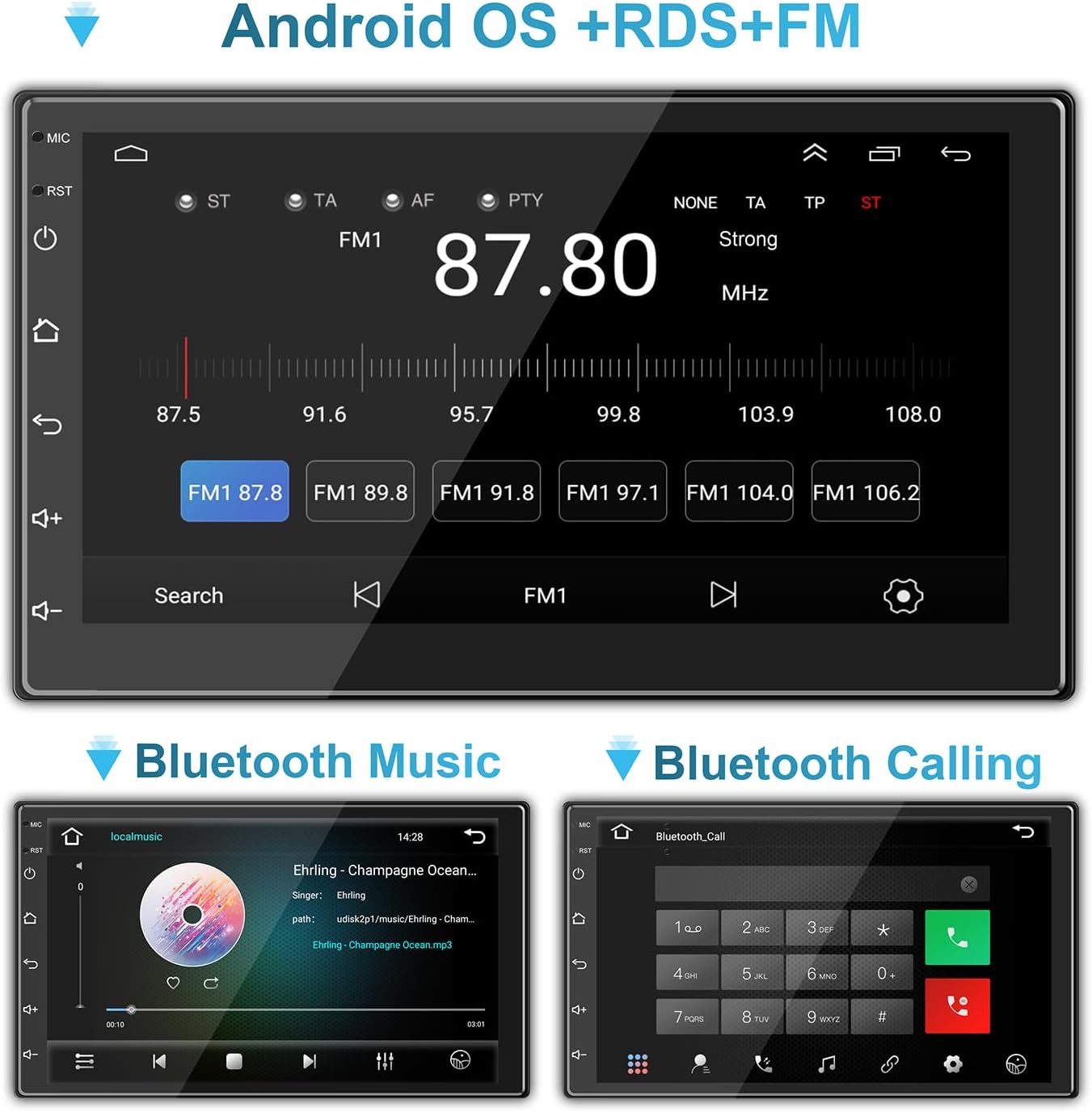
Image: Bluetooth music and calling interfaces.
7.3 WiFi & Internet
Connect the stereo to a Wi-Fi network (e.g., mobile hotspot) to access online features, download apps, and stream content.
- Go to 'Settings' on the stereo and select 'Wi-Fi'.
- Укључите Wi-Fi и изаберите жељену мрежу са листе.
- Унесите лозинку ако се то од вас затражи и повежите се.

Image: Connecting to mobile WiFi and streaming content.

Image: WiFi and Bluetooth connectivity features.
7.4 Огледалска веза
Mirror Link allows you to display your smartphone's screen directly on the car stereo. This feature is typically accessed via a dedicated app on the stereo and may require a wired USB connection for initial setup.
8. GPS навигација
The stereo comes with a built-in GPS module and pre-installed navigation software. Ensure the GPS antenna is properly installed and has a clear view неба за прецизно позиционирање.
- Access the navigation application from the main menu.
- Enter your destination, and the system will provide turn-by-turn directions.
- Maps can be updated via Wi-Fi connection or by downloading map data to the unit's storage.
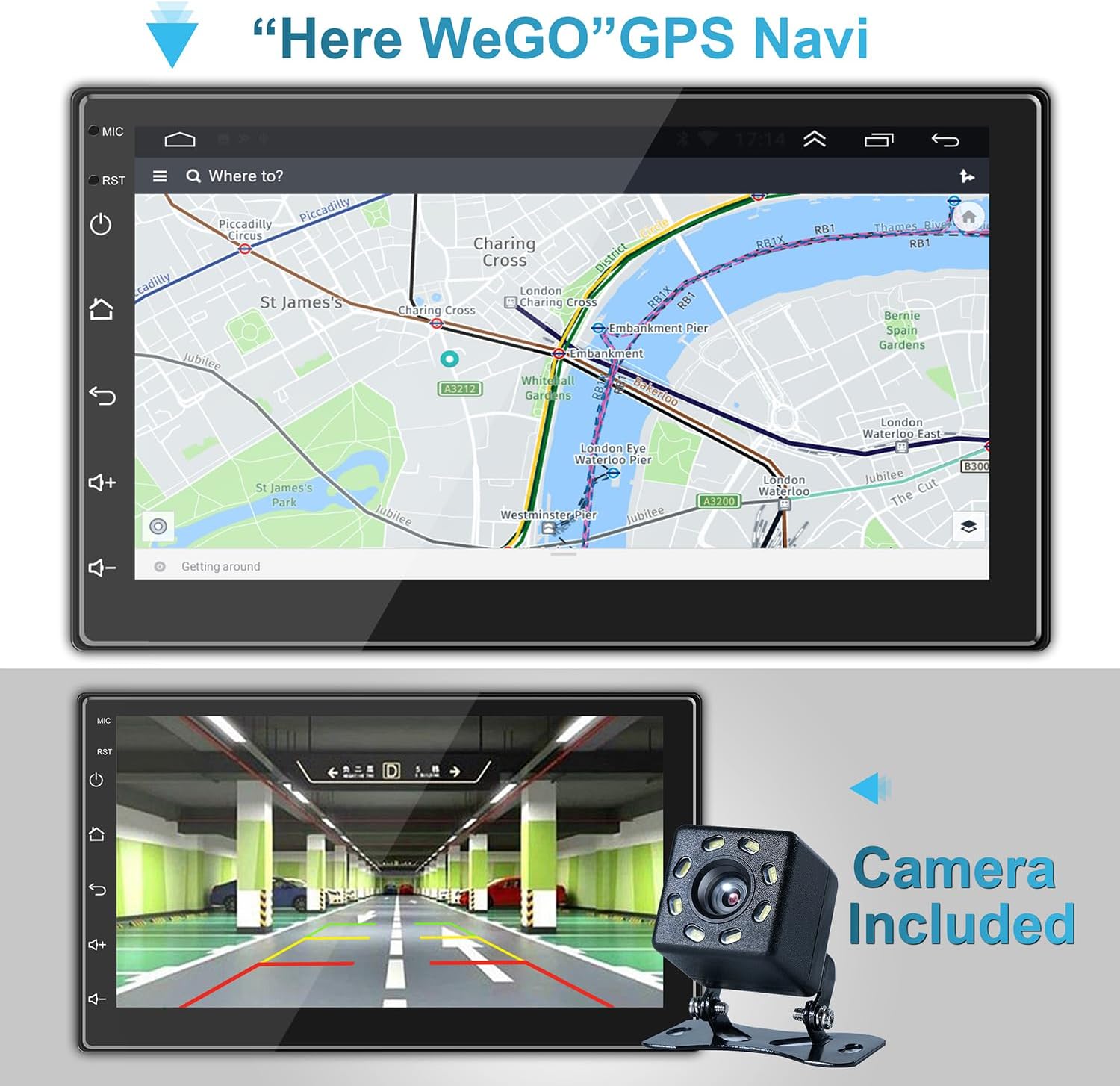
Image: GPS Navigation interface.

Image: GPS Navigation within CarPlay.
9. Камера за вожњу уназад
The included backup camera automatically displays the rear view on the stereo screen when the vehicle is shifted into reverse gear. This feature significantly aids in safe parking and maneuvering.
- Ensure the camera is properly installed and connected to the 'Back (REVERSE)' input on the stereo's wiring harness.
- The screen will automatically switch to the camera view када је укључена брзина за вожњу уназад.
Image: Backup camera view on the stereo screen.
10. Multimedia Settings
The stereo supports various multimedia functions, including audio playback and video viewинг.
10.1 Аудио еквилајзер
Customize your audio experience using the built-in equalizer. Access the equalizer settings to adjust sound effects and music styles (e.g., Pop, Rock, Jazz, Classical, Custom).
10.2 Репродукција видео записа
The unit supports 1080P HD video playback from USB drives or streaming via connected Wi-Fi. Ensure video files are in compatible formats (e.g., H.264).
Image: High-definition video playback.
11. Одржавање
To ensure the longevity and optimal performance of your ANKEWAY car stereo, follow these maintenance tips:
- Чишћење: Користите меку, суву крпу за чишћење екрана осетљивог на додир и спољашњости уређаја. За тврдокорне мрље, благо обришитеampОбришите крпу водом или средством за чишћење екрана. Избегавајте абразивне материјале или јаке хемикалије.
- температура: Do not expose the unit to extreme temperatures. Prolonged exposure to direct sunlight or very cold conditions can affect performance and lifespan.
- Ажурирања софтвера: Periodically check for software updates from the manufacturer to ensure the best performance and access to new features. Updates can often be downloaded via Wi-Fi.
- Везе: Повремено проверите све спојеве ожичења како бисте били сигурни да су безбедни и да немају корозије.
КСНУМКС. Решавање проблема
Ако наиђете на проблеме са стерео уређајем у аутомобилу, погледајте следеће уобичајене проблеме и решења:
| Проблем | Могући узрок | Решење |
|---|---|---|
| Но Повер | Лабав прикључак за напајање; Прегорели осигурач; Неправилно ожичење. | Check ACC and B+ wiring; Inspect fuse in the vehicle's fuse box and on the stereo's harness; Ensure proper grounding. |
| Нема звука | Жице звучника су искључене; Јачина звука је прениска; Функција искључивања звука је активна; Неисправна подешавања звука. | Verify speaker connections; Increase volume; Check if mute is on; Adjust audio output settings. |
| Bluetooth/Wi-Fi Connectivity Issues | Phone not discoverable; Incorrect pairing; Weak signal; Software glitch. | Ensure phone's Bluetooth/Wi-Fi is on and discoverable; Re-pair device; Move closer to Wi-Fi source (for hotspot); Restart stereo and phone. |
| CarPlay/Android Auto се не повезује | Incorrect USB cable; Phone software outdated; App not installed/updated; Wireless connection issues. | Use a high-quality USB cable; Update phone OS and CarPlay/Android Auto apps; Ensure Bluetooth and Wi-Fi are active for wireless connection. |
| ГПС сигнал је изгубљен/нетачан | GPS antenna obstructed or disconnected; Poor satellite reception. | Ensure GPS antenna is securely connected and placed in a clear area (e.g., dashboard); Move vehicle to an open area. |
| Задња камера се не приказује | Camera power/video cable disconnected; Reverse trigger wire (BACK) not connected. | Check camera connections; Ensure the 'BACK' wire is correctly connected to the vehicle's reverse light trigger. |
If the problem persists after trying these solutions, please contact ANKEWAY customer support for further assistance.
13. Спецификације
| Феатуре | Спецификација |
|---|---|
| Број модела | АВ1010 |
| Димензије производа | 1.73" Д x 7.01" Ш x 3.98" В (4.39 x 17.81 x 10.11 цм) |
| Тежина артикла | 2.38 фунте (1.08 кг) |
| Величина екрана | 7 инча (18 цм) |
| Оперативни систем | Андроид |
| Меморија (РАМ) | 2ГБ |
| Складиштење (РОМ) | 32ГБ |
| Технологија повезивања | USB, RCA, Cable, Bluetooth, WiFi |
| Посебне карактеристике | Wireless Android Auto, Wireless Apple CarPlay, Mirror Link, GPS Navigation, RDS/FM Radio |
| Режим аудио излаза | Стерео |
| Излазна снага | 4 к 60 вати |
| Видео Енцодинг | Х.264 |

Image: Product dimensions and rear panel layout.
14. Гаранција и подршка
For warranty information, technical support, or any inquiries regarding your ANKEWAY Double Din Car Stereo, please contact ANKEWAY customer service. Refer to the contact information provided with your purchase or visit the official ANKEWAY webсајт за ресурсе подршке.