
BMC G3 A20
BMC G3 A20 Anti-Snoring Device User Manual
Model: G3 A20 | Brand: BMC
Увод
This user manual provides comprehensive instructions for the safe and effective operation, setup, and maintenance of your BMC G3 A20 Anti-Snoring Device. Please read this manual thoroughly before using the device and keep it for future reference.
Важне информације о безбедности
УПОЗОРЕЊЕ: Consult a healthcare professional before using this device. Do not use if you have difficulty breathing or are unable to remove the device yourself. Keep out of reach of children. Discontinue use if you experience discomfort or adverse reactions.
Always ensure the device is placed on a stable, flat surface during operation. Do not block the air inlet or outlet. Use only accessories and parts recommended by the manufacturer.
Производ је завршенview и компоненте
The BMC G3 A20 is an advanced anti-snoring device designed for comfortable and effective use. It features intelligent temperature control, automatic start/stop functions, and a low noise level for a peaceful sleep environment.

Слика 1: BMC G3 A20 device with its complete set of accessories, including the carrying case, air hose, power adapter, SD card for data storage, and replacement filters.

Слика 2: The BMC G3 A20 device with its integrated humidifier chamber opened, revealing the water reservoir for humidification.
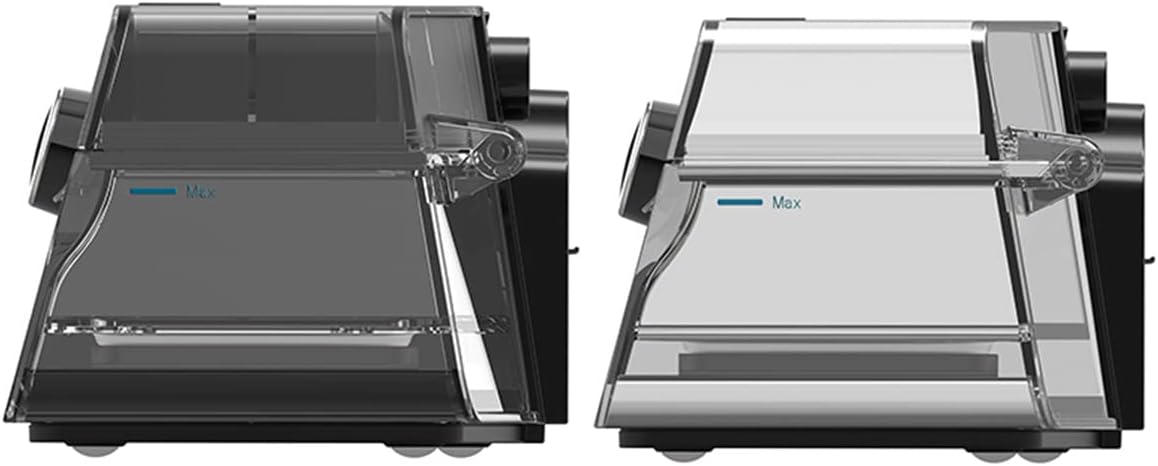
Слика 3: Сиде view comparison of two humidifier chambers, illustrating the 'Max' fill line for proper water level.

Слика 4: Hands demonstrating the process of opening and removing the humidifier chamber from the BMC G3 A20 device for cleaning or refilling.

Слика 5: All individual components of the BMC G3 A20 system laid out, including the main device, carrying bag, air hose, power adapter, mask, and filters.
Упутства за подешавање
- Распакујте уређај: Carefully remove the BMC G3 A20 device and all accessories from the packaging.
- Прикључак за напајање: Connect the power adapter to the device and plug it into a suitable electrical outlet.
- Humidifier Setup (Optional):
- Open the humidifier chamber as shown in Figure 2 and Figure 4.
- Fill the humidifier with distilled water up to the 'Max' line (refer to Figure 3). Do not overfill.
- Close the humidifier chamber securely.
- Прикључак црева: Connect the air hose to the device's air outlet.
- Mask Connection: Attach your compatible mask to the other end of the air hose.
- Почетна подешавања: Ensure the device is set to the default pressure range of 4-20 cm H2O. Adjust other settings as recommended by your healthcare professional.
Управљање уређајем
- Укључено: Turn on the device. The BMC G3 A20 features an automatic start function.
- Apply Mask: Place the mask comfortably and securely on your face, ensuring a proper seal.
- Подешавања монитора: Use the 3.5-inch color LCD screen to monitor important parameters in real-time, such as pressure, humidification status, and treatment data.
- Аутоматске функције: The device will automatically adjust pressure and humidification based on its intelligent control system. It also features automatic stop when the mask is removed or the session ends.
- Приступ подацима: For detailed treatment data, scan the QR code displayed on the device screen with your smartphone. This allows you to view data in iCode.
The device is designed for low energy consumption, maximizing humidification effect while reducing power usage through eco-intelligent heating technology.
Одржавање и чишћење
Regular cleaning and maintenance are crucial for the optimal performance and longevity of your BMC G3 A20 device.
- Дневно чишћење:
- After each use, empty any remaining water from the humidifier chamber and rinse it with distilled water. Allow it to air dry completely.
- Обришите спољашњост уређаја меком, дamp тканина. Не урањајте уређај у воду.
- Недељно чишћење:
- Wash the humidifier chamber, air hose, and mask components with mild soap and warm water. Rinse thoroughly and allow to air dry away from direct sunlight.
- Inspect the air filter for dust and debris. Replace if visibly dirty or as recommended by your healthcare professional.
- Замена филтера: Replace the air filter regularly, typically every 1-3 months, or more frequently in dusty environments.
- Складиштење: When not in use for an extended period, ensure the device and all components are clean and dry. Store them in the provided carrying case in a cool, dry place.
Упутства за негу: Hand wash components as needed. Do not use harsh chemicals or abrasive cleaners.
Решавање проблема
| Проблем | Могући узрок | Решење |
|---|---|---|
| Уређај се не укључује | Кабл за напајање није повезан; Проблем са утичницом | Check power connections; Try a different outlet |
| Нема протока ваздуха или низак притисак | Hose kinked or disconnected; Mask leak; Air filter blocked | Check hose for kinks and connections; Adjust mask for proper seal; Clean or replace air filter |
| Humidifier not producing moisture | Water reservoir empty; Humidifier chamber not properly closed | Refill water reservoir; Ensure humidifier chamber is securely closed |
| Прекомерна бука | Air filter dirty; Device not on a stable surface | Clean or replace air filter; Place device on a firm, flat surface |
If the problem persists after attempting these solutions, please contact customer support or your healthcare provider.
Техничке спецификације
- Модел: BMC G3 A20
- Ниво буке: <30 дБ
- Димензије (Д к Ш к В): 17 цм к 19 цм к 11.7 цм
- Тежина: Отприлике 3.3 кг
- Default Pressure Setting: 4-20 цм Х2О
- Влажење: Integrated, Eco-intelligent heating technology
- Breathing Relief: Да
- Компензација надморске висине: Automatic, up to 1000 meters
- Аутоматско покретање/заустављање: Да
- Приказ: ЛЦД екран у боји дијагонале 3.5 инча
- Складиштење података: Via SD card, accessible via QR code (iCode)
- Материјал: Synthetic fabric (for mask/strap, if applicable), other components as per device construction.
- Боја: Црно
Гаранција и подршка
The BMC G3 A20 device comes with a Двогодишња гаранција произвођача од дана куповине. Ова гаранција покрива недостатке у материјалу и изради при нормалној употреби.
For warranty claims, technical support, or any questions regarding your device, please contact your authorized BMC dealer or the customer support provided by the seller.
Молимо вас да сачувате доказ о куповини ради гаранције.
Ask a question about this manual
Ask about setup, troubleshooting, compatibility, parts, safety, or missing instructions. Manuals+ will review the question and use this page’s manual context to help answer it.