
Увод
Thank you for choosing the ASHATA 6-Channel USB 3.7V Lithium Battery Charger Board. This device is designed to efficiently charge up to six 3.7V LiPo 1S or LiHv batteries simultaneously and independently. Its compact design and versatile power input make it an ideal solution for hobbyists and professionals requiring reliable battery charging.
Садржај пакета
- 1 x ASHATA 6-Channel USB Lithium Battery Charger Board
Безбедносне информације
Молимо вас да прочитате и разумете сва безбедносна упутства пре употребе овог производа. Непоштовање ових упутстава може довести до струјног удара, пожара или озбиљних повреда.
- Use only with compatible 3.7V LiPo 1S or LiHv batteries. Do not attempt to charge other battery types.
- Ensure the charger is connected to a stable 5V USB power source (e.g., computer USB port, power bank, phone charger).
- Не остављајте батерије за пуњење без надзора.
- Keep the charger away from water, moisture, and high temperatures.
- Do not short-circuit the charging ports.
- If the charger or battery shows signs of damage, discontinue use immediately.
- Чувати ван домашаја деце.
Производ је завршенview
The ASHATA 6-Channel USB Lithium Battery Charger Board features a compact design with multiple independent charging channels and user-friendly indicators.
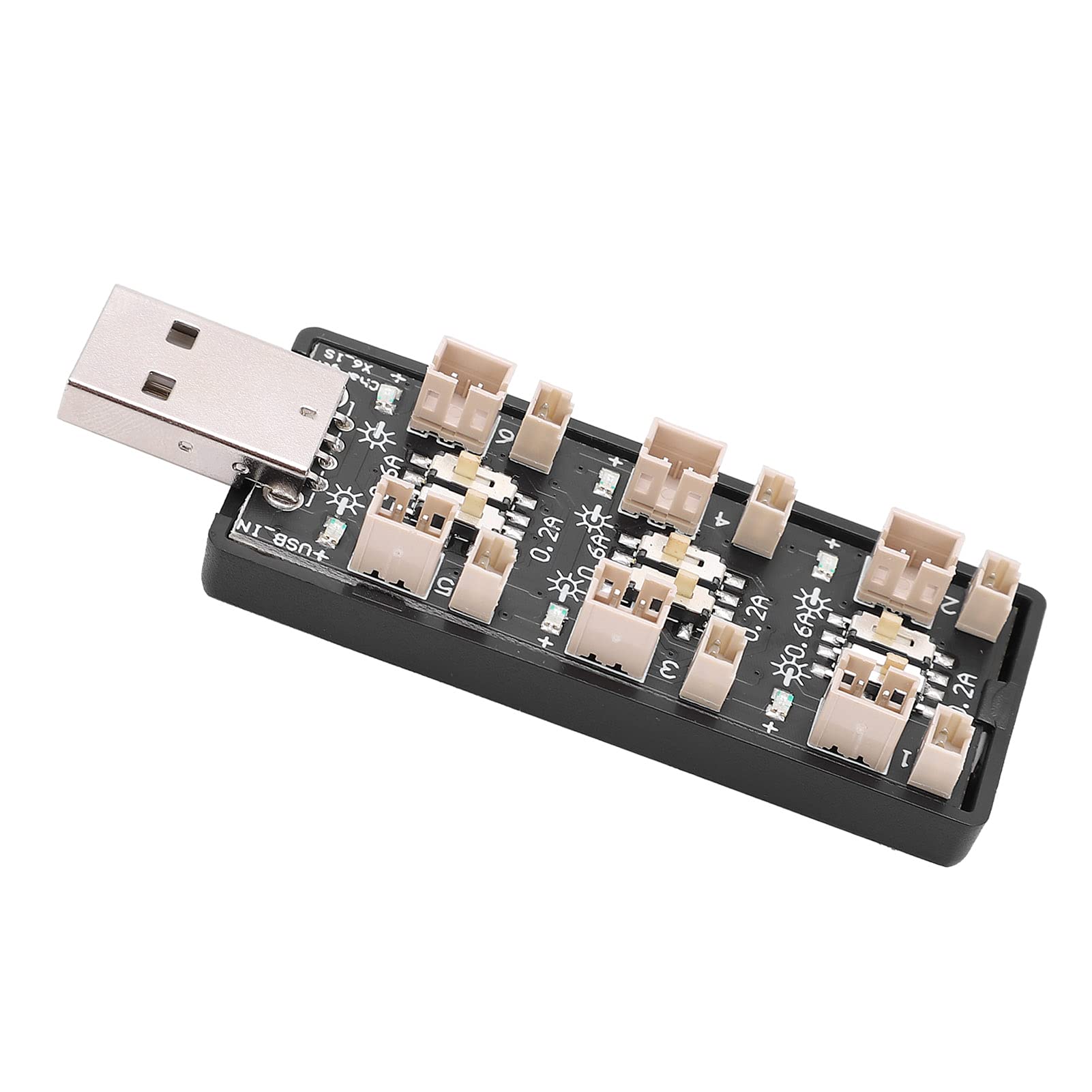
Слика 1: Свеукупно view of the ASHATA 6-Channel USB Lithium Battery Charger Board, showing the integrated USB plug for power input and the six charging ports.
Кључне компоненте:
- USB Input Plug: Standard USB-A connector for power input.
- Charging Ports (x6): Independent ports for connecting 3.7V LiPo 1S or LiHv batteries.
- Current Selection Switches (x6): Individual toggle switches for each channel to select charging current (0.2A or 0.6A).
- LED Indicators (x6): Each channel has an LED to indicate charging status.

Слика 2: Крупни план view highlighting the individual charging ports and their corresponding current selection toggle switches (0.2A and 0.6A settings) and LED indicators.
Сетуп
- Повежите извор напајања: Insert the integrated USB plug of the charger board into a compatible 5V USB power source. This can be a computer USB port, a power bank, or a standard USB wall adapter (e.g., phone charger).
- Припремите батерије: Ensure your 3.7V LiPo 1S or LiHv batteries are in good condition and compatible with the charger's ports.

Слика 3: Одозго надоле view of the charger board, illustrating the layout of the six independent charging channels and the USB input.
Упутство за употребу
- Select Charging Current: For each battery you intend to charge, adjust the corresponding toggle switch to either 0.2А or 0.6А.
- 0.2А: Suitable for smaller capacity batteries or for a slower, more gentle charge.
- 0.6А: Suitable for larger capacity batteries or when a faster charge is desired. Ensure your battery can handle this current.
- Повежите батерије: Carefully plug your 3.7V LiPo 1S or LiHv batteries into the charging ports. Ensure correct polarity.
- Монитор статус пуњења: The LED indicator for each channel will behave as follows:
- Трепћући ЛЕД: Показује да се батерија тренутно пуни.
- Стална ЛЕД: Indicates that the battery is fully charged and the charging process has automatically stopped.
- Искључите батерије: Once the LED turns solid, the battery is fully charged. Disconnect the battery from the charging port.
- Искључите напајање: When all charging is complete, disconnect the USB charger board from its power source.

Слика 4: Горњи и доњи део views of the charger board, showing the compact form factor and the USB input.
Одржавање
- Чишћење: Use a dry, soft cloth to clean the charger board. Do not use liquid cleaners or solvents.
- Складиштење: Чувајте пуњач на хладном и сувом месту, даље од директне сунчеве светлости и екстремних температура када се не користи.
- инспекција: Periodically inspect the charger for any signs of damage to the casing, ports, or USB plug.
Решавање проблема
| Проблем | Могући узрок | Решење |
|---|---|---|
| LED does not light up when battery is connected. |
|
|
| Battery charges slowly. |
|
|
| Charger or battery gets excessively hot. |
|
|
Спецификације
| Број модела | Rich0CsIrfVFiU |
| Улазни волtagе Распон | USB 5V ± 5% (0.5A ~ 2A) |
| Оутпут Волtagе Распон | КСНУМКСВ ~ КСНУМКСВ |
| Опсег излазне струје | 600mA x 6CH (0.6A) / 200mA x 6CH (0.2A) |
| Број канала | 6 независна канала |
| Применљиви тип батерије | LiPo 1S; LiHv high voltage lithium battery (3.7V nominal) |
| Димензије (Д к Ш к В) | 8 к 3 к 2 цм |
| Произвођач | АСХАТА |
| Земља порекла | Кина |
Гаранција и подршка
For warranty information or technical support, please refer to the retailer's policy or contact ASHATA customer service through their official channels. Please have your model number (Rich0CsIrfVFiU) and purchase details ready when contacting support.