
Амазон Ецхо Схов 21
Амазон Ецхо Схов 21 упутство за употребу
Модел: Ехо Шоу 21
1. Увод
Welcome to your new Amazon Echo Show 21. This smart display is designed to be the central hub for your home, offering a large Full HD screen for entertainment, organization, and communication. With built-in Fire TV and Alexa, you can stream content, manage your smart home, make video calls, and keep your family organized with customizable widgets.

Figure 1.1: Amazon Echo Show 21 Overview
The Echo Show 21 integrates seamlessly into your daily life, providing a visual and interactive experience for all your Alexa commands.
2. Почетак рада: Подешавање
2.1 Шта је у кутији
- Echo Show 21 device
- Alexa Voice Remote with batteries (2 AAA included)
- Power adapter (30W) and 5 ft. cord (white)
- Wall mount, anchors, screws, mounting template
- Водич за брзи почетак
2.2 Почетно подешавање
The Echo Show 21 is designed for simple setup. You will need a Wi-Fi connection.
- Укључено: Прикључите адаптер за напајање на ваш Echo Show 21 и укључите га у зидну утичницу. Уређај ће се аутоматски укључити.
- Ви-Фи веза: Follow the on-screen instructions to connect your device to your Wi-Fi network. Amazon Wi-Fi simple setup can automatically connect your device if you are a Prime member and have previously saved your Wi-Fi credentials.
- Amazon Account Login: Log in with your Amazon account credentials.
- Персонализација: Customize your home screen, set up profiles, and configure your preferred settings.
- Даљинско упаривање: The included Alexa Voice Remote should pair automatically. If not, follow the on-screen instructions or refer to the quick start guide for manual pairing.
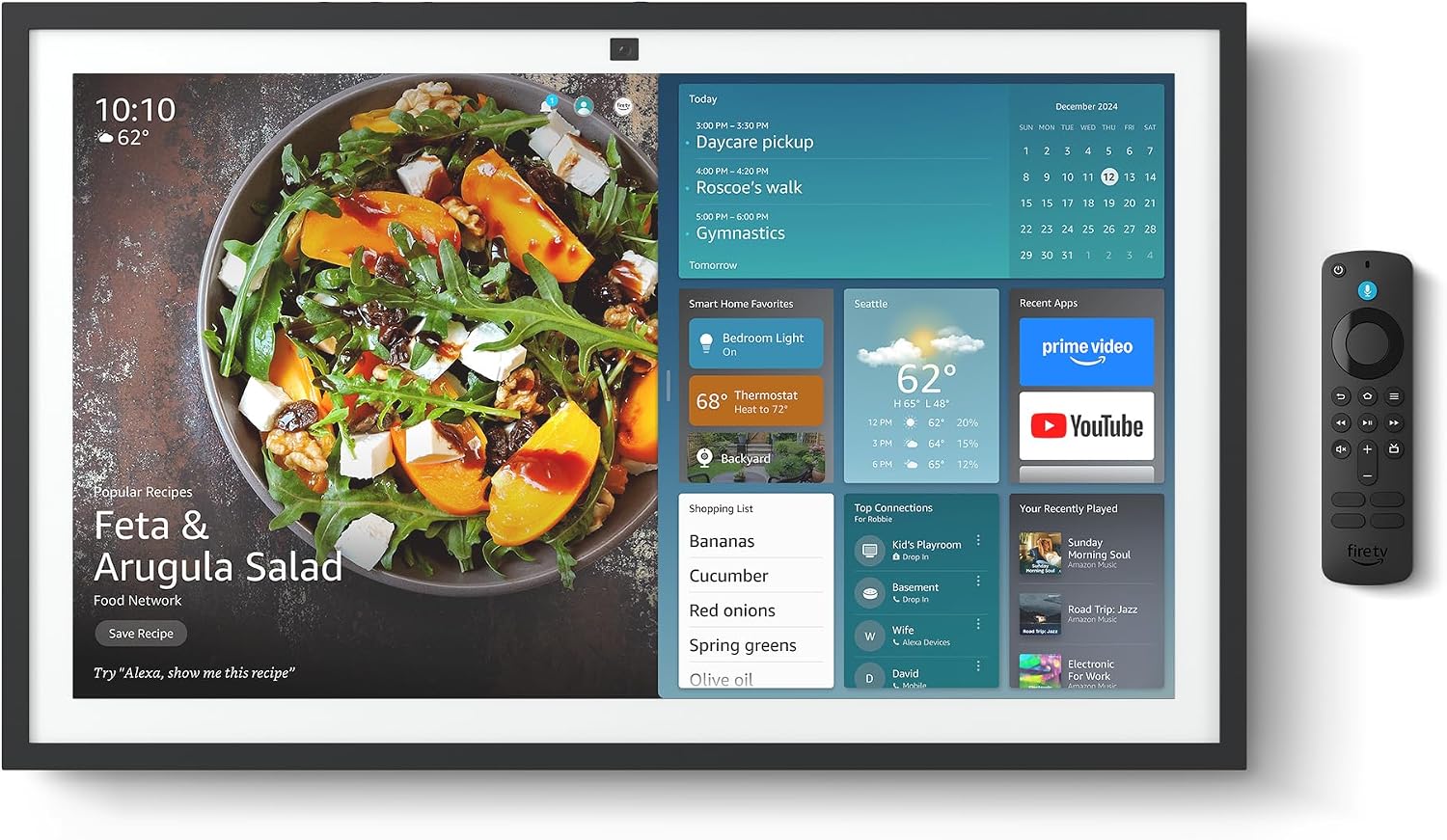
Figure 2.1: Echo Show 21 with Alexa Voice Remote
2.3 Опције монтаже
The Echo Show 21 can be wall-mounted using the included hardware or placed on a stand (sold separately). Wall mounting requires an electric drill.
3. Управљање вашим Echo Show 21
3.1 Гласовна контрола помоћу Алексе
Your Echo Show 21 is primarily controlled by voice using Alexa. Simply say the wake word "Alexa" followed by your command or question.
- Опште команде: "Alexa, what's the weather?", "Alexa, set a timer for 10 minutes."
- Музика и аудио: "Alexa, play pop music," "Alexa, play my morning playlist."
- Video & Entertainment: "Alexa, open Prime Video," "Alexa, play The Boys on Netflix."
3.2 Интеграција са Fire TV-ом
Enjoy endless entertainment with built-in Fire TV. Use the included Alexa Voice Remote or voice commands to navigate.

Figure 3.1: Fire TV Interface
- Access thousands of apps like Prime Video, Netflix, YouTube, Apple TV.
- Stream movies, TV shows, and live content.
- The Fire TV remote allows for traditional navigation and playback control.
3.3 Home Screen & Widgets
The 21-inch display is ideal for organizing your day with customizable widgets.

Figure 3.2: Customizable Home Screen Widgets
- Keep important information like calendars, shopping lists, and weather in view.
- Personalize your home screen with family photos.
3.4 Паметна кућна контрола
Control compatible smart devices using your voice or the smart home dashboard.

Figure 3.3: Smart Home Dashboard
- Turn lights on/off, adjust thermostats, or view преноси уживо са камера.
- Supports Zigbee, Matter, and Thread Border Router for broad compatibility.
3.5 Видео позиви
Connect with family and friends using the 13 MP camera with auto-framing, wide field of vision, 3.3x zoom, and noise reduction.

Figure 3.4: Echo Show 21 as a Digital Photo Frame
The camera can also be used to display your favorite memories as a digital photo frame.
4. Одржавање
Да бисте осигурали дуговечност и оптималне перформансе вашег Echo Show 21, пратите ова упутства за одржавање:
- Чишћење екрана: Користите меку крпу која не оставља влакна да нежно обришете екран. За тврдокорне мрље, благо обришитеampen the cloth with water. Avoid abrasive cleaners or sprays directly on the screen.
- Чишћење тела уређаја: Wipe the exterior surfaces with a dry, soft cloth. Do not use harsh chemicals or solvents.
- вентилација: Ensure the device's ventilation openings are not blocked to prevent overheating.
- Ажурирања софтвера: Your Echo Show 21 receives automatic software security updates. Ensure your device is connected to Wi-Fi to receive these updates.
КСНУМКС. Решавање проблема
If you encounter issues with your Echo Show 21, try the following common solutions:
- Уређај не реагује: Try saying "Alexa" again clearly. If unresponsive, unplug the power adapter for a few seconds and then plug it back in to restart the device.
- Нема Wi-Fi везе: Check your router and modem to ensure they are working correctly. Restart your router. On the Echo Show 21, go to Settings > Network to re-select your Wi-Fi network and re-enter the password.
- Проблеми са звуком: Ensure the volume is not muted or too low. Say "Alexa, turn up the volume." Check audio settings in the device menu.
- Камера не ради: Ensure the physical camera shutter is open and the mic/camera-off button is not activated (red light indicates off).
- Даљински не реагује: Check the batteries in the Alexa Voice Remote. If necessary, replace them. Re-pair the remote if it becomes disconnected.
6. Техничке спецификације
| Феатуре | Спецификација |
|---|---|
| Величина | 21.4 cm Š x 13.2 cm V x 1.5 cm D |
| Тежина | 10.7 лб |
| Дисплаи | 21” with 1920 x 1080 resolution (landscape or portrait) |
| Камера | 13 MP + Shutter |
| Аудио | Two 2” woofers + two 0.6” tweeters |
| Ви-Фи повезивање | Wi-Fi 6E (802.1ax), Tri-band, dual-antenna (MIMO). Supports 802.11a/b/g/n/ac. |
| Смарт Хоме Хуб | Zigbee + Matter + Thread Border Router |
| Процесор | Octa-core SoC with Amazon AZ2 neural network engine |
| Сензори | ALS RGB + Accelerometer |
| Језик | енглески и шпански |

Figure 6.1: Echo Show 15 vs. Echo Show 21 Dimensions
7. Карактеристике приватности
Echo Show 21 је дизајниран са више слојева контроле приватности:
- Mic/Camera-Off Button: A physical button to electronically disconnect the microphones and camera.
- Затварач камере: A built-in physical shutter to cover the camera lens.
- Технологија речи за будност: Alexa devices only begin recording and sending audio to the cloud after detecting the wake word.
- Индикатори стримовања: Визуелни индикатори показују када се аудио или видео преносе у облак.
- Voice Recording Control: Способност да view и обришите своје гласовне снимке.

Figure 7.1: Mic/Camera-Off Button and Camera Shutter
For more details, visit the Alexa Privacy Hub.
8. Функције приступачности
The Echo Show 21 includes various accessibility features to personalize Alexa to your abilities:
- Додирните за Алексу: Access Alexa via touch through on-screen tiles or a keyboard.
- Адаптивно слушање: Пружа више времена за завршетак говора пре него што Алекса одговори.
- Жељена брзина говора: Контролишите колико брзо или споро Алекса говори.
- Титловање: Алекса титлови, титлови за позиве и скривени титлови пружају текст за подржани садржај.
- Покажи и испричај: Helps users who are blind or visually impaired identify products.
- ГласView Читач екрана: Enables access for customers who are blind or visually impaired.
- Увећавач екрана: Увећајте/умањите и померите се по екрану.
- Киндл Читање наглас: Нека Алекса наглас чита ваше Киндл књиге.
- Текст у реалном времену: Type live text in a video call.
These features can be enabled via Settings > Accessibility on your device.
9. Гаранција и подршка
9.1 Гаранција на производ
Your Echo Show 21 comes with a 1-годишња ограничена гаранција и сервис. Optional 1-year, 2-year, and 3-year extended warranties are available for U.S. customers, sold separately.
Use of Echo Show 21 and Fire TV on Echo Show 21 is subject to their respective terms of service.
9.2 Корисничка подршка
For further assistance, troubleshooting, or to learn more about your device, please visit the Amazon support webсајт или контактирајте корисничку службу Амазона.
Ask a question about this manual
Ask about setup, troubleshooting, compatibility, parts, safety, or missing instructions. Manuals+ will review the question and use this page’s manual context to help answer it.