
1. Увод
The IHSENO Mini WiFi Smart Switch Relay is a compact and intelligent device designed to integrate your traditional lighting and appliances into a smart home system. It operates on 2.4GHz WiFi and is compatible with the Tuya Smart Life App, allowing for remote control, voice commands via Alexa and Google Home, and intelligent scheduling.

Слика 1.1: Готовоview of the IHSENO Mini WiFi Smart Switch Relay and its packaging.
Кључне карактеристике:
- Mini WiFi Smart Switch: Designed for 2.4GHz WiFi, enabling whole-house intelligence through the Tuya APP.
- Tuya Smart Life App Control: Connects with other smart devices for intelligent scene linkage.
- Customize Different Scene Modes: Allows setting scenes like 'Reading' or 'Movie' and controlling various smart devices.
- Alexa & Google Home Enabled: Supports voice control for hands-free operation.
- Компактан дизајн: Fits into most standard electrical boxes, even with existing wiring.
2. Безбедносне информације
Пажљиво прочитајте сва безбедносна упутства пре инсталације и рада. Непоштовање ових упутстава може довести до струјног удара, пожара или других опасности.
- Препоручена професионална инсталација: Electrical work should be performed by a qualified electrician.
- Искључите напајање пре инсталације: Увек искључите напајање на прекидачу пре инсталирања или сервисирања уређаја.
- Само за унутрашњу употребу: This device is intended for indoor use in dry locations.
- Волtagе и тренутне оцене: Немојте прекорачити наведену волtage (AC 100-240V) and current (3 Amps) ratings.
- Ожичење: Ensure all wiring connections are secure and comply with local electrical codes. Input and output connections cannot be reversed.

Image 2.1: Safety and Certification details for the Mini Smart Switch.
3. Подешавање и инсталација
The IHSENO Mini WiFi Smart Switch Relay is designed for easy integration into your existing electrical system. It supports both 1-way and 2-way control setups.
Дијаграми ожичења:
Важно: Always ensure the power is OFF at the circuit breaker before performing any wiring. Input and output connections cannot be reversed.

Image 3.1: Wiring Method 1 - Direct connection to a lamp and mains power.

Image 3.2: Wiring Method 2 - Connection with a 1-way wall switch.

Image 3.3: Wiring Method 3 - Connection with a 2-way wall switch.
Упаривање апликација:
- Преузмите Туиа Смарт or Смарт Лифе апликацију из продавнице апликација на вашем паметном телефону.
- Региструјте се или се пријавите на свој налог.
- Уверите се да је ваш паметни телефон повезан на ВиФи мрежу од 2.4 ГХз.
- Power on the smart switch. The indicator light should blink rapidly, indicating it's in pairing mode. If not, refer to the troubleshooting section for resetting the device.
- In the app, tap '+' to add a device. Select 'Electrical' > 'Switch (Wi-Fi)' or allow the app to auto-discover the device.
- Пратите упутства на екрану да бисте довршили процес упаривања.
4. Упутство за употребу
Once installed and paired, you can control your IHSENO Mini WiFi Smart Switch Relay through various methods.
4.1. Даљинско управљање апликацијом
Control your connected devices from anywhere using the Tuya Smart Life App, as long as your smartphone and the switch are connected to the internet.

Image 4.1: WiFi Remote Control functionality.

Image 4.2: App Remote Control in action, showing control of a lamp.
4.2. Управљање гласом
Integrate your smart switch with Amazon Alexa or Google Assistant for convenient voice commands.
- Отворите апликацију Alexa или Google Home.
- Link your Tuya Smart Life account to the voice assistant.
- Откријте уређаје.
- Use commands like "Alexa, turn on the lamp" or "Hey Google, turn off the kitchen light."
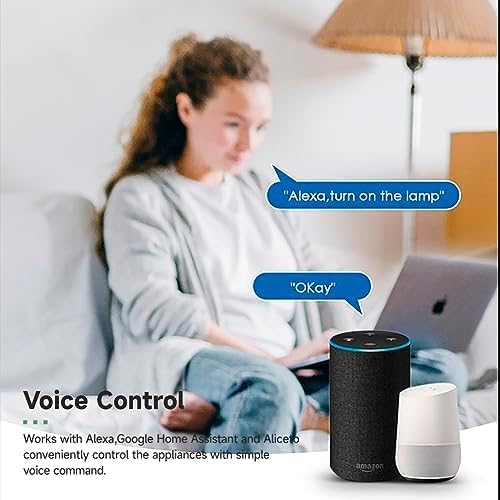
Image 4.3: Voice control with Alexa and Google Home.
4.3. Intelligent Timing and Scene Modes
Set schedules, countdowns, and create custom scene modes within the Tuya Smart Life App.
- Тајминг: Schedule devices to turn on/off at specific times (e.g., 23:30 Off).
- Бициклизам: Set recurring schedules (e.g., 08:00 ON Everyday).
- Одбројавање: Set a timer for the device to turn off after a specified duration.
- Режими сцене: Combine multiple smart devices to activate with a single command or schedule (e.g., 'Movie Night' scene dims lights and turns on entertainment).
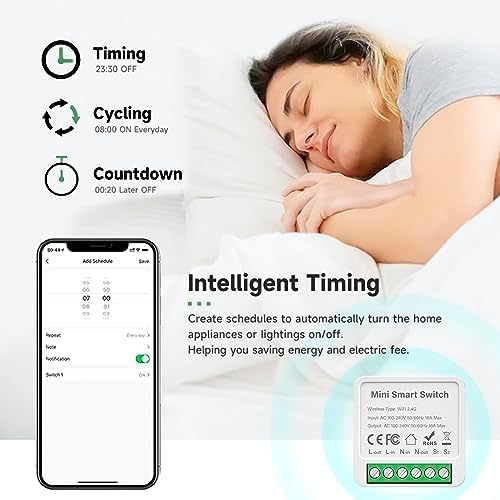
Image 4.4: Intelligent Timing features in the app.
4.4. Sharing Function
Share control of your smart devices with family members through the Tuya Smart Life App.

Image 4.5: Sharing function for family members.
5. Одржавање
To ensure the longevity and optimal performance of your IHSENO Mini WiFi Smart Switch Relay, follow these simple maintenance guidelines:
- Чишћење: Користите меку, суву крпу за чишћење уређаја. Не користите течна средства за чишћење или аеросоле.
- Окружење: Avoid exposing the device to excessive moisture, extreme temperatures, or direct sunlight.
- инспекција: Periodically check wiring connections for any signs of wear or looseness.
КСНУМКС. Решавање проблема
If you encounter issues with your IHSENO Mini WiFi Smart Switch Relay, refer to the following common problems and solutions:
- Уређај се не упарује:
- Ensure your WiFi network is 2.4GHz. The device does not support 5GHz WiFi.
- Check that the device is powered on and the indicator light is blinking rapidly. If not, power cycle the device or perform a factory reset (refer to app instructions for reset procedure).
- Move the device closer to your WiFi router during pairing.
- Device offline in app:
- Verify your home WiFi network is active and has internet access.
- Check the power supply to the smart switch.
- Рестартујте свој WiFi рутер.
- Гласовна контрола не ради:
- Ensure your Tuya Smart Life account is correctly linked to Alexa or Google Home.
- Check the device name in the voice assistant app; ensure it's easy to pronounce and recognize.
- Проверите да ли је ваш уређај са гласовним асистентом повезан са интернетом.
- Physical switch not responding:
- Ensure all wiring connections are secure and correct according to the diagrams.
- Check if the physical switch itself is functional.
7. Спецификације
Technical specifications for the IHSENO Mini WiFi Smart Switch Relay:

Слика 7.1: Детаљне спецификације производа.
| Спецификација | Детаљ |
|---|---|
| Бранд | IHSENO |
| Модел | B0CF1FYYBN |
| Вирелесс Типе | ВиФи 2.4Г |
| Улазни волtage | АЦ 100-240В 50/60Хз |
| Оутпут Волtage | АЦ 100-240В 50/60Хз |
| Max Current Rating | 3 Amps (Note: Product image shows 16A Max, but product specifications list 3 Amps. Please verify with product packaging.) |
| Тип монтаже | Сурфаце Моунт |
| Контакт материјал | Бакар |
| Материјал | PC V0 (Fireproof) |
| Величина | 41x20x41mm (approx. 1.6*0.8*1.6 inches) |
| Оперативни режим | (ON)-ON-OFF |
| Тип прекидача | 1-ваи |
| Свитцх Стиле | Притисните дугме |
| Компатибилност апликација | Smart Life (Support iOS & Android) |
8. Гаранција и подршка
IHSENO is committed to providing high-quality products and customer satisfaction.
If you have any questions about this product, please feel free to contact our customer service team. We aim to reply within 24 hours to assist you with any inquiries or issues.
Молимо погледајте документацију о куповини за конкретне услове гаранције.