
1. Производ је готовview
The SOLAKAKA SM800 is an ultra-lightweight, tri-mode wireless gaming mouse designed for high-performance gaming and versatile connectivity. It features a high-precision optical sensor, durable microswitches, and programmable buttons.

Figure 1: SOLAKAKA SM800 Wireless Gaming Mouse highlighting the PAW3395 Optical Sensor with specifications including 26000 DPI, 650 IPS, 50G ACC, and 1MM/2MM LOD.
Кључне карактеристике:
- PAW3395 Оптички сензор: High precision, low power consumption, low delay, up to 26,000 DPI.
- Тромодална повезаност: Supports Type-C wired, Bluetooth 5.1, and 2.4GHz wireless connections.
- Ултра-лаган дизајн: Weighs approximately 58g for comfortable, extended use.
- Kailh GM8.0 Microswitches: Durable switches with 80 million click lifespan and quick response.
- Програмабилна дугмад: Customize button functions, DPI settings, lighting, polling rate, and macros via dedicated software.
- Ергономски облик: Streamlined design for a comfortable grip across various hand positions.
Садржај пакета:
- SOLAKAKA SM800 Wireless Gaming Mouse
- УСБ-Ц кабл
- 2.4ГХз УСБ пријемник
- Упутство за употребу
- DIY Anti-slip Stickers
2. Подешавање
2.1 Пуњење миша
Connect the provided USB-C cable to the mouse's Type-C port and the other end to a USB power source (e.g., computer, wall adapter). The mouse features a Type-C fast charging port.

Слика 2: Крупни план view of the SOLAKAKA SM800 mouse showing the Type-C fast charging port, anti-slip wheels, and the storage slot for the 2.4GHz receiver.
2.2 Повезивање миша
The SM800 offers three connection modes: 2.4GHz wireless, Bluetooth 5.1, and Type-C wired.

Figure 3: The SM800 mouse illustrating its tri-mode connectivity, allowing quick switching and saving up to 4 devices.
- Укључивање/искључивање: Locate the toggle switch on the bottom of the mouse. Slide it to the 'ON' position to power on the mouse.
- Промена режима: Press the mode switch button on the bottom of the mouse to cycle between 2.4GHz wireless (red indicator), Bluetooth 1 (blue indicator), and Bluetooth 2 (green indicator).
- 2.4ГХз бежична веза:
- Remove the 2.4GHz USB receiver from its storage slot on the bottom of the mouse.
- Укључите рисивер у слободан УСБ порт на рачунару.
- Switch the mouse to 2.4GHz mode (red indicator). The mouse should connect automatically.
- Блуетоотх веза:
- Switch the mouse to Bluetooth 1 (blue indicator) or Bluetooth 2 (green indicator) mode.
- On your device, search for Bluetooth devices and select 'SOLAKAKA SM800' to pair.
- Жична веза типа C:
- Connect the USB-C cable directly from the mouse to your computer. The mouse will automatically switch to wired mode and begin charging.
3. Упутство за употребу
3.1 Функције дугмета
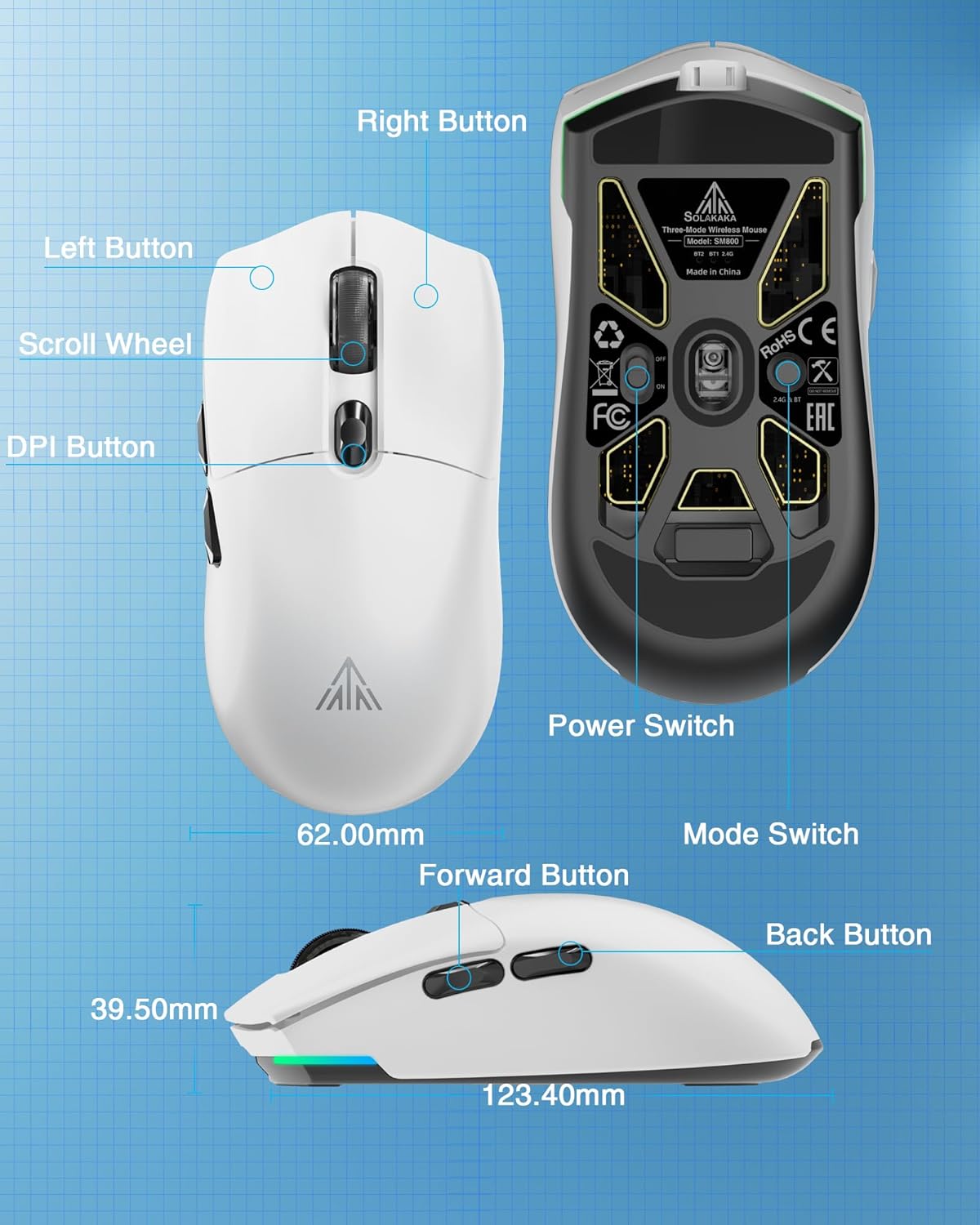
Слика 4: Детаљно view of the SM800 mouse, indicating the Left Button, Right Button, Scroll Wheel, DPI Button, Forward Button, Back Button, Power Switch, and Mode Switch, along with its dimensions.
- Лево дугме: Примарна функција клика.
- Десно дугме: Секундарна функција клика.
- Точак за померање: Scroll up/down, Middle Button click.
- Дугме ДПИ: Прелази кроз унапред подешаване нивое DPI-ја.
- Дугме за напред: Навигација напред у web прегледачи или апликације.
- Дугме за назад: Навигација уназад web прегледачи или апликације.
3.2 ДПИ подешавање
The mouse supports 6 levels of adjustable DPI. Press the DPI button (located behind the scroll wheel) to cycle through the preset DPI settings. The default DPI levels are 800, 1600, 3200, 4800, 8000, and 26000. The 26,000 DPI setting requires the SOLAKAKA software for activation and customization.

Figure 5: Illustration of the SM800's 6 adjustable DPI levels, ranging from 800 to 26000, with a note that 26000 DPI requires SOLAKAKA software.
3.3 Прилагођавање софтвера
For advanced customization, including button remapping, macro programming, DPI fine-tuning, polling rate adjustment, and RGB lighting effects, download and install the official SOLAKAKA SM800 software.

Figure 6: The SM800 mouse displayed with its programmable software interface, allowing users to customize buttons, DPI, lighting, polling rate, and macros.
Software Installation Steps:
- Унесите URL: bit.ly/m/solakaka
- Click on "SM800" and download the zip file.
- Unzip the SM800 software zip file.
- Click the icon to install the SM800 software.
- Double-click the icon to enter the software settings.
4. Одржавање
4.1 Чишћење
To maintain optimal performance, regularly clean your mouse with a soft, dry cloth. Avoid using harsh chemicals or abrasive materials.
4.2 Applying Anti-slip Stickers
The package includes DIY anti-slip stickers for enhanced grip and personalization. Carefully peel the stickers and apply them to the desired areas on the mouse surface.
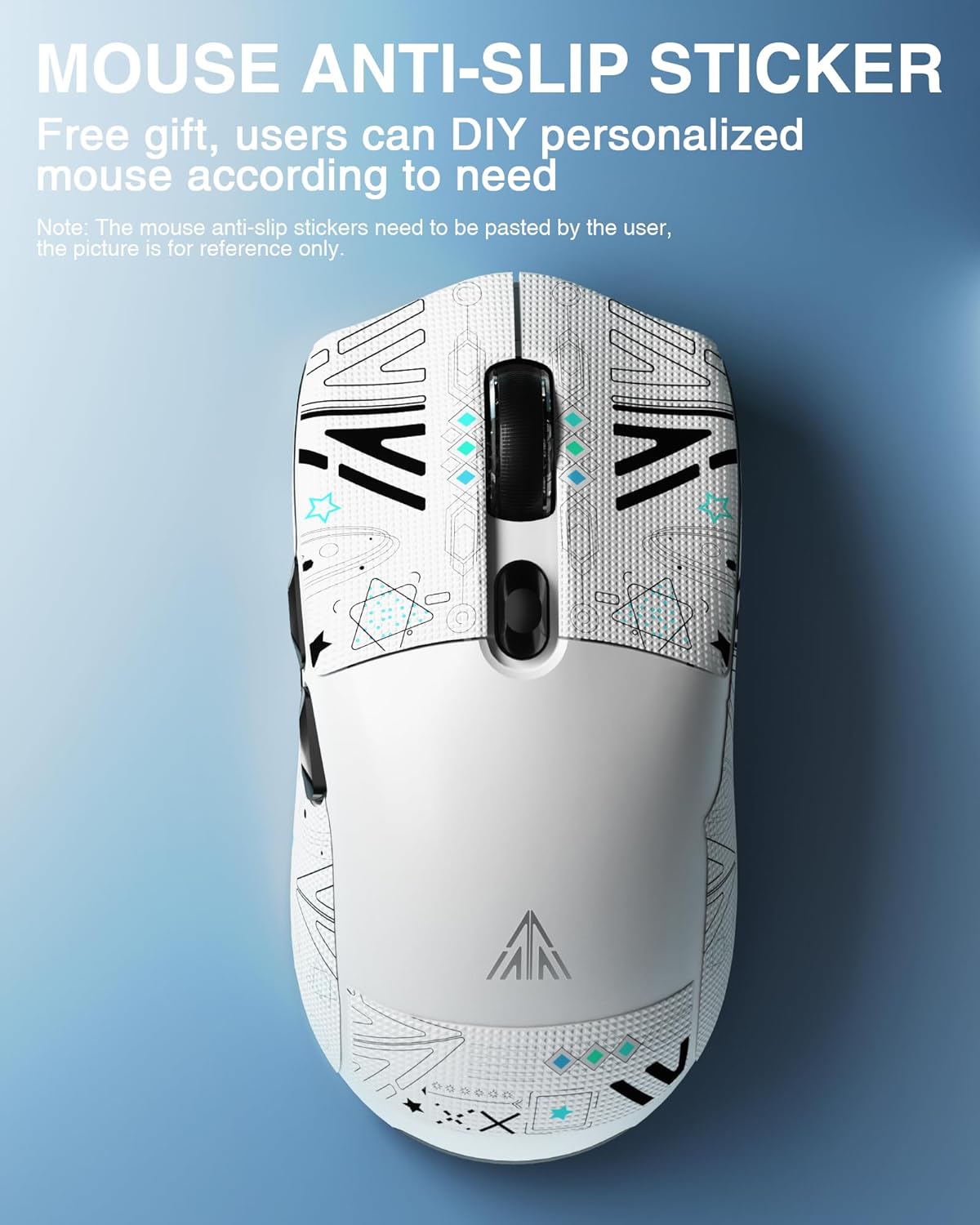
Figure 7: The SM800 mouse showcasing applied anti-slip stickers, which can be customized by the user.
КСНУМКС. Решавање проблема
- Миш не реагује: Ensure the mouse is powered on and correctly connected via wired, 2.4GHz, or Bluetooth mode. Check battery level.
- 2.4GHz connection issues: Ensure the USB receiver is securely plugged in and the mouse is in 2.4GHz mode. Try a different USB port.
- Проблеми са упаривањем преко Bluetooth-а: Ensure the mouse is in Bluetooth pairing mode (flashing blue/green indicator) and your device's Bluetooth is enabled. Try re-pairing.
- DPI not changing to 26,000: The highest DPI setting requires the official SOLAKAKA software to be installed and configured.
- Software not installing/working: Ensure your operating system meets the software requirements. Temporarily disable antivirus/firewall if encountering installation issues.
6. Спецификације
| Феатуре | Спецификација |
|---|---|
| Димензије производа | 4.8 к 2.56 к 1.54 инча |
| Тежина артикла | 2.05 унци (приближно 58 г) |
| Технологија повезивања | Bluetooth 5.1, 2.4GHz Wireless, Type-C Wired |
| Технологија детекције покрета | Оптички (PAW3395 сензор) |
| Мак ДПИ | 26,000 ДПИ |
| Број дугмади | 6 |
| Микропрекидачи | Kailh GM8.0 (80 million clicks) |
| Батерија | 1 литијум-јонска батерија (укључена, 300 mAh) |
| Боја | Бела |
7. Званични видео снимци производа
Watch these official videos for a visual guide to the SOLAKAKA SM800 Wireless Gaming Mouse's features and functionality.
SOLAKAKA SM800 Ultra-lightweight 58g Tri-mode Gaming Mouse
Овај видео пружа крајview of the SOLAKAKA SM800's ultra-lightweight design, tri-mode connectivity, and key gaming features.
SOLAKAKA SM800 26K DPI Tri-Mode Wireless Gaming Mouse
This video highlights the 26,000 DPI optical sensor and the versatile tri-mode wireless connectivity of the SM800 gaming mouse.
8. Гаранција и подршка
For warranty information and customer support, please refer to the official SOLAKAKA webсајт или директно контактирајте њихову корисничку службу. Сачувајте рачун за куповину за потребе гаранције.