
Увод
This manual provides detailed instructions for the installation, operation, and maintenance of your Cooler Master MasterLiquid Atmos 360 Black CPU Liquid Cooler. This all-in-one (AIO) water cooling system is designed to deliver efficient thermal performance for your CPU, featuring a dual-chamber pump, pre-installed SickleFlow 120 Edge fans, and Addressable Gen 2 RGB lighting.
The MasterLiquid Atmos 360 is compatible with a wide range of Intel LGA (1700/1200/1151/1150/1155/1156) and AMD (AM5/AM4) sockets.

Image: The Cooler Master MasterLiquid Atmos 360 Black CPU Liquid Cooler, showcasing its radiator, three RGB fans, and illuminated pump head.
Садржај пакета
Пре почетка инсталације, проверите да ли су све компоненте присутне у пакету:
- 360mm Radiator with pre-installed SickleFlow 120 Edge Fans
- CPU Water Block/Pump Unit
- Mounting Hardware for Intel LGA 1700/1200/115x sockets
- Mounting Hardware for AMD AM5/AM4 sockets
- Термална паста
- ARGB Gen 2 Controller (if included)
- Various Cables (PWM fan cables, ARGB cables)
- Упутство за употребу

Слика: Свеобухватни view of all included components for the MasterLiquid Atmos 360, including the radiator, fans, pump, mounting brackets, and accessories.
Подешавање и инсталација
Follow these steps carefully to install your liquid cooler. Refer to your motherboard and PC case manuals for specific guidance on component placement and cable routing.
1. Prepare the CPU Socket
- Identify your CPU socket type (Intel LGA or AMD AM).
- Install the appropriate backplate (for Intel) or retention clips (for AMD) as per the included hardware guide.
- Clean the CPU surface with isopropyl alcohol to remove any residue.
2. Нанесите термалну пасту
- Нанесите малу количину, величине зрна грашка, приложене термалне пасте на средину интегрисаног распршивача топлоте (IHS) вашег процесора.
- Do not spread the paste manually; the pressure from the cold plate will distribute it evenly.
3. Install the Radiator and Fans
- Одредите оптимално место за монтажу радијатора од 360 мм у кућишту рачунара (обично горе или напред).
- Secure the radiator to the case using the provided screws. The SickleFlow Edge fans are pre-installed on the radiator for convenience.
4. Mount the Pump/Cold Plate
- Attach the correct mounting brackets to the pump unit for your CPU socket.
- Carefully place the pump/cold plate assembly onto the CPU, aligning the mounting holes.
- Secure the pump unit with the appropriate screws, tightening them in a diagonal pattern until snug. Do not overtighten.
5. Повежите каблове
- Connect the pump's 3-pin power cable to an available CPU_FAN or AIO_PUMP header on your motherboard.
- Connect the PWM fan cables from the SickleFlow Edge fans to the CPU_FAN or other available fan headers on your motherboard. It is recommended to connect them to a single header using a splitter if necessary, to ensure synchronized fan speed control.
- Connect the ARGB cables from the pump and fans to an Addressable Gen 2 RGB header on your motherboard (5V-D-G) or to the included ARGB controller.

Image: The assembled MasterLiquid Atmos 360, showing the radiator, fans, and pump unit connected by tubing.
Упутство за употребу
Прво укључивање
After installation, power on your system. The pump and fans should begin operating. Monitor your CPU temperatures using system monitoring software to ensure proper function.
РГБ контрола осветљења
The MasterLiquid Atmos 360 features Addressable Gen 2 RGB lighting on both the pump and fans. You can control the lighting effects through several methods:
- Синхронизација матичне плоче: If connected to a compatible ARGB motherboard header, use your motherboard's RGB software (e.g., ASUS Aura Sync, MSI Mystic Light, Gigabyte RGB Fusion, ASRock Polychrome Sync) to customize lighting.
- Included ARGB Controller: If an ARGB controller is included, use its physical buttons to cycle through pre-set lighting modes and colors.
- Cooler Master MasterCTRL/MasterPlus Software: Download and install Cooler Master's MasterCTRL or MasterPlus software for advanced customization of lighting effects and device performance.
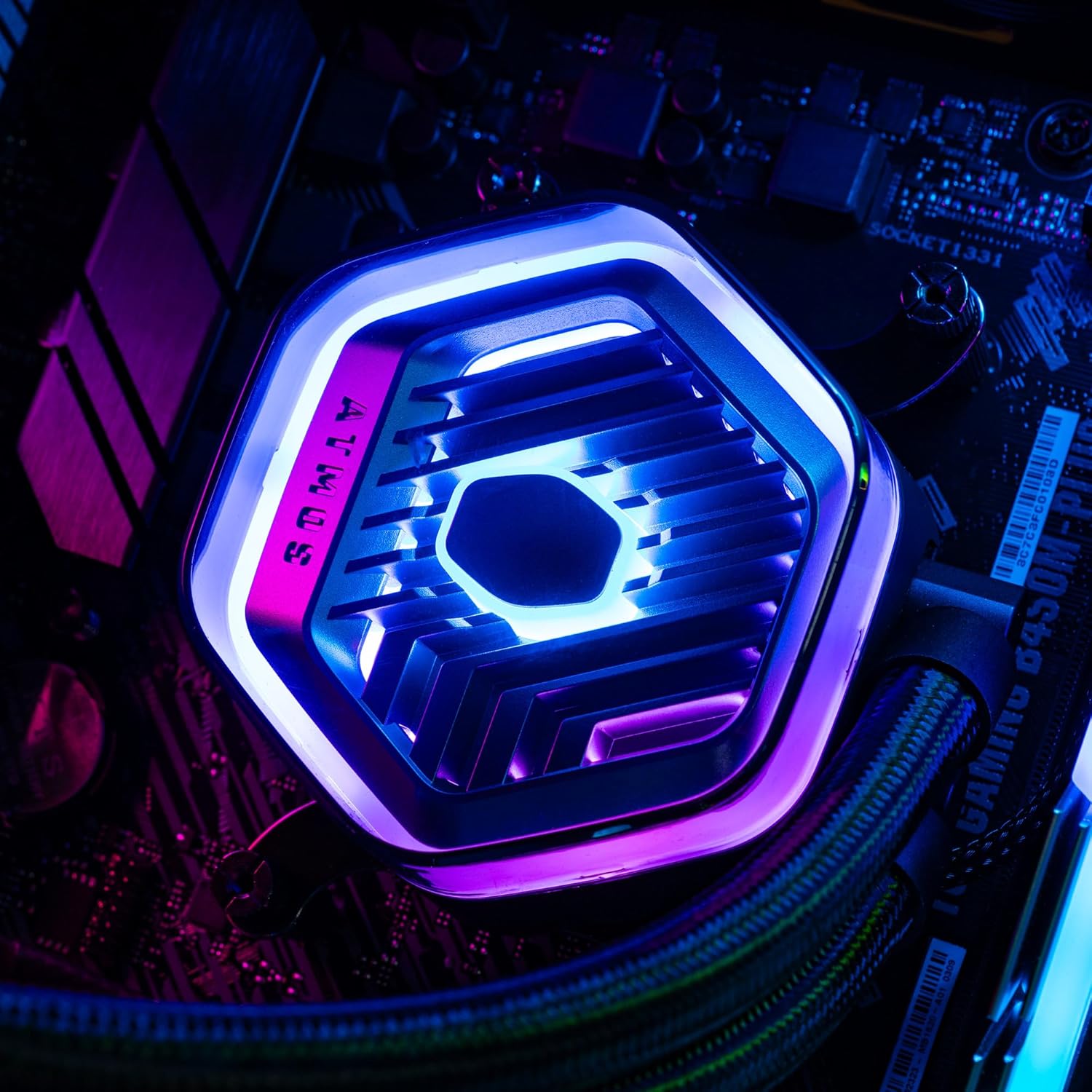
Слика: Детаљна view of the MasterLiquid Atmos pump head, showcasing its unique design and customizable RGB illumination.
Контрола брзине вентилатора
The SickleFlow Edge fans are PWM (Pulse Width Modulation) controlled. Their speed can be managed via your motherboard's BIOS/UEFI settings or through motherboard-specific software. Adjust fan curves to balance cooling performance and noise levels according to your preferences.
Одржавање
Редовно одржавање помаже у обезбеђивању оптималних перформанси и дугог века трајања вашег расхладног уређаја.
- Чишћење прашине: Periodically clean dust from the radiator fins and fan blades using compressed air or a soft brush. Ensure the system is powered off before cleaning.
- Визуелни преглед: Occasionally inspect the tubing and connections for any signs of leaks or damage. While AIO coolers are sealed systems, a quick visual check can prevent potential issues.
- Ажурирања софтвера: Keep your Cooler Master MasterCTRL/MasterPlus software and motherboard BIOS/UEFI updated to ensure compatibility and access to the latest features and performance optimizations.
Решавање проблема
If you encounter issues with your MasterLiquid Atmos 360, refer to the following common troubleshooting steps:
Високе температуре процесора
- Check Pump Connection: Ensure the pump's power cable is securely connected to the correct motherboard header (CPU_FAN or AIO_PUMP) and receiving power.
- Проверите рад вентилатора: Confirm that all radiator fans are spinning. Check their connections to the motherboard or fan controller.
- Термална паста: Ensure thermal paste was applied correctly and the cold plate has good contact with the CPU. Re-apply if necessary.
- Проток ваздуха: Check your PC case's overall airflow. Ensure radiator fans are oriented correctly for intake or exhaust as desired.
РГБ осветљење не ради
- ARGB веза: Verify that the ARGB cables are correctly connected to a 5V-D-G header on your motherboard or the ARGB controller. Ensure it is not connected to a 12V RGB header, which can damage the LEDs.
- софтвер: Check your motherboard's RGB software or Cooler Master's MasterCTRL/MasterPlus software for lighting settings. Ensure the lighting is enabled and configured.
- Снага контролера: If using an external ARGB controller, ensure it is receiving power (usually via SATA power connector).
Необична бука пумпе
- Ваздушни мехурићи: New AIOs may have some air bubbles that can cause gurgling noises initially. These usually dissipate within a few hours of operation. Gently tilt your PC case to help move air bubbles to the radiator.
- Монтажа: Ensure the pump is securely mounted and not vibrating against other components.
If problems persist, please contact Cooler Master customer support.
Спецификације
| Феатуре | Спецификација |
|---|---|
| Број модела | MLX-D36M-A25PZ-R1 |
| Димензије производа (Д к Ш к В) | 394 x 119.6 x 27.2 mm (15.51" x 4.71" x 1.07") |
| Метод хлађења | Liquid (All-in-One) |
| Компатибилни уређаји | Desktop, Server |
| Компатибилне утичнице | Интел ЛГА 1700/1200/1151/1150/1155/1156, АМД АМ5/АМ4 |
| Ниво буке | 27.2 Decibels (Fan) |
| Maximum Rotational Speed (Fan) | 2500 РПМ |
| Air Flow Capacity (Fan) | 70.7 ЦФМ |
| Материјал | Алуминијум (Радијатор) |
| Тип конектора за напајање | 3-пински (пумпа), 4-пински PWM (вентилатори) |
| Волtage | 12 Волтс |
| Ватtage | 3.6 вати |
| Тежина артикла | 1.42 килограма |
Информације о гаранцији
The Cooler Master MasterLiquid Atmos 360 Black CPU Liquid Cooler comes with a 5-годишња гаранција од дана куповине. Ова гаранција покрива недостатке у материјалу и изради при нормалној употреби.
For warranty claims or detailed terms and conditions, please retain your proof of purchase and visit the official Cooler Master webсајту или контактирајте њихову корисничку подршку.
Подршка
For further assistance, technical support, or to download the latest software and drivers, please visit the official Cooler Master webсајт:
You may also find helpful resources, FAQs, and community forums on their support pages.