
1. Увод
Thank you for choosing the CaDA C59002W The Dinosaur World Triceratops Building Block Set. This set allows you to construct a detailed Triceratops model that can be controlled via a remote control or a dedicated mobile application. Please read this manual carefully before assembly and operation to ensure proper use and enjoyment of your product.

Image 1.1: The fully assembled CaDA C59002W Triceratops model, showcasing its green and black design with white horns.
2. Безбедносне информације
- Препорука за узраст: This product is recommended for ages 8 and up. It contains small parts that may pose a choking hazard for children under 3 years old.
- Надзор одраслих: Adult supervision is recommended during assembly and initial operation.
- Безбедност батерије: Do not mix old and new batteries. Do not mix alkaline, standard (carbon-zinc), or rechargeable (nickel-cadmium) batteries. Insert batteries with correct polarity. Remove batteries if the product is not used for an extended period.
- Безбедност животне средине: This product is made from materials free from harmful substances. Dispose of packaging materials responsibly.
3. Садржај пакета
Please verify that all components are present before beginning assembly. Refer to the parts list provided in the separate printed instruction booklet.
- Building blocks for Triceratops model
- Главна контролна јединица
- КСНУМКСГХз даљински управљач
- Printed instruction manual (for assembly)
- Sticker sheet (if applicable)

Image 3.1: The product packaging for the CaDA C59002W set, featuring the Triceratops model and indicating dual-mode control.
4. Упутство за монтажу
The CaDA C59002W Triceratops model is assembled using the included building blocks. Follow the step-by-step instructions provided in the separate printed assembly manual. Ensure each piece is securely connected to prevent the model from falling apart during play.
- 1. корак: Unpack all building blocks and sort them by color or type as suggested in the assembly manual.
- 2. корак: Follow the numbered steps in the printed manual carefully. Pay close attention to the orientation of pieces.
- 3. корак: Ensure all connections are firm. If a piece feels loose, re-check the assembly step.
- 4. корак: Once the main structure is complete, integrate the main control unit and any motors or sensors as indicated in the final assembly steps.
5. Подешавање и упаривање
5.1 Инсталација батерије
Batteries are not included with this set.
- Главна контролна јединица: Locate the battery compartment on the main control unit. Insert the required batteries (e.g., AA or AAA, refer to the printed manual for exact type and quantity) ensuring correct polarity (+/-). Close the compartment securely.
- даљински управљач: Locate the battery compartment on the 2.4GHz remote control. Insert the required batteries (e.g., AA or AAA, refer to the printed manual for exact type and quantity) ensuring correct polarity (+/-). Close the compartment securely.
5.2 Упаривање даљинског управљача
To establish a connection between the remote control and the Triceratops model:
- Ensure batteries are correctly installed in both the model's control unit and the remote control.
- Turn on the main control unit of the Triceratops model. An indicator light should illuminate.
- Turn on the remote control. The indicator light on the remote control should blink, searching for a signal.
- Once the lights on both devices become solid, pairing is successful. If pairing fails, turn both devices off and repeat the process.
5.3 Повезивање апликације
The CaDA C59002W supports app-based control. Follow these steps to connect your model to the app:
- Download the official CaDA app from your device's app store (iOS App Store or Google Play Store).
- Уверите се да је Блуетоотх омогућен на вашем мобилном уређају.
- Turn on the main control unit of the Triceratops model.
- Open the CaDA app and follow the on-screen instructions to search for and connect to your C59002W model.
- Када се повежете, интерфејс апликације ће приказати опције контроле.

Image 5.1: The two primary control methods: app-based control via a mobile device and a 2.4GHz remote control with a 25-meter range.
6. Упутство за употребу
6.1 Рад на даљинском управљачу
Use the included 2.4GHz remote control for basic movement:
- Напред назад: Use the designated joystick or buttons to move the Triceratops forward or backward.
- окретање: Use the other joystick or buttons to steer the Triceratops left or right.
- Опсег: The remote control has an approximate range of 25 meters. Ensure no major obstructions are between the remote and the model.
6.2 Рад контроле апликације
The CaDA app offers multiple control modes:
- Контрола џојстика: Use the virtual joysticks on the app interface to control movement similar to the physical remote control.
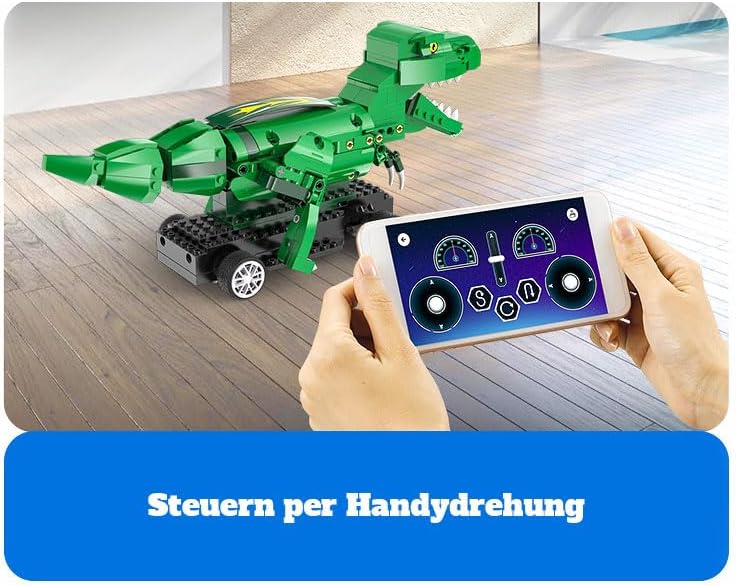
Image 6.1: The mobile app interface displaying virtual joystick controls for precise movement of the model.
- Контрола нагиба: Some app versions may allow you to control the model by tilting your mobile device.

Image 6.2: The mobile app interface demonstrating tilt-based control, where the model responds to the orientation of the phone.
- Path Programming: The app may feature a programming interface where you can draw a path or sequence commands for the Triceratops to follow.
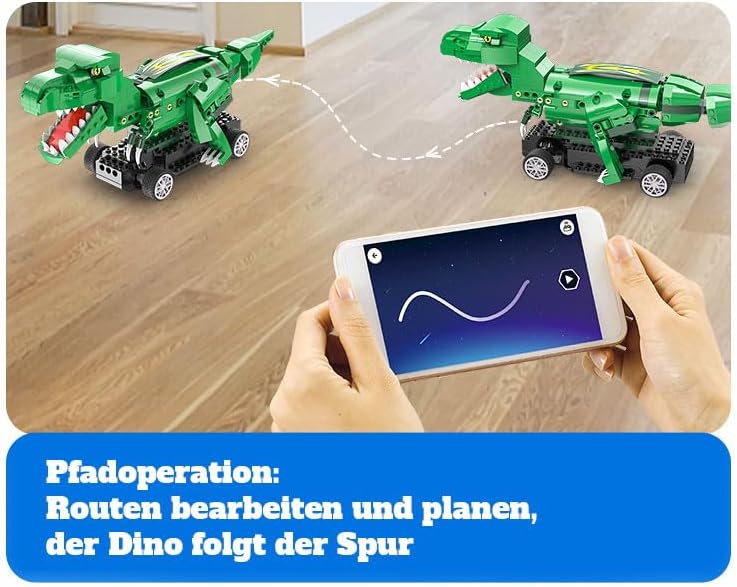
Image 6.3: The mobile app interface illustrating the path programming feature, allowing users to draw a route for the dinosaur to follow.
- Block Programming: Advanced users can utilize block-based coding within the app to create custom movements and actions for the model.

Image 6.4: The mobile app interface demonstrating block-based programming, where users can drag and drop command blocks to create sequences of actions.
7. Одржавање
- Чишћење: Use a soft, dry cloth to gently wipe dust and dirt from the model. Do not use water or chemical cleaners, as they may damage the electronic components or plastic.
- Складиштење: Store the model in a cool, dry place away from direct sunlight and extreme temperatures. If storing for an extended period, remove batteries from both the model and the remote control.
- инспекција: Periodically check for any loose connections or damaged parts. Re-attach any loose blocks.
КСНУМКС. Решавање проблема
- Model does not move:
- Ensure batteries are correctly installed and fully charged in both the model's control unit and the remote control.
- Verify that the model and remote control are properly paired (refer to Section 5.2).
- Проверите да ли постоје физичке препреке које спречавају кретање.
- If using the app, ensure a stable Bluetooth connection.
- Даљински управљач не реагује:
- Замените батерије у даљинском управљачу.
- Re-pair the remote control with the model.
- Ensure you are within the operating range (approx. 25 meters) and there are no significant interferences.
- Missing or damaged parts during assembly:
- Пажљиво проверите сав материјал за паковање како бисте били сигурни да нису превиђени ситни делови.
- If a part is genuinely missing or damaged, please contact CaDA customer support or your retailer for assistance.
- Проблеми са повезивањем апликације:
- Уверите се да је Блуетоотх омогућен на вашем уређају.
- Restart the app and the model's control unit.
- Check if your device's operating system is compatible with the latest version of the CaDA app.
9. Спецификације
| Феатуре | Детаљ |
|---|---|
| Број модела | C59002W (also C59002W_CA) |
| Бранд | ЦаДА |
| Димензије производа (Д к Ш к В) | 10 к 10 к 10 цм |
| Тежина производа | 2 килограма |
| Тема | Dinosaur (Triceratops) |
| Посебна карактеристика | Без штетних материја |
| Батерије укључене | бр |
| Тип контроле | 2.4GHz Remote Control, Mobile App Control |
| Домет даљинског управљача | Прибл. 25 метара |
| Препоручена старост | Child (Ages 8 and Up) |
10. Гаранција и подршка
For warranty information, please refer to the documentation included with your purchase or contact your retailer. If you encounter any issues not covered in this manual or require further assistance, please contact CaDA customer support through their official webсајт или контакт информације које су наведене у паковању вашег производа.