
Tenveo TEVO-VHD20UA
Tenveo VHD20UA PTZ Conference Camera User Manual
Model: TEVO-VHD20UA
1. Увод
This manual provides detailed instructions for the installation, operation, and maintenance of your Tenveo VHD20UA PTZ Conference Camera. Please read this manual thoroughly before using the product to ensure proper setup and optimal performance. Keep this manual for future reference.
2. Производ је готовview
The Tenveo VHD20UA is a high-definition PTZ (Pan-Tilt-Zoom) camera designed for professional video conferencing, live streaming, and tele-medicine applications. It features a 20x optical zoom, 1080p Full HD resolution at 60 frames per second, and multiple connectivity options including HDMI and USB 3.0.
Кључне карактеристике
- Full HD 1080p 60fps: Delivers crisp, clear video quality for professional presentations and meetings.
- 20x Optical Zoom & 8x Digital Zoom: Allows for detailed close-ups of participants or objects without loss of clarity.
- Аутоматско праћење помоћу вештачке интелигенције: Intelligent framing and presenter tracking capabilities ensure subjects remain in focus and within the frame automatically.
- Виде Фиелд оф View: A 62° wide field of view captures more of the meeting space.
- Вишеструко повезивање: Supports HDMI, USB 3.0, RS-232, and RS-485 for versatile integration with various systems.
- Инфрацрвени даљински управљач: Easy control over pan, tilt, zoom, and preset settings.
- 255 унапред подешених подешавања: Store and recall up to 255 camera positions for quick scene changes.
- Универзална компатибилност: Works seamlessly with popular video conferencing platforms like Zoom, Webex, Google Meet, Microsoft Teams, and more.

Слика 2.1: Готовоview of Tenveo VHD20UA PTZ Camera key features, including 20x optical zoom, 8x digital zoom, AI auto-tracking, CMOS sensor, 1080p 60fps video, easy preset settings, USB3.0, HDMI, RS232/485 connectivity, and a 62° wide field of view.
3. Подешавање
3.1 Распакивање и преглед
Carefully remove all components from the packaging. Verify that all items listed in the packing list are present and undamaged. If any items are missing or damaged, contact Tenveo support immediately.
3.2 Физичка инсталација
The Tenveo VHD20UA camera offers flexible installation options to suit various environments. Choose the method that best fits your setup requirements.
- Положај на радној површини: Place the camera on a stable, flat surface. Ensure it is positioned to capture the desired area.
- Монтажа статива: The camera includes a standard tripod mount for use with compatible tripods.
- Монтажа на зид: Use the provided wall mount bracket (if included) and appropriate hardware to secure the camera to a wall. Ensure the wall can support the camera's weight.
- Монтажа на плафон: For inverted installation, use a compatible ceiling mount bracket. Remember to adjust the image flip setting in the camera menu if mounted upside down.
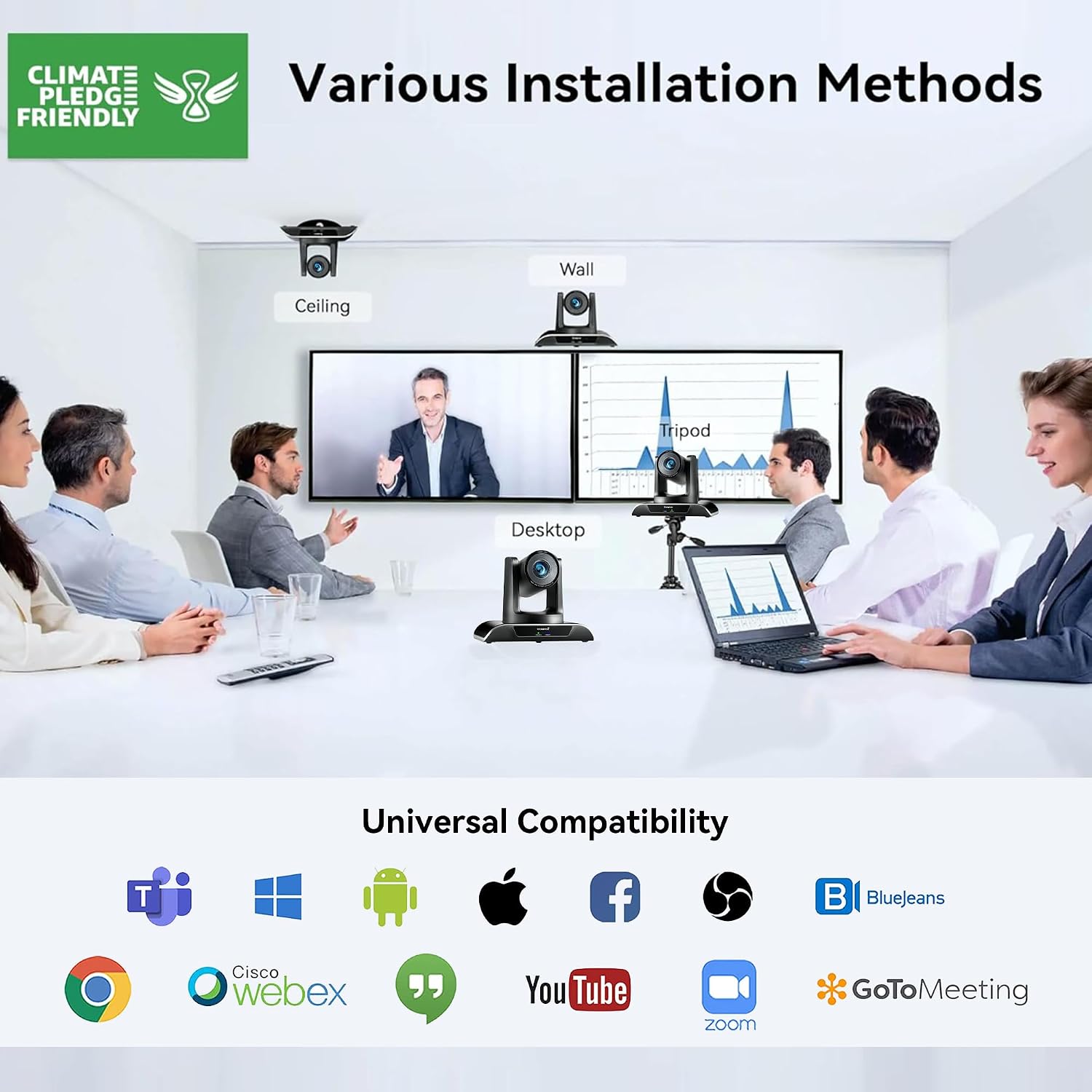
Слика 3.1: Various installation methods for the Tenveo VHD20UA PTZ Camera, including ceiling, wall, desktop, and tripod mounting options, demonstrating its adaptability to different environments.
3.3 Повезивање камере
The VHD20UA camera supports multiple connection types for video output and control. Refer to the diagram below for connection points.
- Напајање: Connect the included power adapter to the DC 12V input port on the camera and then to a power outlet.
- УСБ 3.0 веза: For direct connection to a computer for video and audio, use a USB 3.0 cable to connect the camera's USB port to your computer's USB 3.0 port. This provides 1080p 60fps video output.
- ХДМИ веза: Connect an HDMI cable from the camera's HDMI output port to an HDMI input on a display, video switcher, or capture card.
- RS-232/RS-485 Control: For external control systems (e.g., joystick controllers, automation systems), connect the appropriate control cable to the RS-232 or RS-485 ports.
- RJ45 (LAN) веза: Connect an Ethernet cable for IP streaming and control (if supported by your specific model and firmware).

Слика 3.2: Детаљно view of the Tenveo VHD20UA PTZ Camera's rear panel, illustrating various connection options including power supply, RS232/485, IR, USB 3.0, HDMI, and RJ45 ports, along with examples of connected devices like a PC, smart TV, video switcher, and serial joystick.
4. Упутство за употребу
4.1 Basic Camera Control (Remote Control)
Use the included infrared remote control to operate the camera's basic functions.
- Укључивање/искључивање: Press the power button to turn the camera on or off.
- Пан/Тилт: Use the directional arrows to move the camera horizontally (pan) and vertically (tilt). The camera supports 350° pan and 180° tilt.
- Зумирање: Use the '+' and '-' buttons to zoom in (telephoto) or zoom out (wide-angle). The camera features 20x optical zoom and 8x digital zoom.
- Фокус: Adjust focus manually using the dedicated focus buttons, or enable auto-focus.

Слика 4.1: The Tenveo VHD20UA PTZ Camera demonstrating its pan (350°) and tilt (180°) capabilities, along with 20x optical zoom, 8x digital zoom, and a 62° wide angle field of view in a conference room setting.
4.2 Унапред подешена подешавања
The camera allows you to save and recall up to 255 preset positions, with quick access to 10 presets via the IR remote.
- Setting a Preset:
- Position the camera to the desired pan, tilt, and zoom level.
- Притисните тастер СЕТ дугме на даљинском.
- Press a number button (0-9) to assign the current position to that preset number.
- Позивање пресета:
- Press the desired number button (0-9) on the remote. The camera will move to the saved position.

Слика 4.2: Illustration of the Tenveo VHD20UA PTZ Camera's quick preset settings feature, allowing users to save and recall up to 10 camera positions using the IR remote control, demonstrating pan (350°) and tilt (180°) capabilities.
4.3 AI Auto-Tracking and Framing
The VHD20UA camera features advanced AI capabilities for automatic subject tracking and framing.
- Аутоматско кадрирање: The camera intelligently adjusts its pan, tilt, and zoom to frame all participants within the view.
- Праћење излагача: The camera can automatically follow a designated presenter as they move within the defined area, keeping them centered in the frame.
Refer to the camera's on-screen display (OSD) menu or advanced control software for specific settings and activation of AI features.

Слика 4.3: Demonstration of the Tenveo VHD20UA PTZ Camera's AI Auto Tracking feature, showcasing both Auto Framing to include all participants and Presenter Tracking to follow a single speaker.
5. Одржавање
Regular maintenance ensures the longevity and optimal performance of your Tenveo VHD20UA camera.
- Чишћење сочива: Use a soft, dry microfiber cloth to gently wipe the camera lens. Avoid using harsh chemicals or abrasive materials that could scratch the lens.
- Чишћење тела камере: Wipe the camera's exterior with a soft, damp cloth. Do not use liquid cleaners directly on the camera.
- Ажурирања фирмвера: Periodically check the Tenveo website for firmware updates. Keeping your camera's firmware up-to-date can improve performance and add new features.
- Складиштење: When not in use for extended periods, store the camera in a clean, dry environment, away from direct sunlight and extreme temperatures.
КСНУМКС. Решавање проблема
If you encounter issues with your Tenveo VHD20UA camera, refer to the following common problems and solutions.
| Проблем | Могући узрок | Решење |
|---|---|---|
| Нема видео излаза |
|
|
| Даљински управљач не ради |
|
|
| Camera movement is jerky or unresponsive |
|
|
| Лош квалитет слике |
|
|
7. Спецификације
Below are the technical specifications for the Tenveo VHD20UA PTZ Conference Camera.
| Феатуре | Детаљ |
|---|---|
| Број модела | TEVO-VHD20UA |
| Видео Ресолутион | 1080p Full HD (1920x1080) at 60fps |
| Effective Resolution | 2.07 мегапиксела |
| Оптицал Зоом | 20к |
| Дигитални зум | 8x |
| Пан Англе | 350° |
| Угао нагиба | 180° |
| Поље оф View (ФОВ) | 62° |
| Максимална жижна даљина | 60.0 мм |
| Минимална жижна даљина | 10.0 мм |
| Мак Апертуре | ф/1.8 |
| Min Aperture | ф/3.9 |
| Фоцус Типе | Аутоматски фокус, ручни фокус |
| Видео Оутпут | ХДМИ, УСБ 3.0 |
| Контролни интерфејс | RS-232, RS-485, Infrared Remote |
| Формат видео снимања | МП4 |
| Стабилизација слике | Да |
| Тежина | 1.37 килограма |
| Повер Суппли | DC 12V (Adapter included) |
8. Подршка
For technical assistance, warranty inquiries, or any questions regarding your Tenveo VHD20UA camera, please contact Tenveo customer support.
Е -пошта за корисничку подршку: tenveo_amazon@tenveo.com
Support is available 24/7 via email.
Ask a question about this manual
Ask about setup, troubleshooting, compatibility, parts, safety, or missing instructions. Manuals+ will review the question and use this page’s manual context to help answer it.