
1. Увод
This manual provides instructions for the Ulefone Armor 22 Protective Case, designed to offer enhanced protection and versatility for your Ulefone Armor 22 smartphone. This case is engineered with durable materials and includes practical accessories to secure your device in various environments.
2. Садржај пакета
Проверите да ли су све ставке присутне у вашем пакету:
- 1 x Ulefone Armor 22 Protective Case
- 1 x Rotatable Back Clip
- 1 x Carabiner Attachment
3. Подешавање и инсталација
3.1 Installing the Protective Case
- Ensure your Ulefone Armor 22 smartphone is clean and free of debris.
- Align your phone with the case, ensuring the camera module and ports match the case cutouts.
- Gently press the phone into the case, starting from one side, until it is fully seated and secure. The flexible TPU corners will help absorb shock.
3.2 Причвршћивање задње копче
The back clip allows for secure attachment to a belt or strap.
- Locate the designated slot on the back of the protective case.
- Slide the back clip into the slot until it clicks securely into place.
- The back clip can be rotated 180 degrees to adjust the viewing angle or carrying position.

Figure 1: Illustration of attaching and detaching the back clip.
3.3 Attaching the Carabiner
The carabiner provides an additional secure attachment point for various applications.
- Locate the strap loop on the protective case, typically near the bottom.
- Thread the carabiner through the strap loop.
- Ensure the carabiner is securely closed after attachment.

Figure 2: Ulefone Armor 22 case with carabiner attached.
4. Рад и карактеристике
4.1 Enhanced Protection
The case features anti-shock absorbent TPU corners and a rigid plastic body, providing comprehensive protection against drops, scratches, and impacts for your Ulefone Armor 22.

Figure 3: The protective case offering full 360-degree protection.
4.2 Multifunctional Design
The 3-in-1 design includes a protective case, a 180-degree rotatable back clip, and a secure carabiner attachment. This allows for versatile carrying options, such as clipping to a belt, backpack, or other gear, keeping your phone accessible without occupying pockets.

Figure 4: The 3-in-1 multifunctional design in action.
4.3 Precise Cutouts
The case features precise cutouts for all buttons, ports, and the camera, ensuring full functionality of your Ulefone Armor 22 without needing to remove the case.
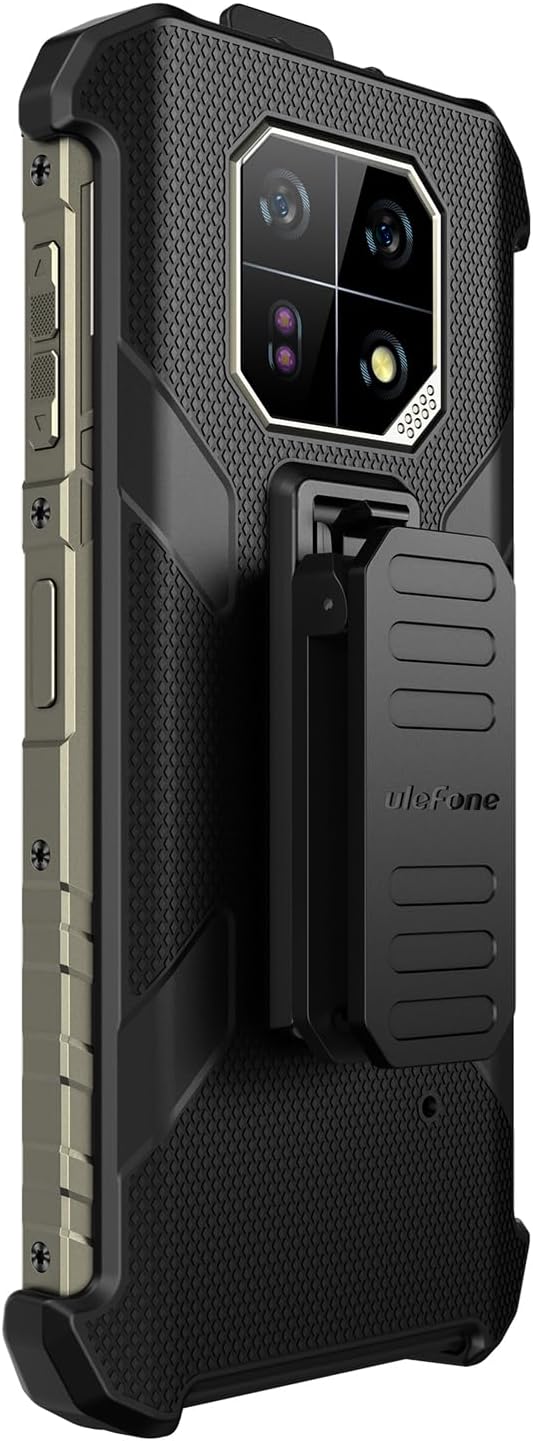
Слика 5: Страна view of the case highlighting precise cutouts.
4.4 Armor Mount Compatibility
The protective case is designed to be compatible with the Ulefone Armor Mount (sold separately), allowing you to securely mount your phone in vehicles or on other surfaces for enhanced work efficiency.

Figure 6: Case compatibility with the Armor Mount (sold separately).
5. Одржавање
To ensure the longevity and effectiveness of your protective case, follow these maintenance guidelines:
- Чишћење: Редовно бришите кућиште меком крпомamp крпом да бисте уклонили прашину и прљавштину. Избегавајте јаке хемикалије или абразивна средства за чишћење.
- инспекција: Periodically inspect the case, back clip, and carabiner for any signs of wear, damage, or loose parts.
- Складиштење: Када се не користи, чувајте кућиште на хладном и сувом месту, даље од директне сунчеве светлости и екстремних температура.
КСНУМКС. Решавање проблема
Most issues with a protective case are related to fit or attachment. Refer to the following:
- Кутија не одговара: Ensure you have the correct case model for the Ulefone Armor 22. Verify that the phone is aligned correctly before pressing it into the case.
- Back clip feels loose: Re-attach the back clip, ensuring it clicks firmly into its slot. If it remains loose, inspect for any damage to the clip or the case slot.
- Carabiner not closing properly: Check for any obstructions in the carabiner's gate mechanism. Ensure it is not bent or damaged.
7. Спецификације
| Бранд | Улефон |
| Компатибилни модел телефона | Ulefone Armor 22 |
| Материјал | Thermoplastic Polyurethane (TPU), Rigid Plastic |
| Боја | Црно |
| Item Dimensions (Case) | 7.45 к 3.54 к 1.28 инча (189.17 к 89.96 к 32.59 мм) |
| Back Clip Dimensions | 72.14 к 28.98 к 18.19 мм |
| Carabiner Dimensions | 147.12 к 40.42 к 6.71 мм |
| Уграђени медији | Belt Clip, Carabiner |
8. Гаранција и подршка
8.1 Информације о гаранцији
This Ulefone Armor 22 Protective Case comes with a једногодишња гаранција from the date of purchase. This warranty covers manufacturing defects. It does not cover damage caused by misuse, accidents, or unauthorized modifications.
8.2 Корисничка подршка
For any questions, concerns, or warranty claims, please contact Ulefone customer support through the retailer where the product was purchased or visit the official Ulefone webсајт за опције подршке.