
1. Увод
This manual provides essential information for the proper installation, operation, and maintenance of your Beetronics 12-Inch Full HD IPS Monitor, model 12HD7M. Please read this manual thoroughly before using the product to ensure optimal performance and safety.
Кључне карактеристике:
- Full HD 1920 x 1080 resolution IPS panel with 178° viewинг углова.
- Multiple video inputs: HDMI, VGA, BNC, and RCA.
- Durable metal housing designed for continuous 24/7 operation.
- Широк улазни волtage range (9-36 Volts) and dimmable backlight.
- Flexible mounting options: Collapsible stand and 75mm VESA mount.
2. Садржај пакета
Verify that all items listed below are included in your product package. If any items are missing or damaged, please contact Beetronics support.
- Beetronics 12-Inch Full HD IPS Monitor (12HD7M)
- Напајање и кабл
- Ремоте Цонтрол
- Flush Mounting Brackets
- Цоллапсибле Станд
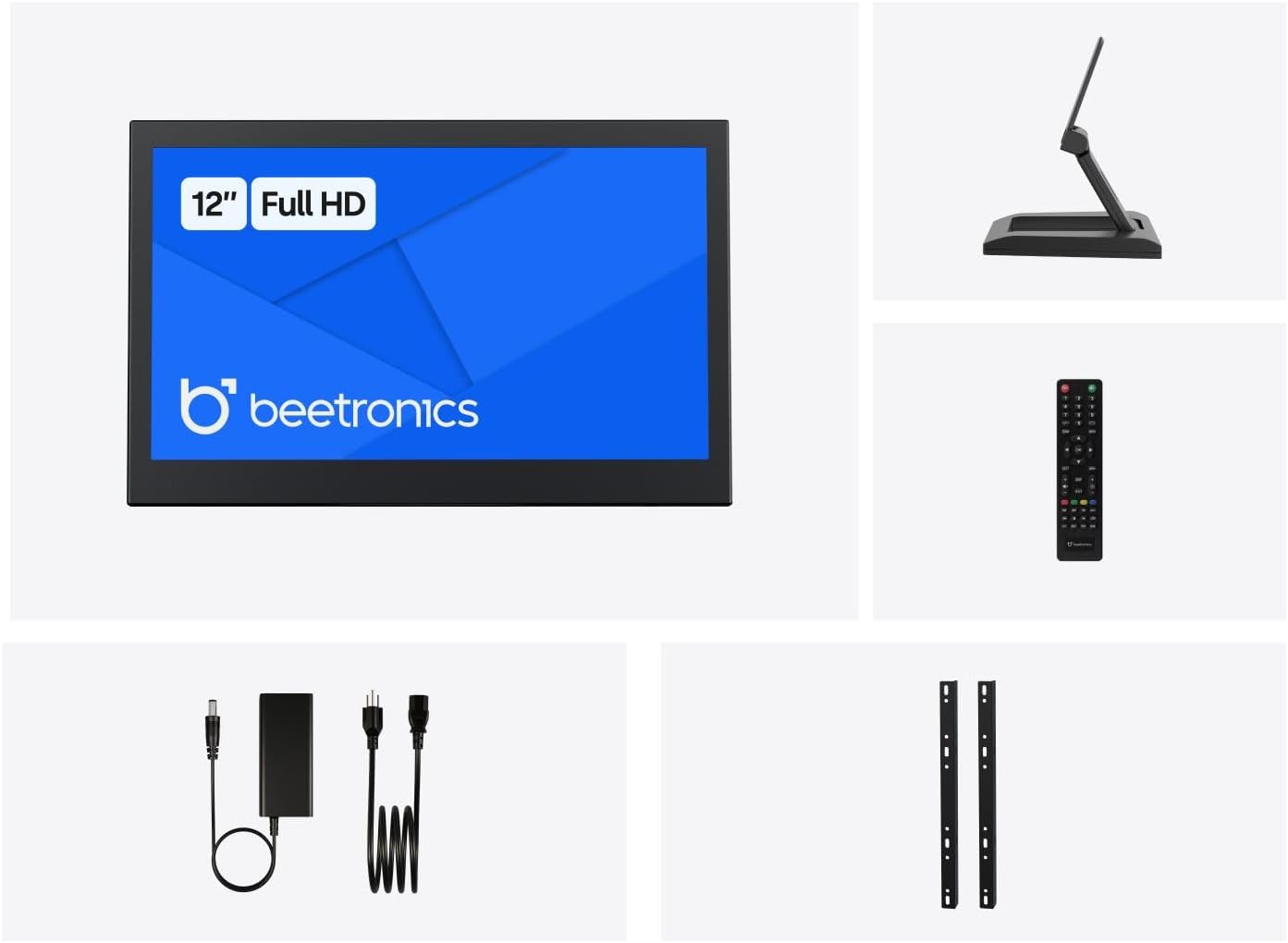
Слика 2.1: Package Contents. This image displays the Beetronics 12HD7M monitor along with its standard accessories, including the power adapter, remote, mounting brackets, and desktop stand.
3. Производ је готовview
Monitor Dimensions and Design:
The Beetronics 12HD7M monitor features a robust metal housing, designed for industrial environments. Its compact form factor allows for versatile integration.

Слика 3.1: Monitor Dimensions. This image illustrates the physical dimensions of the 12HD7M monitor, including width (279 mm), height (179 mm), and stand height adjustment (50-64 mm).
Улазно / излазни портови:
The monitor is equipped with a comprehensive set of rear-facing, downward-oriented input ports for easy cable management and installation.

Слика 3.2: Rear I/O Ports. This image provides a clear view of the monitor's rear panel, detailing the DC power input, HDMI, VGA, USB, AV, BNC, and audio input/output ports. Control buttons for power, menu, and volume are also visible.
- Улаз за једносмерну струју: За повезивање приложеног адаптера за напајање.
- ДВИ: High-Definition Multimedia Interface for digital video and audio.
- ВГА: Video Graphics Array for analog video input.
- БНЦ: Bayonet Neill-Concelman connector, commonly used for professional video applications.
- RCA (AV): Composite video and stereo audio inputs.
- УСБ: For service or specific peripheral connections.
- Аудио улаз/излаз: 3.5mm jacks for audio connectivity.
4. Подешавање
4.1 Опције монтаже
The 12HD7M monitor offers flexible mounting solutions to suit various environments.
Desktop Stand Installation:
The included collapsible stand allows for desktop placement and angle adjustment. Ensure the stand is securely attached to the monitor and placed on a stable, flat surface.
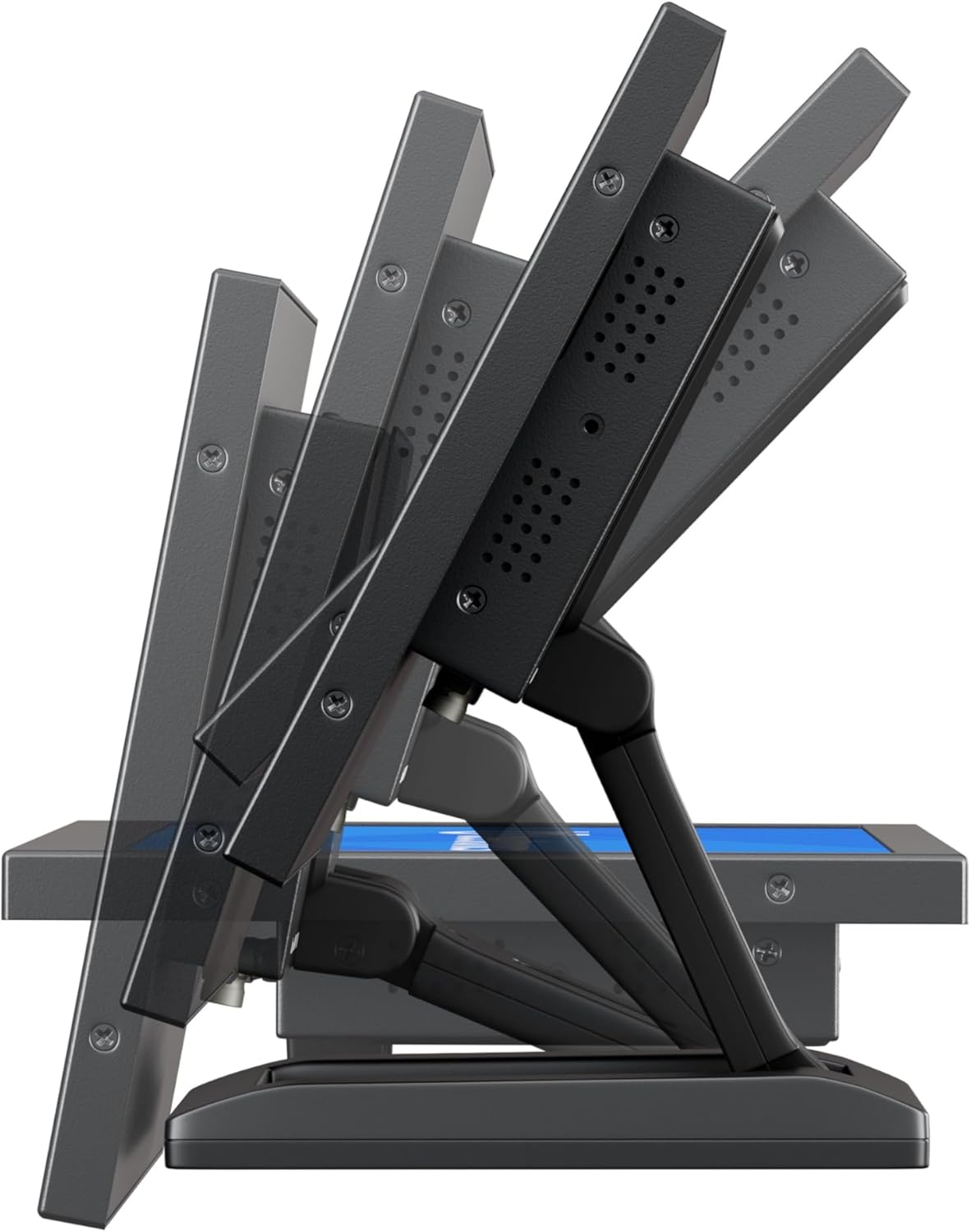
Слика 4.1: Adjustable Stand. This image shows the monitor's side profile, highlighting the flexibility of the collapsible stand to adjust the screen's tilt angle for optimal viewинг.
VESA Wall/Panel Mounting:
The monitor features a 75mm VESA mount pattern on the rear, allowing it to be mounted on compatible VESA arms, wall mounts, or integrated into panels using the flush mounting brackets. Ensure appropriate screws (M4) are used and tightened securely.

Слика 4.2: VESA Mount Points. This image displays the back of the monitor, indicating the standard VESA mounting points for secure attachment to compatible brackets or arms.
4.2 Повезивање напајања
- Connect the power adapter cable to the DC input port on the rear of the monitor.
- Plug the power adapter into a suitable electrical outlet. The monitor supports a wide input voltagОпсег од 9-36В ДЦ.
4.3 Повезивање видео извора
Connect your video source (e.g., computer, camera, media player) to the desired input port on the monitor using appropriate cables.
- ДВИ: For high-quality digital video and audio.
- ВГА: За аналогне видео везе.
- БНЦ: For professional video equipment.
- RCA (AV): For composite video and analog audio.
5. Упутство за употребу
5.1 Укључивање/искључивање
Press the 'ON/OFF' button located on the rear panel or on the remote control to power the monitor on or off.
5.2 Навигација кроз мени (OSD)
The On-Screen Display (OSD) menu allows you to adjust various monitor settings. Use the 'MENU' button to access the OSD, and the '+', '-', 'AUTO' buttons to navigate and adjust settings. The remote control can also be used for easier navigation.
5.3 Избор улаза
To switch between different video input sources, press the 'AUTO' button on the rear panel or the 'Input' button on the remote control. Cycle through HDMI, VGA, BNC, and AV inputs until the desired source is displayed.
5.4 Подешавања слике
Access the OSD menu to adjust picture quality settings:
- Осветљеност: Подешава укупну осветљеност екрана.
- Контраст: Контролише разлику између светлих и тамних подручја.
- Температура боје: Selects preset color modes (e.g., Warm, Cool, User).
- Размера: Adjusts the display ratio (e.g., 16:9, 4:3).
- Оштрина: Enhances edge definition.
5.5 Аудио подешавања
If an audio source is connected, adjust the volume using the '+' and '-' buttons on the rear panel or remote control. Further audio settings may be available in the OSD menu.
6. Одржавање
6.1 Чишћење монитора
- Увек искључите монитор и извуците га из струје пре чишћења.
- Користите меку крпу која не оставља длачицеampводом или благим, неабразивним средством за чишћење екрана.
- Не прскајте течност директно на екран или у било који отвор.
- Избегавајте употребу јаких хемикалија, растварача или абразивних материјала.
6.2 Општа нега
- Избегавајте постављање тешких предмета на монитор.
- Do not expose the monitor to extreme temperatures, humidity, or direct sunlight.
- Обезбедите одговарајућу вентилацију око монитора како бисте спречили прегревање.
КСНУМКС. Решавање проблема
Ако наиђете на проблеме са монитором, погледајте следеће уобичајене проблеме и решења.
| Проблем | Могући узрок | Решење |
|---|---|---|
| Но Повер | Power cable not connected; Power adapter faulty; Power outlet not working. | Check power cable connections; Test power adapter with another device; Try a different power outlet. |
| Нема сигнала | Video cable not connected; Incorrect input source selected; Video source not active. | Ensure video cable is securely connected; Select the correct input source using the 'Input' button; Verify video source is powered on and outputting a signal. |
| Слика је искривљена или мутна | Incorrect resolution; Loose video cable; Monitor settings. | Set the video source to the monitor's native resolution (1920x1080); Reconnect video cable; Adjust 'Sharpness' or 'Auto' settings in the OSD. |
| Нема звука | Audio cable not connected (for VGA/BNC/RCA); Volume too low; Audio source not active. | Ensure audio cable is connected (if not using HDMI); Increase monitor volume; Check audio output from the source device. |
8. Спецификације
Detailed technical specifications for the Beetronics 12HD7M monitor.
| Феатуре | Спецификација |
|---|---|
| Број модела | 12HD7M |
| Величина екрана | 11.6 инча (дијагонално) |
| Резолуција | 1920 к 1080 (Фулл ХД) |
| Панел Типе | ИПС |
| Аспецт Ратио | 16:9 |
| Viewинг Англе | 178° (хоризонтално/вертикално) |
| Осветљеност слике | 500 Цандела |
| Површина екрана | Мат |
| Видео улази | HDMI, VGA, BNC, RCA (AV) |
| Аудио улази/излази | 3.5mm Audio In, 3.5mm Audio Out |
| Повер Инпут | 9-36 волти (једносмерна струја) |
| Димензије производа | 1.4 к 11 к 9.6 инча (35.6 к 279.4 к 243.8 мм) |
| Тежина артикла | 3.7 фунте (1.68 кг) |
| Монтажа | 75mm VESA, Collapsible Stand |
9. Гаранција и подршка
9.1 Информације о гаранцији
The Beetronics 12HD7M monitor comes with a solid 2 година гаранције, reflecting our commitment to quality and reliability. This warranty covers defects in materials and workmanship under normal use. Please retain your proof of purchase for warranty claims.
9.2 Техничка подршка
For technical assistance, troubleshooting beyond this manual, or warranty inquiries, please contact Beetronics customer support. Refer to the official Beetronics webсајт за најновије контакт информације и ресурсе за подршку.
Webсајт: www.beetronics.com