
Vorago BSP-500-V2
Упутство за употребу блутут звучника Vorago BSP-500-V2
Модел: БСП-500-В2
Бренд: Вораго
1. Производ је готовview
The Vorago BSP-500-V2 is a portable Bluetooth speaker designed for robust performance and durability. It features IPX5 water resistance, making it suitable for various environments, including outdoor adventures and parties. This manual provides detailed instructions for setting up, operating, and maintaining your speaker.
Кључне карактеристике:
- True Wireless Stereo (TWS) Connectivity: Connect two BSP-500-V2 speakers for an immersive stereo sound experience.
- Продужено трајање батерије: Enjoy up to 7 hours of music playback at 70% volume, thanks to its 2000 mAh battery.
- УСБ тип-Ц пуњење: Convenient and modern USB-C port for charging.
- Свестрано повезивање: Supports Bluetooth for wireless streaming and a 3.5mm auxiliary input for wired connections.
- ИПКС5 отпорност на воду: Protected against low-pressure water jets from any direction.
Садржај пакета:
- Вораго БСП-500-В2 Блуетоотх звучник
- УСБ кабл за пуњење типа Ц
- 3.5 мм аудио кабл
- Кориснички приручник (овај документ)
Дијаграм производа:

Слика 1.1: Предња страна view of the Vorago BSP-500-V2 Bluetooth speaker, showcasing its mesh grille and central Vorago logo.

Слика 1.2: Под углом view of the speaker, highlighting its robust, rectangular design and integrated carrying strap.

Слика 1.3: Врх view showing the control panel with power, volume down, play/pause, and volume up buttons.
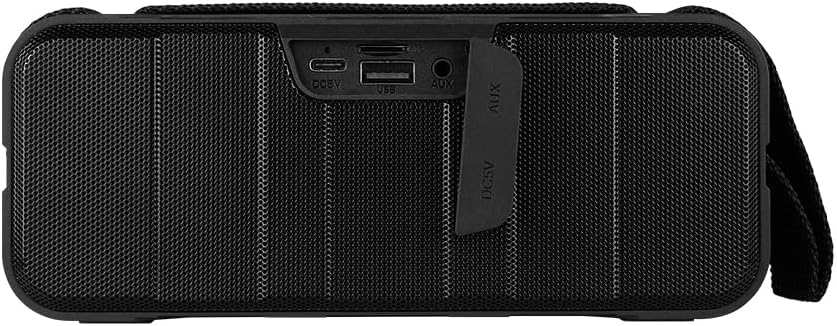
Слика 1.4: Задња страна view of the speaker, showing the protective flap covering the input ports.

Figure 1.5: Close-up of the input ports, including DC 5V (USB-C), USB-A, and AUX (3.5mm) inputs, protected by a rubber cover.
2. Безбедносне информације
- Не излажите звучник екстремним температурама (врућим или хладним).
- Избегавајте испуштање или излагање звучника јаким ударима.
- Држите звучник даље од директне сунчеве светлости и извора топлоте.
- Do not disassemble, repair, or modify the speaker yourself. This will void the warranty.
- Ensure the port cover is securely closed when using the speaker near water to maintain IPX5 water resistance.
- Do not immerse the speaker in water. IPX5 rating protects against splashes and light rain, not submersion.
- Use only the provided charging cable or a certified USB Type-C cable for charging.
- Очистите звучник меком, сувом крпом. Не користите абразивна средства за чишћење или раствараче.
3. Подешавање
3.1 Пуњење звучника
- Open the protective rubber cover on the rear of the speaker to access the charging port.
- Connect the USB Type-C end of the charging cable to the speaker's DC 5V port.
- Повежите други крај USB кабла са USB адаптером за напајање (није укључен) или USB портом рачунара.
- Индикаторска лампица пуњења ће светлети током пуњења и искључити се када се потпуно напуни.
- Once charging is complete, securely close the protective rubber cover to maintain water resistance.
3.2 Укључивање/искључивање
- За укључивање: Притисните и држите Дугме за напајање on the top panel for approximately 3 seconds until you hear an audible prompt.
- За искључивање: Притисните и држите Дугме за напајање for approximately 3 seconds until you hear an audible prompt.
3.3 Блуетоотх упаривање
- Уверите се да је звучник укључен. Аутоматски ће ући у режим упаривања путем Bluetooth-а, што ће бити назначено трепћућим LED светлом.
- На свом уређају (паметном телефону, таблету, лаптопу) омогућите Блутут и потражите доступне уређаје.
- Select "BSP-500-V2" from the list of found devices.
- Once successfully paired, the speaker will emit an audible confirmation, and the LED light will stop flashing and remain solid.
- Звучник ће се аутоматски поново повезати са последњим упареним уређајем када се укључи, ако је уређај у домету и ако је Bluetooth омогућен.
3.4 Упаривање са правим бежичним стерео (TWS) системом
TWS allows you to connect two BSP-500-V2 speakers together for a true stereo sound experience.
- Ensure both BSP-500-V2 speakers are powered on and not connected to any other Bluetooth device.
- On one of the speakers (this will be the primary speaker), double-press the Дугме за репродукцију/паузуЗвучник ће ући у TWS режим упаривања.
- The two speakers will automatically search for and connect to each other. You will hear an audible confirmation once they are successfully paired.
- Once TWS is established, connect your device to the primary speaker via Bluetooth as described in Section 3.3.
- To disconnect TWS, double-press the Дугме за репродукцију/паузу на било ком звучнику.
3.5 Помоћна (АУКС) веза
For devices without Bluetooth, you can use the 3.5mm audio cable.
- Open the protective rubber cover on the rear of the speaker.
- Connect one end of the 3.5mm audio cable to the speaker's AUX port.
- Connect the other end of the cable to the audio output jack of your device.
- Звучник ће се аутоматски пребацити у AUX режим.
- Once disconnected, securely close the protective rubber cover.
4. Упутство за употребу
4.1 Функције дугмади:
| Дугме | Функција (кратки притисак) | Функција (дуг притисак) |
|---|---|---|
| Дугме за напајање | Н/А | Укључивање/искључивање |
| Дугме за смањивање јачине звука | Смањите јачину звука | Превиоус Трацк |
| Дугме за репродукцију/паузу | Пуштање/паузирање музике, одговарање/прекидање позива | Reject Call, Double-press for TWS Pairing |
| Дугме за појачавање звука | Повећајте јачину звука | Нект Трацк |
5. Одржавање
- Чишћење: Use a soft, dry, lint-free cloth to clean the speaker's surface. For stubborn dirt, slightly dampНавлажите крпу водом. Не користите јаке хемикалије, раствараче за чишћење или јаке детерџенте.
- Нега водоотпорности: Always ensure the rubber port cover on the back of the speaker is fully and securely sealed when using the speaker outdoors or near water. This maintains its IPX5 water resistance. After exposure to water, wipe the speaker dry before opening the port cover for charging or auxiliary connections.
- Складиштење: When not in use for extended periods, store the speaker in a cool, dry place, away from direct sunlight and extreme temperatures. It is recommended to charge the speaker fully before storing and to recharge it every few months to maintain battery health.
- Одржавање батерије: To prolong battery life, avoid fully discharging the battery frequently. Charge the speaker when the low battery indicator is active.
КСНУМКС. Решавање проблема
| Проблем | Могући узрок | Решење |
|---|---|---|
| Звучник се не укључује. | Ниска батерија. | Charge the speaker fully using the provided USB Type-C cable. |
| Није могуће упаривање преко Bluetooth-а. | Speaker is not in pairing mode; Device's Bluetooth is off; Speaker is already connected to another device; Device is too far from speaker. | Ensure speaker is powered on and flashing (pairing mode). Turn on Bluetooth on your device. Disconnect from other devices. Move device closer to speaker (within 10 meters). |
| Нема звука или је јачина звука ниска. | Volume too low on speaker or device; Incorrect input mode; Speaker not connected. | Increase volume on both speaker and connected device. Ensure correct mode (Bluetooth or AUX) is active. Verify successful Bluetooth pairing or AUX cable connection. |
| Изобличење звука. | Volume too high; Device too far from speaker; Interference. | Reduce volume on speaker and/or device. Move device closer to speaker. Avoid obstacles between speaker and device. |
| Упаривање TWS-а не успева. | Speakers are already paired to a device; Speakers are too far apart. | Ensure both speakers are disconnected from any Bluetooth devices. Place speakers close to each other during TWS pairing. |
7. Спецификације
| Феатуре | Детаљ |
|---|---|
| Назив модела | БСП-500-В2 |
| Спеакер Типе | Мултимедија |
| Посебна карактеристика | Блуетоотх |
| Препоручена употреба | For music players |
| Компатибилни уређаји | Лаптоп, МП3 плејер, паметни телефон, таблет |
| Тип контролера | Дугме |
| Конфигурација канала сурроунд звука | 5.0 |
| Трајање батерије | 7 сата |
| Укључене компоненте | Спеакер |
| Димензије производа | 5Д к 15В к 18Х центиметара |
| Тежина производа | 1 килограма |
| Водоотпоран | Да (ИПКС5) |
| Капацитет батерије | 2000 мАх |
| Ampдизалица Тип | Активан |
| Извор напајања | Батерија |
| Фреквенцијски одзив | 180 Хз |
| Технологија повезивања | Блуетоотх |
| Режим аудио излаза | Стерео |
| Тип монтаже | Таблетоп Моунт |
8. Гаранција и подршка
The Vorago BSP-500-V2 Bluetooth Speaker comes with a limited warranty. Please refer to the warranty card included with your product for specific terms and conditions, or visit the official Vorago webсајт за више детаља.
For technical support, troubleshooting assistance, or warranty claims, please contact Vorago customer service through their official channels. You can find more information and contact details on the Vorago Brand Store on Amazon или њихов службеник webсајту.
Молимо вас да сачувате доказ о куповини ради гаранције.
Ask a question about this manual
Ask about setup, troubleshooting, compatibility, parts, safety, or missing instructions. Manuals+ will review the question and use this page’s manual context to help answer it.