
Важна безбедносна упутства
Read all instructions before using this appliance. To reduce the risk of fire, electrical shock, or injury when using your air conditioner, follow these basic precautions:
- Овај уређај мора бити правилно уземљен.
- Never unplug the air conditioner by pulling on the power cord. Always grasp the plug firmly and pull straight out from the receptacle.
- Немојте штипати, савијати или чворовити кабл за напајање.
- Не користите клима уређај са оштећеним каблом за напајање или утикачем.
- Не користите продужни кабл или адаптер за утикач са овим уређајем.
- Always turn off the air conditioner and unplug it before cleaning or servicing.
- Не блокирајте отворе за усис или издув ваздуха.
- Use only for its intended purpose as described in this manual.
- Држите материјале за паковање ван домашаја деце.
Производ је завршенview
The RCA 12000 BTU Wi-Fi Air Conditioner is designed to cool rooms up to 550 sq. ft. It features Wi-Fi connectivity, allowing remote control via a smart device. The unit includes multiple operating modes, a digital display, and a 24-hour timer for personalized comfort.
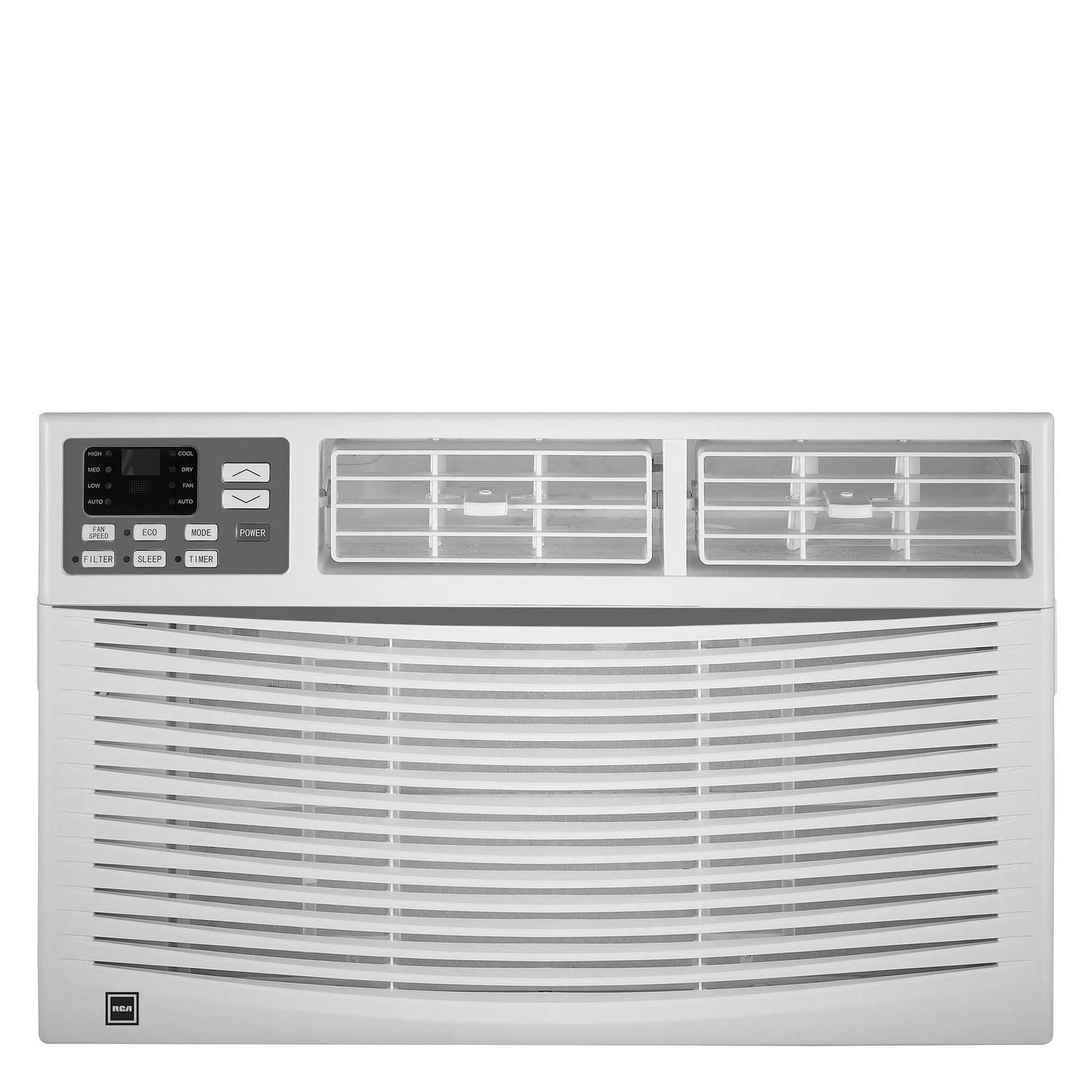
Слика: Фронт view of the RCA 12000 BTU Wi-Fi Air Conditioner, showing the control panel and air vents.
Кључне карактеристике:
- 12,000 BTU cooling capacity, suitable for areas up to 550 sq. ft.
- Integrated Wi-Fi for remote control via smart devices.
- Three fan modes for customized airflow.
- Digital display for easy temperature and setting adjustments.
- Програмабилни тајмер од 24 сата.
- Eco mode for energy-efficient operation.
- Filter check reminder for timely maintenance.
- Auto restart function after power outagес.
- Includes window installation kit and remote control.
Садржај пакета
Verify that all parts are included in the package before installation:
- RCA 12000 BTU Wi-Fi Air Conditioner Unit
- Даљински управљач са батеријама
- Window Installation Kit (side panels, top rail, sash lock, foam seals)
- Упутство за употребу
An image showing all included components laid out would typically be found here.
Инсталација и подешавање
Инсталација прозора:
This air conditioner is designed for installation in standard double-hung windows with a minimum height of 16 inches and a width between 26 and 36 inches.
- Припремите прозор: Ensure the window opening is clean and clear of obstructions.
- Причврсти горњу шину: Secure the top rail to the air conditioner unit using the provided screws.
- Инсталирајте бочне панеле: Slide the accordion side panels into the side panel frames on the unit.
- Поставите јединицу у прозор: Carefully lift the unit and place it in the window opening, ensuring the bottom rail rests against the window sill.
- Безбедносна јединица: Extend the side panels to fill the window opening and secure them with screws. Install the sash lock to prevent the window from being opened from the outside. Apply foam seals to ensure an airtight fit.
- дренажа: Ensure the unit is slightly tilted outwards to allow for proper condensate drainage.
An image illustrating the step-by-step window installation process would be beneficial here.
Ви-Фи подешавање:
To enable remote control functionality, connect your air conditioner to your home Wi-Fi network.
- Преузми апликацију: Download the RCA Home app from your smartphone's app store (iOS or Android).
- Креирајте налог: Отворите апликацију и креирајте нови кориснички налог или се пријавите ако га већ имате.
- Додај уређај: Follow the in-app instructions to add a new device. This typically involves putting the air conditioner into pairing mode (refer to the unit's control panel or remote for specific instructions, often a Wi-Fi button press).
- Повежите се на Ви-Фи: Select your home Wi-Fi network and enter the password when prompted by the app.
- Потврда: Once connected, the Wi-Fi indicator on the air conditioner's display will illuminate steadily, and the app will confirm successful pairing.
An image showing the Wi-Fi indicator on the unit's display and a screenshot of the app's pairing screen would be helpful.
Упутство за употребу
Контролна табла и даљински управљач:
The air conditioner can be operated using the control panel on the unit or the included remote control. The remote control offers full functionality from a distance.
An image of the remote control with button labels would be useful here.
Основна операција:
- Укључивање/искључивање: Притисните тастер ПОВЕР дугме за укључивање или искључивање јединице.
- Избор режима: Притисните тастер МОДЕ button to cycle through available modes: Cool, Fan, and Eco.
- Подешавање температуре: Користите UP (▲) и ДОВН (▼) arrows to set the desired temperature. The temperature range is typically 62°F to 86°F (17°C to 30°C).
- Брзина вентилатора: Притисните тастер БРЗИНА ВЕНТИЛАТОРА дугме да бисте изабрали ниску, средњу или високу брзину вентилатора.
Напредне функције:
- Тајмер: Притисните тастер ТИМЕР button to set a delay for the unit to turn on or off. Use the UP/ДОВН arrows to adjust the time in 1-hour increments, up to 24 hours.
- Еко режим: When activated, the unit will cycle the compressor on and off to maintain the set temperature, saving energy. The fan may continue to run during compressor off cycles.
- Режим спавања: (If available) This mode gradually increases the temperature over several hours to provide comfortable sleeping conditions while saving energy.
- Ви-Фи контрола: Use the RCA Home app on your smart device to remotely turn the unit on/off, change temperatures, control modes, create custom schedules, and adapt fan speeds.
Одржавање
Редовно одржавање осигурава оптималне перформансе и продужава век трајања вашег клима уређаја.
Чишћење ваздушног филтера:
The air filter should be cleaned every two weeks or when the 'Filter Check' indicator illuminates.
- Turn Off Unit: Always turn off and unplug the air conditioner before cleaning.
- Уклони филтер: Отворите предњу плочу и пажљиво извуците ваздушни филтер.
- Очисти филтер: Оперите филтер топлом водом са сапуном. Добро исперите. За јако запрљане филтере, пре прања можете користити усисивач за уклањање растресите прљавштине.
- Суви филтер: Оставите филтер да се потпуно осуши на ваздуху пре него што га поново уметнете. Не излажите га директној сунчевој светлости или високој температури.
- Поново инсталирајте филтер: Вратите суви филтер у његов отвор и затворите предњу плочу.
An image demonstrating how to remove and clean the air filter would be helpful.
Генерално чишћење:
- Екстеријер: Обришите кућиште меком крпомamp cloth. Do not use harsh chemicals, abrasive cleaners, or waxes.
- завојнице: Periodically check the condenser coils (located at the back of the unit) for dirt and debris. If necessary, gently brush them clean.
Решавање проблема
Пре него што контактирате корисничку подршку, погледајте следећу табелу за уобичајене проблеме и решења:
| Проблем | Могући узрок | Решење |
|---|---|---|
| Клима уређај се не укључује. | Нема струје; осигурач је искључен; уређај је искључен из струје. | Check power cord connection; reset circuit breaker; ensure unit is plugged into a working outlet. |
| Уређај се не хлади ефикасно. | Dirty air filter; blocked air intake/exhaust; room too large; windows/doors open. | Clean air filter; clear obstructions; ensure room size is within capacity; close all windows and doors. |
| Вода капље унутра. | Unit not tilted properly; clogged drain pan. | Ensure unit is slightly tilted outwards for drainage; clear any blockages in the drain pan. |
| Проблеми са Wi-Fi везом. | Incorrect Wi-Fi password; router too far; app not updated. | Verify Wi-Fi password; move unit closer to router or use a Wi-Fi extender; update RCA Home app. |
Спецификације
| Феатуре | Детаљ |
|---|---|
| Бранд | РЦА |
| Број модела | RACE1206WF |
| Капацитет хлађења | 12,000 БТУ |
| Област покривености | До 550 квадратних стопа |
| Дехумидифицатион Рате | 2 пинта на сат |
| Минимална висина прозора | 16 инча |
| Window Width Range | 26 - 36 инча |
| Димензије (ДкДкХ) | 22 cm x 24 cm x 17 cm (приближно) |
| Тежина артикла | 78 фунти |
| Повезивање | Ви-Фи |
Информације о гаранцији
This RCA air conditioner comes with a 1-годишња ограничена гаранција произвођача. Please refer to the warranty card included with your product for full terms and conditions, or visit the official RCA webсајт за више детаља.
Корисничка подршка
For technical assistance, troubleshooting beyond this manual, or warranty claims, please contact RCA Customer Support. Contact information can typically be found on the manufacturer's webсајту или на гарантном листу који сте добили уз производ.