
Увод
Thank you for choosing the Vivitar Singimals Kids Karaoke Speaker. This manual provides essential information for the safe and effective use of your new karaoke speaker. Please read it thoroughly before operation and retain it for future reference.
Шта је у кутији:
- Singimals Kids Karaoke Speaker (Asher The Fox)
- Жични микрофон
- Кабл за пуњење
- Упутство за употребу
Производ је завршенview
The Vivitar Singimals Kids Karaoke Speaker is designed for interactive fun, featuring a 5W speaker, Bluetooth v5.1 connectivity, and multicolor LED lighting. It offers up to 12 hours of playtime on a single charge.
Кључне карактеристике:
- 5W Speaker: Delivers clear and crisp audio for an engaging karaoke experience.
- Блуетоотх в5.1: Ensures stable and efficient wireless connection to compatible devices.
- 12-часовно време репродукције: Enjoy extended entertainment with the built-in rechargeable battery.
- Вишебојно ЛЕД осветљење: Dynamic lights that pulse and dance to the music, enhancing the performance atmosphere.
- Преносиви дизајн: Compact and lightweight for easy transport and use anywhere.
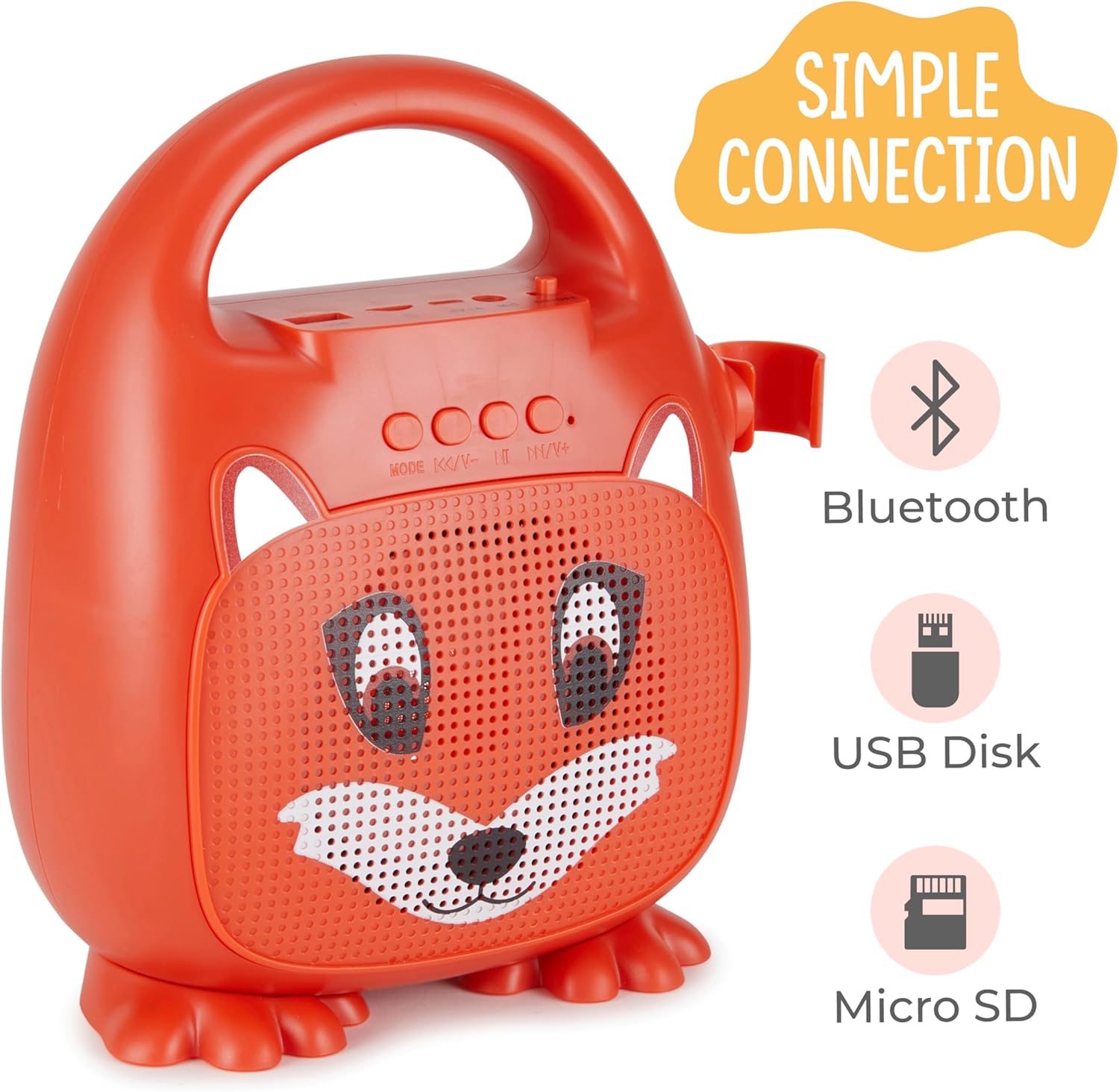
Слика 1: Предња страна view of the Singimals Kids Karaoke Speaker (Asher The Fox).
Сетуп
1. Пуњење звучника:
Before first use, fully charge the speaker. Connect the provided charging cable to the speaker's charging port (usually labeled "5V 1A" or similar) and the other end to a USB power adapter (not included) or a computer's USB port. The charging indicator light will show the charging status.
2. Повезивање микрофона:
Insert the microphone's plug into the MIC input port on the speaker. Ensure the microphone's ON/OFF switch is in the 'ON' position when in use.

Figure 2: Wired Microphone with ON/OFF switch.
3. Укључивање/искључивање:
Locate the ON/OFF switch on the speaker. Slide it to the 'ON' position to power on the device. Slide it to 'OFF' to power down.
4. Блуетоотх упаривање:
- Power on the karaoke speaker. It will automatically enter Bluetooth pairing mode, indicated by a flashing LED light.
- На паметном телефону или другом уређају који подржава Bluetooth, идите на подешавања Bluetooth-а.
- Тражи available devices and select "Singimals" (or similar name) from the list.
- Once connected, the LED indicator on the speaker will stop flashing and remain solid, and you may hear an audible confirmation.
5. USB Disk and Micro SD Card Playback:
Уметните USB флеш диск или Micro SD картицу (са унапред учитаним аудио записима) files) into the respective ports on the speaker. The speaker will automatically detect the media and begin playback. Use the 'MODE' button to switch between input sources (Bluetooth, USB, Micro SD).

Слика 3: Контролна табла и улазни портови.
Упутство за употребу
Контролна дугмад:
| Дугме | Функција |
|---|---|
| МОДЕ | Switches between input modes (Bluetooth, USB, Micro SD). |
| Претходна песма / Утишавање звука | Кратак притисак за претходну нумеру. Дуг притисак за смањење јачине звука. |
| Пусти / Пауза | Plays or pauses the current audio track. |
| Следећа песма / појачавање звука | Кратак притисак за следећу нумеру. Дуг притисак за повећање јачине звука. |
ЛЕД осветљење:
The speaker features multicolor LED lights that illuminate the speaker grille. These lights automatically pulse and change colors with the music. There is no separate control for the LED lighting; it operates automatically when the speaker is on.
Одржавање
- Чишћење: Wipe the speaker and microphone with a soft, dry cloth. Do not use abrasive cleaners or solvents.
- Складиштење: Уређај чувајте на хладном и сувом месту, даље од директне сунчеве светлости и екстремних температура.
- Одржавање батерије: To prolong battery life, charge the speaker regularly, even if not in frequent use. Avoid fully discharging the battery for extended periods.
- Изложеност води: This device is not waterproof. Keep it away from water and moisture.
Решавање проблема
| Проблем | Решење |
|---|---|
| Звучник се не укључује. | Ensure the ON/OFF switch is in the 'ON' position. Charge the speaker if the battery is depleted. |
| Нема звука из микрофона. | Check if the microphone is securely plugged into the MIC port. Ensure the microphone's ON/OFF switch is in the 'ON' position. |
| Није могуће упаривање преко Bluetooth-а. | Ensure the speaker is in Bluetooth mode (flashing LED). Turn off and on Bluetooth on your device. Move your device closer to the speaker. |
| Лош квалитет звука. | Ensure the audio source is of good quality. Adjust the volume on both the speaker and the connected device. Check for obstructions around the speaker grille. |
Спецификације
| Феатуре | Детаљ |
|---|---|
| Бранд | Уживо |
| Број модела | SNG200-FOX |
| Технологија повезивања | Блуетоотх |
| Блуетоотх верзија | в5.1 |
| Оутпут Ватtage | 5 Ваттс |
| Извор напајања | Баттери Поверед |
| Димензије артикла (Д к Ш к В) | 4.72 к 8.7 к 9.25 инча |
| Тежина артикла | 0.94 килограма |
| Материјал | Пластика |
| Аудио улаз | Microphone, USB, Micro SD |
Безбедносне информације
- Не излажите уређај екстремним температурама, директној сунчевој светлости или високој влажности.
- Држите уређај даље од воде и других течности.
- Не покушавајте да растављате или модификујете уређај. То ће поништити гаранцију и може проузроковати оштећење.
- Користите само приложени кабл за пуњење.
- Supervise young children during use to ensure safe operation.
- Избегавајте дуже слушање музике на великој јачини звука како бисте спречили оштећење слуха.
Гаранција и подршка
For warranty information and customer support, please refer to the warranty card included with your product or visit the official Vivitar webсајт. Сачувајте рачун као доказ о куповини.
Произвођач: Сакар Интернатионал, Инк.