
Увод
Thank you for choosing the ROCAM Digital Projection Alarm Clock, Model CR1024. This device combines a digital alarm clock with a 270° rotatable projection feature, FM radio, dual alarm settings, and a USB charging port. Please read this manual carefully to ensure proper use and to fully enjoy all its features.

Image: The ROCAM Digital Projection Alarm Clock displaying time, date, temperature, and humidity, positioned on a bedside table next to a cup of coffee and a notebook.
Карактеристике производа
- Пројекција ротирајућа за 270°: Project time onto your wall or ceiling with adjustable angle and focus.
- 5-Level Dimmable LED Display: Adjust the brightness of the main display to your preference.
- FM радио и тајмер за спавање: Enjoy your favorite radio stations and set a sleep timer for automatic shutdown.
- Dual Alarm with Weekend/Weekday Mode: Set two independent alarms with customizable schedules (Mon-Sun, Mon-Fri, Sat-Sun, One-Time).
- USB-C Power Input & USB-A Charging Output: Power the clock via USB-C and charge external devices like smartphones via USB-A.
- Резервна батерија: Одржава подешавања времена и аларма током нестанка струјеtages (батерије нису укључене).
- Приказ температуре и влажности: Shows indoor temperature (°C/°F) and humidity.
- Функција ноћног светла: Integrated night light for soft illumination.
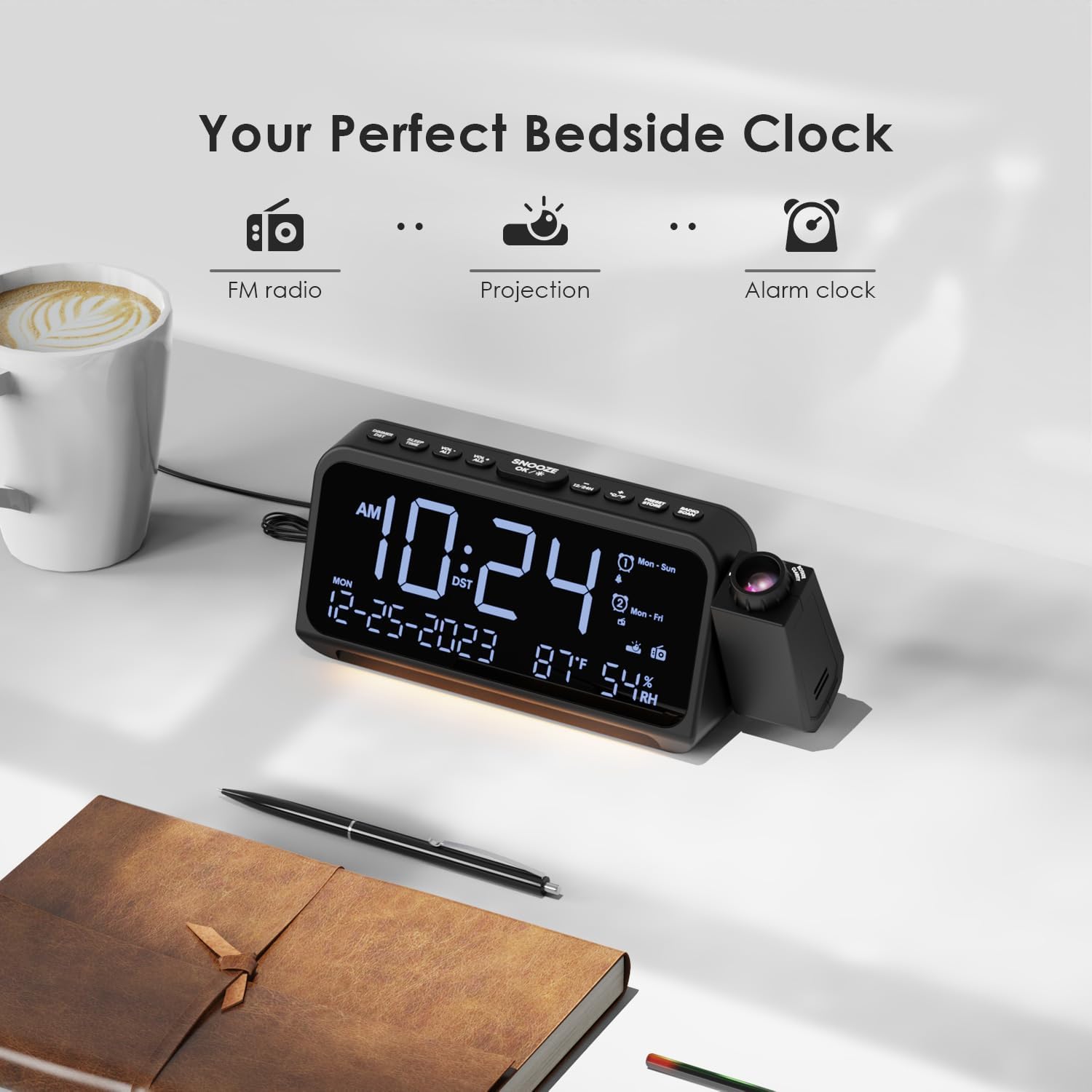
Image: Visual representation of the clock's main functions: FM radio, projection, and alarm clock.
Садржај пакета
Молимо вас да проверите пакет за следеће ставке:
- ROCAM Digital Projection Alarm Clock (CR1024)
- УСБ кабл за напајање типа Ц
- Повер Адаптер
- Упутство за употребу
Note: 1 CR2 battery is required for backup functionality and is not included in the package.

Image: The alarm clock, USB-C cable, power adapter, and user manual laid out, with product dimensions (20cm x 8.7cm x 3.81cm) and weight (240g) indicated.
Производ је завршенview
Дугмад на горњем панелу:
- SNOOZE/OK/*: Snooze alarm, confirm settings, or activate night light.
- VOL-/AL1: Decrease volume, set Alarm 1.
- VOL+/AL2: Increase volume, set Alarm 2.
- 12/24х: Пребацивање између 12-часовног и 24-часовног формата времена.
- °Ц/°Ф: Switch between Celsius and Fahrenheit temperature display.
- PRESET/STORE: Save FM radio presets.
- RADIO/SCAN: Turn FM radio on/off, scan for stations.
- ВРЕМЕНСКИ СКЛОП: Enter time setting mode.
- АЛАРМ СЕТ: Уђите у режим подешавања аларма.
Side Panel & Rear:
- Пројекционо сочиво: Projects time onto a surface.
- Точак фокуса: Подешава јасноћу пројектоване слике.
- Ротација пројекције: Allows 270° adjustment of the projection angle.
- ДИМ дугме: Adjusts projection brightness.
- Дугме за напајање: Turns the projection on/off.
- Type-C Input (5V-2A): Main power connection.
- USB-A Output (5V-1A): За пуњење екстерних уређаја.
- ФМ антена: Продужите за бољи радио пријем.
- Одељак за батерије: For CR2 backup batteries.

Слика: Детаљна view of the top control buttons and the projection unit, highlighting the dual alarm settings.

Image: The back of the alarm clock, illustrating the Type-C power input and the USB-A output port for charging other devices.
Сетуп
1. Прикључак за напајање:
- Connect the provided USB Type-C cable to the Type-C input port on the back of the alarm clock.
- Укључите други крај УСБ кабла у адаптер за напајање, а затим укључите адаптер у стандардну зидну утичницу.
- Екран ће се упалити, што указује да је сат укључен.

Image: The alarm clock is shown connected to a wall outlet via its USB-C power cable and adapter.
2. Battery Backup Installation:
- Пронађите одељак за батерије на дну сата.
- Отворите поклопац одељка.
- Insert 1 CR2 battery (not included) according to the polarity markings (+/-).
- Close the battery compartment cover. This battery will preserve time and alarm settings during a power outage.

Image: The bottom of the alarm clock with the battery compartment open, showing where to insert CR2 batteries.
Упутство за употребу
1. Подешавање времена и датума:
- Притисните и држите ВРЕМЕНСКИ СКЛОП дугме. Цифре за сате ће почети да трепћу.
- Користите ВОЛ+ or ВОЛ- дугмад за подешавање сата. Притисните ВРЕМЕНСКИ СКЛОП поново да потврдим.
- Поновите поступак за минуте, годину, месец и дан.
- Притисните 12/24Х to switch between 12-hour and 24-hour format.
- Притисните ° Ц/° Ф to switch between Celsius and Fahrenheit for temperature display.
2. Setting Alarms (Alarm 1 & Alarm 2):
- Притисните и држите АЛАРМ СЕТ button. The Alarm 1 icon and hour digits will flash.
- Користите ВОЛ+ or ВОЛ- to set the desired alarm hour. Press АЛАРМ СЕТ потврдити.
- Понављајте неколико минута.
- Select alarm mode (Mon-Sun, Mon-Fri, Sat-Sun, One-Time) using ВОЛ+ or ВОЛ-. Притисните АЛАРМ СЕТ потврдити.
- Choose alarm sound: buzzer or FM radio. Use ВОЛ+ or ВОЛ- да изаберете. Притисните АЛАРМ СЕТ потврдити.
- To set Alarm 2, briefly press АЛАРМ СЕТ again and repeat the steps.
- To activate/deactivate an alarm, briefly press АЛ1 or АЛ2. The alarm icon will appear/disappear on the display.
Image: The clock display showing options for setting two alarms with different ringtone choices and day modes (Mon-Sun, Mon-Fri, Sat-Sun, One-Time).
3. Функција одлагања:
Када се огласи аларм, притисните дугме ОДЛОЖИ/У РЕДУ/* button to temporarily silence it for 9 minutes. The alarm will sound again after the snooze period.
4. Display Brightness (Dimmer):
Притисните тастер ОДЛОЖИ/У РЕДУ/* button repeatedly to cycle through 5 levels of display brightness (L-1 to L-5) or turn the display off.

Image: The clock display showing five different brightness levels (L-1 to L-5) for the main LED screen.
5. Projection Settings:
- Укључи/искључи: Притисните тастер Дугме за напајање on the side of the projection unit to turn the projection on or off.
- Подесите осветљеност: Притисните тастер ДИМ button on the side of the projection unit to cycle through 5 levels of projection brightness.
- Подесите угао: Rotate the projection unit up to 270° to direct the time onto your desired surface (wall or ceiling).
- Подесите фокус: Ротирајте Фоцус Вхеел on the projection unit to sharpen the projected image.

Image: The digital time '10:24' projected in red onto a dark wall, demonstrating the projection feature.

Image: The projection unit rotating 270 degrees, showing how the projected time can be adjusted for optimal viewинг.

Image: The projected time showing five distinct brightness levels, from level 1 (dimmest) to level 5 (brightest).
6. Рад ФМ радија:
- Extend the FM antenna for better reception.
- Притисните тастер RADIO/SCAN button to turn the FM radio on.
- Притисните и држите RADIO/SCAN to automatically scan and save available stations.
- Користите ВОЛ+ or ВОЛ- to manually tune to a station or cycle through saved presets.
- Притисните PRESET/STORE to save the current station as a preset.
- Притисните RADIO/SCAN again to turn the FM radio off.

Image: The clock displaying an FM radio frequency (108.0 MHz) and options for a sleep timer (OFF, 15, 30, 60, 90 minutes).
7. Тајмер за спавање:
When the FM radio is on, press the ОДЛОЖИ/У РЕДУ/* button repeatedly to set a sleep timer (15, 30, 60, 90 minutes, or OFF). The radio will automatically turn off after the selected duration.

Image: A hand pressing a button on the clock, with sleep timer options (P01, P06, P12, P15, P20) displayed, indicating timed radio playback.
8. USB Charging Output:
Connect your smartphone or other USB-powered device to the USB-A output port (5V-1A) on the back of the clock to charge it. Ensure the alarm clock is powered via its USB-C input.
Одржавање
- Чишћење: Обришите сат меком, сувом крпом. Не користите абразивна средства за чишћење или раствараче.
- Замена батерије: If the clock loses time during a power outage, replace the CR2 backup battery.
- Пласман: Avoid placing the clock in direct sunlight, high temperatures, or high humidity.
Решавање проблема
| Проблем | Решење |
|---|---|
| Приказ сата је празан. | Ensure the USB-C power cable is securely connected to both the clock and a working power outlet. Check if the display brightness is set to OFF. |
| Аларм се не оглашава. | Verify that the alarm is activated (alarm icon visible). Check the alarm volume. Ensure the alarm mode (Mon-Sun, Mon-Fri, etc.) is correctly set for the current day. |
| Пројекција је мутна. | Ротирајте Фоцус Вхеел on the projection unit until the image is clear. Ensure the projection surface is within optimal range. |
| Слаб ФМ радио пријем. | Fully extend the FM antenna. Try repositioning the clock to improve signal. Perform an auto-scan to find stronger stations. |
| УСБ порт за пуњење не ради. | Ensure the alarm clock is powered by the USB-C input. Check the charging cable and the device being charged. |
Спецификације
- Број модела: ЦР1024
- Димензије: 20 к 3.81 к 8.7 цм (Д к Ш к В)
- Тежина: 240 г
- Улазна снага: USB типа C, 5V-2A
- УСБ излаз: USB Type-A, 5V-1A
- Резервна батерија: 1 x CR2 батерија (није укључена)
- ФМ фреквенцијски опсег: 87.5 - 108 MHz
Гаранција и подршка
ROCAM products are designed for reliability and performance. This product comes with a standard manufacturer's warranty. For specific warranty details, please refer to the warranty card included in your package or contact ROCAM customer support.
If you encounter any issues or have questions regarding your ROCAM Digital Projection Alarm Clock, please contact our customer support team. Contact information can typically be found on our official webсајту или на паковању производа.