
MEGATEK CP27BR
MEGATEK Portable CD Player User Manual
Model: CP27BR
Увод
Thank you for choosing the MEGATEK Portable CD Player. This device is designed to provide a versatile and high-quality audio experience, supporting various media formats and offering multiple connectivity options. Please read this manual carefully to ensure proper use and maintenance of your new CD player.

Image: The MEGATEK Portable CD Player, showcasing its compact design, integrated speakers, control buttons, and included accessories like headphones and USB-C charging cables.
Безбедносне информације
Да бисте осигурали безбедан рад и спречили оштећења, молимо вас да се придржавате следећих мера предострожности:
- Не излажите уређај екстремним температурама, влажности или директној сунчевој светлости.
- Избегавајте испуштање или излагање уређаја јаким ударима.
- Не растављајте и не покушавајте сами да поправите уређај. Све сервисирање препустите квалификованом особљу.
- Користите само приложени кабл за пуњење и компатибилни адаптер за напајање.
- Држите уређај даље од воде и других течности.
- Очистите уређај меком, сувом крпом. Не користите абразивна средства за чишћење или раствараче.
- Дуготрајно слушање на високим нивоима јачине звука може проузроковати оштећење слуха. Подесите јачину звука на безбедан ниво.
Садржај пакета
Проверите да ли су све ставке присутне у пакету:
- MEGATEK Portable CD Player - Black
- Жичане слушалице
- УСБ-Ц кабл за пуњење
- Упутство за употребу

Image: A visual representation of the package contents, including the CD player, headphones, USB-C cable, and user manual.
Производ је завршенview
Familiarize yourself with the various parts and controls of your MEGATEK Portable CD Player.
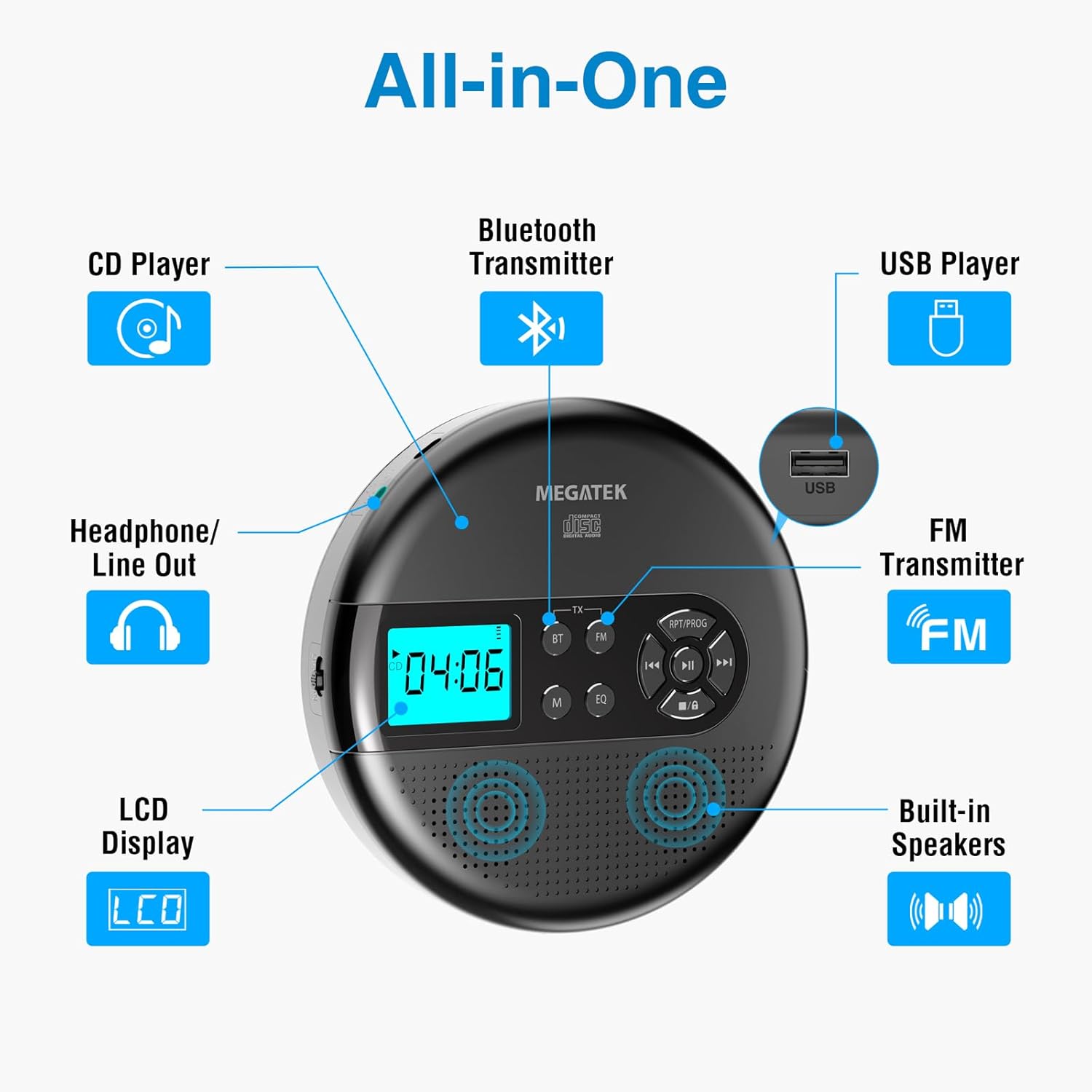
Image: An "All-in-One" diagram highlighting key features such as the CD Player, Bluetooth Transmitter, USB Player, FM Transmitter, Built-in Speakers, LCD Display, and Headphone/Line Out port.
Контроле и портови:
- ЛЦД екран: Shows track number, time, mode, and battery status.
- Дугме за репродукцију/паузу: Покреће или паузира репродукцију.
- Дугмад Претходно/Следеће: Прескаче нумере или премотава унапред/уназад.
- Стоп дугме: Зауставља репродукцију.
- RPT/PROG Button: Controls repeat modes and programming tracks.
- БТ дугме: Activates Bluetooth transmission mode.
- ФМ дугме: Activates FM transmission mode.
- Дугме М (режим): Switches between CD, USB, Bluetooth, and FM modes.
- ЕК тастер: Кружи кроз унапред подешена подешавања еквилајзера.
- Контрола јачине звука: Подешава ниво аудио излаза.
- УСБ порт: За репродукцију звука fileс са УСБ диска.
- Порт за пуњење типа Ц: За пуњење унутрашње батерије.
- 3.5mm Audio Out Jack: За повезивање слушалица или екстерних звучника.
- Уграђени стерео звучници: За директно репродуковање звука.
Сетуп
Пуњење батерије:
The device is equipped with a built-in 2000mAh rechargeable Li-ion battery. Before first use, fully charge the player.
- Connect the provided USB-C charging cable to the Type-C charging port on the player.
- Повежите други крај USB-C кабла са USB адаптером за напајање (није укључен) или USB портом рачунара.
- The battery indicator on the LCD display will show charging status. A full charge provides up to 15 hours of playtime at medium volume.

Image: The portable CD player connected to a power source via its USB-C cable, resting on a nightstand next to a bed.
Убацивање ЦД-а:
- Locate the CD compartment latch/button on the side of the player and slide/press it to open the lid.
- Carefully place the CD onto the center spindle with the label side facing up.
- Пажљиво притисните CD надоле док не кликне на своје место.
- Чврсто затворите поклопац одељка за ЦД док се не закључа.

Image: The portable CD player with its lid open, showing a blue CD disc inserted into the compartment, ready for playback.
Упутство за употребу
Репродукција ЦД-а:
- Уметните CD као што је описано у одељку Подешавање.
- Притисните тастер Пусти/Паузирај дугме за почетак репродукције.
- Користите Претходно/Следеће buttons to navigate between tracks. Hold to fast-forward or rewind.
- Притисните тастер RPT/PROG button to cycle through repeat modes (repeat one, repeat all, random) or to program a custom playback order.
- Притисните тастер Стани дугме за завршетак репродукције.
- Adjust volume using the dedicated volume control.
УСБ репродукција:
The player supports MP3, WMA, and WAV audio fileс са УСБ диска.
- Уметните УСБ флеш диск у УСБ порт.
- Притисните тастер М (режим) дугме за пребацивање на УСБ режим.
- Користите Пусти/Паузирај, Претходно/Следеће, и RPT/PROG buttons as you would for CD playback.
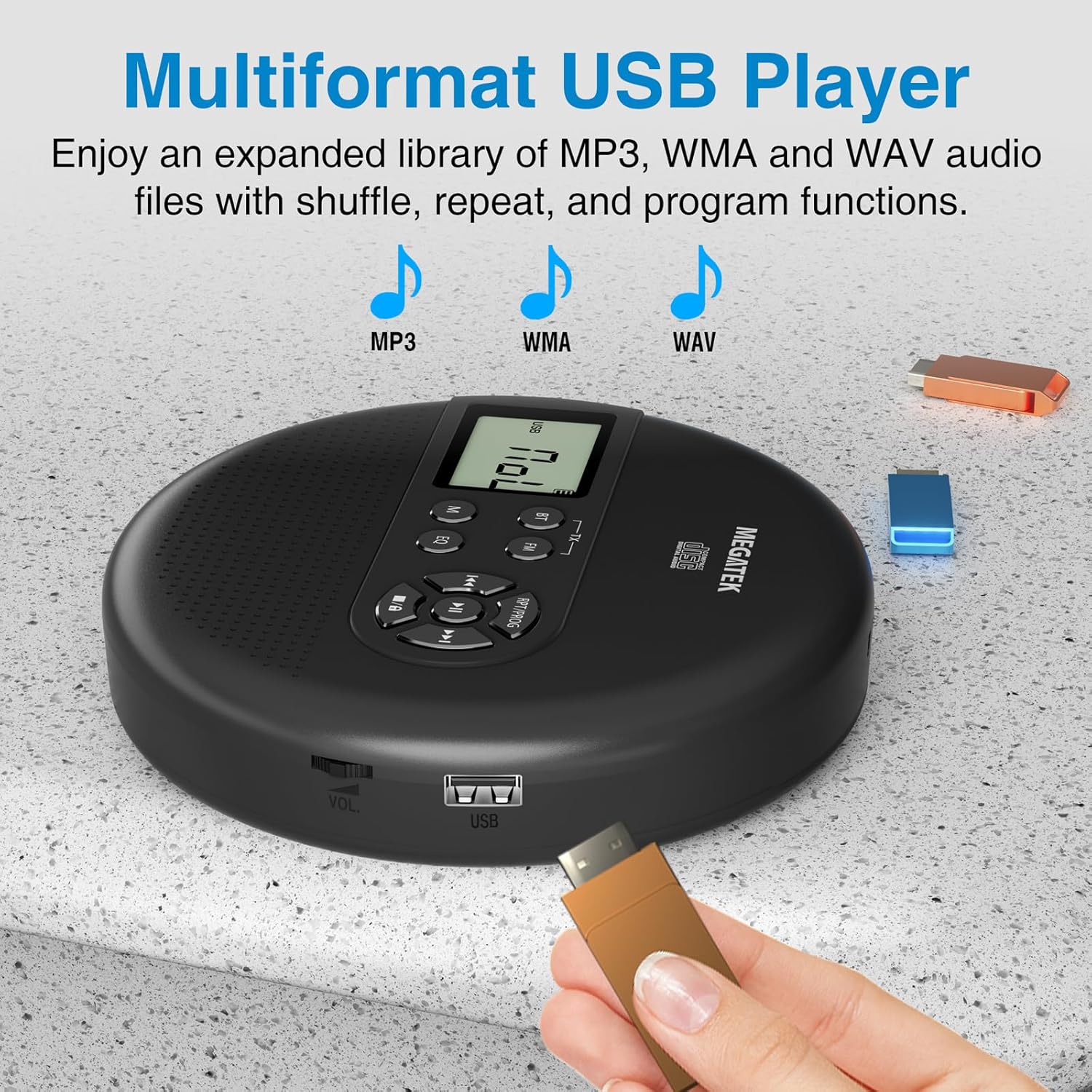
Image: The portable CD player with a USB flash drive inserted into its side port, illustrating its multi-format USB playback capability.
Блуетоотх пренос:
Stream audio wirelessly to Bluetooth-enabled headphones or speakers. Note: This feature does not support connections to car stereo systems.
- Уверите се да су ваше Bluetooth слушалице или звучник у режиму упаривања.
- На CD плејеру притисните дугме BT button. The Bluetooth indicator on the display will flash.
- The player will automatically search for and connect to nearby Bluetooth devices. Once connected, the indicator will stop flashing.

Image: The portable CD player wirelessly transmitting audio to two external Bluetooth speakers, demonstrating its Bluetooth transmission capability.
ФМ пренос:
Transmit audio signals to nearby FM radios, including car FM stereos and home stereo systems.
- Притисните тастер FM button on the CD player. The display will show an FM frequency.
- Tune your FM radio (car stereo, home stereo) to the same frequency displayed on the CD player.
- Adjust the frequency on the CD player using the Претходно/Следеће buttons if interference occurs or to find a clearer channel.

Image: The portable CD player placed on a car dashboard, transmitting audio to the car's FM stereo system, indicated by an FM frequency on the car's display.
Using Headphones/External Speakers:
For private listening or connecting to wired audio systems:
- Plug the included wired headphones into the 3.5mm audio out jack.
- Alternatively, connect an audio cable (not included) from the 3.5mm audio out jack to the AUX input of external speakers or an audio system.
- The built-in speakers will automatically mute when headphones or external speakers are connected.

Image: A close-up of the portable CD player, visually representing sound waves emitting from its dual stereo speakers, emphasizing the built-in audio capability.
Одржавање
- Чишћење: Use a soft, dry, lint-free cloth to clean the exterior of the player. For the CD lens, use a specialized CD lens cleaner. Do not use liquids or aerosol cleaners directly on the device.
- Складиштење: Када се плејер не користи дуже време, чувајте га на хладном и сувом месту, даље од директне сунчеве светлости и екстремних температура.
- Одржавање батерије: Да бисте продужили век трајања батерије, избегавајте често потпуно пражњење батерије. Редовно пуните уређај, чак и ако га не користите активно.
Решавање проблема
| Проблем | Могући узрок | Решење |
|---|---|---|
| Плејер се не укључује. | Батерија је празна. | Charge the player using the USB-C cable. |
| Нема звука из звучника/слушалица. | Volume is too low; headphones not fully plugged in; incorrect mode selected. | Increase volume; ensure headphones are securely connected; press the М (режим) дугме да бисте изабрали одговарајући извор. |
| Прескакање или не репродукција CD-а. | CD is dirty, scratched, or inserted incorrectly; anti-skip function overwhelmed. | Clean the CD; ensure CD is properly seated; avoid strong vibrations. |
| Проблеми са Bluetooth везом. | Уређај није у режиму упаривања; предалеко од плејера; сметње. | Ensure receiving device is in pairing mode; move closer to the player; restart both devices. |
| FM transmission static/poor quality. | Interference; incorrect frequency. | Adjust the FM frequency on the player and receiver to find a clear channel. |
Спецификације
| Феатуре | Детаљ |
|---|---|
| Број модела | ЦП27БР |
| Димензије производа | 5.91 к 5.91 к 1.32 инча |
| Тежина артикла | 10.9 унци |
| Батерија | 2000mAh литијум-јонска (пуњива) |
| Плаитиме | До 15 сати (при средњој јачини звука) |
| Подржани формати CD-ова | CD, CD-R/RW, MP3 CD, Audio Book CD |
| Подржани USB формати | МП3, ВМА, ВАВ |
| Заштита од прескакања | 60 секунди |
| Повезивање | USB, Bluetooth Transmitter, FM Transmitter, 3.5mm Audio Out |
| Посебне карактеристике | Built-in Stereo Speakers, Resume Play, Shuffle, Repeat, Program Functions, 5 EQ Options |
Гаранција и подршка
MEGATEK offers comprehensive support for its products:
- Замена на 12 месеци: In case of product defects or issues within 12 months of purchase.
- Доживотна техничка подршка: Assistance with product usage, troubleshooting, and general inquiries.
- 24/7 корисничка служба: Available through Amazon buyer-seller messaging.
For any questions or problems, please contact MEGATEK customer service via the Amazon platform or refer to the contact information provided in the product packaging.
Image: A graphic detailing MEGATEK's customer support, including 12-month replacement, lifetime technical support, and 24/7 Amazon buyer-seller messaging, alongside an image of customer service representatives.
Ask a question about this manual
Ask about setup, troubleshooting, compatibility, parts, safety, or missing instructions. Manuals+ will review the question and use this page’s manual context to help answer it.