
Увод
The Coby Ultimate Wireless Speaker is designed to deliver a powerful and immersive audio experience, complemented by dynamic light-up modes. This portable speaker is engineered for high-fidelity sound, ensuring crisp highs, rich mids, and deep bass. With its travel-friendly design and extended battery life, it is suitable for various environments, from personal listening to social gatherings.

Image: The Coby Ultimate Wireless Speaker, showcasing its vibrant, multi-color light display on the front grille. The speaker is black with a robust, portable design.
Производ је завршенview и контроле
Familiarize yourself with the speaker's layout and controls for optimal use.
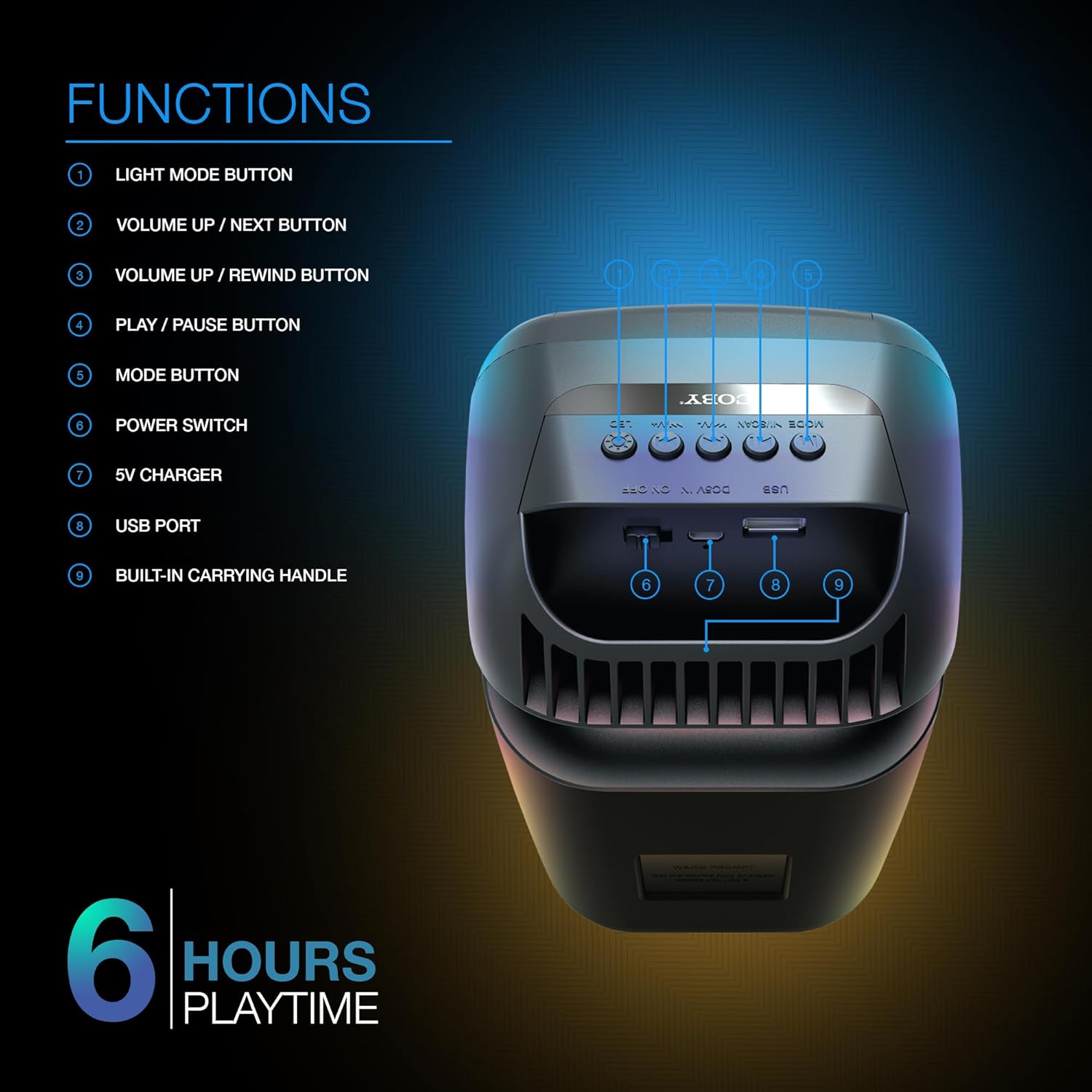
Image: A detailed diagram illustrating the top and rear controls of the Coby Ultimate Wireless Speaker. Numbered labels point to each function: Light Mode Button, Volume Up/Next, Volume Up/Rewind, Play/Pause, Mode Button, Power Switch, 5V Charger Port, USB Port, and Built-in Carrying Handle.
Контролне функције:
- Дугме Лигхт Моде: Cycles through the 5 dazzling light-up modes.
- Volume Up / Next Button: Повећава јачину звука или прескаче на следећу нумеру.
- Volume Up / Rewind Button: Decreases volume or rewinds the current track.
- Дугме за репродукцију/паузу: Starts or pauses audio playback.
- Дугме за режим: Switches between different input modes (e.g., Bluetooth, FM Radio).
- Прекидач: Укључује или искључује звучник.
- 5В пуњач: Порт за повезивање кабла за пуњење.
- УСБ порт: For USB media playback or charging external devices (if supported).
- Built-in Carrying Handle: За лаку преносивост.
Сетуп
1. Пуњење звучника
Before first use, fully charge the speaker. Connect the provided 5V charging cable to the 5V Charger port on the speaker and plug the other end into a compatible USB power adapter (not included). The charging indicator light will show the charging status. A full charge provides up to 6 hours of playtime.
2. Укључивање/искључивање
Locate the Power Switch on the speaker. Slide the switch to the 'ON' position to power on the device. Slide it to the 'OFF' position to power off.
3. Блуетоотх упаривање
- Ensure the speaker is powered on and in Bluetooth mode (indicated by the Mode button).
- На свом мобилном уређају (паметном телефону, таблету итд.) омогућите Блутут и потражите доступне уређаје.
- Select "Coby CPA9000" or a similar name from the list of found devices.
- Once connected, the speaker will emit an audible confirmation, and you can begin streaming audio.
The speaker features Bluetooth version 5.3 for fast pairing and stable audio streaming.
Операција
1. Аудио репродукција
- Пусти/паузирај: Press the Play/Pause button to start or pause the current track.
- Подешавање јачине звука: Use the Volume Up / Next and Volume Up / Rewind buttons to adjust the playback volume.
- Навигација стаза: Briefly press the Volume Up / Next button to skip to the next track. Briefly press the Volume Up / Rewind button to go to the previous track.
2. Light-Up Modes
The speaker features 5 dazzling light-up modes that synchronize with your music. Press the Light Mode Button to cycle through the available light patterns and effects. Choose the mode that best suits your mood or environment.
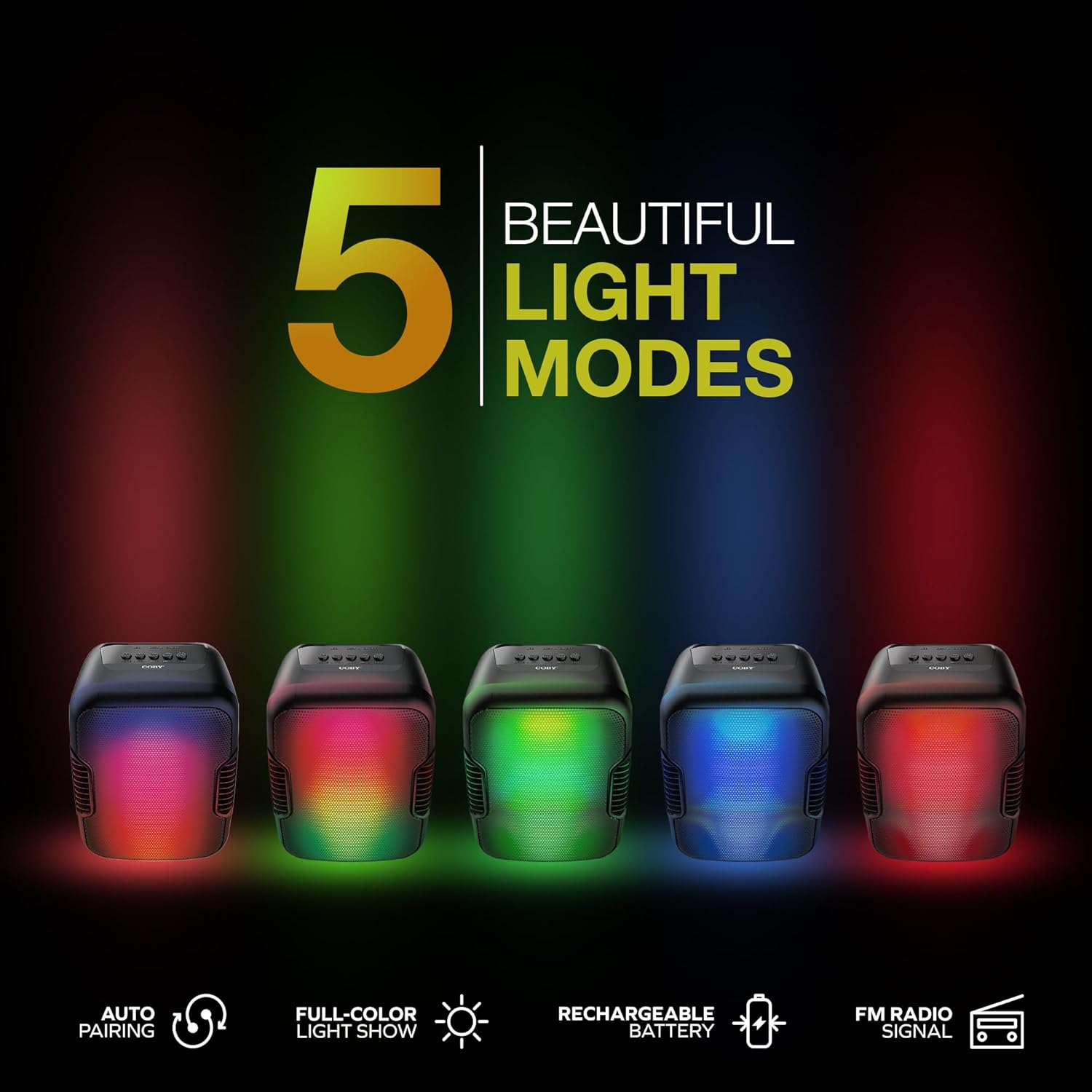
Image: Five Coby Ultimate Wireless Speakers arranged in a row, each displaying a different vibrant light mode, illustrating the variety of visual effects available.
3. Функција ФМ радија
To use the FM Radio, press the Mode button until you hear the FM radio signal. The speaker will automatically scan and tune into available stations. Use the Volume Up / Next and Volume Up / Rewind buttons to navigate between stations.
Одржавање
- Чишћење: Користите меку, суву крпу за чишћење спољашњости звучника. Не користите абразивна средства за чишћење или раствараче.
- Складиштење: Чувајте звучник на хладном и сувом месту, даље од директне сунчеве светлости и екстремних температура када се не користи дуже време.
- Одржавање батерије: Да бисте продужили век трајања батерије, избегавајте често потпуно пражњење батерије. Редовно пуните звучник, чак и ако га не користите стално.
Решавање проблема
| Проблем | Могући узрок | Решење |
|---|---|---|
| Звучник се не укључује. | Батерија је празна. | Charge the speaker fully using the provided charging cable. |
| Нема звука из звучника. | Volume is too low or muted; Device not paired correctly; Incorrect mode selected. | Increase volume on both speaker and connected device. Re-pair Bluetooth. Press Mode button to select correct input. |
| Блуетоотх веза је нестабилна. | Уређај је ван домета; Сметње од других уређаја. | Move the connected device closer to the speaker. Avoid placing speaker near other wireless devices. |
| Light modes are not working. | Light mode feature is off. | Press the Light Mode Button to activate and cycle through modes. |
Спецификације

Image: The Coby Ultimate Wireless Speaker shown with its dimensions: 9.46 inches height, 4.92 inches width, and 4.33 inches depth.
| Феатуре | Детаљ |
|---|---|
| Назив модела | CPA9000 FLAME |
| Спеакер Типе | Субвоофер |
| Технологија повезивања | Блуетоотх |
| Бежична комуникациона технологија | Блуетоотх 5.3 |
| Режим аудио излаза | Стерео |
| Трајање батерије | До 6 сати |
| Извор напајања | Напаја се батеријама (1 литијум-јонска батерија је укључена) |
| Димензије производа (Д x Ш x В) | 4.33 cm x 4.92 cm x 9.46 cm |
| Тежина артикла | 14.1 унци |
| Посебна карактеристика | USB Port, Light-Up Modes, Built-in Handle, FM Radio |
| Компатибилни уређаји | Паметни телефон, таблет |
| Контролни метод | Buttons on device |
| Је водоотпоран | ФАЛСЕ |
| УПЦ | 810071493751 |
Гаранција и подршка
The Coby Ultimate Wireless Speaker comes with a limited warranty. For specific warranty terms and conditions, please refer to the documentation included with your purchase or visit the official Coby website. For technical support or further assistance, please contact Coby customer service.