
Star Micronics MCL32CBI
Star Micronics mC-Label3 MCL32CBI Direct Thermal Printer User Manual
Model: MCL32CBI
Увод
This manual provides essential information for the setup, operation, maintenance, and troubleshooting of your Star Micronics mC-Label3 MCL32CBI Direct Thermal Printer. Please read this manual thoroughly before using the printer to ensure proper and safe operation.
Садржај пакета
Проверите да ли су све ставке наведене у наставку укључене у ваш пакет:
- mC-Label3 Multifunctional Printer
- АЦ адаптер
- Повер Цабле
- USB Cables (C-C 1.0m and C-A 1.8m)
- ЛАН кабл (1м)
- Simple Setup Sheet Safety Guide

Слика: Фронт view of the Star Micronics mC-Label3 printer, showcasing its compact design and label output slot.
Сетуп
1. Повезивање штампача
The mC-Label3 MCL32CBI printer offers multiple connectivity options:
- УСБ-Ц: Connect the printer directly to your PC, Android, or iOS device using the provided USB-C to USB-C or USB-C to USB-A cables.
- Етхернет (ЛАН): For network connectivity, connect the printer to your router or network switch using the supplied LAN cable.
- Блуетоотх: The MCL32CBI model supports Bluetooth connectivity for iOS and Android devices. Ensure Bluetooth is enabled on your device and pair with the printer.

Слика: Позади view of the mC-Label3 printer, highlighting the LAN, USB, and power ports for various connection types.
2. Убацивање медија
The printer supports various media types, including linerless labels, die-cut labels, continuous labels, and thermal receipt paper.
- Open the top cover of the printer by lifting the latch.
- Place the media roll into the media compartment, ensuring the leading edge feeds out from the top.
- Pull a small amount of media past the print head and close the top cover securely.
- Ensure the media is properly aligned within the guides.

Слика: Одозго надоле view of the mC-Label3 printer with its cover open, illustrating the internal mechanism for loading thermal paper or label rolls.
Упутство за употребу
1. Укључивање/искључивање
Connect the power cable to the printer and a power outlet. Press the power button located on the front of the printer to turn it on. The status indicator light will illuminate.
2. Printing Labels and Receipts
The mC-Label3 MCL32CBI printer is designed for efficient label and receipt printing. It supports various applications and cloud services.
- Компатибилност софтвера: Works seamlessly with PC, Android, and iOS applications.
- Услуге у облаку: Utilize Star Micronics Cloud Services to design and manage labels.
- One Touch Label: This feature allows storing pre-made receipts and labels for quick and easy printing directly from the printer.
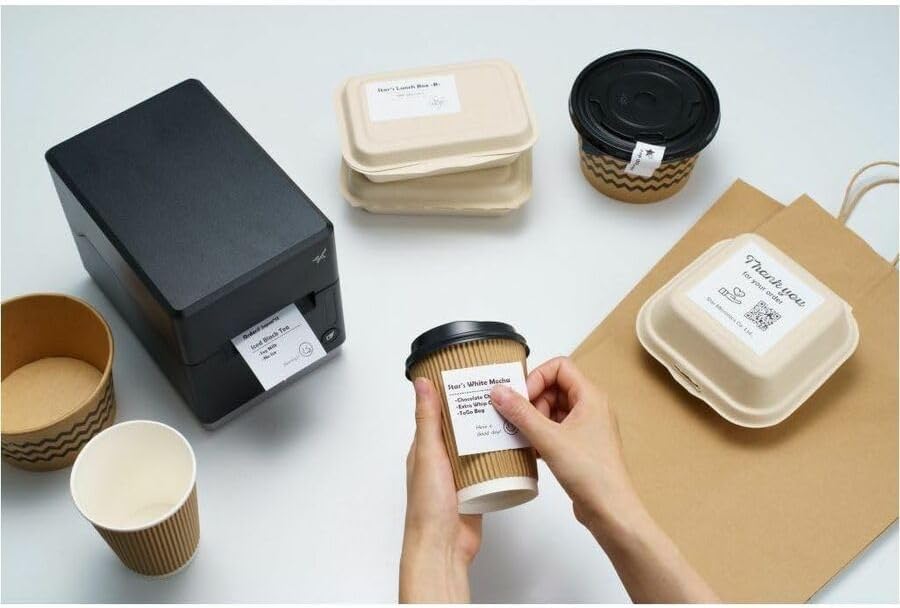
Image: A hand pressing the feed button on the mC-Label3 printer, demonstrating the printing of a 'Thank you' label.

Image: The mC-Label3 printer shown in a practical setting, printing labels for food containers and coffee cups, illustrating its versatility.
Одржавање
1. Чишћење штампача
Regular cleaning ensures optimal performance and extends the life of your printer.
- Користите меку крпу која не оставља длачице дampened with isopropyl alcohol to clean the print head.
- Wipe down the exterior of the printer with a soft, dry cloth.
- Избегавајте употребу абразивних средстава за чишћење или растварача.
2. Replacing Media
When the media roll is depleted, follow the media loading instructions in the Setup section to replace it.
3. Effortless Repairs
The mC-Label3 is designed for effortless, no-tools-required repairs with minimal upkeep, simplifying any necessary component replacements.
Решавање проблема
Овај одељак пружа решења за уобичајене проблеме на које можете наићи.
| Проблем | Могући узрок | Решење |
|---|---|---|
| Штампач се не укључује | Кабл за напајање није повезан; Проблем са утичницом | Уверите се да је кабл за напајање безбедно повезан; покушајте са другом утичницом. |
| Нема штампаног излаза | Out of media; Media loaded incorrectly; Driver issue | Load new media; Re-load media correctly; Reinstall printer drivers. |
| Лош квалитет штампе | Dirty print head; Low quality media | Clean the print head; Use recommended thermal media. |
| Проблеми са повезивањем | Incorrect cable connection; Bluetooth not paired; Network configuration | Check USB/Ethernet cables; Re-pair Bluetooth; Verify network settings. |
Спецификације
| Феатуре | Детаљ |
|---|---|
| Назив модела | мЦ-Лабел3 |
| Број модела ставке | MCL32CBI |
| Технологија штампе | Дирецт Тхермал |
| Излаз штампача | Моноцхроме |
| Максимална брзина штампања Монохром | 23 ппм |
| Максимална резолуција црно-беле штампе | 203 DPI (203 x 203 DPI) |
| Принт Медиа | Labels (Linerless, Die-Cut, Continuous), Thermal Receipt |
| Технологија повезивања | Bluetooth, Wired (USB, Ethernet) |
| Хардверски интерфејс | УСБ, Етхернет |
| Компатибилни уређаји | PC, Android, iOS |
| Тип контролера | иОС, Андроид |
| Димензије производа | 6.7" Д x 5.6" Ш x 8.3" В (17.0 x 14.2 x 21.1 цм) |
| Тежина артикла | 7.2 фунте (3.27 кг) |
| Капацитет меморије | 64 МБ |
| Боја | Црно |
| Произвођач | STAR MICRONICS |
| Земља порекла | Кина |
Информације о гаранцији
The Star Micronics mC-Label3 MCL32CBI printer comes with a manufacturer's warranty. For specific terms and conditions, please refer to the warranty card included in your package or visit the official Star Micronics webсајту.
Врста гаранције: Произвођач
Подршка
For further assistance, technical support, or to download the latest drivers and firmware, please visit the official Star Micronics support webсајту или контактирајте њихову корисничку службу.
Star Micronics Official Webсајт: ввв.стармицроницс.цом
Линк за подршку: ввв.стармицроницс.цом/суппорт