
SUNOL T16
SUNOL T16 Wireless Earbuds User Manual
Model: T16 | Brand: SUNOL
Увод
The SUNOL T16 Wireless Earbuds are designed for an active lifestyle, offering high-quality audio and convenient features. These Bluetooth headphones provide up to 48 hours of total playtime with their wireless charging case, featuring an LED power display for easy monitoring. With earhooks for a secure fit and water resistance, they are ideal for workouts, running, and various sports activities. The built-in microphone with noise cancellation ensures clear calls.
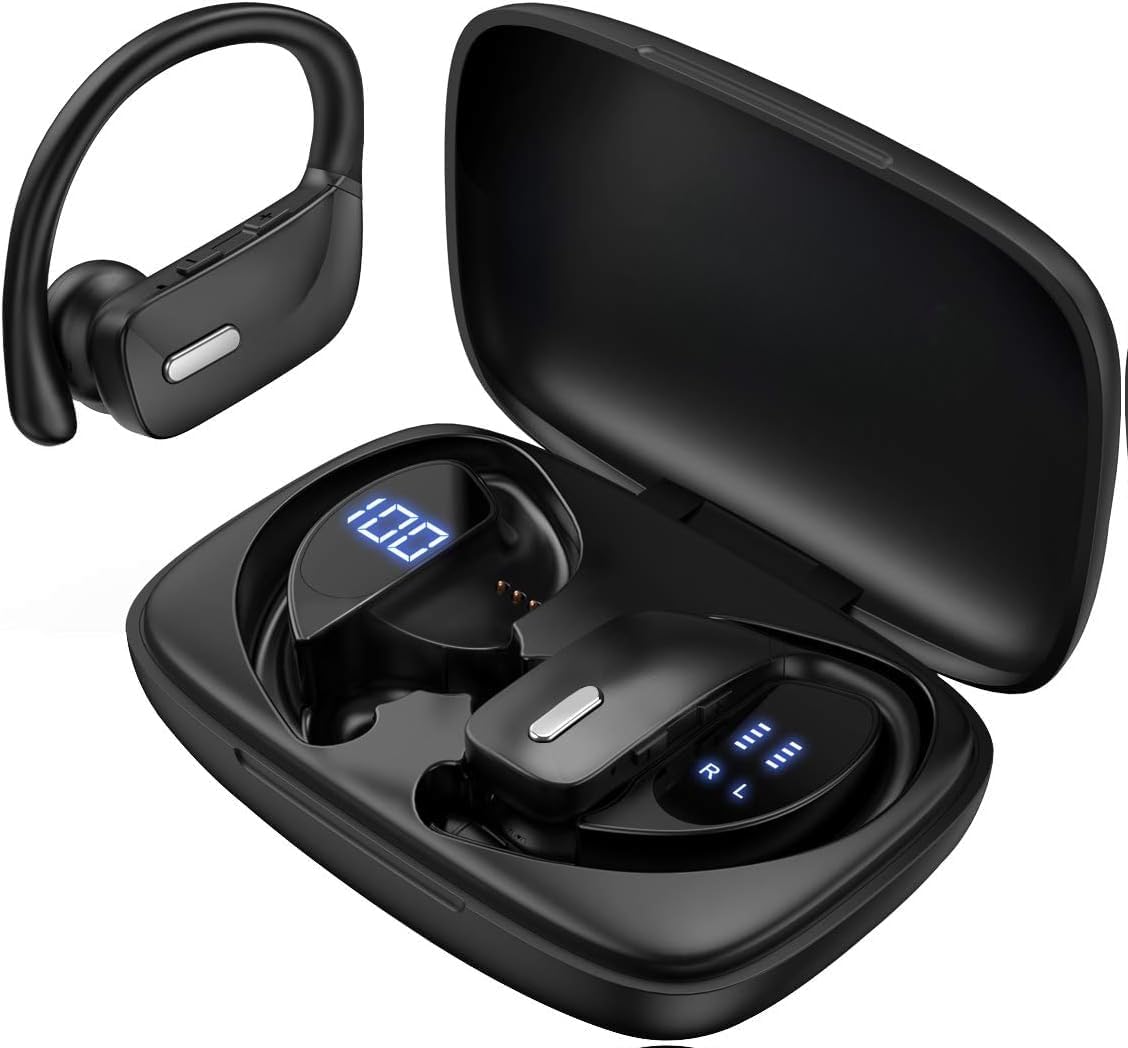
Image: The SUNOL T16 Wireless Earbuds with their charging case, showcasing the digital display.
Шта је у кутији
- SUNOL T16 Wireless Earbuds (Left and Right)
- Футрола за бежично пуњење
- УСБ-Ц кабл за пуњење
- 3 Pairs of Ear Caps (S, M, L)
Спецификације
| Феатуре | Детаљ |
|---|---|
| Назив модела | Т16 |
| Технологија повезивања | Бежично (Bluetooth 5.0) |
| Блуетоотх домет | До 10 метара |
| Трајање батерије слушалица | До 9 сати (једно пуњење) |
| Укупно време репродукције (са футролом) | До 48 сати |
| Опције пуњења | Wireless Charging, USB-C Charging |
| Величина аудио драјвера | 10 мм динамички управљачки програм |
| Фреквенцијски опсег | 20 Hz - 20,000 Hz |
| Импеданса | 40 Охм |
| Контрола буке | Активно поништавање буке |
| Микрофон | Built-in with Noise Cancellation |
| Ниво отпорности на воду | Отпоран на воду |
| Тип контроле | Touch, Siri Voice Assistant |
| Постављање уха | Over Ear (with earhooks) |
| Материјал | акрилонитрил бутадиен стирен (АБС) |
| Тежина артикла | 6.4 унци |

Image: Diagram illustrating the premium stereo sound quality and Bluetooth 5.0 connectivity.
Сетуп
1. Пуњење слушалица и футроле
The charging case supports both wireless charging and USB-C charging. The impressive 9 hours of listening time on a single charge for the sports wireless headphones are extended to a remarkable 48 hours of play time with the included charging case.
- To charge the case, connect a USB-C cable to the charging port on the back of the case, or place it on a compatible wireless charging pad.
- Ставите слушалице у одговарајуће отворе у кућишту за пуњење. Уверите се да су правилно постављене да би се покренуло пуњење.
- The smart LED digital power display on the case will show the remaining battery level of the charging case and the individual earbuds. The percentage in the middle indicates the case battery, while the battery icons on both sides indicate the left and right earbud charge levels.

Image: The charging case with its LED display showing battery levels for the case and individual earbuds.

Image: Diagram illustrating the battery life: 15 min charge for 1 hour playtime, 8 hours on a single charge, and 48 hours with the charging case.
2. Упаривање са вашим уређајем
The earbuds automatically enter pairing mode when removed from the charging case.
- Отворите кућиште за пуњење и извадите обе слушалице. Аутоматски ће се укључити и ући у режим упаривања.
- On your mobile device (smartphone, tablet, laptop), go to the Bluetooth settings.
- Тражи available devices. You should see "T16" or "S8" appear in the list.
- Select "T16" or "S8" to connect. Once connected, you will hear an audio prompt, and the earbuds will be ready for use.

Image: Diagram showing the earbuds automatically pairing with mobile phones.
Video: Official product video demonstrating the unboxing, charging, and Bluetooth pairing process of the SUNOL T16 Wireless Earbuds.
Упутство за употребу
Ношење слушалица
The T16 earbuds are designed with flexible earhooks to ensure a secure and comfortable fit, especially during physical activity. Gently place the earbud into your ear canal and adjust the earhook over the top of your ear until it feels stable and comfortable. Experiment with the included ear cap sizes to find the best fit for optimal sound and comfort.

Image: A woman wearing the SUNOL T16 earbuds, demonstrating their secure fit for an active lifestyle.
Додирните контроле
The earbuds feature physical buttons for precise control of various functions:
- Пусти/паузирај: Један додир на обе слушалице.
- Одговори/прекини позив: Једном додирните било коју слушалицу током позива.
- Претходна песма: Двапут додирните леву слушалицу.
- Следећа песма: Двапут додирните десну слушалицу.
- Active Voice Assistant (Siri): Трипут додирните било коју слушалицу.
- Одбијање позива: Дуго притисните било коју слушалицу током долазног позива.
- Подешавање јачине звука: Use the dedicated volume buttons on the earbuds.

Image: Diagram detailing the physical buttons and their functions, including volume adjustment, play/pause, call management, and voice assistant activation.
Одржавање
To ensure the longevity and optimal performance of your SUNOL T16 Wireless Earbuds, follow these maintenance guidelines:
- Чишћење: Regularly wipe the earbuds and charging case with a soft, dry, lint-free cloth. For ear caps, remove them and clean with mild soap and water, then dry thoroughly before reattaching.
- Отпорност на воду: While water-resistant, avoid submerging the earbuds in water. Dry them completely if they get wet from sweat or rain before placing them back in the charging case.
- Складиштење: Када се не користе, чувајте слушалице у њиховој футроли за пуњење како бисте их заштитили и одржали напуњеним. Чувајте их на хладном и сувом месту, даље од екстремних температура.
- Порт за пуњење: Држите USB-C порт за пуњење чистим од прашине и прљавштине.
Решавање проблема
If you encounter any issues with your SUNOL T16 Wireless Earbuds, try the following solutions:
- Слушалице се не упарују:
- Уверите се да су обе слушалице потпуно напуњене.
- Place earbuds back in the case, close the lid, wait a few seconds, then open and remove them again.
- Turn off Bluetooth on your device, then turn it back on and try pairing again.
- Forget or remove the "T16" or "S8" device from your device's Bluetooth list and attempt to pair from scratch.
- Само једна слушалица ради:
- Уверите се да су обе слушалице напуњене.
- Place both earbuds back in the charging case, close the lid, and then take them out simultaneously.
- If the issue persists, try resetting the earbuds.
- Лош квалитет звука:
- Ensure the earbuds are properly seated in your ears and the ear caps provide a good seal.
- Проверите подешавања јачине звука и звука изворног аудио уређаја.
- Move closer to your connected device to avoid interference or exceeding the 10-meter Bluetooth range.
- Clean the earbud speakers and ear caps.
- Футрола за пуњење се не пуни:
- Уверите се да је USB-C кабл безбедно повезан и са кућиштем и са извором напајања.
- Пробајте други USB-C кабл или адаптер за напајање.
- Ако користите бежично пуњење, уверите се да је футрола правилно постављена на подлози за пуњење.
Гаранција и подршка
For warranty information and technical support, please refer to the documentation included with your product or contact the manufacturer, SUNOL, directly through their official webсајт или канале за корисничку подршку. Сачувајте рачун као доказ о куповини за евентуалне рекламације у вези са гаранцијом.
Ask a question about this manual
Ask about setup, troubleshooting, compatibility, parts, safety, or missing instructions. Manuals+ will review the question and use this page’s manual context to help answer it.