
1. Увод
Хвала вам на куповиниasing the PPLEE RGB Digital Alarm Clock, Model CR1008R. This clock is designed to provide accurate timekeeping, customizable alarm functions, and convenient charging options. Please read this manual thoroughly before use to ensure proper operation and to maximize your product experience.
2. Безбедносне информације
- Уверите се да је адаптер за напајање компатибилан са вашим локалним напајањем (100-240V).
- Не излажите уређај води или прекомерној влажности.
- Avoid placing the clock near heat sources or in direct sunlight.
- Користите само испоручени адаптер за напајање.
- Чувати ван домашаја деце.
- Insert AAA batteries correctly for backup function (not included).
3. Садржај пакета
Проверите да ли су све ставке присутне у вашем пакету:
- 1 x PPLEE RGB Digital Clock
- 1 к адаптер за напајање
- КСНУМКС к кабл за напајање
- 1 x Упутство за употребу (овај документ)

Image: The package includes the RGB digital clock, power adapter, power cord, and user manual.
4. Производ је готовview
Упознајте се са главним компонентама вашег будилника.

Слика: Фронт view of the PPLEE RGB Digital Alarm Clock displaying time with RGB digits and a smartphone charging via its USB port.
Предњи панел: Large LED display for time, AM/PM indicator, DST indicator, Alarm indicator.
Горња плоча: Snooze/Light bar, Hour button, Minute button.
Задња плоча:
- DC IN Port: For power adapter connection.
- USB Charging Port: For charging external devices.
- Type-C Charging Port: For charging external devices.
- Alarm ON/OFF Switch.
- Alarm Volume Control (Low/Med/High).
- Dimmer Control (for display brightness).
- Time Format Switch (12H/24H).
- DST (Daylight Saving Time) Switch.
- Set Time Button.
- Set Alarm Button.
- Multi-Color Button (for display and night light).
- Battery Compartment (for 2x AAA backup batteries).

Слика: Позади view of the alarm clock highlighting the various control buttons and charging ports, including dimmer, alarm volume, time/alarm set, and time format switches.
5. Подешавање
5.1 Прикључак за напајање
- Connect the power cord to the DC IN port on the back of the clock.
- Plug the power adapter into a standard electrical outlet (AC 100-240V).
- The clock display will light up.
5.2 Инсталација резервне батерије
For battery backup, which saves settings during power outages and can trigger the alarm, install 2 AAA batteries (not included) into the battery compartment on the back of the clock.
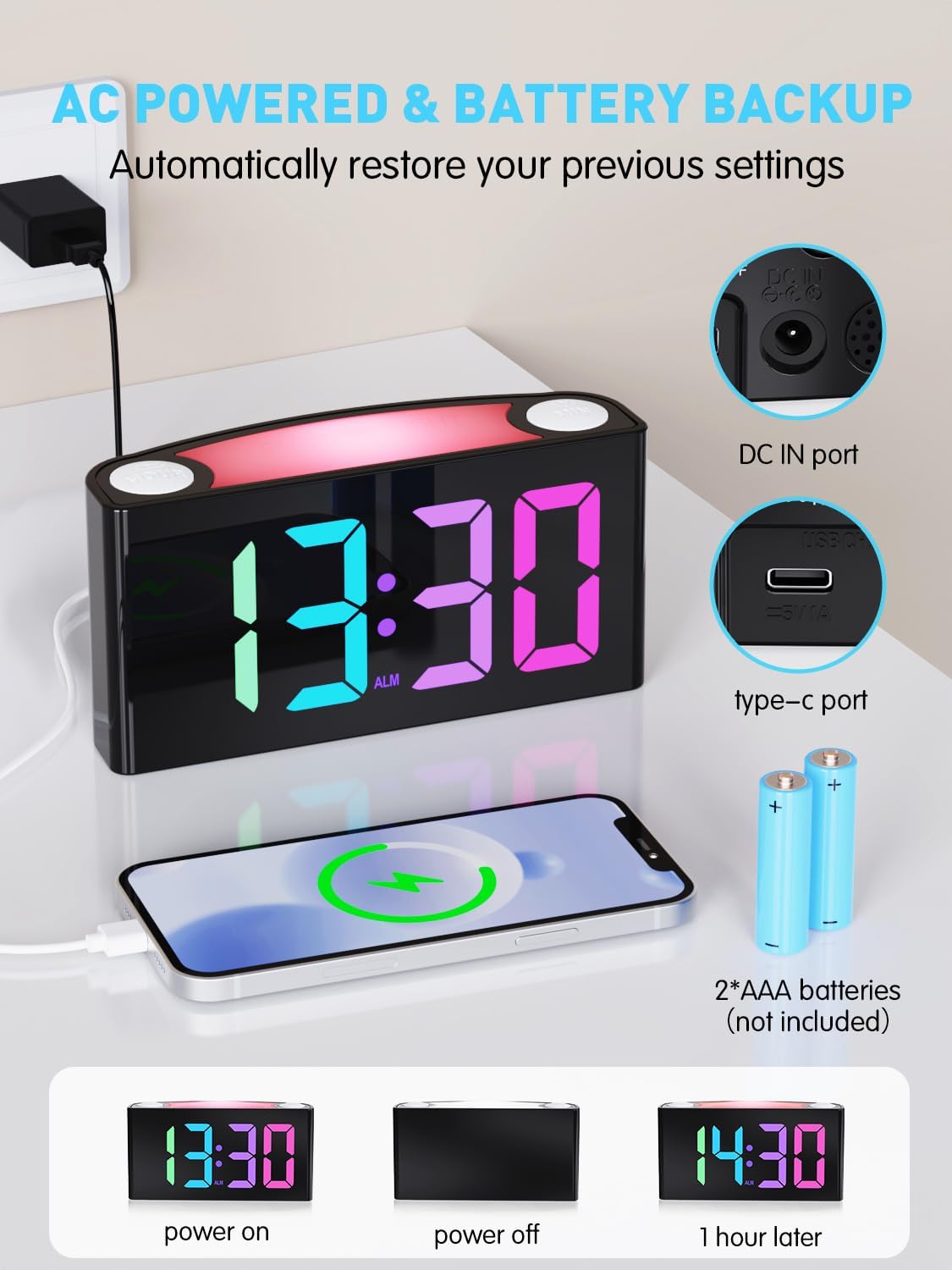
Image: The alarm clock is shown connected to AC power, with an open battery compartment indicating where to insert 2 AAA batteries for backup. The display shows "13:30" (power on), a blank screen (power off), and "14:30" (1 hour later, demonstrating time retention).
Напомена: The clock's main functions (display, USB charging, alarm) require AC power. Batteries only provide backup for time memory and alarm trigger during power interruptions.
6. Упутство за употребу
6.1 Подешавање времена
- Притисните тастер "SET TIME" button on the rear panel. The display will start flashing.
- Притисните тастер "HOUR" button (on top) to adjust the hour.
- Притисните тастер "МИН" button (on top) to adjust the minute.
- Притисните "SET TIME" again to save, or wait 5 seconds for automatic confirmation.
Video: Demonstrates how to set the time on the PPLEE RGB Digital Alarm Clock, including adjusting hours and minutes and confirming the setting.
6.2 Подешавање аларма
- Померите "ALARM ON/OFF" switch to the "ON" position. The alarm indicator will light up.
- Притисните тастер "SET ALARM" button on the rear panel. The alarm time display will start flashing.
- Притисните тастер "HOUR" button (on top) to adjust the alarm hour.
- Притисните тастер "МИН" button (on top) to adjust the alarm minute.
- Притисните "SET ALARM" again to save, or wait 5 seconds for automatic confirmation.
Да бисте искључили аларм, померите "ALARM ON/OFF" switch to the "OFF" position. The alarm indicator will disappear.
6.3 Display Brightness (Dimmer)
The clock features a 7-level dimmer for the time display (0%-100% brightness).
- Користите "DIMMER" button on the rear panel to cycle through brightness levels.

Image: The alarm clock display shows various brightness levels from 0% to 100%, illustrating the 7-level dimmer function.
6.4 режима ноћног светла
The clock includes an 8-mode/7-color night light with 3 adjustable brightness settings.
- Притисните тастер „ОДРЕМАЊЕ/СВЕТЛО“ bar on top to turn the night light on/off and cycle through colors/modes.
- To adjust night light brightness, press and hold the „ОДРЕМАЊЕ/СВЕТЛО“ бар.

Image: A person sleeping next to the alarm clock, which emits a soft yellow night light from its top bar. Below are icons indicating 3-level adjustable brightness for the night light.
6.5 Јачина звука аларма
Adjust the alarm volume to your preference (Low, Medium, High).
- Користите "ALARM VOLUME" switch on the rear panel to select the desired volume level.

Image: A person reaching for the snooze bar on the alarm clock, which displays "8:30". The image also illustrates the 3-level adjustable alarm volume (90db, 103db, 110db).
6.6 Функција одлагања
Када се огласи аларм, притисните велико „ОДРЕМАЊЕ/СВЕТЛО“ bar on top to activate snooze for 9 extra minutes of sleep.
The alarm will sound again after 9 minutes. To completely turn off the alarm, use the "ALARM ON/OFF" прекидач.
6.7 12/24 Hour Format and DST
- Користите "TIME FORMAT" switch on the rear panel to toggle between 12-hour and 24-hour display.
- Користите "DST" switch on the rear panel to enable or disable Daylight Saving Time (adjusts time by 1 hour).
6.8 Dual Charging Ports
The clock is equipped with a Type-C output port and a USB output port for charging your devices.

Image: The alarm clock with its display showing "12:00" and two smartphones connected to its USB and Type-C charging ports, indicating active charging.
Simply connect your device's charging cable to the appropriate port on the back of the clock.
7. Одржавање
- Очистите сат меком, сувом крпом. Не користите абразивна средства за чишћење или раствараче.
- Ensure the clock is unplugged before cleaning.
- If not in use for an extended period, remove the backup batteries.
КСНУМКС. Решавање проблема
| Проблем | Решење |
|---|---|
| Приказ сата је празан. | Check if the power adapter is securely plugged into both the clock and the wall outlet. Ensure the outlet has power. |
| Аларм се не оглашава. | Verify the "ALARM ON/OFF" switch is in the "ON" position. Check the alarm volume setting. Ensure the alarm time is correctly set. |
| Време је нетачно након нестанка струјеtage. | Ensure 2 AAA batteries are installed in the battery compartment for backup. If batteries were not present or depleted, reset the time manually. |
| Devices not charging via USB/Type-C. | Confirm the clock is connected to AC power. Check the charging cable and the device being charged. |
| Ноћно светло не ради. | Press the "SNOOZE/LIGHT" bar to cycle through modes and turn on the light. Check if the clock is powered. |
9. Спецификације
| Број модела | ЦР1008Р |
| Бранд | ППЛЕЕ |
| Дисплаи Типе | Digital LED (RGB) |
| Димензије производа | 6.46" Ш x 3.39" В |
| Извор напајања | Електрични са каблом (AC 100-240V) |
| Баттери Бацкуп | 2 к ААА батерије (нису укључене) |
| Портови за пуњење | 1 x USB, 1 x Type-C |
| Дисплаи Бригхтнесс | 7-level adjustable dimmer |
| Нигхт Лигхт | 8 modes / 7 colors, 3-level adjustable brightness |
| Јачина звука аларма | 3-level adjustable (Low, Medium, High) |
| Трајање одлагања | КСНУМКС минута |
10. Гаранција и подршка
For warranty information or technical support, please refer to the contact details provided with your purchase or visit the official PPLEE webсајту. Сачувајте рачун о куповини за гаранције.
Емаил: support@pplec.net