
1. Увод
Thank you for choosing the ARROWMAX SES PRO Electric Precision Screwdriver. This cordless tool is designed for precision tasks, featuring smart motion control and a comprehensive set of 34 magnetic bits. It is ideal for electronics, laptops, glasses, and other delicate applications. This manual provides essential information for safe operation, setup, maintenance, and troubleshooting to ensure optimal performance and longevity of your device.
2. Безбедносне информације
Please read all safety warnings and instructions carefully before using this product. Failure to follow these instructions may result in electric shock, fire, and/or serious injury.
- Одржавајте радни простор чистим и добро осветљеним. Затрпана или мрачна подручја изазивају несреће.
- Не користите електричне алате у експлозивној атмосфери, као што је присуство запаљивих течности, гасова или прашине. Електрични алати стварају варнице које могу запалити прашину или испарења.
- Држите подаље децу и особе у близини док користите електрични алат. Ометања могу узроковати да изгубите контролу.
- Избегавајте случајно покретање. Уверите се да је прекидач у положају „искључено“ пре него што повежете батерију, подигнете или носите алат.
- Не претерујте. Увек држите правилан положај и равнотежу. Ово омогућава бољу контролу електричног алата у неочекиваним ситуацијама.
- Обуците се како треба. Не носите широку одећу или накит. Држите косу и одећу даље од покретних делова. Опуштена одећа, накит или дуга коса могу се заглавити у покретним деловима.
- Користите личну заштитну опрему. Увек носите заштиту за очи. Заштитна опрема као што су маска за прашину, неклизајуће заштитне ципеле, кацига или заштита за слух која се користи у одговарајућим условима ће смањити личне повреде.
- Чувајте електричне алате у стању мировања ван домашаја деце и не дозволите особама које нису упознате са електричним алатом или овим упутствима да рукују електричним алатом.
- Одржавајте електричне алате. Проверите да ли су покретни делови неусклађени или везани, поломљени делови и било које друго стање које може утицати на рад електричног алата. Ако је оштећен, дајте електрични алат на поправку пре употребе.
- Електрични алат, прибор и наставке за алате итд. користите у складу са овим упутствима, узимајући у обзир услове рада и посао који треба обавити. Употреба електричног алата за радње другачије од предвиђених може довести до опасне ситуације.
- Пуните само пуњачем који је одредио произвођач. Пуњач који је погодан за једну врсту батерије може да створи опасност од пожара када се користи са другом батеријом.
- Немојте користити алат ако га прекидач не укључује и не искључује. Сваки електрични алат који се не може контролисати помоћу прекидача је опасан и мора се поправити.
- Одвојите батерију од електричног алата пре него што извршите било каква подешавања, промените прибор или одложите електрични алат. Такве превентивне мере безбедности смањују ризик од случајног покретања електричног алата.
3. Садржај пакета
The ARROWMAX SES PRO Electric Precision Screwdriver package typically includes the following items:
- 1 x ARROWMAX SES PRO Electric Precision Screwdriver
- 1 x Magnetic Storage Case
- 34 x Magnetic Precision Bits (S2 Steel, 4mm)
- 1 к УСБ-А на УСБ-Ц кабл за пуњење

Image: The ARROWMAX SES PRO Electric Precision Screwdriver, its magnetic bit case, and the included 34 precision bits.
4. Производ је готовview и компоненте
Familiarize yourself with the main components of your ARROWMAX SES PRO screwdriver:

Image: Labeled diagram of the ARROWMAX SES PRO screwdriver's key components.
- Порт за пуњење типа Ц: Located at the top for recharging the internal battery.
- ЛЕД дисплеј статуса: An OLED screen showing battery level, torque setting, and operational status.
- Дугме за напајање: Used to turn the device on/off and adjust torque settings.
- Тело од алуминијумске легуре: Durable and lightweight construction.
- ЛЕД светла: Осветљава радно подручје ради боље видљивости.
- Bit Installation Port: Where precision bits are inserted.
5. Подешавање
5.1 Пуњење одвијача
- Locate the USB-C charging port at the top of the screwdriver.
- Connect the provided USB-A to USB-C charging cable to the screwdriver and a compatible USB-A power adapter (not included).
- The LED Status Display will indicate the charging progress. A full charge allows for tightening approximately 900 screws.
- Важна напомена: This electric screwdriver only supports USB-A to USB-C charging and is not compatible with USB-C PD (Power Delivery) chargers.

Слика: Прекоview of charging port, battery, torque adjustment, and OLED display.
5.2 Installing Precision Bits
- Select the appropriate precision bit from the magnetic storage case. The case features a pop-up design for easy access.
- Insert the bit firmly into the Bit Installation Port at the tip of the screwdriver. The magnetic holder will secure the bit in place.
- To remove a bit, simply pull it out.
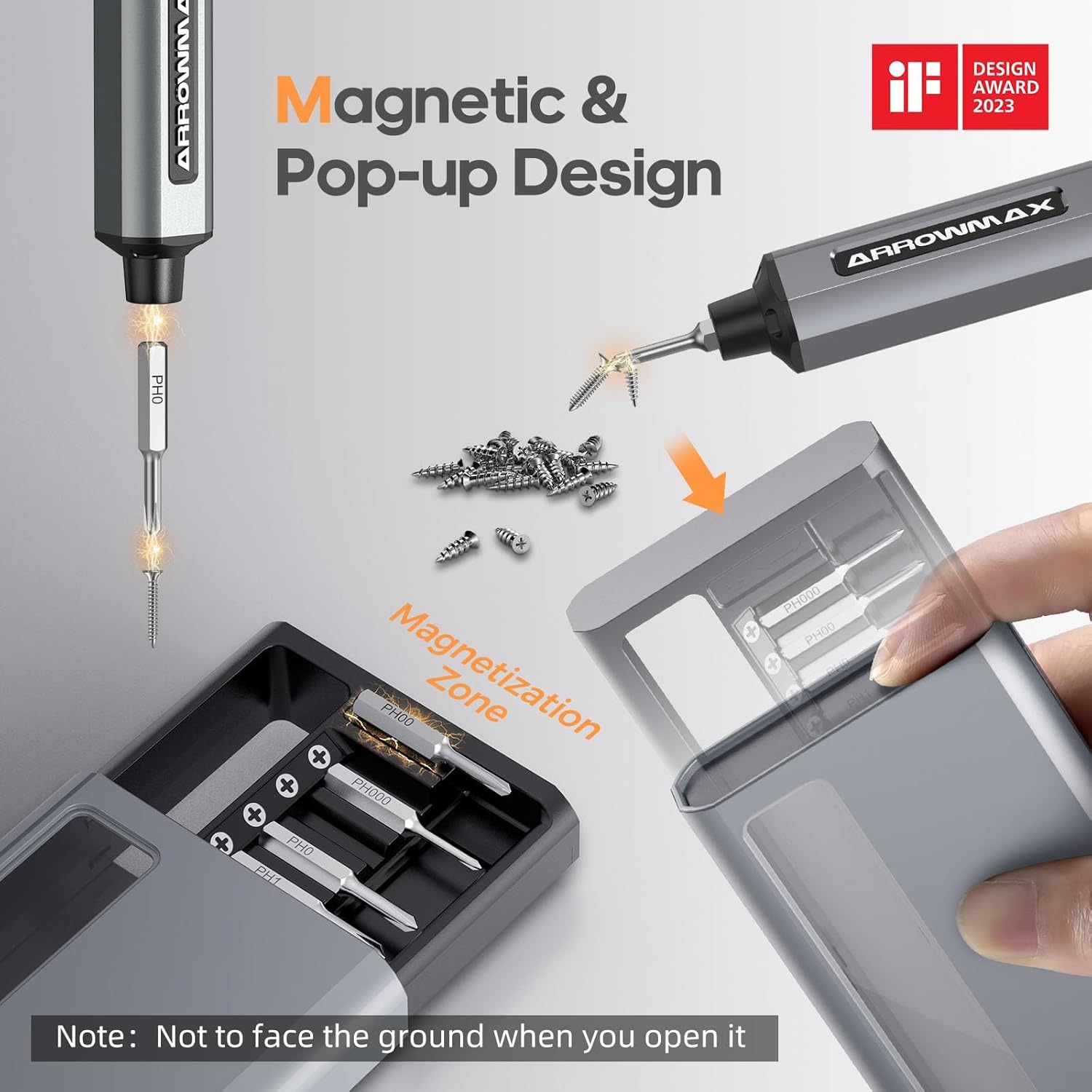
Image: Magnetic pop-up bit case design and bit magnetization zone.
6. Упутство за употребу
6.1 Укључивање/искључивање
Press and hold the Power Button for a few seconds to turn the screwdriver on or off. The OLED screen will illuminate upon activation.
6.2 Подешавање обртног момента
The SES PRO offers 5 adjustable torque levels, including an auto-sensing mode, to suit various tasks. The electric torque ranges from 0.049 N.m to 0.30-0.35 N.m, with a manual torque of 3 N.m.
- With the screwdriver powered on, press the Power Button three times continuously to cycle through the torque settings.
- The OLED screen will display the current torque level (e.g., 1, 2, 3, 4, A for Auto-Sensing).
- Select a lower torque for delicate items like glasses or small electronics, and higher torque for more robust applications.
- For screws that are too tight for the electric motor, the screwdriver can be used in manual mode by applying direct force.
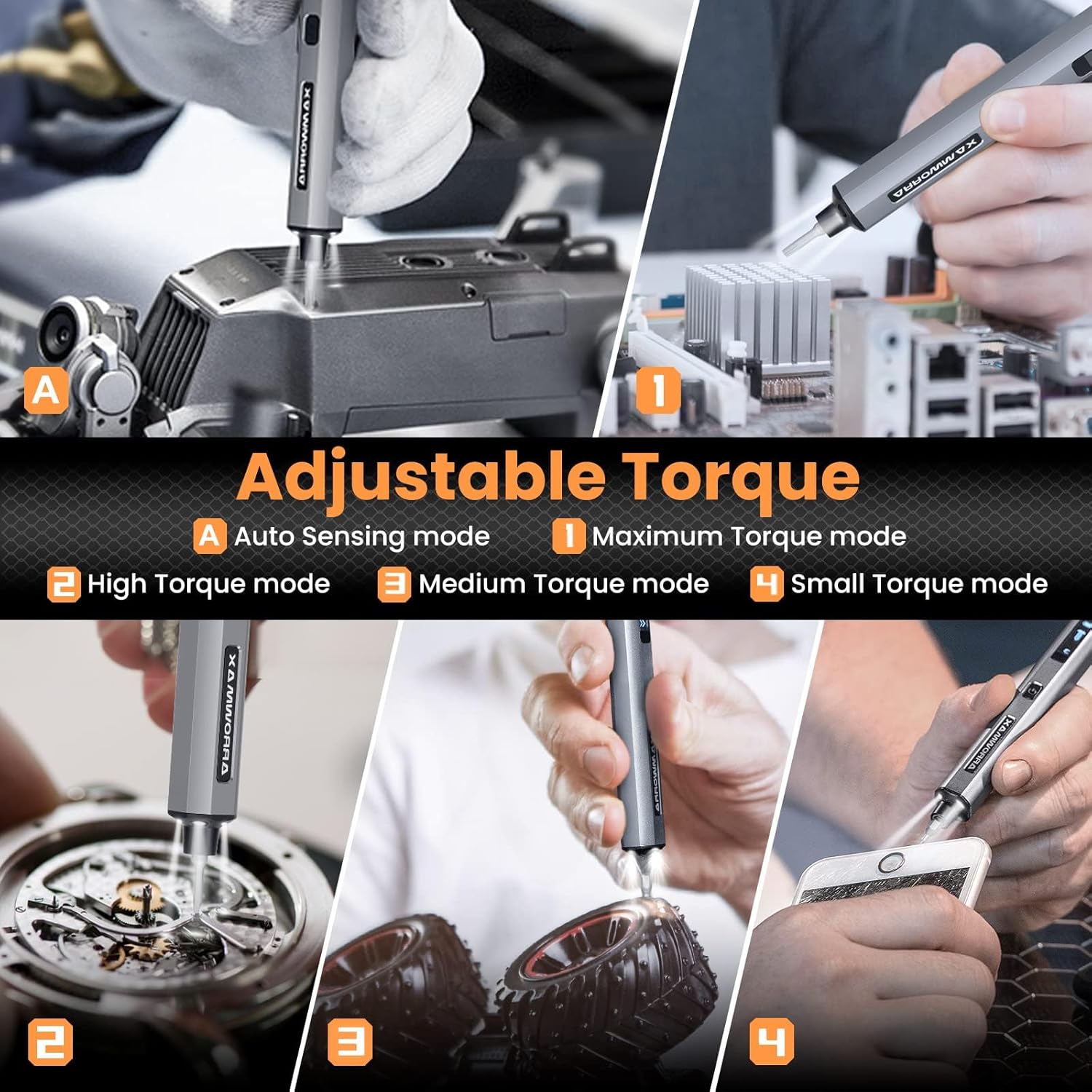
Image: Adjustable torque settings for various applications.
6.3 Body Sensory Dual-Mode (Forward/Reverse)
The SES PRO features a body sensory dual-mode for intuitive control of rotation direction.
- To drive a screw in (tighten), gently rotate your wrist in a clockwise direction while holding the screwdriver.
- To remove a screw (loosen), gently rotate your wrist in a counter-clockwise direction.
- The screwdriver's internal gyroscope detects your wrist movement and activates the motor accordingly.
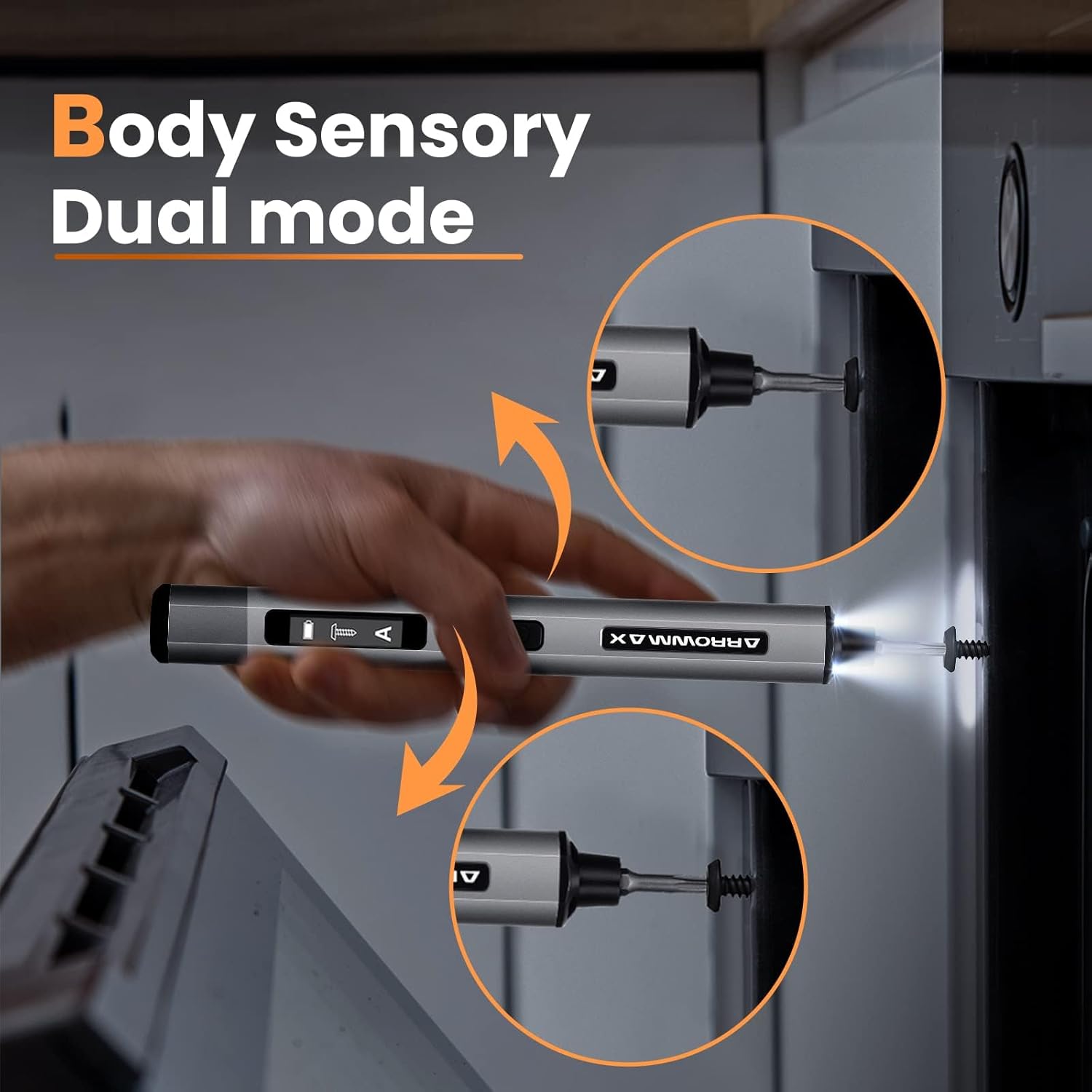
Image: Body sensory dual-mode in action for forward and reverse operation.
6.4 LED Work Lights
The integrated LED lights at the tip of the screwdriver automatically illuminate when the motor is active, providing clear visibility of your work area.
7. Одржавање
7.1 Чишћење
- Wipe the screwdriver body with a soft, dry cloth. Do not use abrasive cleaners or solvents.
- Ensure the bit installation port is free of debris.
7.2 Одржавање батерије
- Да бисте продужили век трајања батерије, избегавајте често потпуно пражњење батерије.
- Чувајте одвијач на хладном и сувом месту када се не користи.
- Recharge the battery periodically if stored for extended periods to prevent deep discharge.

Image: The SES PRO's long-lasting battery capacity.
7.3 Bit Care
- Keep the precision bits clean and free of rust.
- Store bits securely in the magnetic case to prevent loss and damage.
КСНУМКС. Решавање проблема
If you encounter issues with your ARROWMAX SES PRO screwdriver, refer to the following common problems and solutions:
| Проблем | Могући узрок | Решење |
|---|---|---|
| Screwdriver does not turn on or respond. | Low battery; device is off. | Charge the screwdriver using the provided USB-A to USB-C cable. Ensure the power button is pressed to turn it on. |
| Одвијач се не пуни. | Incorrect charger type; faulty cable/adapter. | Ensure you are using a USB-A to USB-C cable and a standard USB-A power adapter. USB-C PD chargers are not supported. Try a different cable or adapter. |
| Motor lacks power or cannot loosen/tighten screws. | Low battery; incorrect torque setting; screw is too tight for electric mode. | Charge the screwdriver. Increase the torque setting. For very tight screws, manually loosen or tighten them first, then use the electric mode. |
| Directional control (forward/reverse) is inconsistent. | Improper wrist movement; gyroscope calibration issue. | Ensure clear and deliberate wrist movements. If issues persist, try restarting the device. |
| Bits fall out or are not held securely. | Bit installation port is dirty; bit is not fully inserted. | Clean the bit installation port. Ensure the bit is pushed in firmly until it clicks or feels secure. |
9. Спецификације
Key technical specifications for the ARROWMAX SES PRO Electric Precision Screwdriver:
| Феатуре | Спецификација |
|---|---|
| Бранд | АРРОВМАКС |
| Модел | SES PRO (AM-199913-G) |
| Брзина | 200 РПМ |
| Извор напајања | Баттери Поверед |
| Волtage | 3.7 волти (ДЦ) |
| Електрични обртни момент | 0.049 N.m - 0.30-0.35 N.m (Adjustable) |
| Ручни обртни момент | 3 Нм |
| Тип батерије | Литијум-јонска (500 mAh) |
| Порт за пуњење | USB-C (USB-A to USB-C charging only) |
| Тежина артикла | 13.7 унци |
| Димензије пакета | 7.48 к 3.43 к 1.73 инча |
| Посебне карактеристике | OLED Screen, Smart Motion Control, Ergonomic Design, LED Lights |
10. Гаранција и подршка
The manufacturer's warranty information for this product is not explicitly provided in the available data. For details regarding warranty coverage, duration, and terms, please refer to the documentation included with your purchase or contact the retailer where the product was acquired.
For technical support, product inquiries, or assistance with troubleshooting that is not covered in this manual, please visit the official ARROWMAX website or contact their customer service department. Contact information can typically be found on the product packaging or the manufacturer's official online channels.