
ATOMSTACK A6 Pro
АТОМСТАЦК А6 Про машина за ласерско гравирање упутство за употребу
Model: A6 Pro | Brand: ATOMSTACK
1. Увод
The ATOMSTACK A6 Pro is a high-performance laser engraving and cutting machine designed for precision and ease of use.Featuring a 6W ultra-high performance laser module and advanced blue-ray laser point compression technology,it offers exceptional cutting ability and fine engraving detail. Its integrated design ensures quick setup,making it suitable for various creative and professional applications.

Слика 1.1: The ATOMSTACK A6 Pro Laser Engraving Machine, showcasinг његов компактан и интегрисан дизајн.
2. Безбедносне информације и упозорења
УПОЗОРЕЊЕ: Laser engraving machines emit powerful laser radiation. Improper use can cause serious injury, including eye damage and skin burns.Always adhere to the following safety guidelines:
- Заштита очију: Always wear appropriate laser safety goggles when operating the machine. Never look directly into the laser beam or its reflection.
- вентилација: Operate the machine in a well-ventilated area to dissipate fumes and smoke produced during engraving and cutting. Consider an exhaust system.
- Опасност од пожара: Laser processing can ignite flammable materials. Do not leave the machine unattended during operation. Keep a fire extinguisher nearby.
- Компатибилност материјала: Only engrave or cut materials specified as safe for laser processing. Avoid materials that produce toxic fumes or can easily ignite.
- Деца и кућни љубимци: Држите децу и кућне љубимце даље од машине током рада.
- Напајање: Use only the specified power adapter (AC 24V 5A) for the machine.
- Хитно заустављање: Упознајте се са положајем и радом дугмета за хитно заустављање.

Слика 2.1: Product information label including critical safety warnings regarding direct or scattered radiation.
3. Подешавање и инсталација
The ATOMSTACK A6 Pro is designed for minimal setup, allowing you to start working quickly.
3.1 Распакивање
- Carefully remove the machine and all components from the packaging.
- Verify that all parts are present according to the packing list (refer to your product's specific packing list).

Слика 3.1: The ATOMSTACK A6 Pro is designed for immediate use upon unboxing, requiring no complex assembly.
3.2 Initial Placement and Connection
- Place the machine on a stable, level, and non-flammable surface. Ensure adequate space around the machine for ventilation and operation.
- Прикључите адаптер за напајање на машину, а затим на одговарајућу утичницу.
- Ensure the laser module is securely seated and the tank chain bundling for cables is properly aligned to prevent tangling.

Слика 3.2: The tank chain bundling system ensures smooth and tangle-free cable operation, enhancing machine longevity.
4. Упутство за употребу
The ATOMSTACK A6 Pro offers versatile engraving and cutting capabilities.
4.1 Инсталација и повезивање софтвера
The ATOMSTACK A6 Pro is compatible with Atomstack's self-developed PC software and supports various control methods.
- Download and install the latest version of Atomstack's PC software from the official website or use the provided mobile application.
- Connect the machine to your computer via USB or Wi-Fi (if supported by your model). For mobile app control, connect your device to the machine's hotspot.
- Ensure the software recognizes the machine before proceeding.
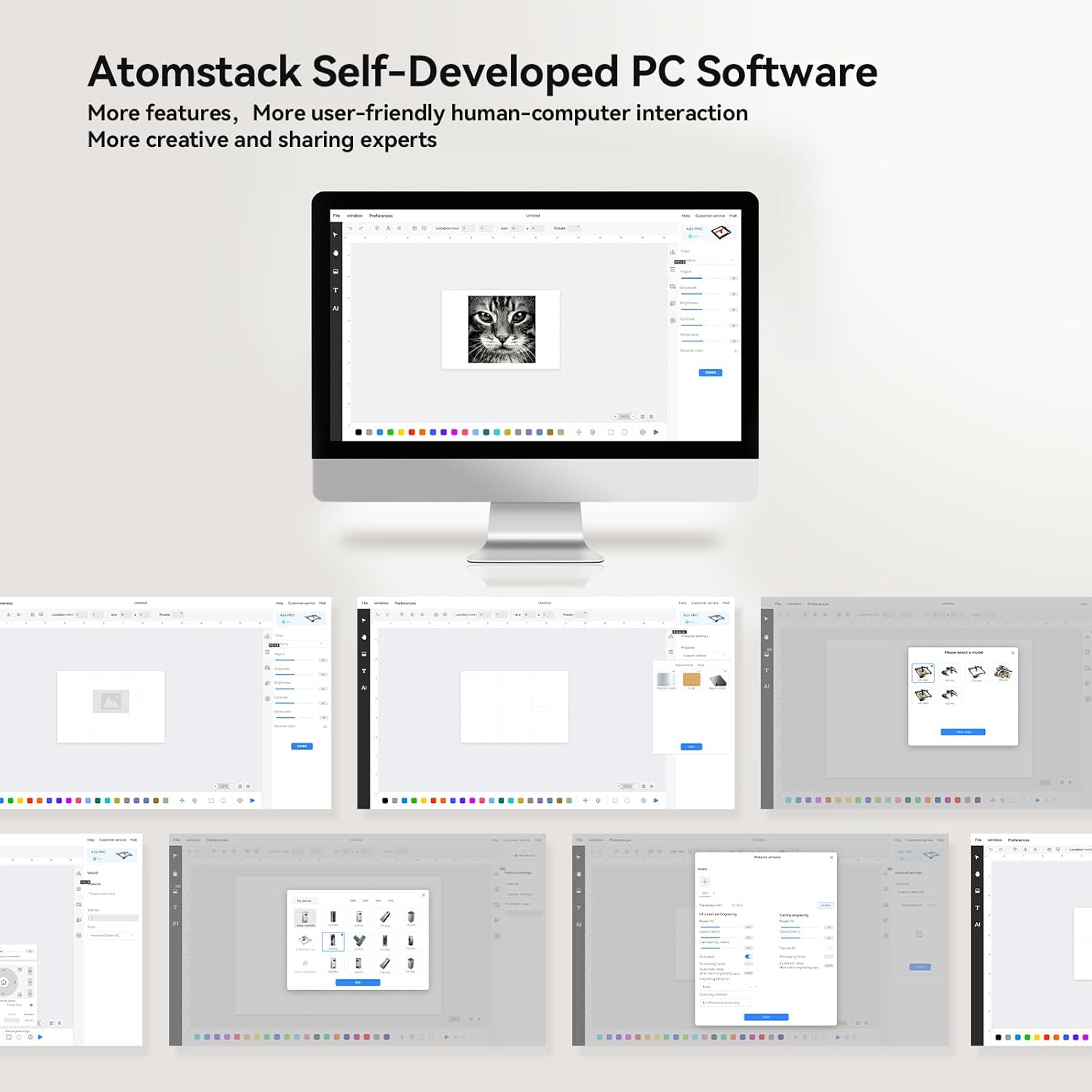
Слика 4.1: Готовоview of the Atomstack self-developed PC software, designed for user-friendly interaction and creative projects.
4.2 Фокусирање ласера
The A6 Pro features a fixed focusing design for quick and accurate focusing.
- Place your material on the engraving bed.
- Adjust the laser module height according to the material thickness until the laser spot is at its smallest and sharpest point. This typically takes less than 10 seconds.
- For precise positioning, utilize the cross-positioning system for visual edge finding and object alignment.

Слика 4.2: The cross-positioning system aids in precise and horizontal engraving, allowing for quick and accurate focusing.
4.3 Engraving and Cutting
The A6 Pro is capable of engraving and cutting various materials with high precision.
- Припрема материјала: Ensure your material is clean and securely placed on the engraving bed.
- Увоз дизајна: Import or create your design within the software.
- Подешавања параметара: Adjust laser power, speed, and passes based on the material type and desired outcome. The 6W laser can cut through 3mm poplar wood, 3mm black acrylic, 3mm poplar plywood, and laser vinyl.
- Почетак операције: Initiate the engraving or cutting process from the software. Monitor the machine closely during operation.

Слика 4.3: The ATOMSTACK A6 Pro is suitable for engraving and cutting a variety of materials including basswood, acrylic, pine wood, paulownia, bamboo, and leather.

Слика 4.4: The A6 Pro demonstrates significantly faster engraving speeds compared to traditional frame machines, enhancing work efficiency.
5. Одржавање
Regular maintenance ensures the longevity and optimal performance of your ATOMSTACK A6 Pro.
- Laser Module Cleaning: The non-clogging laser module is designed to resist lens pollution. However, periodic inspection and gentle cleaning of the laser lens with a suitable optical cleaner and lint-free cloth are recommended to maintain optimal laser performance.
- Чишћење шина: Keep the X-axis metal double guide rails clean and free of dust and debris to ensure smooth and precise movement.
- Генерално чишћење: Wipe down the machine's exterior with a soft, dry cloth. Avoid using abrasive cleaners or solvents.
- Инспекција каблова: Periodically check the tank chain bundled cables for any signs of wear or damage.
КСНУМКС. Решавање проблема
This section addresses common issues you might encounter with your ATOMSTACK A6 Pro.
| Проблем | Могући узрок | Решење |
|---|---|---|
| Машина се не укључује. | Power cable not connected; faulty power adapter; power switch off. | Ensure power cable is securely connected. Check power outlet. Verify power switch is in the ON position. |
| Laser not firing or weak. | Laser module not properly focused; dirty lens; incorrect software settings; laser module malfunction. | Re-focus the laser. Clean the laser lens. Check laser power settings in software. Contact support if issue persists. |
| Engraving/cutting results are inaccurate or distorted. | Loose belts/rails; material not flat; incorrect software settings; vibrations. | Check for any loose components or debris on the guide rails. Ensure material is flat and secured. Verify design and parameter settings in software. Minimize external vibrations. |
| Software not connecting to machine. | Incorrect USB port; driver issues; Wi-Fi connection problems. | Try a different USB port. Reinstall drivers. For Wi-Fi, ensure you are connected to the machine's hotspot. Restart both machine and computer/device. |
7. Спецификације
| Феатуре | Детаљ |
|---|---|
| Модел | А6 Про |
| Бранд | АТОМСТАЦК |
| Ласер Повер | 6W (Optical Output) |
| Величина ласерске тачке | 0.05 x 0.05 mm (Ultra-fine) |
| Подручје гравирања | 370 к 310 мм |
| Мецханицал Прецисион | До 0.02 мм |
| Максимална брзина гравирања | 600 мм/с |
| Повер Инпут | АЦ 24В 5А |
| Димензије производа | 60 к 60 к 17 цм |
| Тежина артикла | 8.26 кг |
| матична плоча | Self-developed 32-bit ESP32 motherboard |
| Supported Materials (Cutting) | 3mm Poplar Wood, 3mm Black Acrylic, 3mm Poplar Plywood, Laser Vinyl |
| Supported Materials (Engraving) | Basswood, Acrylic, Pine wood, Paulownia, Bamboo, Leather, etc. |

Слика 7.1: The ATOMSTACK A6 Pro features an upgraded self-developed 32-bit motherboard for faster data processing.
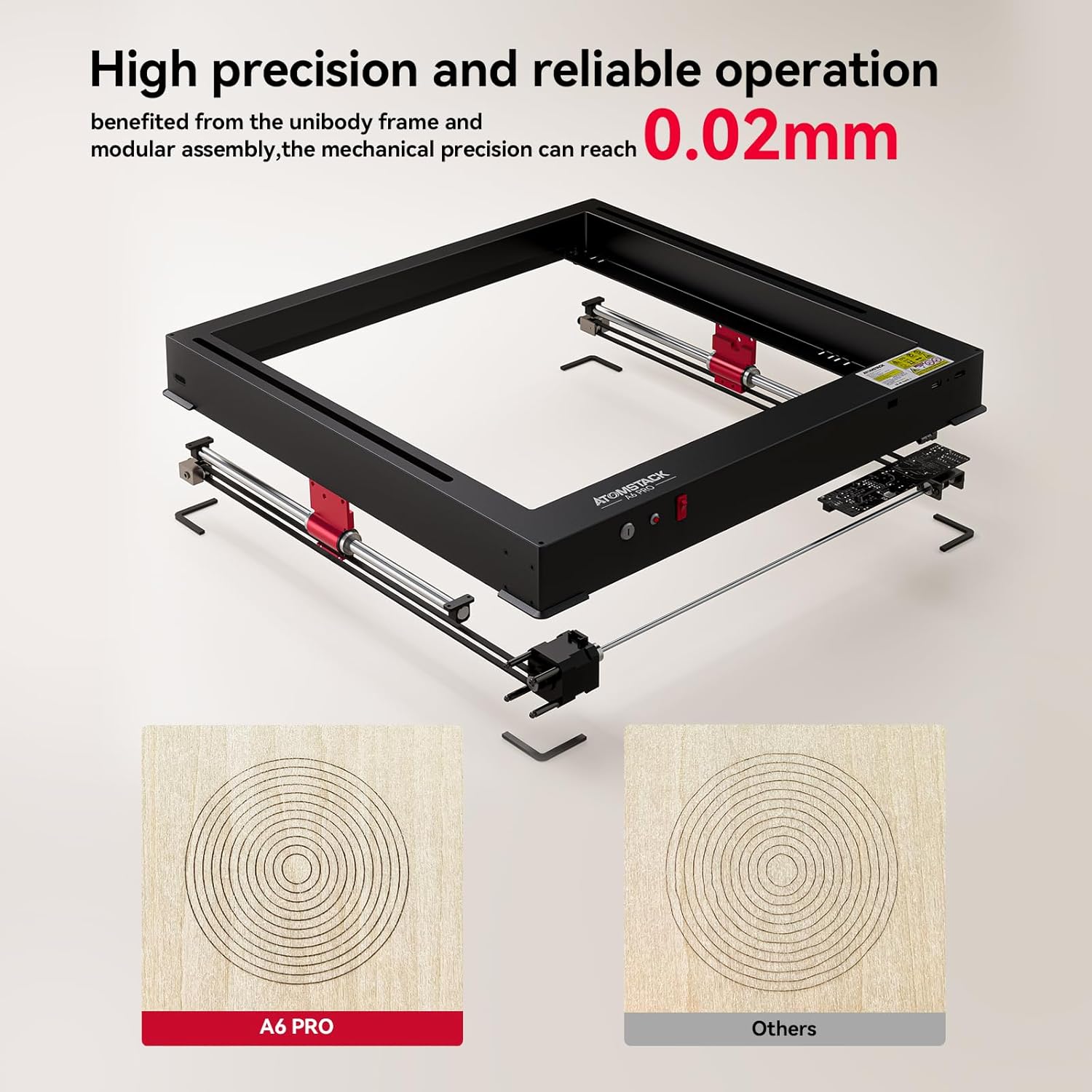
Слика 7.2: The unibody frame and modular assembly contribute to a mechanical precision of up to 0.02mm.
8. Гаранција и подршка
ATOMSTACK provides customer support and warranty services for its products.
- Информације о гаранцији: Please refer to the warranty card included with your product or visit the official ATOMSTACK webсајт за детаљне услове гаранције.
- техничка подршка: For technical assistance, troubleshooting beyond this manual, or spare parts inquiries, please contact ATOMSTACK customer support.
- Контакт е-маил: суппорт@атомстацк.цом
- Произвођач: Shenzhen Atomstack Technologies Co., Ltd.
- Адреса: 17th Floor, Building 3A, Phase II, Intelligent Park, No.76.Baohe Avenue, Baolong Street, Longgang Dist., Shenzhen, 518172China.
Ask a question about this manual
Ask about setup, troubleshooting, compatibility, parts, safety, or missing instructions. Manuals+ will review the question and use this page’s manual context to help answer it.