
1. Увод
The SMARTGEN HES9510-RM is a sophisticated hybrid energy monitoring system designed for remote management and oversight of various power generation and control units. It is compatible with single or multiple HGM9510N genset controllers, HGM9560 bus tie mains parallel controllers, and HES9510 hybrid energy controllers.
This system facilitates automatic start/stop, closing/opening operations, comprehensive data measurement, and real-time alarm display functions. Featuring an intuitive LCD display with touch screen capabilities, the HES9510-RM ensures ease of use and reliable operation. Built around a high-end ARM microprocessor, it communicates with connected controllers via network interfaces and RS485, allowing direct parameter reading and display on its screen for a clear overview of the system layout and branch parameters.
Кључне карактеристике:
- Remote monitoring for single or up to six HGM9510N genset controllers.
- Remote monitoring for a single HGM9560 bus tie mains parallel controller.
- Remote monitoring for a single HES9510 hybrid energy controller.
- High-end ARM microprocessor core with LCD backlight and touch screen for visual display and operation.
- Real-time display of genset parameters and alarm information detected by connected controllers.
2. Производ је готовview
The HES9510-RM unit features a robust design with a clear display for system monitoring and touch controls for interaction.
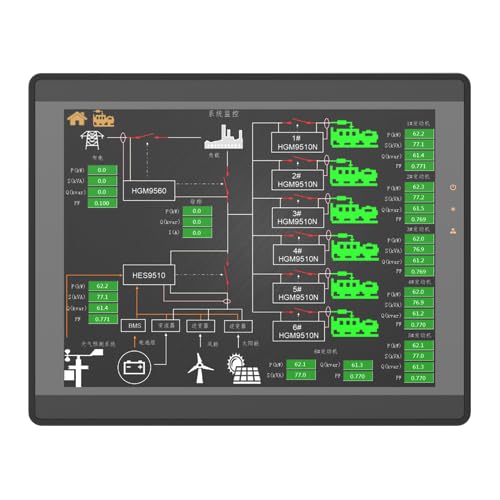
Слика 2.1: Предња страна view of the HES9510-RM display, illustrating the system's graphical interface for energy monitoring.

Слика 2.2: Задња страна view of the HES9510-RM, detailing the enclosure and mounting points.
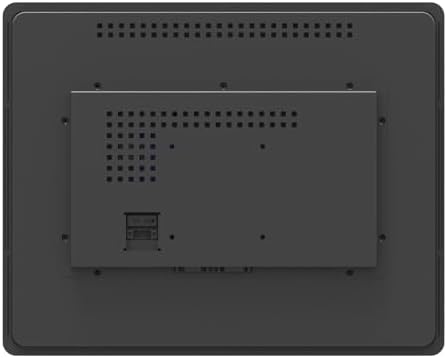
Слика 2.3: Детаљан задњи део view of the HES9510-RM, showing communication interfaces and power input.
3. Подешавање
Proper installation and connection are crucial for the optimal performance of the HES9510-RM system. This section outlines general setup considerations.
3.1 Монтажа
- Select a suitable location for mounting the HES9510-RM, ensuring it is protected from extreme temperatures, moisture, and direct sunlight.
- Ensure adequate ventilation around the unit to prevent overheating. Refer to Figure 2.2 for mounting points and rear panel layout.
- Secure the unit firmly using appropriate fasteners for the chosen mounting surface.
3.2 Електричне везе
- Напајање: Connect the HES9510-RM to a stable power source as specified in the technical specifications. Ensure correct voltagе и поларитет.
- Мрежни интерфејс: For communication with HGM9510N genset controllers and HES9510 hybrid energy controllers, connect the HES9510-RM via its network interface ports. Use standard Ethernet cables.
- РС485 комуникација: For communication with the HGM9560 bus tie mains parallel controller, utilize the RS485 communication port. Ensure proper wiring for data transmission and reception.
Always consult the detailed wiring diagrams provided with the product packaging for specific connection instructions. Incorrect wiring can damage the unit or connected equipment.
4. Упутство за употребу
The HES9510-RM system is designed for user-friendly operation through its LCD touch screen interface.
4.1 Укључивање
- Once all electrical connections are secure, apply power to the HES9510-RM.
- The system will initiate a self-test and boot-up sequence. The main monitoring screen should appear after a short period.
4.2 Навигација кроз интерфејс
- The LCD is a touch screen. Use your finger or a stylus to interact with on-screen elements.
- The main screen typically displays a general system layout, showing the status of connected gensets, hybrid energy systems, and bus tie controllers.
- Tap on specific components or data points to access detailed information, branch parameters, or control options.
4.3 Праћење и контрола
- Data Measurement: Real-time parameters such as voltage, current, frequency, power, and energy consumption are displayed.
- Приказ аларма: The system provides immediate visual and audible alerts for any detected alarms or abnormal conditions from connected controllers. Acknowledge alarms as required.
- даљински управљач: Depending on the configuration and permissions, the HES9510-RM allows for remote auto start/stop, closing/opening of gensets, and other control functions for connected devices. Exercise caution when performing remote control actions.
4.4 Конфигурација система
Access the system settings menu (usually via an icon on the main screen) to configure network settings, display preferences, alarm thresholds, and communication parameters. Refer to the advanced user guide for detailed configuration procedures.
5. Одржавање
Regular maintenance ensures the longevity and reliable operation of your HES9510-RM system.
- Чишћење: Gently clean the LCD touch screen with a soft, lint-free cloth. Do not use abrasive cleaners or solvents.
- вентилација: Ensure that the ventilation openings on the unit are free from dust and obstructions to maintain proper airflow and prevent overheating.
- Ажурирања фирмвера: Periodically check the SMARTGEN-America website for available firmware updates. Follow the provided instructions carefully for any update procedures.
- Провере везе: Routinely inspect all cable connections (power, network, RS485) for secure fit and signs of wear or damage.
КСНУМКС. Решавање проблема
Овај одељак пружа основне кораке за решавање уобичајених проблема. За сложеније проблеме, контактирајте техничку подршку.
6.1 No Power/Display
- Проверите прикључак за напајање и уверите се да је безбедно прикључен.
- Проверите да ли је извор напајања активан и да ли обезбеђује исправну јачину звукаtage.
- Проверите да ли кабл за напајање има видљивих оштећења.
6.2 Грешке у комуникацији
- Ensure all network and RS485 cables are correctly connected and not damaged.
- Verify that the connected controllers (HGM9510N, HGM9560, HES9510) are powered on and functioning correctly.
- Check the communication settings on the HES9510-RM and the connected controllers to ensure they match (e.g., IP addresses, baud rates).
6.3 Unresponsive Touch Screen
- Perform a soft reset of the unit if possible (refer to the advanced user guide for instructions).
- Ensure the screen is clean and free from debris or moisture that might interfere with touch detection.
7. Спецификације
Technical specifications for the SMARTGEN HES9510-RM Hybrid Energy Monitoring System:
| Спецификација | Валуе |
|---|---|
| Бранд | СМАРТГЕН |
| Модел | HES9510-RM |
| ASIN | B0CJ586JBZ |
| Тежина артикла | 2.42 фунте (1.1 килограма) |
| Материјал | Бакар |
| Произвођач | СМАРТГЕН |
| Комуникациони интерфејси | Network Interface, RS485 |
| Дисплаи Типе | LCD with Touch Screen |
| Цоре Процессор | High-end ARM Microprocessor |
8. Гаранција и подршка
For detailed warranty information, please refer to the warranty card included with your product or visit the official SMARTGEN-America webсајт. Гарантни услови обично покривају производне недостатке током одређеног периода од датума куповине.
For technical support, troubleshooting assistance beyond this manual, or inquiries regarding parts and service, please contact SMARTGEN-America customer service. Contact information can usually be found on the product packaging or the manufacturer's webсајту.
Онлине ресурси:
- Check more SMARTGEN products on the smartgen-america webсајту.