
1. Производ је готовview
The PELADN Mini PC WI-6 is a compact and powerful desktop computer designed for various applications, including light office work, 4K video playback, online education, and design tasks. It features the latest 12th Gen Alder Lake-N100 Processor, 16GB DDR4 RAM, and a 512GB M.2 PCIe SSD, offering efficient performance in a small form factor.

Слика 1.1: Предња страна view of the PELADN Mini PC WI-6, showcasing its compact design and sleek blue finish.
Кључне карактеристике:
- Моћан процесор: Equipped with the 12th Gen Alder Lake-N100 Processor (4C/4T, up to 3.4GHz) for enhanced performance.
- Ample Memory & Storage: 16GB DDR4 RAM and 512GB M.2 SSD, with upgrade friendly options.
- 4K Dual Screen Display: Supports 4K video playback and dual 4K@60Hz displays via two HD 2.0 ports.
- Свестрано повезивање: Features Gigabit Ethernet, 2.4G+5.0G dual-band WiFi, and Bluetooth 4.2.
- Компактан дизајн: Lightweight and portable, measuring 124mm x 112mm x 35mm, with VESA mount support.
- Ефикасно хлађење: Built-in fan cooling system to prevent overheating during multitasking.

Figure 1.2: Diagram illustrating the key features of the PELADN Mini PC, including processor, memory, storage, graphics, and connectivity options.
2. Садржај пакета
Молимо вас да проверите садржај пакета након распакивања како бисте били сигурни да су сви предмети присутни и у добром стању.
- 1 x PELADN Mini PC WI-6
- 1 к адаптер за напајање
- КСНУМКС к ХД кабл
- 1 к Упутство за употребу
- 1 x Wall-Mounted Bracket (VESA mount)
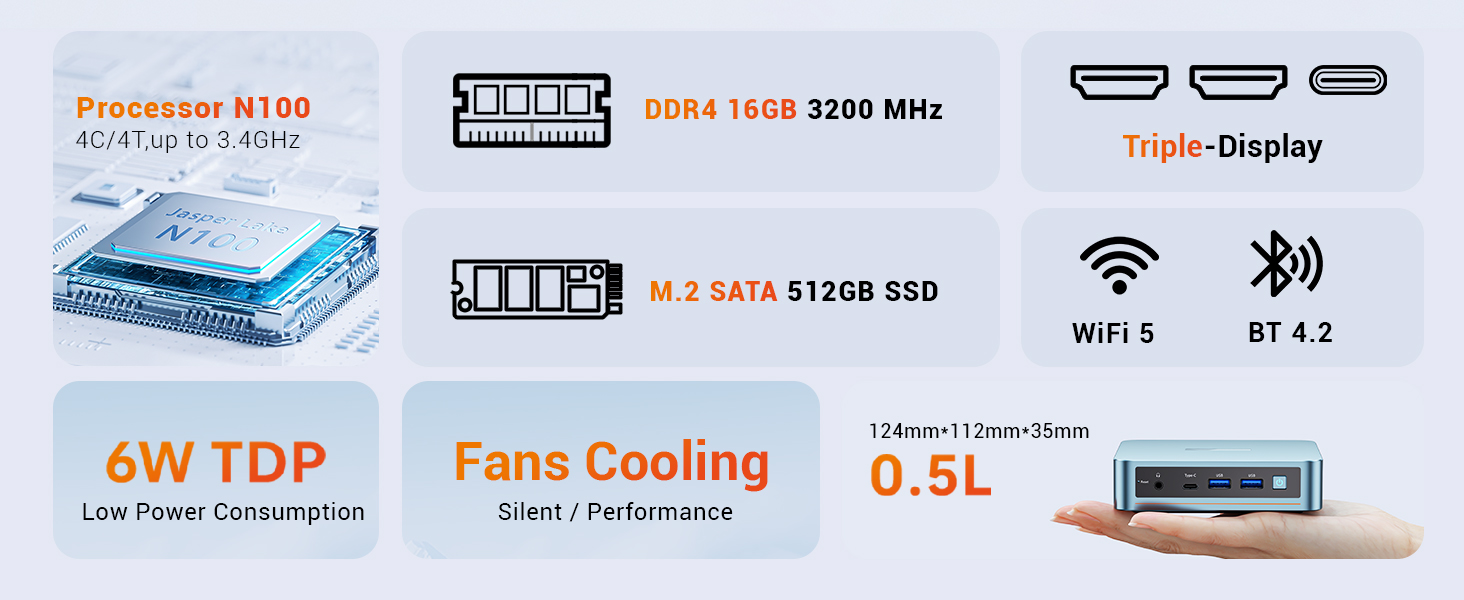
Figure 2.1: An illustration of the items included in the PELADN Mini PC package, such as the PC unit, power adapter, HD cable, user manual, and VESA mount.
3. Водич за подешавање
3.1 Повезивање периферних уређаја
Before powering on your Mini PC, connect the necessary peripherals.
- Повежи екран: Use the provided HD cable to connect your monitor(s) to the HD ports on the back of the Mini PC. The device supports dual 4K@60Hz displays.
- Повежите тастатуру и миш: Plug your wired or wireless keyboard and mouse into the available USB ports (USB 2.0 or USB 3.0). For initial setup, a wired keyboard and mouse are recommended.
- Повежите мрежу: For a wired connection, plug an Ethernet cable into the RJ45 LAN port. For wireless, ensure your WiFi network is available.
- Прикључите напајање: Plug the power adapter into the DC 12V port on the Mini PC, then connect the adapter to a power outlet.

Слика 3.1: Детаљно view of the PELADN Mini PC's front and rear ports, including HD, USB 2.0, RJ45 LAN, DC 12V, Earphone, Type-C, and USB 3.0 ports.
3.2 Укључивање и почетно подешавање
Once all peripherals are connected:
- Press the Power Button located on the front of the Mini PC.
- The device will boot up. As Windows 11 is pre-installed, you will be guided through the initial Windows setup process, including language selection, network configuration, and user account creation.
- Пратите упутства на екрану да бисте довршили подешавање.
3.3 Инсталација VESA носача (опционо)
The included VESA mount allows you to attach the Mini PC to the back of a compatible monitor or TV, saving desk space.
- Secure the VESA bracket to the Mini PC using the provided screws.
- Attach the Mini PC with the bracket to the VESA mounting holes on the back of your display, securing it with screws.

Figure 3.2: Step-by-step guide on how to install the PELADN Mini PC using the VESA mount, showing attachment to the back of a monitor.
4. Упутство за употребу
4.1 Основна употреба
The PELADN Mini PC is optimized for everyday computing tasks.
- Office Applications: Run Microsoft Office suite and other productivity software smoothly.
- Web Прегледање: Enjoy fast and responsive internet browsing.
- Репродукција 4K видеа: Stream and play 4K content with ease, ideal for home theater setups.
- Мултитаскинг: The N100 processor and 16GB RAM allow for efficient switching between multiple applications.

Figure 4.1: An image depicting the PELADN Mini PC in an office setting, demonstrating its suitability for business and everyday use.
4.2 Конфигурација екрана
Utilize the dual HD 2.0 ports for extended desktop or mirrored display setups.
- Connect two monitors to the HD ports for a dual-screen workspace.
- Adjust display settings (resolution, orientation) through Windows Display Settings.
4.3 Network and Bluetooth
The Mini PC offers flexible connectivity options:
- Ви-Фи: Connect to 2.4G or 5.0G wireless networks for internet access.
- Етхернет: For a stable and fast connection, use the Gigabit Ethernet port.
- Блуетоотх КСНУМКС: Pair Bluetooth-enabled devices such as headphones, speakers, or input devices.
5. Одржавање
5.1 Општа нега
- Keep the Mini PC in a clean, dry environment, away from direct sunlight and extreme temperatures.
- Avoid placing objects on top of the unit that could obstruct airflow.
- Очистите спољашњост меком, сувом крпом. Не користите течна средства за чишћење.
5.2 Систем хлађења
The PELADN Mini PC features a built-in cooling fan to maintain optimal operating temperatures. Ensure the ventilation holes are not blocked to allow proper airflow.

Слика 5.1: Експлодирани view of the PELADN Mini PC, highlighting the internal components including the cooling fan and SSD, which contribute to its silent and efficient performance.
5.3 Ажурирања софтвера
Regularly update your Windows operating system and drivers to ensure system stability, security, and optimal performance.
- Идите на Подешавања система Windows > Ажурирање и безбедност > Windows Update.
- Check for and install any available updates.
КСНУМКС. Решавање проблема
This section addresses common issues you might encounter with your PELADN Mini PC.
| Проблем | Могући узрок | Решење |
|---|---|---|
| No power/Does not turn on | Адаптер за напајање није правилно повезан; Проблем са утичницом. | Ensure power adapter is securely connected to both the PC and the power outlet. Try a different outlet. |
| Нема приказа на монитору | HD cable loose or faulty; Incorrect input selected on monitor. | Check HD cable connections. Ensure monitor is set to the correct input source (e.g., HDMI 1, HDMI 2). Try a different HD cable or monitor. |
| Нема интернет конекције (Wi-Fi) | Wi-Fi disabled; Incorrect password; Router issue. | Check Wi-Fi settings in Windows. Verify Wi-Fi password. Restart your router. |
| No internet connection (Ethernet) | Ethernet cable loose or faulty; Network driver issue. | Ensure Ethernet cable is securely connected. Try a different cable. Check network adapter status in Device Manager. |
| System slow or unresponsive | Too many applications running; Low storage space; Overheating. | Close unnecessary applications. Free up disk space. Ensure proper ventilation around the PC. |
For more advanced troubleshooting or persistent issues, please refer to the official PELADN support resources or contact customer service.
Напредне функције:
- Аутоматско укључивање: Configure in BIOS for automatic startup.
- Wake on LAN (WoL): Enable in BIOS and network adapter settings to wake the PC remotely.
- ПКСЕ покретање: Preboot Execution Environment support for network booting.
7. Спецификације
| Феатуре | Детаљ |
|---|---|
| Бранд | ПЕЛАДН |
| Број модела | ВИ-КСНУМКС |
| Процесор | 12th Gen Intel Alder Lake-N100 (4C/4T, up to 3.4GHz, 6W TDP) |
| РАМ | 16GB DDR4 (Max 3200MHz) |
| Складиштење | 512GB M.2 PCIe SSD |
| Графика | Intel UHD Graphics (750MHz max), Integrated |
| Дисплаи Оутпут | 2 x HD 2.0 (Supports 4K@60Hz Dual Display) |
| УСБ портови | 2 x USB 3.0, 2 x USB 2.0, 1 x Type-C (Data/Video) |
| Мрежа | Gigabit Ethernet (RJ45), Wi-Fi 2.4G+5.0G |
| Блуетоотх | Блуетоотх 4.2 |
| Аудио | 1 x Audio Jack (HP&MIC) |
| Оперативни систем | Windows 11 Pro (Pre-installed) |
| Димензије (ДкШкВ) | 4.88 к 4.41 к 1.38 инча (124 мм к 112 мм к 35 мм) |
| Тежина | 1.76 фунти |
| Боја | Плава |
8. Гаранција и подршка
PELADN is committed to providing high-quality products and excellent customer service.
- гаранција: The PELADN Mini PC comes with a 12-month (1 year) warranty from the date of purchase.
- враћа: Enjoy a 30-day no-reason return and exchange policy.
- техничка подршка: Professional technical staff are available to assist you.
- Време одговора: Циљ нам је да одговоримо на све упите у року од 24 сата.
For support, please visit the official PELADN store or contact their customer service directly. You can find more information and contact details at the PELADN Store on Amazon.
Figure 8.1: An image detailing PELADN's customer support offerings, including technical support, 24-hour reply, 30-day return policy, and 12-month warranty.