
СУНОЛ К8
Упутство за употребу GM20 правих бежичних слушалица
Модел: К8
Увод
Thank you for choosing the SUNOL GM20 True Wireless Earbuds. This manual provides detailed instructions on how to set up, operate, and maintain your earbuds to ensure optimal performance and longevity. Please read this manual thoroughly before using the product.
Производ је завршенview

Image: The GM20 True Wireless Earbuds in orange, shown with their matching charging case. The charging case features an LED display indicating battery percentage.
The GM20 True Wireless Earbuds are designed for a superior audio experience with advanced features:
- Блуетоотх 5.3 технологија: Ensures faster pairing, more stable connection, and lower power consumption with an effective range of up to 10 meters.
- Интегрисани микрофон: High-quality microphone with environmental noise reduction for clear hands-free calls.
- Продужена репродукција: Up to 48 hours of total playback time with the 600mAh charging case, which can recharge the earbuds four times.
- ЛЕД дисплеј: The charging case features an LED display to show the power levels of both the earbuds and the charging case.
- Водоотпорни дизајн: IPX8 waterproof nano-coating makes the earbuds suitable for various activities, including sports.
- Удобно пристајање: Ergonomic in-ear design with multiple ear tip sizes for prolonged comfortable wear.
Шта је у кутији
Upon opening your GM20 True Wireless Earbuds package, you should find the following items:
- GM20 True Wireless Earbuds (Left and Right)
- Футрола за пуњење
- Кабл за пуњење
- Више величина врхова за уши
- Кориснички приручник (овај документ)
Сетуп
1. Пуњење слушалица и футроле
Пре прве употребе, уверите се да су и слушалице и кућиште за пуњење потпуно напуњене.
- Place the earbuds into the charging case. Ensure they are correctly seated; the LED display on the case will show charging status.
- Connect the charging cable to the charging port on the case and to a USB power source. The LED display will indicate the charging progress of the case.
- A full charge for the case typically takes a few hours. The earbuds will charge automatically when placed inside the powered case.

Image: The GM20 charging case displaying "100" on its LED screen, indicating a full charge. An earbud is shown next to it, ready for use.
2. Упаривање са вашим уређајем (упаривање у једном кораку)
Слушалице GM20 имају аутоматско упаривање ради практичности.
- Прво упаривање:
- Отворите кућиште за пуњење и извадите обе слушалице. Аутоматски ће се укључити и ући у режим упаривања.
- На свом уређају (паметном телефону, таблету итд.) омогућите Блутут.
- Тражи Bluetooth devices and select "GM20 TWS" from the list.
- Када се повежете, чућете звук потврде и слушалице ће бити спремне за употребу.
- Поновно упаривање: The earbuds will automatically connect to the last paired device when taken out of the charging case.
- If the earbuds do not connect automatically, ensure Bluetooth is enabled on your device and select "GM20 TWS" from your Bluetooth settings.
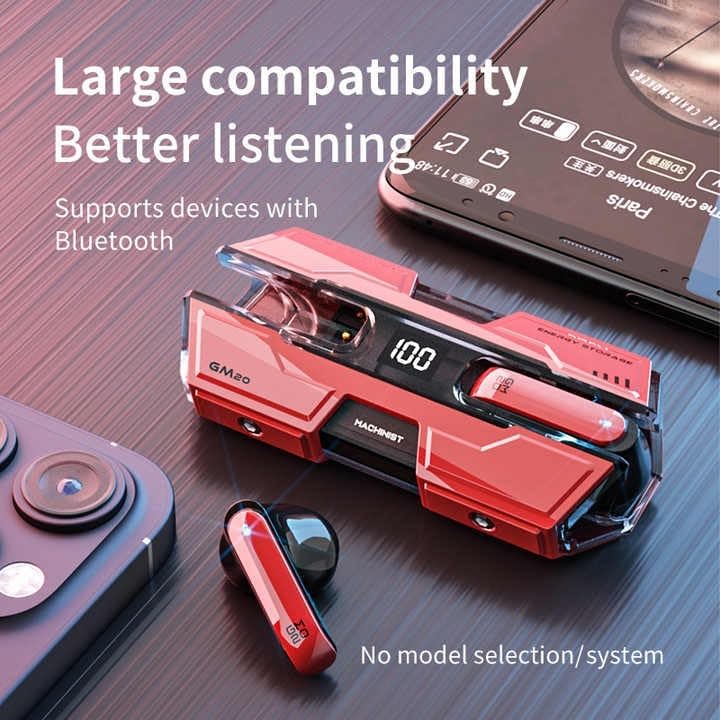
Image: The GM20 earbuds and charging case positioned near a smartphone, emphasizing their broad compatibility with Bluetooth-enabled devices.
Упутство за употребу
Контроле за слушалице
The GM20 earbuds feature a multifunction button on each earbud for easy control of audio playback and calls.
| Акција | Функција |
|---|---|
| Један притисак (лева/десна слушалица) | Пуштање/паузирање музике, одговарање/прекидање позива |
| Двапут притисните (лева слушалица) | Претходна песма |
| Двоструки притисак (десна слушалица) | Нект Сонг |
| Дуги притисак (2 секунди) | Одбиј позив, активирај гласовног асистента |
| Дуги притисак (5 секунди) | Укључивање/искључивање |
Ношење слушалица
For optimal sound quality and comfort, ensure the earbuds are properly seated in your ears. Experiment with the different sizes of ear tips provided to find the best fit for your ears.

Слика: Експлодирана view diagram of an earbud, illustrating its internal components such as the 13mm moving coil and composite diaphragm, which contribute to high-resolution sound.
Одржавање
Proper maintenance will extend the life of your GM20 earbuds.
- Чишћење: Редовно чистите слушалице и кућиште за пуњење меком, сувом крпом која не оставља влакна. Не користите абразивна средства за чишћење или раствараче.
- Отпорност на воду: The earbuds are IPX8 waterproof, meaning they are protected against prolonged immersion in water. However, the charging case is not waterproof. Avoid exposing the charging case to liquids. Always ensure earbuds are dry before placing them back in the charging case.
- Складиштење: Када се не користе, чувајте слушалице у њиховој футроли за пуњење како бисте их заштитили и одржали напуњеним. Чувајте их на хладном и сувом месту, даље од екстремних температура.
- Одржавање батерије: Да бисте сачували век трајања батерије, избегавајте често потпуно пражњење слушалица и кућишта за пуњење. Редовно их пуните, чак и ако их не користите стално.
Решавање проблема
If you encounter issues with your GM20 earbuds, try the following solutions:
- Слушалице се не упарују:
- Уверите се да су обе слушалице потпуно напуњене.
- Искључите Блутут на уређају, а затим га поново укључите.
- Forget "GM20 TWS" from your device's Bluetooth settings and attempt to re-pair.
- Вратите слушалице у футролу, затворите поклопац, сачекајте неколико секунди, па га отворите и покушајте поново.
- Нема звука или је јачина звука ниска:
- Проверите ниво јачине звука и на уређају и на слушалицама.
- Уверите се да су слушалице правилно повезане са вашим уређајем.
- Очистите мрежицу звучника слушалица од свих остатака.
- Sound distortion or crackling:
- Уверите се да су слушалице у домету Bluetooth везе вашег уређаја од 10 метара.
- Смањите сметње тако што ћете се удаљити од других бежичних уређаја или јаких електромагнетних поља.
- Покушајте поново да упарите слушалице.
- Слушалице се не пуне:
- Уверите се да је кабл за пуњење безбедно повезан и са кућиштем и са извором напајања.
- Проверите да ли је порт за пуњење на кућишту чист и без прљавштине.
- Пробајте други кабл за пуњење или адаптер за напајање.
Спецификације
| Феатуре | Детаљ |
|---|---|
| Назив модела | K8 |
| Блуетоотх верзија | 5.3 |
| Блуетоотх домет | 10 метара |
| Трајање батерије (слушалице) | Approx. 8-10 hours (single charge) |
| Трајање батерије (са кућиштем за пуњење) | До 48 сати |
| Капацитет батерије кућишта за пуњење | 600мАх |
| Ниво отпорности на воду | ИПКС8 (само слушалице) |
| Фреквенцијски одзив | 20 Hz - 20 kHz |
| Импеданса | 32 Охм |
| Контролни метод | Додир/дугме |
| Материјал | акрилонитрил бутадиен стирен (АБС) |
| Тежина артикла | 14.4 унци (цело паковање) |
Гаранција и подршка
For warranty information and customer support, please refer to the documentation included with your purchase or visit the official SUNOL website. If you experience any issues not covered in this manual, please contact SUNOL customer service for assistance.
Сачувајте доказ о куповини за гаранцијске захтеве.
Ask a question about this manual
Ask about setup, troubleshooting, compatibility, parts, safety, or missing instructions. Manuals+ will review the question and use this page’s manual context to help answer it.