
Увод
This manual provides detailed instructions for the setup, operation, and maintenance of your infactory FWS-100 Radio-Controlled Weather Station. Please read this manual thoroughly before using the device to ensure proper function and longevity.
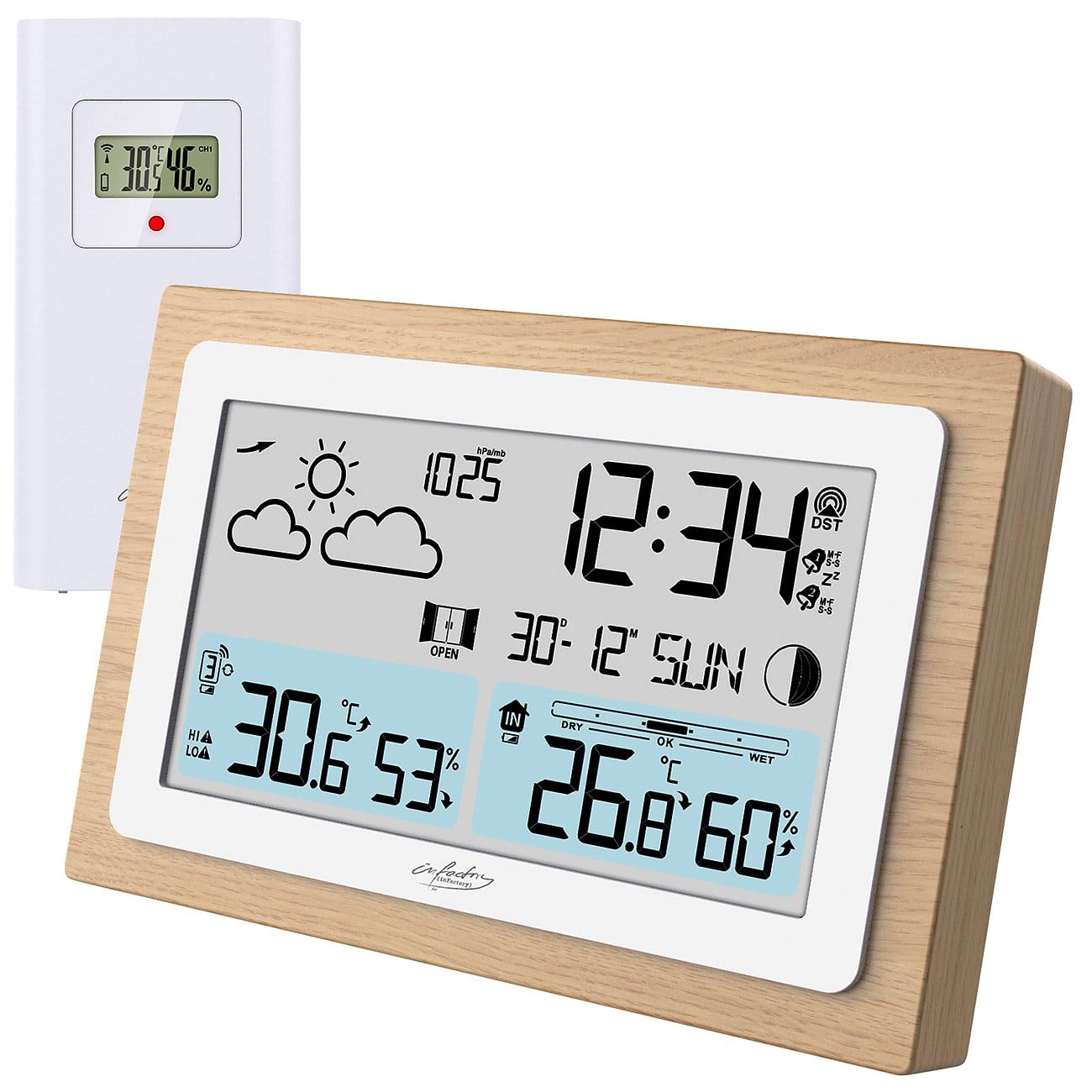
Image: The infactory FWS-100 weather station with its main unit featuring a wooden frame and a separate white outdoor sensor.
Садржај пакета
- 1x infactory FWS-100 Radio-Controlled Weather Station (main unit)
- 1x Wireless Outdoor Sensor (IP44 splash-proof)
- 1x User Manual (refer to this translated version for English)
Напомена: Batteries (2x AAA for main unit, 2x AAA for outdoor sensor) and a DC power adapter are not included and must be purchased separately.
Кључне карактеристике
- LCD display (11.2 x 6.2 cm) with backlight
- Simultaneous display of indoor and outdoor temperature and humidity
- Weather trend forecast
- Radio-controlled time (DCF signal) with manual setting option
- 12/24 hour format selection
- Date and moon phase display
- Alarm clock with up to two adjustable alarms and snooze function
- Real wood frame design
- Wireless outdoor sensor with up to 60m transmission range (open area)
- Expandable with up to 2 additional outdoor sensors (sold separately)
- Temperature range: Indoor -9.9°C to 50°C; Outdoor -40°C to 70°C
- Power supply: 2x AAA batteries or DC power adapter (not included) for main unit; 2x AAA batteries (not included) for outdoor sensor.
Сетуп
1. Инсталација батерије
Главна јединица:
- Отворите поклопац одељка за батерије на задњој страни главне јединице.
- Уметните 2x AAA батерије, водећи рачуна о исправном поларитету (+/-).
- Затворите поклопац одељка за батерије.
- Alternatively, connect a DC 5V power adapter (not included) to the DC jack for continuous power and backlight.
Спољни сензор:
- Open the battery compartment cover on the back of the outdoor sensor.
- Уметните 2x AAA батерије, водећи рачуна о исправном поларитету (+/-).
- Затворите поклопац одељка за батерије.

Слика: Позади view of the main weather station unit, showing the battery compartment and control buttons.
2. Постављање сензора
Place the outdoor sensor in a shaded, dry location, protected from direct sunlight and rain. Ensure it is within the 60-meter transmission range of the main unit. Avoid placing it near large metal objects or electronic devices that may interfere with the wireless signal. The sensor is splash-proof (IP44) but not fully waterproof.
3. Почетна синхронизација
After inserting batteries into both units, the main unit will automatically attempt to connect with the outdoor sensor and receive the DCF radio signal for time synchronization. This process may take several minutes. Ensure both units are close to each other during initial setup.
Video: This video demonstrates the general features and setup of a wireless weather station, including sensor placement and display functions.
Упутство за употребу
1. Прикажи прекоview
ЛЦД екран приказује разне информације истовремено:
- Горе лево: Weather forecast icons (sunny, cloudy, rainy, etc.)
- Горе десно: Time, DCF signal indicator, alarm indicators (Zz for snooze, bell for alarm)
- средина: Date and day of the week, moon phase
- Доњи леви: Outdoor temperature and humidity, signal strength for outdoor sensor
- Доле десно: Indoor temperature and humidity, comfort level indicator (DRY, OK, WET)

Слика: Детаљна view of the weather station's LCD display, showing indoor/outdoor temperatures, humidity, time, date, and weather forecast icons.
2. Подешавања времена и датума
The station automatically sets the time via the DCF radio signal. If the signal is not received or you wish to set it manually:
- Притисните и држите "ПОСТАВИ" button (or similar, refer to button layout on back) to enter time setting mode.
- Користите "+" и "-" дугмад за подешавање вредности.
- Притисните "ПОСТАВИ" again to confirm and move to the next setting (e.g., 12/24 hour format, hour, minute, year, month, day).
3. Функције аларма
The station supports up to two alarms.
- Притисните тастер "АЛАРМНИ" button (or similar) to view времена аларма.
- Притисните и држите "АЛАРМНИ" за улазак у режим подешавања аларма.
- Користите "+" и "-" да подесите време аларма.
- Притисните "АЛАРМНИ" to confirm and switch between Alarm 1 and Alarm 2 settings.
- Да бисте активирали/деактивирали аларм, притисните дугме "АЛАРМНИ" више пута док се икона аларма не појави/нестане.
- When an alarm sounds, press any button (except snooze) to stop it, or press the "SNOOZE" button for a temporary delay.
4. Избор јединице температуре
Да бисте прелазили између Целзијуса (°C) и Фаренхајта (°F), притисните "C/F" button (or similar, often combined with another button). This usually affects both indoor and outdoor temperature displays.
5. Adding Additional Sensors
The weather station can connect to up to two additional outdoor sensors (not included). To add a new sensor:
- Install batteries in the new sensor.
- On the main unit, press the "CH" (Channel) button to cycle through channels.
- Притисните и држите "CH" button to initiate a search for new sensors. The main unit will display the new sensor's data once connected.
Одржавање
- Чишћење: Wipe the main unit and sensor with a soft, dry cloth. Do not use abrasive cleaners or solvents.
- Замена батерије: Replace batteries in both units when the low battery indicator appears on the display. Ensure correct polarity.
- Складиштење: Ако уређај складиштите дуже време, извадите све батерије да бисте спречили цурење.
Решавање проблема
| Проблем | Могући узрок | Решење |
|---|---|---|
| Нема дисплеја на главној јединици | Dead batteries or incorrect polarity. No power adapter connected. | Replace batteries or check polarity. Connect DC power adapter. |
| Outdoor temperature/humidity not displayed | Sensor out of range, dead sensor batteries, or interference. | Move sensor closer to main unit. Replace sensor batteries. Re-synchronize sensor (see Setup). Avoid interference sources. |
| Нетачан приказ времена | Weak DCF signal or manual setting required. | Move unit to a location with better signal reception. Manually set the time (see Operating Instructions). |
| Inaccurate outdoor temperature | Сензор је изложен директној сунчевој светлости или извору топлоте. | Relocate the outdoor sensor to a shaded area, away from heat sources. |
Спецификације
- Бренд: infactory
- Модел: FWS-100 (ZX7450)
- Тип приказа: ЛЦД
- Величина ЛЦД екрана: 11.2 к 6.2 цм
- Опсег унутрашње температуре: -9.9°Ц до 50°Ц (14.2°Ф до 122°Ф)
- Опсег спољне температуре: -40°Ц до 70°Ц (-40°Ф до 158°Ф)
- Прецизност температуре: ±0.1°Ц
- Опсег бежичног преноса: До 60 метара (отворена површина)
- Outdoor Sensor Protection: ИП44 (отпоран на прскање)
- Power Supply (Main Unit): 2x AAA batteries (not included) or DC 5V power adapter (not included)
- Power Supply (Outdoor Sensor): 2к ААА батерије (нису укључене)
- Димензије (главна јединица): 14.8 к 9.8 к 2.6 цм
- Dimensions (Outdoor Sensor): 9.7 к 5 к 3.2 цм
- Тежина (главна јединица): 256 г
- Повезивање: Бежични
- Посебне карактеристике: Radio-controlled clock, dual alarms, snooze, moon phase, weather forecast, comfort indicator.
Гаранција и подршка
Warranty information is typically provided with your purchase. Please refer to the documentation included in your product packaging or contact your retailer for details regarding warranty coverage and customer support. For technical assistance, please contact infactory customer service.