
1. Производ је готовview
The APPS2Car Magic Keyboard Case is designed to enhance the functionality of your iPad, providing a keyboard, multi-touch trackpad, and a protective case. It features a floating cantilever stand, backlit keys, and IPX7 waterproof protection.
Видео: Готовоview of the APPS2Car Magic Keyboard Case features and design.
Video: Demonstration of the APPS2Car Keyboard Case for iPad 11 inch and iPad Air.

Image: The keyboard case is designed to be portable and lightweight, making it easy to carry.
2. Kompatibilni modeli
Ова футрола са тастатуром је компатибилна са следећим моделима iPad-а:
- iPad Air (5. генерација)
- iPad Air (4. генерација)
- iPad Pro 11 инча (4. генерација)
- iPad Pro 11 инча (3. генерација)
- iPad Pro 11 инча (2. генерација)
- iPad Pro 11 инча (1. генерација)
To ensure compatibility, please check the model number (starting with 'A') on the back of your iPad.
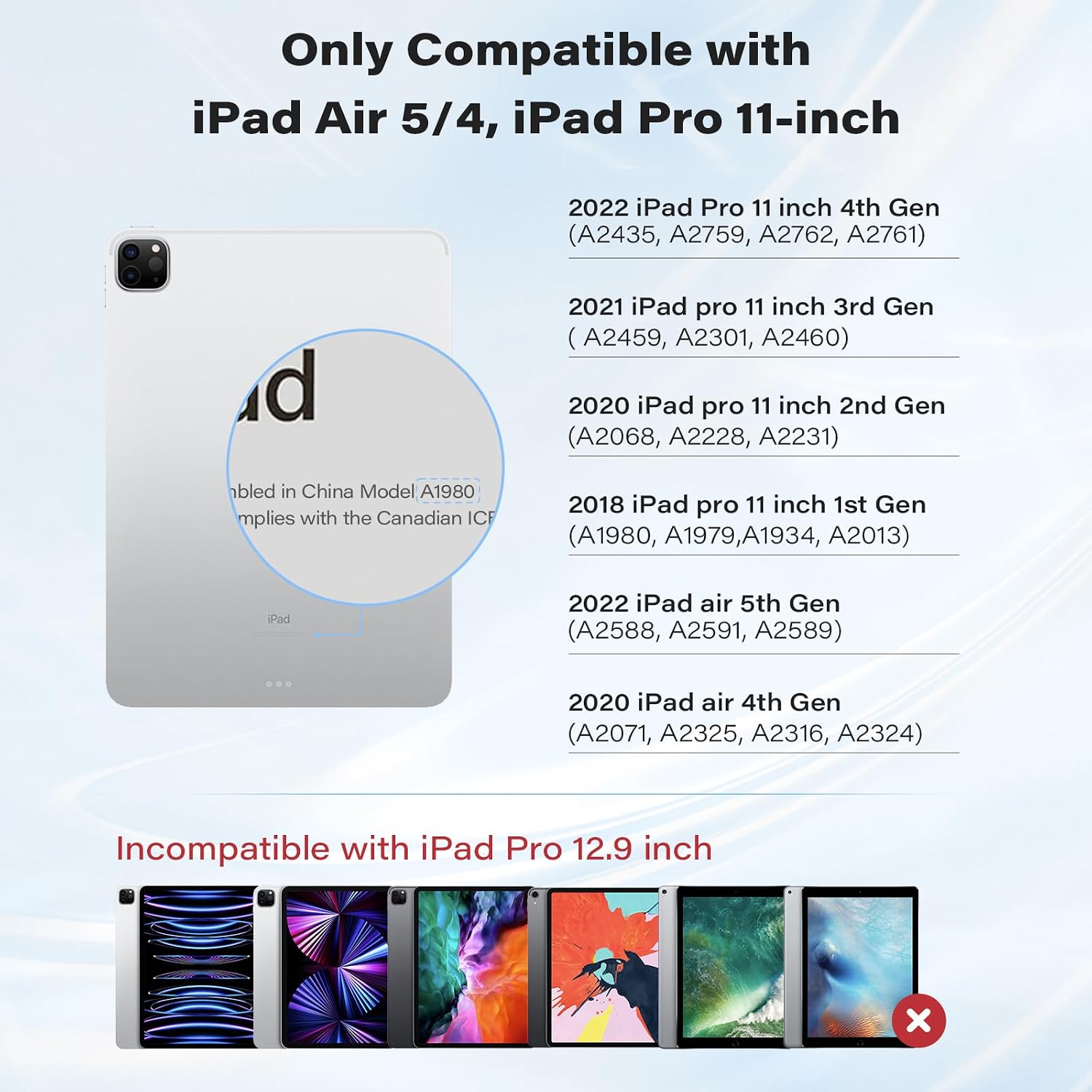
Image: Visual guide for compatible iPad models.
Video: Short demonstration confirming compatibility with iPad Pro 11 inch.
3. Шта је у кутији
Након отварања пакета, наћи ћете следеће артикле:
- APPS2Car Magic Keyboard Case
- Упутство за употребу
4. Упутства за подешавање
4.1 Блуетоотх упаривање
Пратите ове кораке да бисте повезали футролу са тастатуром са вашим iPad-ом путем Bluetooth-а:
- Switch on the keyboard using the power button.
- Hold down the 'option' key and the 'B' key simultaneously to activate Bluetooth pairing mode. The Bluetooth indicator light on the keyboard will flash.
- На вашем iPad-у идите на Подешавања > Блуетоотх.
- Ensure Bluetooth is toggled 'On'.
- In the 'MY DEVICES' list, locate and tap 'APPS2Car' to initiate pairing.
- Confirm the pairing request on your iPad. The keyboard will show as 'Connected' once successful.
If pairing is unsuccessful, turn off the keyboard, disable Bluetooth on your iPad, and repeat the steps.

Image: The keyboard utilizes Bluetooth 5.2 Low Energy (BLE) for stable and efficient connection.
Video: Step-by-step guide on how to pair the keyboard via Bluetooth.
5. Упутство за употребу
5.1 Магнетно постоље
Attach your iPad to the magnetic back cover. The floating cantilever stand allows for smooth adjustment to various viewing angles, providing a laptop-like experience.

Image: The magnetic stand offers a 135° viewing angle and features a durable aluminum alloy hinge.
5.2 Мулти-тач трекпед
The integrated high-precision trackpad supports full multi-touch gestures for navigation. Ensure your iPadOS is updated to the latest version for optimal trackpad functionality.

Image: The trackpad features AG glass with an anti-fingerprint coating, offering precise and responsive control.
Trackpad Settings:
To adjust pointer sensitivity and enable tap-to-click or two-finger secondary click:
- Иди на Подешавања > генерал > Трацкпад.
- Adjust the 'TRACKING SPEED' slider to your preference.
- Toggle 'Tap to Click' and 'Two Finger Secondary Click' to 'On' as desired.
Video: Instructions on how to set up trackpad sensitivity and features.
5.3 Позадинско осветљење тастера
The keyboard features backlit keys with adjustable brightness levels for comfortable typing in various lighting conditions.
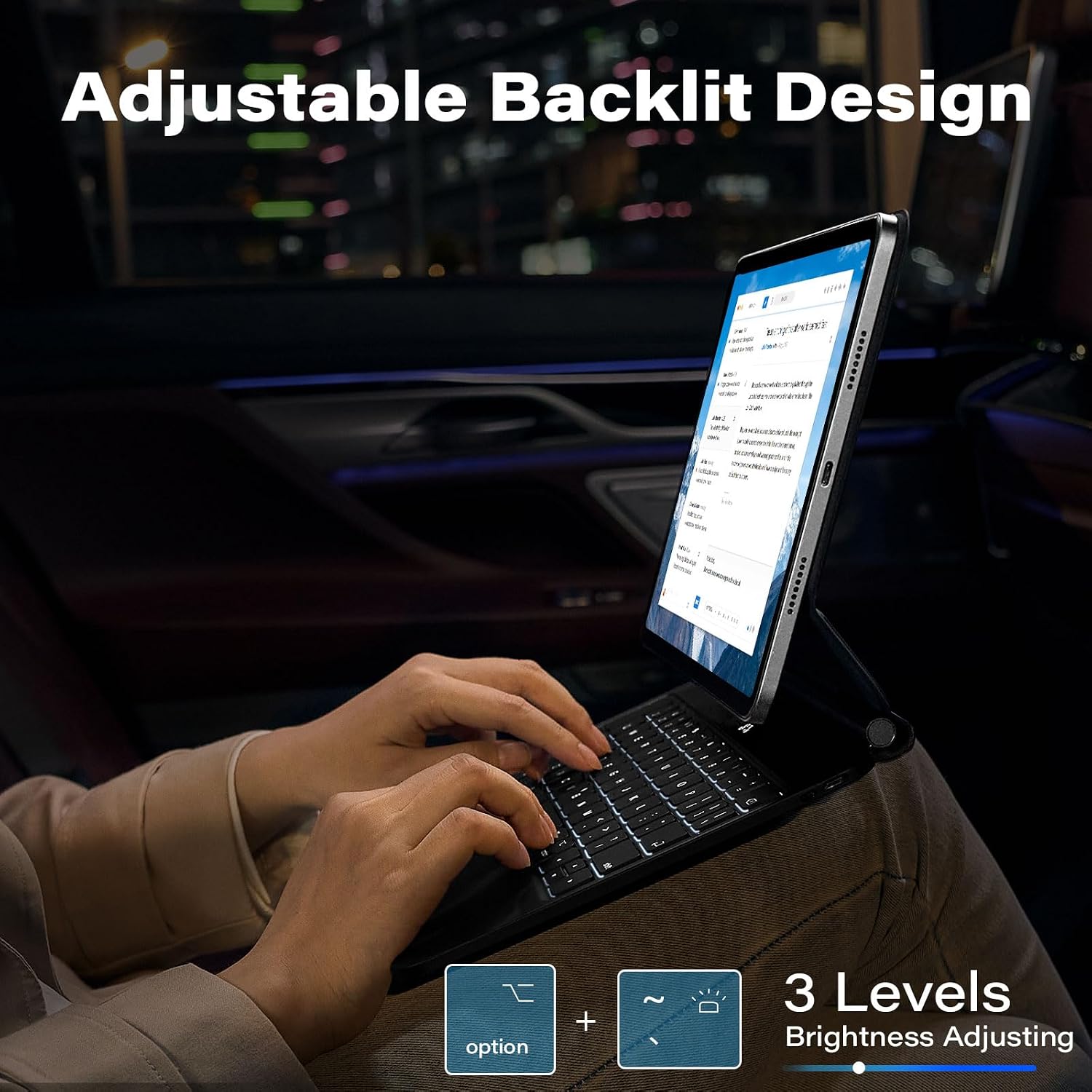
Image: The keyboard offers 3 levels of adjustable backlighting.
6. Одржавање
6.1 IPX7 Waterproof & Dustproof Protection
The keyboard case is designed with IPX7-rated protection, making it resistant to spills, splashes, and dust. In case of spills, gently wipe the surface with a clean, dry cloth.

Image: The keyboard features IPX7 waterproof protection against liquid spills.
КСНУМКС. Решавање проблема
7.1 Проблеми са повезивањем
- Уверите се да је тастатура напуњена.
- Turn off the keyboard and then turn it back on.
- На вашем iPad-у идите на Подешавања > Блуетоотх, toggle Bluetooth off and then on again.
- If the issue persists, 'Forget This Device' for 'APPS2Car' in your iPad's Bluetooth settings and re-pair the keyboard.
7.2 Trackpad or Keyboard Performance
- Ensure your iPad is updated to the latest iOS version. The keyboard is optimized for recent software enhancements.
- Поново покрените iPad и тастатуру.
- If using an earlier iOS version, update your system, restart Bluetooth, and reconnect for optimal functionality.
8. Спецификације
| Феатуре | Детаљ |
|---|---|
| Бранд | АППС2Цар |
| Број модела | APPS2Car Magic Keyboard 5 |
| Компатибилни уређаји | iPad Pro 11 inch (1st, 2nd, 3rd, 4th Gen), iPad Air (4th, 5th Gen) |
| Технологија повезивања | Блуетоотх 5.2 ниске енергије (БЛЕ) |
| Опис тастатуре | Вишенаменски |
| Посебне карактеристике | Backlit, Foldable, Multi-Touch Trackpad, Magnetic Stand, IPX7 Waterproof |
| Боја | Athens Black |
| Позадинско осветљење тастатуре | Single Color, 3 Adjustable Levels |
| Материјал | Акрилонитрил бутадиен стирен |
| Извор напајања | Баттери Поверед |
| Распоред тастатуре | КВЕРТИ |
| Број кључева | 64 |
| Произвођач | Wiiki-Tech |
9. Гаранција и подршка
The APPS2Car Magic Keyboard Case comes with a 12-month manufacturer warranty. For any product inquiries, technical assistance, or warranty claims, please contact APPS2Car customer support through the retailer where the product was purchased.