
1. Увод
This manual provides detailed instructions for the operation and maintenance of your FANGOR F-CD-143 Portable CD Player and Bluetooth Speaker. This device offers a versatile audio experience, functioning as a standalone portable CD player or combining with its detachable Bluetooth speaker base for enhanced sound. Please read this manual thoroughly before using the product to ensure proper function and longevity.
2. Садржај пакета
Please check the package contents upon unboxing to ensure all items are present.
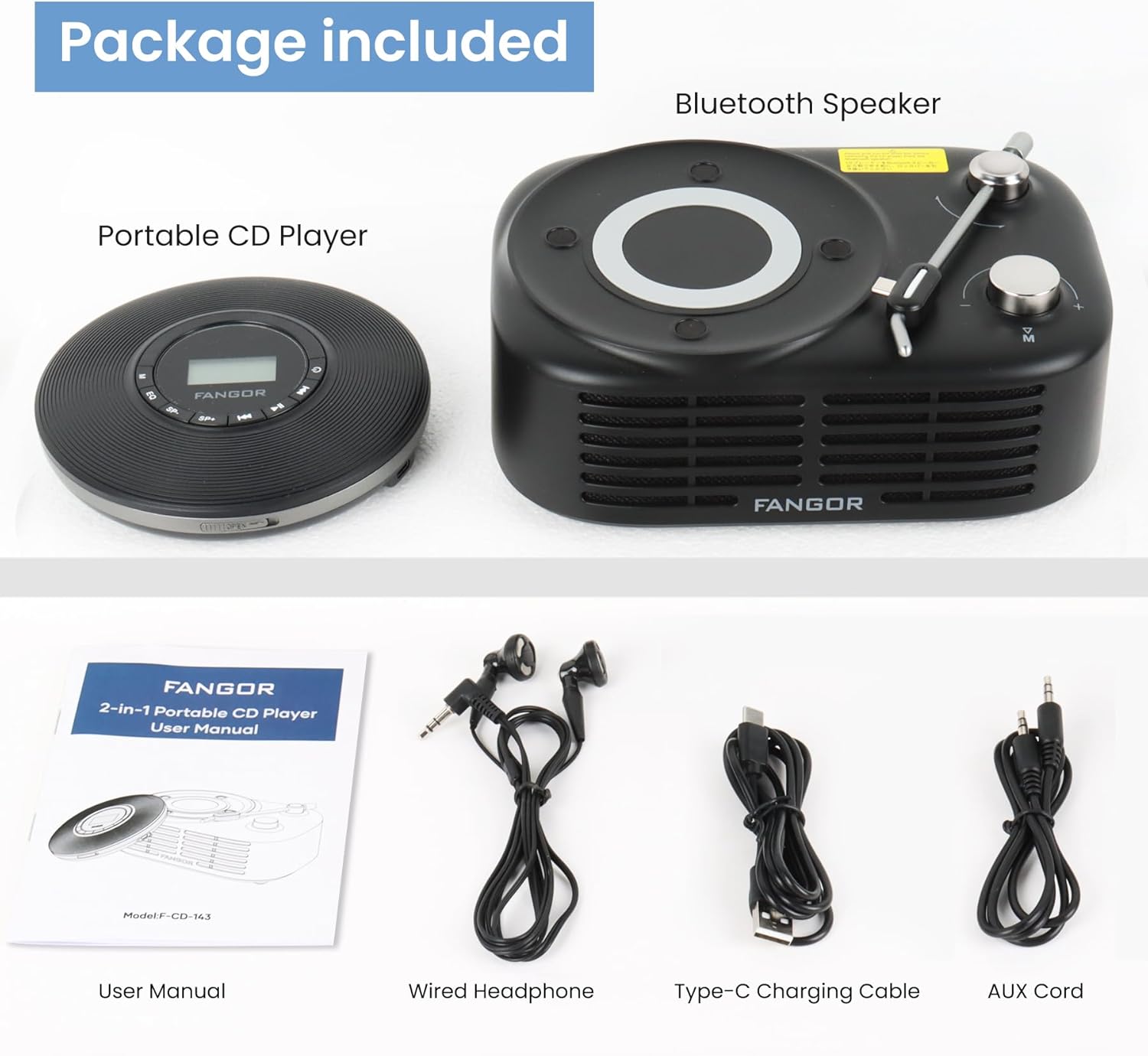
Figure 2.1: Package Contents. The image displays the portable CD player, the Bluetooth speaker base, a user manual, wired headphones, a Type-C charging cable, and an AUX cord.
- Преносни ЦД плејер
- Блуетоотх база звучника
- Кориснички приручник (овај документ)
- Ожичене слушалице
- Кабл за пуњење типа Ц
- AUX кабл
3. Производ је готовview
The FANGOR F-CD-143 is a versatile audio device designed for both personal and shared listening experiences. It features a portable CD player that can be used independently with wired headphones or connected to the included Bluetooth speaker base.

Figure 3.1: 2-in-1 Portable CD Player & Bluetooth Speaker. The top half shows a person using the portable CD player with wired headphones. The bottom half shows the Bluetooth speaker base with 'Bluetooth 5.3' indicated.
3.1 Кључне карактеристике
- Одвојиви дизајн: Use the CD player independently or with the Bluetooth speaker base.
- Компатибилност широког формата: Supports CD, MP3, CD-R, CD-RW, CD-DA, WMA (WAV must be below 128 bitrate) formats.
- Репродукција ТФ картице: Supports TF cards up to 32GB for additional music options.
- Заштита од прескакања: 60-second Electronic Skip Protection (ESP) system prevents playback interruptions.
- ЛЦД екран са позадинским осветљењем: Allows clear viewing of information in various lighting conditions.
- Више режима репродукције: Includes A-B repeat, repeat all, and repeat single track.
- Звучни ефекти: Features 5 sound effects: BBS, POP, JAZZ, ROCK, Original Sound.
- Функција последње меморије: Resumes playback from the last stopped position.
- Повезивање: 3.5mm AUX output for wired headphones or external speakers. Bluetooth 5.3 for wireless connection to the speaker base or other Bluetooth devices.
- Уграђена пуњива батерија: Provides long-lasting playtime for portable use.
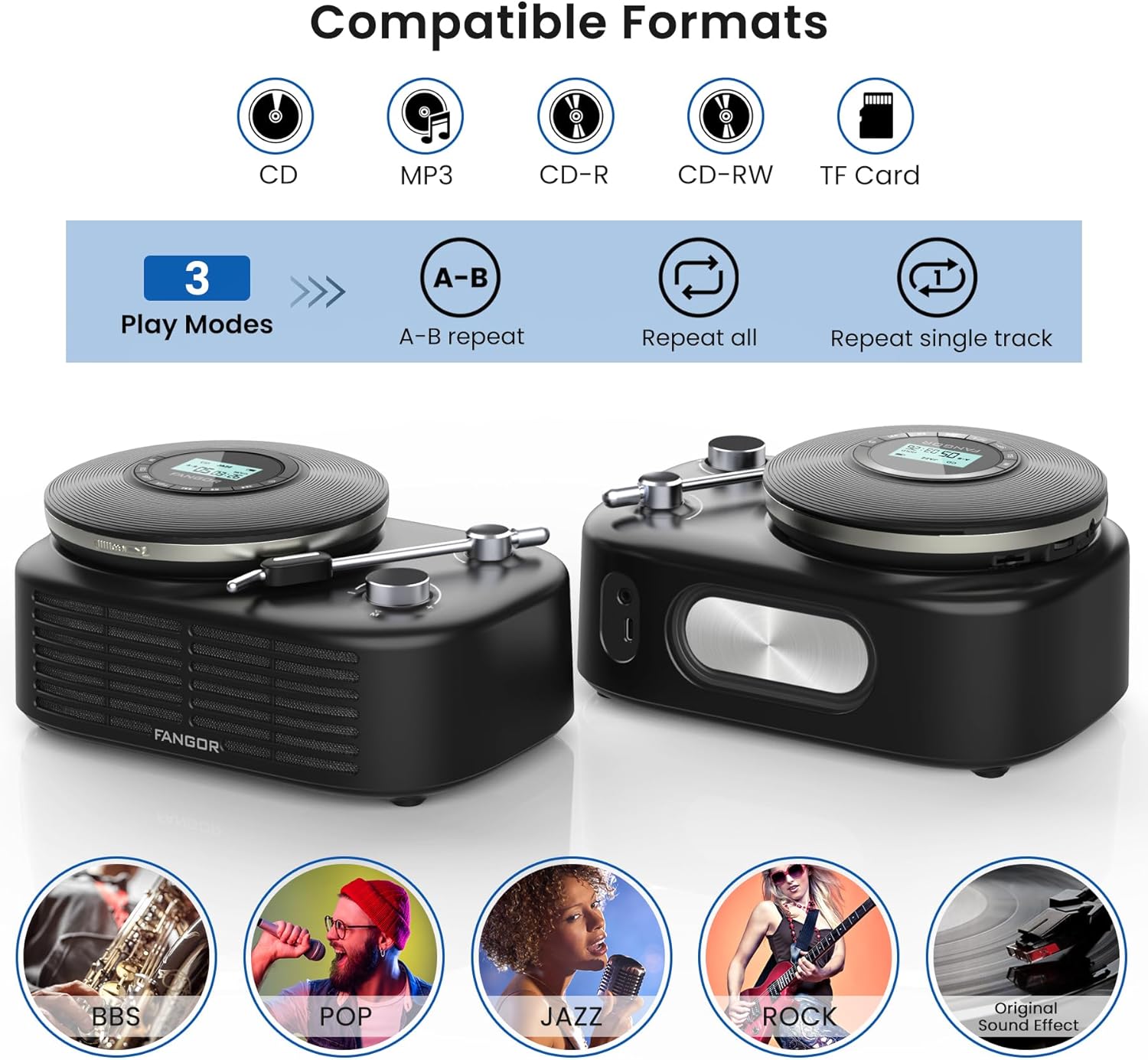
Figure 3.2: Compatible Formats, Play Modes, and Sound Effects. This image illustrates the various audio formats supported by the device, the available playback modes, and the different sound equalization options.

Figure 3.3: HIFI Stereo Sound and Connectivity. The image highlights the dual speakers of the Bluetooth base and its ability to connect via Bluetooth 5.3 or AUX to various devices like tablets, computers, and mobile phones.
4. Подешавање
4.1 Пуњење уређаја
The portable CD player has a built-in rechargeable battery. Before first use, fully charge the device.
- Connect the provided Type-C charging cable to the charging port on the portable CD player.
- Connect the other end of the cable to a compatible USB power source (e.g., wall charger, power bank, computer USB port, car charger).
- Индикаторска лампица пуњења ће светлети током пуњења и искључити се када се потпуно напуни.

Figure 4.1: Built-in Rechargeable Battery and Charging Options. This image demonstrates the flexibility of charging the portable CD player using common USB power sources.
4.2 Assembling the CD Player with Bluetooth Speaker Base
To use the CD player with the Bluetooth speaker base, align the CD player with the designated slot on the speaker base and gently press until it clicks into place. Ensure a secure connection.
4.3 Убацивање CD-a
- Open the CD compartment cover on the portable CD player.
- Carefully place the CD with the label side facing up onto the spindle.
- Gently press the center of the CD until it is securely seated on the spindle.
- Чврсто затворите поклопац одељка за ЦД.
4.4 Повезивање слушалица или екстерних звучника
- Жичане слушалице: Plug the wired headphones into the 3.5mm AUX output jack on the portable CD player.
- External Speakers (Wired): Use the provided AUX cord to connect the 3.5mm AUX output jack of the CD player to the AUX input of an external speaker system.
- External Speakers (Bluetooth): The Bluetooth speaker base can connect to other Bluetooth devices. Refer to section 5.3 for Bluetooth pairing instructions.
5. Упутство за употребу
5.1 Основна репродукција CD-ова
- Ensure a CD is properly inserted and the device is powered on.
- Притисните тастер ПЛАИ/ПАУСЕ button to start playback. The track number and elapsed time will be shown on the LCD display.
- Притисните ПЛАИ/ПАУСЕ поново да бисте паузирали репродукцију. Притисните га још једном да бисте наставили.
- Притисните тастер НАПРАВИТЕ НАПРЕД дугме за прелазак на следећу нумеру.
- Притисните тастер ПРЕСКОЧИ НАЗАД button to return to the beginning of the current track. Press it twice quickly to go to the previous track.
- Притисните тастер СТОП дугме за заустављање репродукције.
5.2 Контрола јачине звука
Подесите јачину звука помоћу ВОЛ+ и ВОЛ- buttons on the portable CD player. If using the Bluetooth speaker base, additional volume control may be available on the speaker itself or the connected Bluetooth device.
5.3 Bluetooth Pairing (Speaker Base)
The Bluetooth speaker base can be used independently as a Bluetooth speaker.
- Ensure the Bluetooth speaker base is powered on.
- Activate Bluetooth on your external device (e.g., smartphone, tablet).
- Тражи available Bluetooth devices. The speaker base will appear as "FANGOR Speaker" or similar.
- Select the speaker from the list to pair. Once paired, a confirmation sound may be heard.
5.4 Репродукција са ТФ картице
- Insert a TF card (up to 32GB) into the TF card slot on the portable CD player.
- The device should automatically switch to TF card mode. If not, press the МОДЕ button to select TF card playback.
- Користите ПЛАИ/ПАУСЕ и СКИП дугмад за контролу репродукције.
5.5 A-B Repeat Function
The A-B repeat function allows you to repeatedly play a specific segment of a track. This is particularly useful for language learning or musical practice.
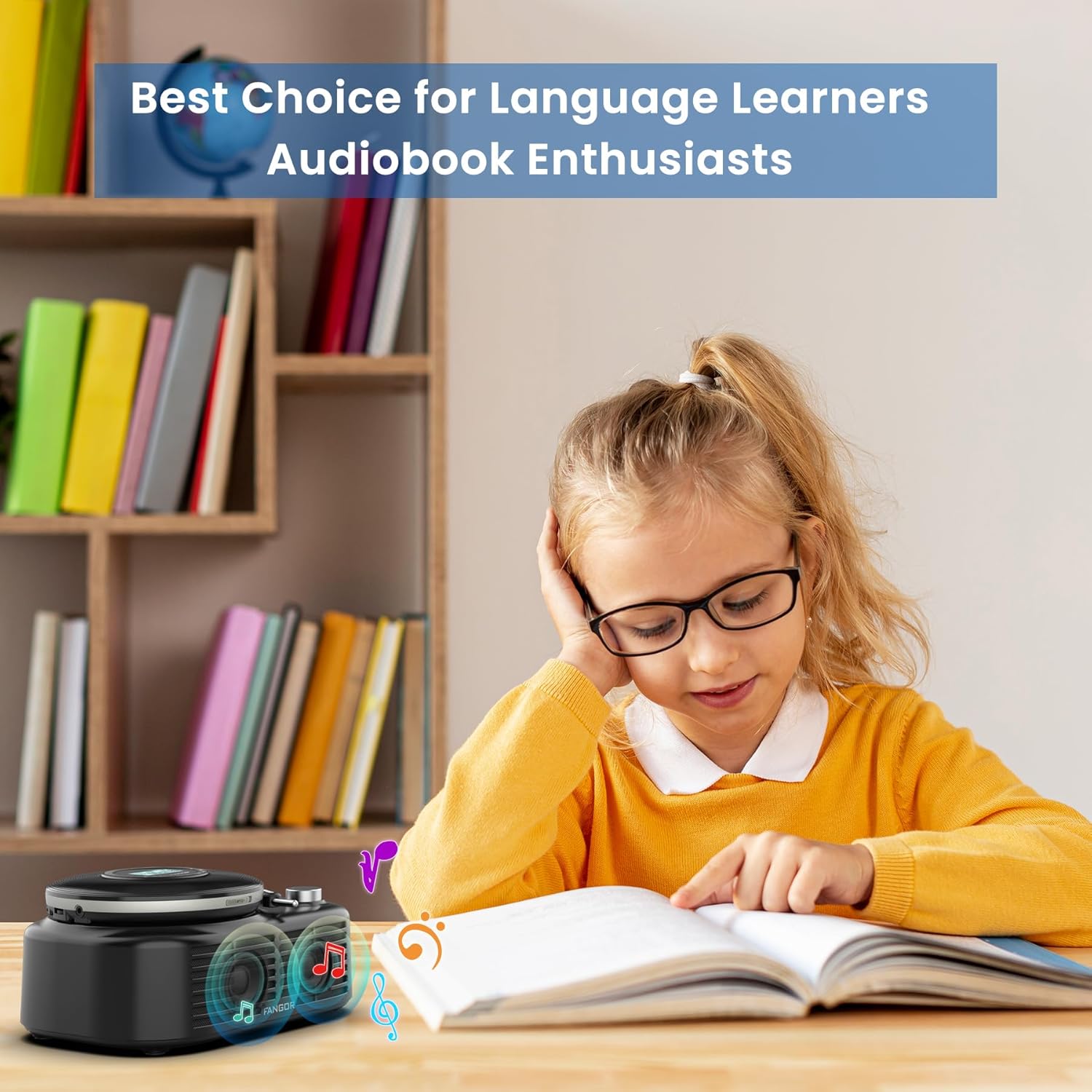
Figure 5.1: Ideal for Language Learners and Audiobook Enthusiasts. This image demonstrates a practical application of the device's features, such as A-B repeat, for educational purposes.
- Током репродукције, притисните АБ button once to set the starting point (A).
- Притисните тастер АБ button again to set the ending point (B). The segment between A and B will now repeat.
- Притисните тастер АБ button a third time to cancel the A-B repeat function.
5.6 Sound Effects (EQ)
Притисните тастер EQ button repeatedly to cycle through the available sound effects: BBS, POP, JAZZ, ROCK, Original Sound. Select the effect that best suits your listening preference.
5.7 Функција последње меморије
The device automatically remembers the last playback position. When you power on the CD player again, it will resume from where it last stopped.
6. Одржавање
6.1 Чишћење уређаја
- Always power off the device and disconnect it from any power source before cleaning.
- Користите меку, суву крпу за брисање спољашњих површина. Не користите абразивна средства за чишћење, воскове или раствараче.
- For the CD lens, use a specialized CD lens cleaning kit. Do not touch the lens directly.
6.2 Одржавање батерије
- Да бисте продужили век трајања батерије, избегавајте често потпуно пражњење батерије.
- If storing the device for an extended period, charge it to approximately 50% every few months.
- Избегавајте излагање уређаја екстремним температурама, што може смањити перформансе батерије.
6.3 Складиштење
Store the device in a cool, dry place away from direct sunlight, dust, and moisture when not in use.
КСНУМКС. Решавање проблема
If you encounter issues with your FANGOR F-CD-143, please refer to the following common problems and solutions.
| Проблем | Могући узрок | Решење |
|---|---|---|
| CD does not play / No sound | CD inserted incorrectly; CD is dirty or scratched; Headphones/speakers not connected; Volume too low; Device not powered on. | Ensure CD is inserted correctly (label side up); Clean or replace CD; Check headphone/speaker connection; Increase volume; Power on the device. |
| Прескакање током репродукције | CD is scratched or dirty; Device is subjected to strong vibrations; ESP system malfunction. | Clean or replace CD; Use the device on a stable surface; Ensure ESP is active (60 seconds anti-skip protection). |
| Bluetooth speaker not pairing | Speaker not in pairing mode; Bluetooth disabled on external device; Speaker too far from external device. | Ensure speaker is powered on and in pairing mode; Enable Bluetooth on your external device; Move speaker closer to the external device (within 10 meters). |
| ТФ картица није препозната | TF card inserted incorrectly; TF card corrupted; Unsupported file format on TF card. | Reinsert TF card correctly; Try a different TF card; Ensure music files are in supported formats (MP3, WMA). |
| Уређај се не укључује | Батерија је празна; Дугме за напајање није правилно притиснуто. | Charge the device fully; Press and hold the power button for a few seconds. |
8. Спецификације
| Феатуре | Спецификација |
|---|---|
| Бранд | ФАНГОР |
| Број модела | F-CD-143 |
| Технологија повезивања | Auxiliary, Bluetooth 5.3 |
| Посебне карактеристике | Portable, Detachable Bluetooth Speaker Base, Anti-Skip Protection, Backlit LCD Display, A-B Repeat, Last Memory |
| Подржани аудио формати | CD, MP3, CD-R, CD-RW, CD-DA, WMA (WAV below 128 bitrate) |
| Тип формата медија | ДВД-Р |
| Подршка за ТФ картицу | Мак 32ГБ |
| Тип конектора | 3.5mm Jack (AUX output), Type-C (Charging) |
| Број дискова | 1 |
| Компатибилни уређаји | Headphone, Speaker, Phones, Tablets, Smart TVs (via Bluetooth speaker base) |
| Уграђени медији | ЦД плејер |
9. Гаранција и подршка
FANGOR is committed to providing high-quality products and services. Your FANGOR F-CD-143 Portable CD Player and Bluetooth Speaker comes with:
- 365-Day No-Reason Replacement: If you encounter any issues within 365 days of purchase, you are eligible for a replacement.
- Доживотна техничка подршка: Our professional after-sales team is available to provide technical assistance for the lifetime of the product.
For any inquiries or support needs, please contact our customer service team. We aim to handle all issues properly within 24 hours.