
FOREVER MATB-100
FOREVER MATB-100 Wireless Power Bank User Manual
Model: MATB-100
1. Увод
Thank you for choosing the FOREVER MATB-100 Wireless Power Bank. This device is designed to provide convenient and efficient charging for your mobile devices, featuring both wired and wireless charging capabilities. Please read this manual carefully before using the product to ensure safe and optimal performance.
2. Кључне карактеристике
- Свестрано пуњење: Supports simultaneous charging of three devices via wireless induction, USB-A, and USB-C ports.
- ЛЕД индикатор: A practical LED display accurately shows the current battery level of the power bank.
- Smart Magnetic Grip: Features a special magnetic grip to stabilize your phone with the power bank, allowing hands-free use during charging.
- Велики капацитет: Equipped with a 10,000 mAh battery, providing multiple recharges for your devices.
- Брзо пуњење: Supports Power Delivery (PD) and Quick Charge (QC) technologies for rapid charging.
- Интегрисани постоље: Allows the power bank to function as a stand for your phone while charging.
3. Производ је готовview
Familiarize yourself with the components of your FOREVER MATB-100 Wireless Power Bank.

Слика 3.1: Предње и задње view of the FOREVER MATB-100 Wireless Power Bank, highlighting the wireless charging pad and the integrated kickstand.

Слика 3.2: Сиде view of the power bank, illustrating the USB-A output port, USB-C input/output port, and the LED battery level indicators.

Слика 3.3: The power bank magnetically attached to the back of a smartphone, demonstrating the secure magnetic grip feature.

Слика 3.4: Diagram showing the dimensions of the power bank: approximately 10.8 cm in length and 6.8 cm in width.
Компоненте:
- Wireless Charging Pad (with magnetic alignment)
- ЛЕД индикатор нивоа батерије
- Дугме за напајање
- УСБ-А излазни порт
- УСБ-Ц улазни/излазни порт
- Интегрисано постоље
4. Подешавање и почетно пуњење
4.1 Пуњење преносног пуњача
Before first use, fully charge your FOREVER MATB-100 Power Bank.
- Повежите приложени USB-C кабл са USB-C портом на преносном пуњачу.
- Connect the other end of the USB-C cable to a compatible USB wall adapter (not included). For optimal charging speed, use a Power Delivery (PD) compatible adapter.
- The LED indicators will illuminate to show the charging progress. When all LEDs are solid, the power bank is fully charged.
Напомена: The power bank can be charged using the USB-C port. It is recommended to fully charge the power bank every three months if not in regular use to maintain battery health.
5. Упутство за употребу
5.1 Провера нивоа батерије
Press the power button once to check the remaining battery level. The LED indicators will light up, with each LED representing approximately 25% of the battery capacity.
5.2 Бежично пуњење
The MATB-100 supports wireless charging for compatible devices, including MagSafe-enabled iPhones and other Qi-compatible smartphones.
- Уверите се да је преносни пуњач довољно напуњен.
- Place your wireless charging compatible device onto the wireless charging pad of the power bank. For MagSafe-enabled devices, the power bank will magnetically align.
- The device should begin charging automatically. If not, press the power button on the power bank to activate wireless charging.
- The LED indicators on the power bank may show charging status.
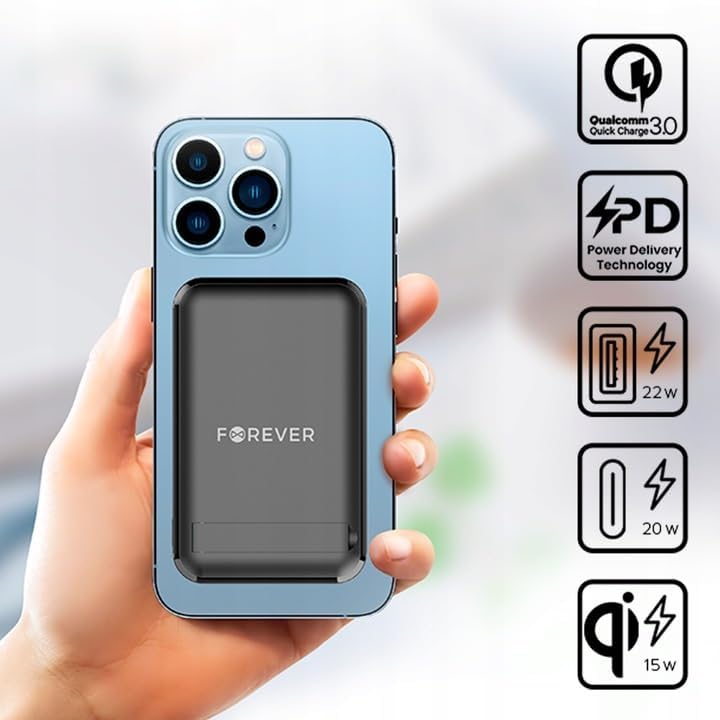
Слика 5.1: A smartphone attached to the power bank, illustrating wireless charging in progress and icons representing Quick Charge, Power Delivery, and various wattagе излази.
Савет: Use the integrated kickstand to prop up your phone while it charges wirelessly, allowing for comfortable viewинг.
5.3 Wired Charging (USB-A and USB-C)
The power bank can charge devices via its USB-A and USB-C ports.
- Уверите се да је преносни пуњач довољно напуњен.
- Connect one end of a compatible charging cable to your device and the other end to either the USB-A or USB-C output port on the power bank.
- The device should begin charging automatically. If not, press the power button on the power bank.

Слика 5.2: A smartphone connected to the power bank via a USB-C cable, demonstrating wired charging.
Напомена: The USB-C port functions as both an input for charging the power bank and an output for charging other devices. The USB-A port is an output only.
5.4 Истовремено пуњење
The FOREVER MATB-100 can charge up to three devices simultaneously (one wirelessly, one via USB-A, and one via USB-C). The total output power will be distributed among the connected devices.
6. Нега и одржавање
- Keep the power bank dry. Moisture can damage the internal circuitry.
- Не излажите екстремним температурама (вруће или хладно).
- Избегавајте испуштање или излагање повер банк јаким ударцима.
- Очистите површину меком, сувом крпом. Не користите јаке хемикалије или абразивна средства за чишћење.
- Чувати на хладном и сувом месту даље од директне сунчеве светлости.
- If not used for extended periods, charge the power bank at least once every three months to prolong battery life.
КСНУМКС. Решавање проблема
7.1 Преносна батерија се не пуни
- Ensure the USB-C cable is securely connected to both the power bank and the wall adapter.
- Проверите да ли зидни адаптер исправно функционише и да ли је укључен у утичницу.
- Try using a different USB-C cable and/or wall adapter.
7.2 Уређај се не пуни преко преносног пуњача
- Check the power bank's battery level. If it's low, recharge the power bank.
- Притисните дугме за напајање на преносном пуњачу да бисте активирали пуњење.
- For wired charging, ensure the cable is securely connected to both the power bank and your device. Try a different cable or port.
- For wireless charging, ensure your device is properly aligned on the charging pad and is wireless charging compatible. Remove any thick cases that might interfere.
- Ensure there are no metallic objects between the power bank and your device during wireless charging.
7.3 Споро пуњење
- Уверите се да користите висококвалитетан, компатибилан кабл за пуњење.
- For wired charging, ensure your device supports Quick Charge (QC) or Power Delivery (PD) if you expect fast charging speeds.
- For wireless charging, ensure your device supports fast wireless charging and is correctly aligned.
- Истовремено пуњење више уређаја може смањити брзину пуњења за сваки појединачни уређај.
8. Спецификације
| Назив модела | МАТБ-100 |
| Бранд | ФОРЕВЕР |
| Капацитет батерије | 10000 mAh (милиampере-сат) |
| Састав батерије | Литијум-јонски |
| Тип конектора | УСБ тип А, УСБ тип Ц |
| Посебна карактеристика | Wireless Charging, Magnetic Grip, Integrated Kickstand |
| Волtage | 5 Volts (Output) |
| Број портова | 2 (USB-A, USB-C) + Wireless Charging |
| Компатибилни уређаји | Smartphones (including MagSafe compatible), Tablets, Headphones, Smartwatches |
| Димензије (Д к Ш к В) | 10.8 цм x 6.8 цм x 2 цм (приближно) |
| Максимални бежични излаз | 15В |
| Max USB-A Output | 22.5W (Quick Charge) |
| Max USB-C Output | 20W (Power Delivery) |
9. Безбедносне информације
- Не растављајте, не отварајте и не цепајте батеријски пакет.
- Do not expose the power bank to heat or fire. Avoid storage in direct sunlight.
- Do not short-circuit the power bank. Do not store battery packs haphazardly in a box or drawer where they may short-circuit each other or be short-circuited by conductive materials.
- Немојте излагати повер банк механичким ударима.
- In the event of a battery leak, do not allow the liquid to come into contact with the skin or eyes. If contact has been made, wash the affected area with copious amounts of water and seek medical advice.
- Држите повер банк ван домашаја деце.
- Supervise children when using the power bank.
- Немојте користити ниједан пуњач осим оног који је посебно приложен за употребу са опремом.
- Dispose of the power bank properly according to local regulations. Do not dispose of with household waste.
10. Гаранција и подршка
For warranty information and technical support, please refer to the documentation provided with your purchase or contact the FOREVER customer service department. Keep your proof of purchase for warranty claims.
For further assistance, you may visit the official FOREVER webсајту или контактирајте свог продавца.
Ask a question about this manual
Ask about setup, troubleshooting, compatibility, parts, safety, or missing instructions. Manuals+ will review the question and use this page’s manual context to help answer it.