
WEWATCH S3
WEWATCH S3 Smart Projector User Manual
Модел: С3
Марка: WEWATCH
1. Увод
Thank you for choosing the WEWATCH S3 Smart Projector. This projector integrates an Android operating system, offering a seamless entertainment experience with built-in streaming applications. It features 4K Ultra-HD resolution, 500 ANSI lumens brightness, 20000:1 contrast, electronic focus, 4-point keystone correction, and versatile connectivity options including dual-band WiFi and Bluetooth. This manual provides essential information for setting up, operating, maintaining, and troubleshooting your projector to ensure optimal performance and longevity.
2. Безбедносне информације
Пажљиво прочитајте сва безбедносна упутства пре употребе пројектора. Сачувајте ово упутство за будуће потребе.
- Напајање: Користите само приложени адаптер за напајање. Уверите се да је јачина звукаtagе одговара захтевима пројектора.
- вентилација: Не блокирајте вентилационе отворе. Обезбедите адекватан проток ваздуха око пројектора како бисте спречили прегревање.
- Изложеност течности: Do not expose the projector to rain, moisture, or any liquids. Avoid placing objects filled with liquids, such as vases, on the projector.
- Чишћење: Искључите пројектор из струје пре чишћења. Користите меку, суву крпу. Не користите течна или аеросолна средства за чишћење.
- Пласман: Place the projector on a stable, flat surface. Avoid placing it in direct sunlight, near heat sources, or in environments with excessive dust or humidity.
- Заштита очију: Не гледајте директно у сочиво пројектора када је укљученоamp је укључено, јер јако светло може изазвати оштећење ока.
- Сервисирање: Не покушавајте сами да сервисирате овај производ. Све сервисирање препустите квалификованом сервисном особљу.
3. Садржај пакета
Молимо вас да проверите садржај пакета након распакивања:
- WEWATCH S3 Smart Projector
- Ремоте Цонтрол
- Повер Адаптер
- ХДМИ кабл
- Упутство за употребу
4. Производ је готовview
Familiarize yourself with the components and ports of your WEWATCH S3 projector.

Фронт view of the WEWATCH S3 Smart Projector, showcasing the lens and sleek design.
Портови за повезивање

Позади view of the WEWATCH S3 Projector, highlighting the various input and output ports including LAN, USB, HDMI, AV, and headphone jack.
The projector is equipped with multiple ports for diverse connectivity:
- LAN Port (x1): За жичану интернет везу.
- USB портови (x2): For connecting USB drives or other USB devices.
- HDMI портови (x2): For connecting devices like laptops, gaming consoles, or TV sticks.
- AV Port (x1): За повезивање старијих аудио/видео уређаја.
- Утичница за слушалице (3.5 мм): За повезивање екстерних аудио уређаја или слушалица.
5. Подешавање
5.1 Положај и величина екрана
Position the projector on a stable surface. The projection distance determines the screen size. You can achieve a large screen size of up to 300 inches.
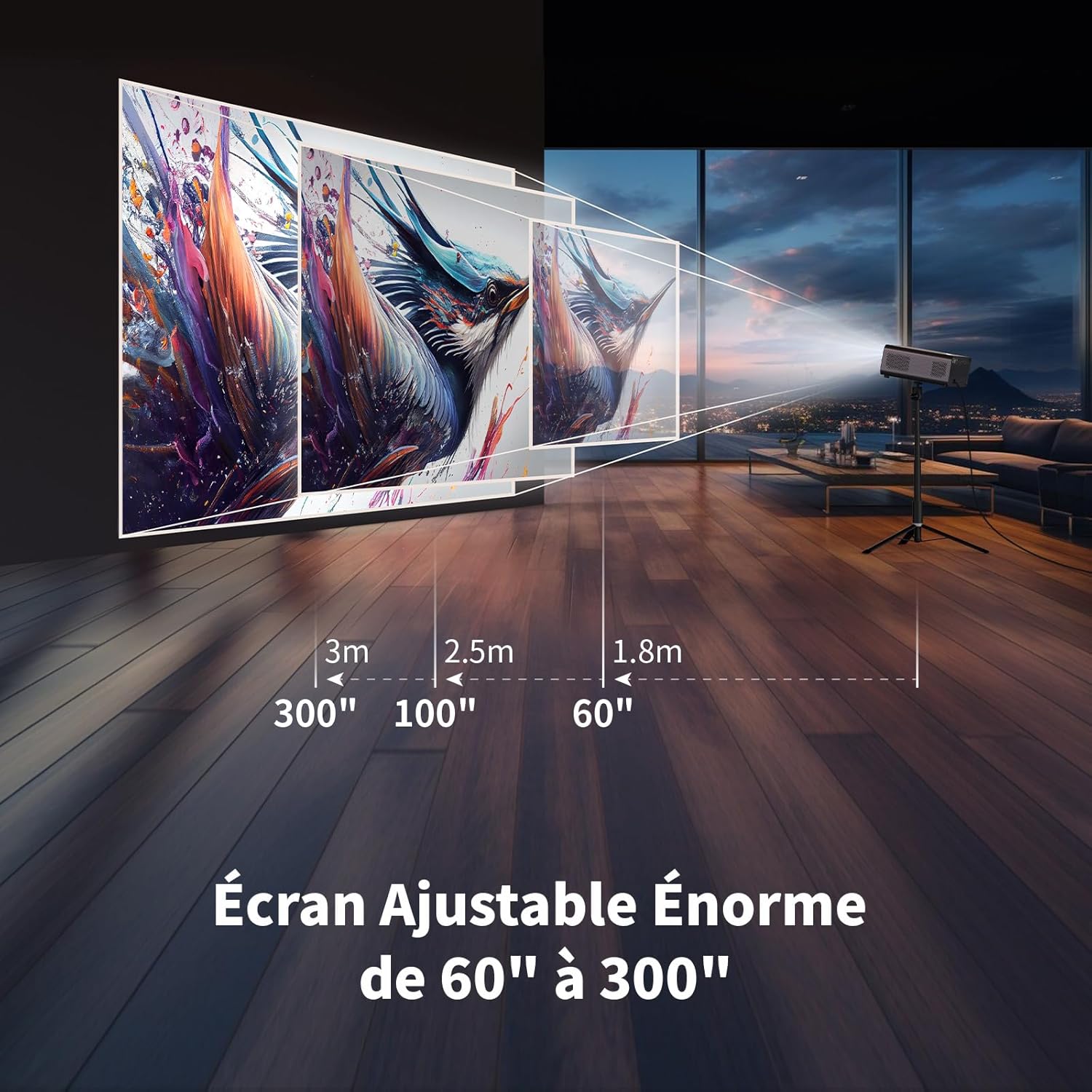
Illustration showing recommended projection distances for various screen sizes, from 60 inches at 1.8m to 300 inches at 3m.
5.2 Прикључак за напајање
Connect the power adapter to the projector's power input and then plug it into a wall outlet. Press the power button on the projector or remote control to turn it on.
5.3 Electronic Focus
Achieve a clear image quickly using the electronic focus function. Use the F+ and F- buttons on the remote control to adjust the focus until the image is sharp.

Image demonstrating the remote control's F+ and F- buttons for electronic focus adjustment, and the visual effect of keystone correction on the projected image.
5.4 Корекција Кеистоне
The projector supports 4-point keystone correction and automatic vertical correction to ensure a rectangular image, regardless of the projection angle. Adjust these settings in the projector's menu if needed.
5.5 Функција зумирања
The zoom function allows you to reduce the image size from 100% to 80% without moving the projector. This can be adjusted via the projector's settings menu.

Visual representation of the projector's zoom function, showing how the image size can be reduced from 100% to 50% without physically moving the projector.
6. Оперативни
6.1 Android OS and Built-in Applications
The WEWATCH S3 features an integrated Android operating system, providing direct access to popular streaming services like Netflix, YouTube, Prime Video, Disney+, and KODI. When using these applications, switch the remote control to mouse mode for optimal navigation. Remember to switch back to normal mode after use.

A user relaxing and watching content projected from the WEWATCH S3, showing the Android interface with icons for Netflix, YouTube, Prime Video, and other streaming applications.
6.2 Бежично повезивање (Wi-Fi и Bluetooth)
The projector supports dual-band 2.4G+5G WiFi for fast and stable connections with iOS, Android, and Windows devices. Bluetooth functionality allows you to connect external speakers for enhanced audio or Bluetooth headphones for private listening.

A person holding a smartphone, wirelessly mirroring its content to the WEWATCH S3 projector, demonstrating the 2.4/5G WiFi and Bluetooth capabilities for seamless content sharing.
6.3 Повезивање екстерних уређаја
Utilize the HDMI, USB, LAN, and AV ports to connect various external devices such as TV sticks, USB drives, laptops, gaming consoles, or older media players for diverse content playback.
6.4 Режим Bluetooth звучника
The projector can function as a standalone Bluetooth speaker. Connect your smartphone or other Bluetooth-enabled devices to the projector to play music, utilizing its built-in HiFi 5W speaker.
7. Одржавање
7.1 Dust Box Cleaning
The WEWATCH S3 features a hidden dust box designed to prevent dust from entering the projector. Regularly clean the dust box to maintain optimal performance and image quality.

Детаљно view of the WEWATCH S3 Projector showing the hidden dust box compartment and the internal fan system, with arrows indicating airflow for cooling.
7.2 Општа нега
- Keep the projector clean and free from dust.
- Чувајте пројектор на хладном и сувом месту када га не користите.
- Avoid touching the lens directly. Use a lens cleaning cloth if necessary.
КСНУМКС. Решавање проблема
Ако наиђете на проблеме са пројектором, погледајте следеће уобичајене проблеме и решења:
| Проблем | Могући узрок | Решење |
|---|---|---|
| Нема пројектоване слике | Power cable loose; Input source incorrect; Lens cap on. | Check power connection; Select correct input source (HDMI, USB, etc.); Remove lens cap. |
| Мутна слика | Focus not adjusted; Projector too far/close; Keystone not adjusted. | Adjust electronic focus (F+/F-); Adjust projection distance; Perform keystone correction. |
| Нема звука | Volume too low; Muted; External speaker not connected properly. | Increase volume; Unmute; Check external speaker connection or try built-in speaker. |
| WiFi/Bluetooth connection issues | Incorrect password; Device out of range; Interference. | Verify password; Move device closer; Reduce interference from other devices. |
| Apps not working correctly | Remote not in mouse mode; App needs update; Internet connection issue. | Switch remote to mouse mode; Check for app updates; Verify internet connection. |
9. Спецификације
Detailed technical specifications for the WEWATCH S3 Smart Projector:
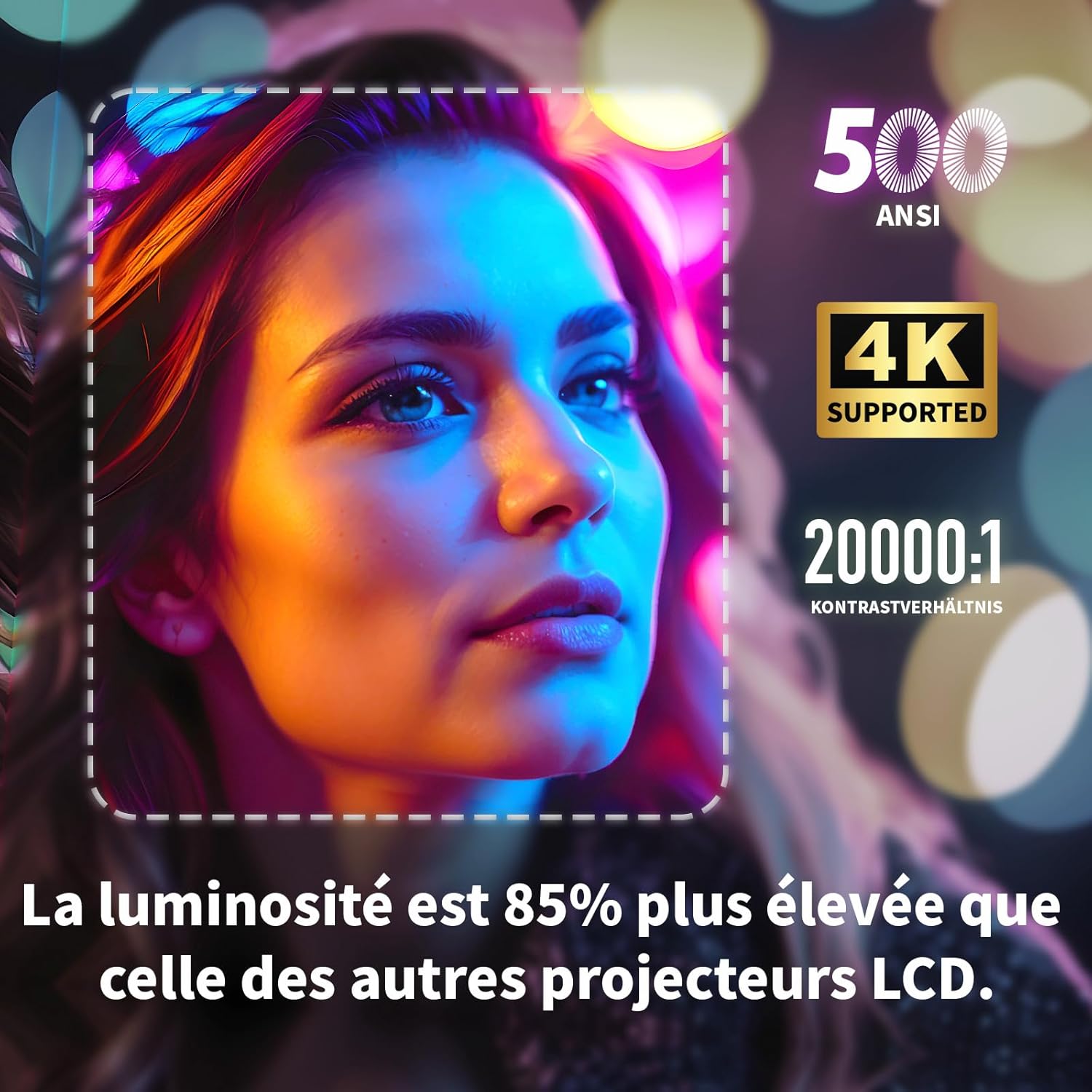
Visual highlighting key specifications: 500 ANSI lumens, 4K support, and 20000:1 contrast ratio, indicating 85% higher brightness than other LCD projectors.
| Феатуре | Спецификација |
|---|---|
| Бранд | МИ ГЛЕДАМО |
| Број модела | S3 |
| Боја | Греи |
| Резолуција екрана | 3840 x 2160 (4K Ultra HD) |
| Осветљеност | КСНУМКС АНСИ Луменс |
| Однос контраста | 20000:1 |
| Оперативни систем | Android OS (with built-in Netflix, YouTube, Prime Video, Disney+, KODI) |
| Технологија повезивања | Bluetooth, Ethernet, HDMI, Wi-Fi (2.4G+5G dual-band) |
| Посебне карактеристике | Electronic Focus, 4-Point Keystone Correction, Automatic Vertical Correction, Zoom (80%-100%), Built-in Speakers, Dust-proof Design |
| Величина екрана | До 300 инча |
| Аудио | Integrated HiFi 5W Speaker, Bluetooth Speaker Mode |
| Димензије | 24.3Д к 24.9Ш к 10.5В цм |
| УСБ портови | 2 |
10. Гаранција и подршка
WEWATCH products come with a standard manufacturer's warranty. For detailed warranty information, technical support, or service inquiries, please refer to the warranty card included in your package or visit the official WEWATCH website. Please have your product model number (S3) and purchase information ready when contacting support.