
1. Увод
Thank you for choosing the Trueque Wireless Keyboard. This manual provides essential information for setting up, operating, and maintaining your keyboard. Please read it thoroughly to ensure optimal performance and longevity of your device.

Image 1: Trueque Wireless Keyboard with blue backlighting, showcasing its full-size layout and large print keys.
2. Садржај пакета
Уверите се да су све ставке присутне у вашем пакету:
- 1 x Trueque Wireless Keyboard
- КСНУМКС к УСБ-Ц кабл за пуњење
- 1 x 2.4 GHz USB Receiver (with Type-C adapter)
- 1 x Упутство за употребу (овај документ)
3. Кључне карактеристике
- 7-Color Backlighting: Customize your typing experience with 7 switchable backlight colors and 3 adjustable brightness levels. This feature enhances visibility in low-light conditions.
- Ergonomic Palm Rest: Designed with an integrated palm rest and foldable stands to reduce wrist strain and promote a comfortable typing posture during extended use.
- Пуњива батерија: Equipped with a built-in rechargeable battery and a Type-C charging port. A full charge takes approximately 2 hours, offering a standby time of up to 365 days. Features an automatic sleep power-saving mode.
- Quiet and Comfortable Typing: Лов-проfile keys provide a fluid and quiet typing experience, similar to a laptop. The keyboard is also waterproof, dustproof, and spill-resistant.
- Integrated Phone/Tablet Holder: A convenient slot is built into the keyboard to securely hold your smartphone or tablet, allowing for easy viewing while working.
- Advanced 2.4 GHz Wireless Connection: Offers a stable and reliable connection up to 33 feet (10 meters) without latency. Plug-and-play functionality requires no driver installation.
- Широка компатибилност: Compatible with devices featuring USB and Type-C ports, including PCs, laptops, Smart TVs, MacBooks, tablets, and smartphones. Supports Windows OS, iOS, Chrome OS, Linux, and Android OS.
- Тастери са великим словима: Features large print characters on keys for enhanced visibility, particularly beneficial for users with low vision.

Image 2: The keyboard displaying various backlight colors, highlighting the 7-color option.
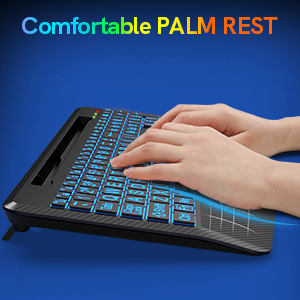
Слика 3: Крупни план view of the keyboard's ergonomic palm rest, designed for comfort.

Image 4: The keyboard's USB-C charging port with a charging cable connected.

Image 5: A smartphone positioned in the keyboard's integrated holder, demonstrating its utility.

Слика 6: Детаљан view of the keyboard's large print keys, designed for easy readability.
4. Водич за подешавање
- Пуњење тастатуре: Before first use, fully charge the keyboard for at least 1 hour using the provided USB-C charging cable. Connect the USB-C end to the keyboard's charging port (located on the side) and the USB-A end to a power source (e.g., computer USB port, USB wall adapter).
- Повежите пријемник:
- For standard USB-A ports: Plug the 2.4 GHz USB receiver directly into an available USB-A port on your device.
- For USB-C ports (e.g., MacBook): Attach the Type-C adapter to the 2.4 GHz USB receiver, then plug the adapter into your device's USB-C port.
- Укључено: Locate the ON/OFF switch on the back of the keyboard and slide it to the "ON" position.
- Аутоматско повезивање: The keyboard should automatically connect to your device. No additional drivers are typically required.

Image 7: The 2.4 GHz USB receiver and its Type-C adapter for versatile connectivity.
5. Упутство за употребу
5.1 Контрола позадинског осветљења
- Укључивање/искључивање позадинског осветљења: Притисните Фн + Есц to toggle the backlight on or off.
- Пребаците боју позадинског осветљења: Притисните Фн + Ф1 to cycle through the 7 available backlight colors.
- Подесите осветљеност: Притисните Fn + Page Up (↑) да повећате осветљеност и Fn + Page Down (↓) to decrease brightness. There are 3 brightness levels.
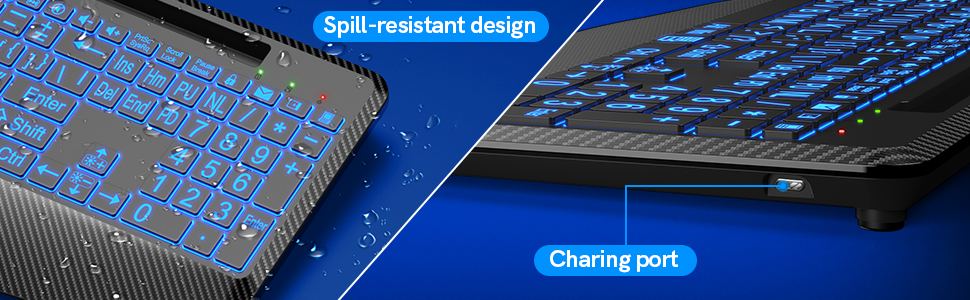
Image 8: Visual guide for controlling backlight color and brightness using function keys.
5.2 Using the Phone/Tablet Holder
The integrated slot at the top of the keyboard can securely hold most smartphones and tablets, providing a convenient viewing angle. Simply place your device into the slot.
5.3 Ergonomic Stand
Flip out the foldable stands located on the underside of the keyboard to adjust the typing angle for improved ergonomics and reduced wrist bending.

Image 9: The keyboard with its foldable stands extended, illustrating the ergonomic tilt.
5.4 Паметни режим спавања
The keyboard enters an automatic sleep mode after a period of inactivity to conserve battery life. Press any key to wake it up.
6. Одржавање
- Чишћење: Користите меку, дamp cloth to clean the keyboard surface. For deeper cleaning, use compressed air to remove debris from between the keys. Avoid harsh chemicals.
- Отпорност на просипање: While the keyboard is spill-resistant, avoid submerging it in liquids. In case of a spill, immediately power off the keyboard and allow it to dry completely before use.
- Складиштење: Чувајте тастатуру на хладном и сувом месту, даље од директне сунчеве светлости и екстремних температура.
КСНУМКС. Решавање проблема
- Тастатура не реагује:
- Уверите се да је тастатура укључена.
- Check if the USB receiver is securely plugged into your device.
- Verify the keyboard battery is charged.
- Покушајте да прикључите УСБ пријемник у други УСБ порт.
- Поново покрените рачунар/уређај.
- Позадинско осветљење не ради:
- The backlight function will not work when the battery is low. Charge the keyboard fully.
- Уверите се да је позадинско осветљење укључено помоћу Фн + Есц.
- Connection issues/Lag:
- Ensure the keyboard is within the 33-foot wireless range of the receiver.
- Minimize interference from other 2.4 GHz wireless devices.
8. Спецификације
| Феатуре | Детаљ |
|---|---|
| Број модела | TQ-WR-KB-001 |
| Повезивање | 2.4 ГХз бежично |
| Домет | До 33 стопе (10 метара) |
| Боје позадинског осветљења | 7 (RGB) |
| Бригхтнесс Левелс | 3 |
| Порт за пуњење | УСБ-Ц |
| Време пуњења | Прибл. 2 сата |
| Време приправности | До 365 дана |
| Димензије (Д к Ш к В) | 16.6 к 8.42 к 1.53 инча |
| Тежина | 1.68 фунти |
| Компатибилност | Windows, iOS, Chrome OS, Linux, Android (via USB/Type-C) |
9. Гаранција и подршка
Trueque provides the following support for your product:
- гаранција: 12-Month Free Warranty.
- Brand Service: 360 Days.
- Online Response: 24 сата.
For customer support, please contact us:
Телефон: 1-866-608-6766 (САД)
Сати: Monday - Friday, 9:00 AM - 1:00 PM PST and 2:00 PM - 6:00 PM PST
10. Производ је готовview Видео
Video 1: An official product video from Trueque Inc, demonstrating the Wireless Keyboard with 7 Colored Backlits and Wrist Rest, including its features and usage.