
1. Увод
This manual provides detailed instructions for the setup, operation, maintenance, and troubleshooting of your new VEILZOR Wireless Keyboard and Mouse Combo. Please read this manual thoroughly before using the product to ensure proper functionality and to prevent damage.
The VEILZOR Wireless Keyboard and Mouse Combo offers advanced 2.4 GHz wireless connectivity, providing a reliable connection up to 10 meters with minimal delays or dropouts. Both the keyboard and mouse feature RGB backlighting, an ergonomic design for comfort, and are rechargeable for extended use.
2. Садржај пакета
- 1 x VEILZOR Wireless Keyboard
- 1 x VEILZOR Wireless Mouse
- 1 x 2-IN-1 USB-A/C Receiver (located in the back of the keyboard)
- 1 к УСБ кабл за пуњење
- 1 x Упутство за употребу (овај документ)
3. Карактеристике производа
- 2.4 GHz Wireless Technology: Provides a stable and reliable connection up to 10 meters.
- RGB позадинско осветљење: Keyboard and mouse feature customizable RGB lighting with 3 brightness levels and 22 light modes for enhanced visibility and aesthetics. (Note: Keyboard cannot be set to a single color.)
- Ергономски дизајн: Keyboard includes a wrist rest and adjustable tilt legs. Mouse is contoured for comfortable use by both left and right-handed users.
- Тиха операција: Keys and mouse clicks are designed for quiet operation, reducing noise by 95% compared to traditional peripherals.
- Integrated Phone/Tablet Holder: A U-shaped stand (8.27*0.66in) on the keyboard allows for convenient docking of mobile devices.
- Мултимедијални тастери: 6 independent multimedia keys for quick access to internet, email, media control, and volume.
- Пуњиве батерије: Built-in 1000mAh (keyboard) and 650mAh (mouse) lithium batteries with auto-sleep and on/off switches for extended battery life.
- Adjustable Mouse DPI: Three DPI settings (800/1200/1600) for customizable cursor speed and precision.
- Плуг анд Плаи: Simple setup with a 2-IN-1 USB-A/C receiver.
- Компатибилност система: Easily switch between Mac and Windows systems.
4. Подешавање
- Пронађите УСБ пријемник: The 2-IN-1 USB-A/C receiver is stored in a compartment on the back of the keyboard. Carefully remove it.
- Повежите пријемник: Plug the USB receiver into an available USB-A or USB-C port on your computer, PC, or laptop.
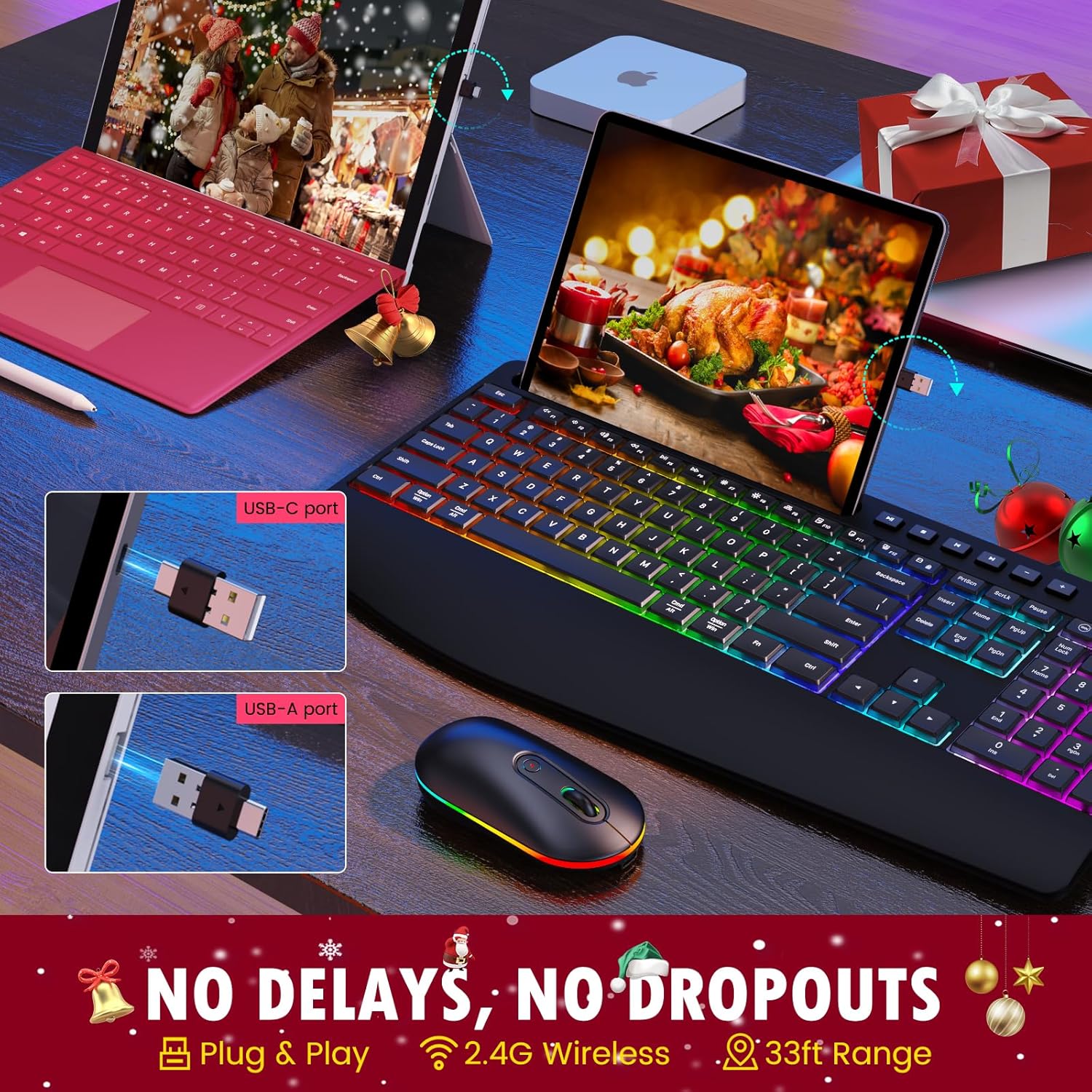
Image: The USB-A and USB-C receiver, demonstrating how it connects to a computer port. This receiver enables wireless communication between the keyboard, mouse, and your device.
- Power On the Keyboard and Mouse: Locate the ON/OFF switches on both the keyboard and the mouse. Slide them to the "ON" position.
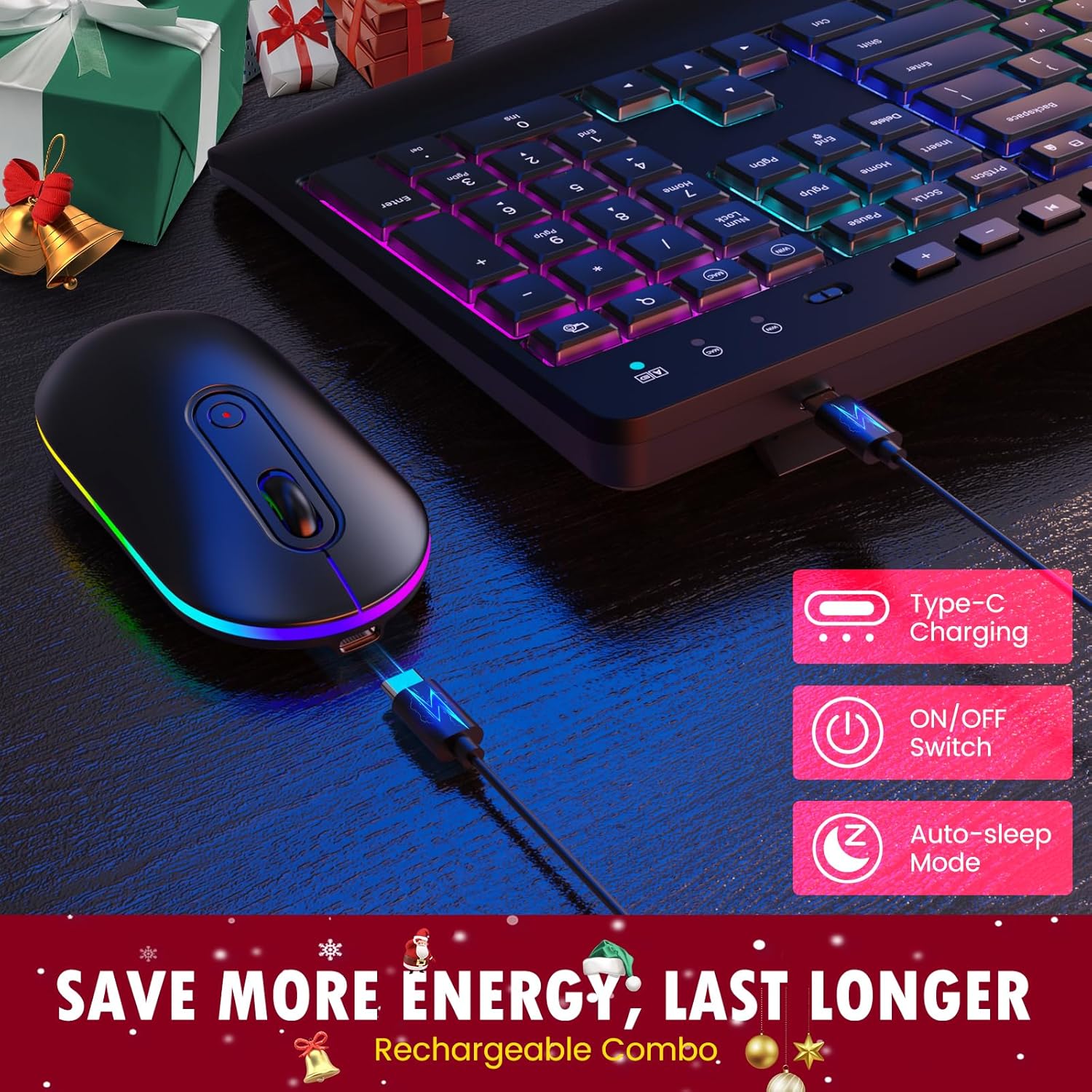
Слика: Крупни план view of the keyboard and mouse, highlighting their Type-C charging ports, ON/OFF switches, and auto-sleep mode indicator. These features contribute to energy efficiency and extended battery life.
- Аутоматско повезивање: The keyboard and mouse should automatically connect to your device. No additional drivers are typically required for basic functionality.
5. Упутство за употребу
5.1 Управљање тастатуром
- куцање: Begin typing as you would with any standard keyboard.
- Adjusting Keyboard Tilt: Flip out the sturdy tilt legs located on the underside of the keyboard to adjust the typing angle for improved ergonomics.

Image: A user's hands positioned on the keyboard, demonstrating the ergonomic design with a built-in wrist rest and adjustable tilt legs. This design aims to reduce wrist strain during prolonged use.
- Using the Phone/Tablet Holder: Place your smartphone or tablet into the integrated U-shaped groove on the top of the keyboard for convenient viewинг.
- Мултимедијални тастери: Use the dedicated multimedia keys (F1-F12 shortcuts, 6 independent multimedia keys) located above the function row for quick access to common functions like volume control, play/pause, and web претраживач.

Image: A close-up of the keyboard, emphasizing the F1-F12 shortcut keys, 6 dedicated multimedia keys, and the full-size number pad. These features are designed to improve work efficiency.
- Промена система: The keyboard supports both Mac and Windows systems. Use the appropriate key combination (refer to keyboard markings) to switch between operating system layouts if needed.
5.2 Рад мишем
- Основна употреба: Move the mouse to control the cursor on your screen. Click the left and right buttons for standard functions.
- Точак за померање: Користите точкић за скроловање за вертикално скроловање у документима и web странице.
6. Контрола RGB позадинског осветљења
The keyboard and mouse feature dynamic RGB backlighting. Please note that the keyboard's RGB cannot be set to a single static color.
- Промена светлосних режима: Press the dedicated backlight key on the keyboard (usually indicated by a light bulb icon or similar) to cycle through the 22 available light modes.
- Подешавање осветљености: Use the brightness control keys (often Fn + arrow keys or dedicated keys) to select one of the 3 brightness levels.
- Mouse RGB: The mouse RGB lighting typically cycles automatically or can be turned off via its ON/OFF switch.

Image: The keyboard illuminated with vibrant RGB backlighting in a low-light environment, demonstrating its "easy to type in the dark" feature with adjustable brightness levels.

Image: The wireless mouse featuring RGB backlighting along its base, with indicators for its 3 DPI levels (800, 1200, 1600). This illustrates the mouse's customizable sensitivity and aesthetic appeal.
7. Подешавање DPI-ја миша
Миш нуди три подесива DPI (тачака по инчу) подешавања за контролу осетљивости и брзине курсора:
- 800 ДПИ: Lower sensitivity, ideal for precise tasks like graphic design.
- 1200 ДПИ: Standard sensitivity, suitable for general use.
- 1600 ДПИ: Higher sensitivity, for quicker cursor movement, often preferred in gaming or large screen setups.
To change the DPI setting, press the DPI button located on the top of the mouse, usually behind the scroll wheel. Each press will cycle through the available DPI levels.
8. Пуњење и трајање батерије
Both the keyboard and mouse are equipped with built-in rechargeable lithium batteries (Keyboard: 1000mAh, Mouse: 650mAh). To charge your devices:
- Connect the provided USB charging cable to the charging port on the keyboard or mouse.
- Plug the other end of the USB charging cable into a USB power source (e.g., computer USB port, USB wall adapter).
- An indicator light will typically show the charging status. Once fully charged, the light may change color or turn off.
To conserve battery life, both devices feature an auto-sleep mode that activates after a period of inactivity. You can also manually turn off the devices using their ON/OFF switches when not in use for extended periods.

Image: The complete VEILZOR Wireless Keyboard and Mouse Combo, showcasing the keyboard's full-size layout, RGB backlighting, and the integrated phone/tablet holder with a smartphone docked. The mouse is positioned next to the keyboard, also featuring RGB lighting.
9. Одржавање и њега
- Чишћење: Користите меку, суву крпу за чишћење површина тастатуре и миша. За тврдокорну прљавштину, благо дamp Може се користити крпа, али водите рачуна да влага не уђе у уређај.
- Избегавајте течности: Do not expose the devices to water or other liquids.
- Складиштење: Чувајте тастатуру и миш на хладном и сувом месту, даље од директне сунчеве светлости и екстремних температура.
- Пажљиво рукујте: Избегавајте испуштање или излагање уређаја јаким ударцима.
КСНУМКС. Решавање проблема
| Проблем | Могући узрок | Решење |
|---|---|---|
| Тастатура/миш не реагује. |
|
|
| Кашњење или одложени одговор. |
|
|
| Позадинско осветљење не ради или је слабо. |
|
|
| Mouse cursor moves too fast/slow. | DPI setting is not preferred. | Press the DPI button on the mouse to cycle through 800/1200/1600 DPI settings. |
11. Спецификације
| Феатуре | Детаљ |
|---|---|
| Назив модела | PC407 Wireless Keyboard Mouse Combo |
| Бежична технологија | 2.4 ГХз РФ |
| Врста везе | 2-IN-1 USB-A/C Receiver |
| Домет | До 10 метара (33 стопе) |
| Димензије тастатуре | 43.4 к 21 к 2.1 цм (16.93 к 8.19 к 0.82 инча) |
| Димензије миша | 5.8 к 11.2 к 2.8 цм (2.3 к 4.4 к 1.1 инча) |
| Укупна тежина | 771 г (27.2 унци) |
| Батерија за тастатуру | Уграђена литијумска батерија од 1000мАх |
| Батерија за миш | Уграђена литијумска батерија од 650мАх |
| Позадинско осветљење | RGB (22 modes, 3 brightness levels) |
| ДПИ миша | 800/1200/1600 |
| Компатибилност | Windows, macOS, PC, Laptop, Tablet |
12. Гаранција и подршка
VEILZOR offers a 1-годишња ограничена гаранција for this Wireless Keyboard and Mouse Combo. This warranty covers manufacturing defects and issues arising from normal use.
If you encounter any problems or have questions regarding your product, please contact VEILZOR customer service. Our team is available to provide friendly and prompt assistance.
For support, please refer to the contact information provided on the product packaging or the official VEILZOR webсајту.
13. Безбедносне информације
- Do not attempt to disassemble or modify the product. This may void the warranty and could result in damage or injury.
- Keep the product away from extreme temperatures, humidity, and direct sunlight.
- Избегавајте испуштање или излагање производа јаким ударима.
- Одложите батерије и електронске компоненте одговорно у складу са локалним прописима.
- Овај производ није играчка. Чувати ван домашаја деце.