
Увод
This manual provides essential information for the proper setup, operation, and maintenance of your AODSK AD-X1 Digital Piano and ALP-22 Adjustable Piano Bench. Please read these instructions carefully before use to ensure optimal performance and longevity of your instruments.

Figure 1: Assembled AODSK AD-X1 Digital Piano and ALP-22 Adjustable Piano Bench.
Подешавање и монтажа
Carefully unpack all components and ensure all parts are present before beginning assembly. Refer to the included hardware package for specific fasteners.
1. Digital Piano Assembly (AD-X1)
- Attach the four legs to the underside of the digital piano body using the provided screws. Ensure they are securely fastened.
- Уметните држач за ноте у предвиђени отвор на горњој плочи дигиталног клавира.
- Connect the sustain pedal or triple pedal unit to the appropriate port on the rear panel of the piano.

Figure 2: Digital Piano dimensions. Length: 53.15 inches, Depth: 12.2 inches, Height: 24.8 inches (without music rest).
2. Piano Bench Assembly (ALP-22)
- Attach the four legs to the base of the piano bench using the provided hardware.
- Ensure the height adjustment mechanism is properly aligned and functional.
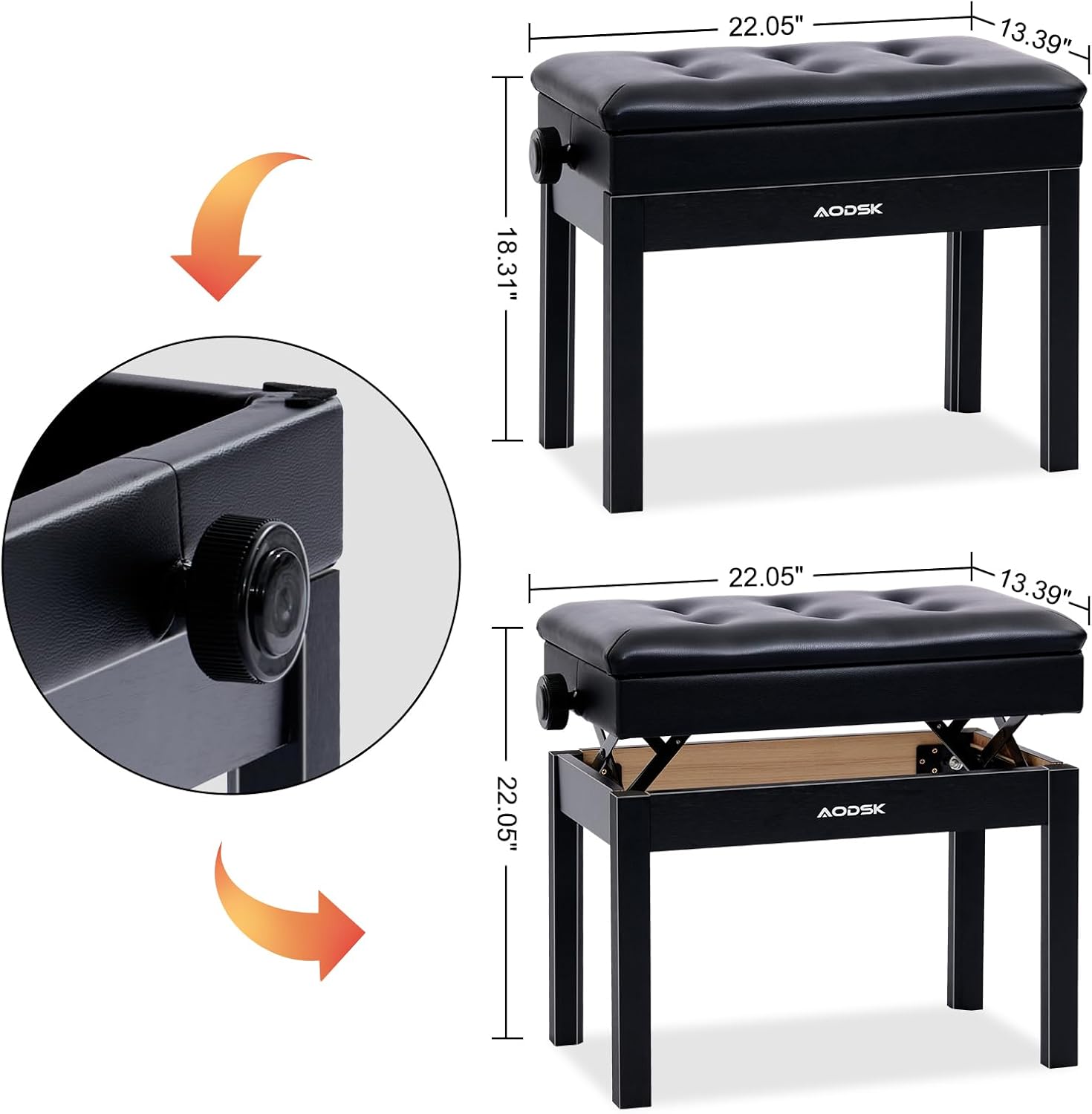
Figure 3: Piano Bench dimensions. Length: 22.05 inches, Width: 13.39 inches. Adjustable height range: 18.31 to 22.05 inches.
Operating the Digital Piano (AD-X1)
1. Укључивање/искључивање
- Connect the power adapter to the DC IN port (3) on the rear panel and plug it into a standard electrical outlet.
- Притисните тастер ПОВЕР button on the control panel to turn the piano on or off.
2. Функције контролне табле
The control panel provides access to various features and settings:

Figure 4: Digital Piano control panel with buttons for DEMO, RHYTHM, VOLUME, TONE, RECORD, SPLIT, TOUCH, RE-PLAY, CHORD, SYNC, METRONOME, START/STOP, POWER, and DATA WHEEL.
- ДЕМО: Plays built-in demonstration songs (80 available).
- РИТАМ: Selects from 128 available rhythms.
- ВОЛУМЕ: Подешава укупни ниво излазног звука.
- ТОН: Selects from 128 available instrument timbres.
- ЗАПИС: Покреће снимање вашег наступа.
- СПЛИТ: Divides the keyboard into two sections for different voices.
- ДОДИР: Adjusts touch sensitivity of the keys.
- RE-PLAY: Plays back recorded performances.
- ЦХОРД: Activates chord recognition mode.
- СИНЦ: Synchronizes rhythm playback.
- МЕТРОНОМ: Activates the metronome function for practice.
- СТАРТ СТОП: Starts or stops rhythm/demo playback.
- DATA WHEEL: Користи се за навигацију кроз меније и подешавање вредности.
3. Headphone Mode
To practice privately, connect headphones to the Headphone Jack (1) on the rear panel. The internal speakers will automatically mute.

Figure 5: Headphone jack for private practice.
4. Повезивање
The rear panel offers various connection options:
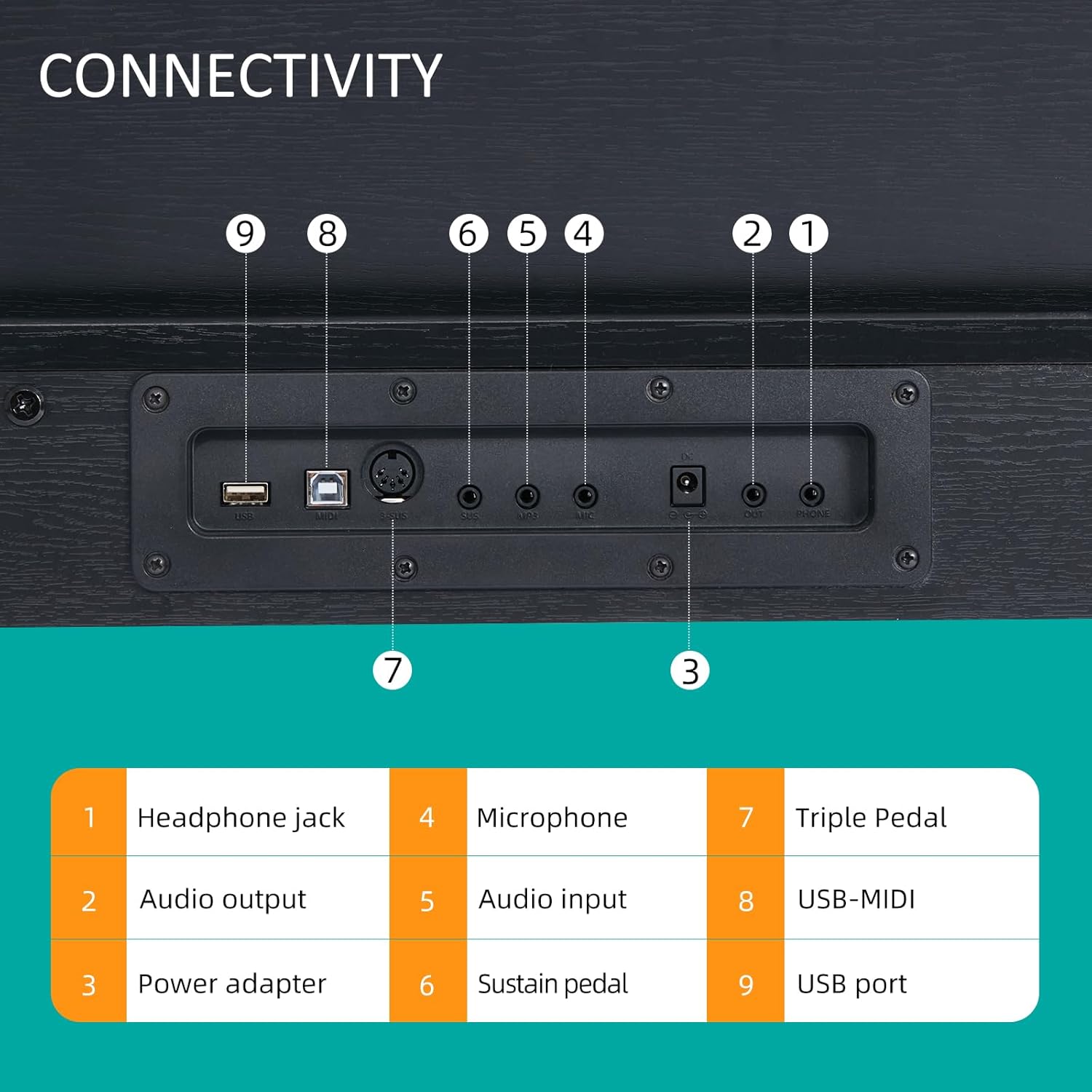
Figure 6: Connectivity panel with labeled ports.
- 1. Прикључак за слушалице: За повезивање слушалица (3.5 мм).
- 2. Аудио излаз: За повезивање са екстерним amplification systems or recording devices.
- 3. Адаптер за напајање: DC IN port for the power supply.
- 4. Микрофон: Input for a microphone.
- 5. Аудио улаз: За повезивање екстерних аудио извора.
- 6. Sustain Pedal: Input for a single sustain pedal.
- 7. Triple Pedal: Input for the included triple pedal unit.
- 8. USB-MIDI: For connecting to a computer or MIDI devices.
- 9. УСБ порт: За повезивање УСБ уређаја за складиштење или других периферних уређаја.
Operating the Piano Bench (ALP-22)
1. Подешавање висине
The ALP-22 piano bench features an adjustable height mechanism. Locate the knob on the side of the bench. Rotate the knob to raise or lower the seat to your desired height. The adjustable range is from 18.31 inches to 22.05 inches.

Figure 7: Adjusting the piano bench height using the side knob.
2. Одељак за одлагање
The padded seat of the ALP-22 bench can be lifted to reveal a storage compartment. This space is suitable for storing sheet music, books, and small accessories.

Figure 8: Storage compartment beneath the piano bench seat.
Одржавање
1. Чишћење
- Wipe the surfaces of the digital piano and bench with a soft, dry cloth.
- За тврдокорну прљавштину, благо дampen the cloth with water and a mild, non-abrasive cleaner. Avoid harsh chemicals or solvents.
- Do not allow liquids to enter the piano's internal components.
2. Складиштење
- Store the instruments in a dry environment, away from direct sunlight and extreme temperature fluctuations.
- Avoid placing heavy objects on the piano or bench.
Решавање проблема
- Нема звука:
- Ensure the power adapter is securely connected and the piano is turned on.
- Проверите ниво јачине звука.
- Ако су слушалице прикључене, искључите их да бисте омогућили излаз за звучнике.
- Verify external audio connections if using an ampлифиер.
- Тастери не реагују:
- Restart the piano.
- Уверите се да између кључева нема страних предмета.
- Pedal Not Functioning:
- Check that the pedal cable is securely connected to the correct port on the piano's rear panel.
Спецификације
AODSK AD-X1 Digital Piano
| Феатуре | Спецификација |
|---|---|
| Назив модела | AD-X1 |
| Број кључева | 88 Standard Keys (A2-C5 range) |
| Max Polyphony | 128 |
| Тимбрес | 128 |
| Ритмови | 128 |
| Демо песме | 80 |
| Повезивање | 3.5mm Headphone Jack, Audio Output, Microphone Input, Audio Input, Sustain Pedal Input, Triple Pedal Input, USB-MIDI, USB Port |
| Извор напајања | Цордед Елецтриц |
| Финисх Типе | Мат |
| Ниво вештине | Бегиннер |
AODSK ALP-22 Adjustable Piano Bench
| Феатуре | Спецификација |
|---|---|
| Назив модела | АЛП-22 |
| Опсег подешавања висине | 18.31'' - 22.05'' |
| Материјал седишта | Padded, High-elastic sponge |
| Складиштење | Integrated compartment under seat |
Гаранција и подршка
For warranty information or technical support, please refer to the documentation included with your purchase or contact AODSK customer service directly. Keep your purchase receipt as proof of purchase.