
1. Производ је готовview
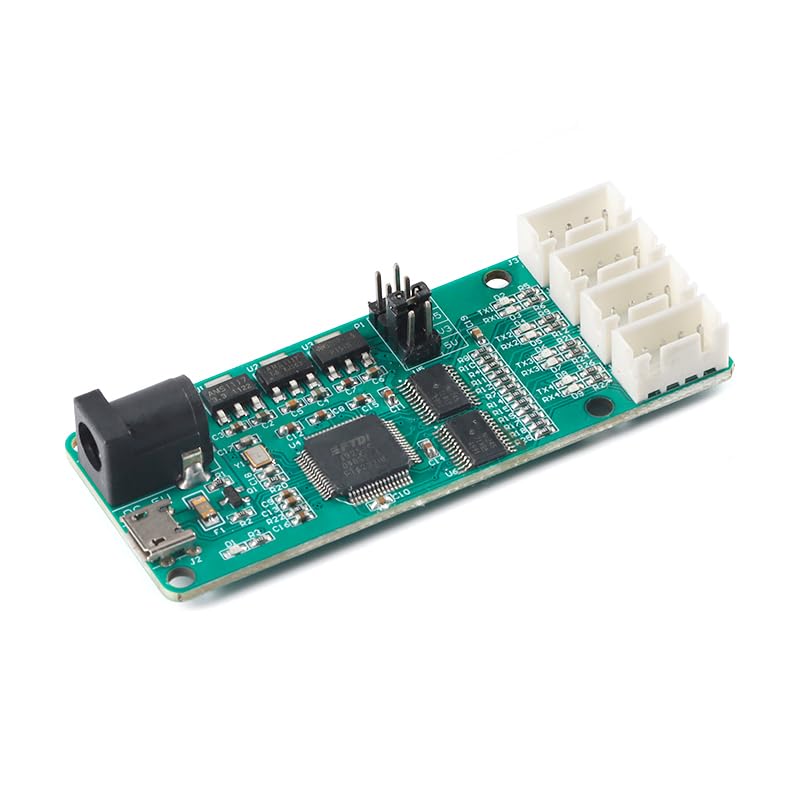
The JESSINIE FT4232-4TTL is a high-performance USB to 4-Way TTL module designed for industrial and development applications. This module allows for simultaneous communication through a single USB connection, expanding to four independent UART serial ports. Each port operates independently, ensuring reliable data transfer and providing a communication rate of up to 12Mbps.
Кључне карактеристике укључују:
- Simultaneous communication via four independent UART serial ports.
- Адјустабле волtage selection for VCC, TX, and RX, supporting 5V, 3.3V, 2.5V, and 1.8V.
- Equipped with XH2.54 interfaces for all four serial ports.
- Individual TX/RX indicator lights for each UART to monitor status.
- DC5.5-2.1 interface for providing high current to external devices.
2. Упутства за подешавање
- Повежите се са рачунаром: Use a Micro USB cable to connect the module's Micro USB interface to your computer.
- Инсталација драјвера: Install the necessary drivers for the FT4232HL chip on your computer. After successful installation, your operating system will recognize four distinct COM ports.
- Волtagе Избор: Изаберите жељени волуменtage for VCC/TX/RX on the TTL power selection interface using a short-circuit cap. The module supports output voltages of 5V, 3.3V, 2.5V, and 1.8V. Ensure the selected voltage matches the requirements of your connected device.

3. Упутство за употребу
- COM Port Identification: The lowest numbered COM port recognized by your computer will correspond to the first TTL interface (Channel 1), while the highest numbered COM port will correspond to the fourth TTL interface (Channel 4). Note that the specific COM port numbers assigned by your operating system are not fixed and may vary.
- Основни тест функционалности: To perform a simple test of the module's functionality, you can short-circuit the TX and RX pins on one of the TTL interfaces. Then, use a terminal program (e.g., PuTTY, Tera Term, or Arduino Serial Monitor) on your computer to send data to that specific COM port. If the data you send is echoed back to the terminal, the module is functioning correctly for that channel.
- Повезивање спољних уређаја: Connect your external TTL-compatible devices to the XH2.54 connectors. Ensure correct pin mapping (TX of module to RX of device, RX of module to TX of device, and GND to GND). Verify that the selected voltage matches your device's requirements.

4. Спецификације
| Број модела | FT4232-4TTL |
| Бранд | JESSINIE |
| Хардверски интерфејс | USB (Micro USB) |
| Компатибилни уређаји | Лични рачунар, лаптоп |
| Подршка за оперативни систем | Виндовс, мацОС, Линук |
| Цоммуницатион Рате | До 12 Мбпс |
| Волtage Selection (VCC/TX/RX) | 5В, 3.3В, 2.5В, 1.8В |
| Serial Port Interfaces | 4 x XH2.54 connectors |
| Индикатори | TX/RX indicator lights for each UART |
| Екстерни улаз за напајање | DC5.5-2.1 interface |
| Димензије | 76 мм x 30 мм (приближно) |
| Тежина артикла | 0.72 Ounces (approx. 20.41 g) |

КСНУМКС. Решавање проблема
- No COM Ports Detected:
- Ensure the USB cable is securely connected to both the module and the computer.
- Verify that the FT4232HL drivers are correctly installed. You may need to download the latest drivers from the FTDI webсајту.
- Try connecting the module to a different USB port on your computer or using a different USB cable.
- Нема преноса/пријема података:
- Check the wiring connections between the module and your external device. Ensure TX (Transmit) on the module is connected to RX (Receive) on the device, and RX on the module is connected to TX on the device. GND (Ground) must also be connected.
- Проверите да ли је исправан обимtage (5V, 3.3V, 2.5V, or 1.8V) is selected on the module via the short-circuit cap, matching your device's requirements.
- Confirm that the baud rate, data bits, parity, and stop bits settings in your terminal software or application match those of the connected device.
- Perform the basic functionality test (shorting TX/RX) to confirm the module itself is transmitting and receiving data.
- Интермитентна веза:
- Inspect all physical connections for looseness or damage.
- Ensure adequate power supply. If you are powering external devices through the module's DC5.5-2.1 interface, confirm the power source is stable and sufficient.
6. Одржавање
To ensure the longevity and optimal performance of your FT4232-4TTL module, follow these maintenance guidelines:
- Чишћење: Keep the module clean and free from dust, dirt, and debris. Use a soft, dry cloth for cleaning. Avoid using liquid cleaners or solvents.
- Услови животне средине: Avoid exposing the module to extreme temperatures, high humidity, or direct sunlight. Store it in a cool, dry place when not in use.
- Руковање: Handle the module with care to prevent physical damage to its components, connectors, or circuit board. Avoid applying excessive force when connecting or disconnecting cables.
- Напајање: Always use a stable and appropriate power supply. If using the DC5.5-2.1 input, ensure the voltage and current ratings are within the module's specifications.
7. Гаранција и подршка
For detailed warranty information, terms, and conditions, please refer to the official JESSINIE website or contact the retailer from whom you purchased the product. It is recommended to retain your purchase receipt or proof of purchase for any warranty claims.
For technical assistance, driver downloads, or further inquiries, please visit the manufacturer's support page or reach out to their customer service department. Provide your product model number (FT4232-4TTL) and a clear description of your issue when seeking support.