
Производ је завршенview
The RHYTHM 8RZ235MS38 is a digital radio-controlled alarm clock featuring 3D figures of Snoopy and Woodstock. It offers a clear LCD screen with comic-style numbers and unique footprint colon indicators. This clock provides essential functions including time display, calendar, temperature, and humidity readings, designed for ease of use and daily convenience.

Слика 1: Предња страна view of the RHYTHM 8RZ235MS38 Snoopy Digital Radio Alarm Clock, displaying time, date, temperature, and humidity.
Кључне карактеристике
- Radio-Controlled Time Synchronization: Automatically adjusts time for accuracy.
- Дигитални ЛЦД екран: Clear display with comic-style numbers and Snoopy footprint colon.
- 3D Snoopy & Woodstock Figures: Integrated into the design, with Snoopy serving as the snooze button.
- Функција аларма: Features electronic sound alarm with snooze capability.
- Интегрисани сензори: Displays current temperature and humidity.
- Приказ календара: Shows date, day, and year.
- Selectable Time Format: Choose between 12-hour (AM/PM) or 24-hour display.
- Функција позадинског осветљења: Includes an afterglow light for visibility in low light conditions.

Слика 2: Завршеноview of the clock's main features, including radio control, 12/24 hour display, temperature/humidity, calendar, and backlight.

Figure 3: Close-up of the Snoopy and Woodstock figures, highlighting Snoopy's role as the snooze button.
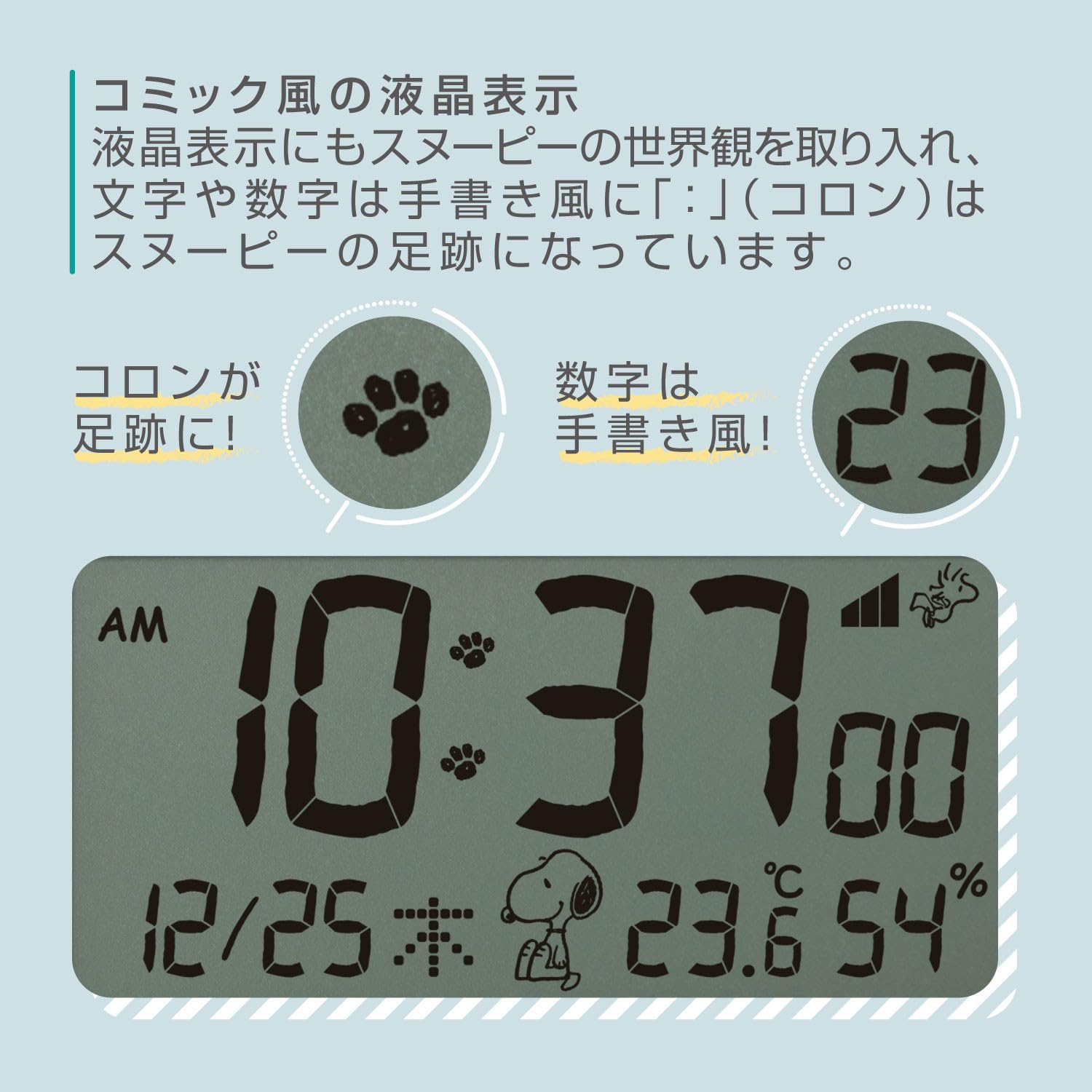
Слика 4: Детаљно view of the LCD display, showcasing the unique comic-style numbers and Snoopy's footprints used as the colon separator.
Сетуп
1. Прикључак за напајање
Connect the provided AC adapter to the clock and plug it into a standard wall outlet. The clock will power on and the display will activate.
2. Почетна синхронизација времена
As a radio-controlled clock, the unit will automatically attempt to synchronize with the atomic time signal upon initial power-up. This process may take several minutes. Ensure the clock is placed in an area with good signal reception, away from large metal objects or electronic interference.
3. Setting Time Zone (if necessary)
If the automatic synchronization does not set the correct time zone for your region, you may need to adjust it manually. Refer to the 'Operating' section for manual time and date setting instructions.
Упутство за употребу
1. Time and Date Display
The main LCD screen continuously displays the current time, date (month/day), day of the week, temperature, and humidity.
2. Подешавање аларма
- Притисните тастер АЛАРМ СЕТ button (location on the front panel) to enter alarm setting mode. The alarm time will flash.
- Користите UP и ДОВН дугмад за подешавање сата.
- Притисните АЛАРМ СЕТ again to adjust the minutes. Use UP и ДОВН дугмад.
- Притисните АЛАРМ СЕТ још једном да бисте потврдили време аларма.
- Да бисте активирали или деактивирали аларм, притисните дугме АЛАРМ УКЉУЧЕН / ИСКЉУЧЕН дугме. Икона аларма ће се појавити на екрану када се активира.
3. Функција одлагања
When the alarm sounds, press the 3D Snoopy figure on top of the clock to activate the snooze function. The alarm will pause for approximately 5-10 minutes (check specific model details for exact duration) before sounding again.
4. Приказ температуре и влажности
The clock automatically measures and displays the ambient temperature (in Celsius or Fahrenheit) and relative humidity. No manual adjustment is typically required for these readings.
5. Контрола позадинског осветљења
The display features an afterglow backlight. The intensity or activation method may vary by model. Typically, a dedicated ЛИГХТ or СНООЗЕ button press will activate the backlight for a few seconds.
6. 12/24 Hour Format Toggle
To switch between 12-hour (AM/PM) and 24-hour time formats, locate the 12/24Х button (refer to the clock's physical buttons) and press it. The display will change accordingly.
Одржавање
- Чишћење: Use a soft, dry cloth to clean the clock's surface. Do not use abrasive cleaners or solvents.
- Пласман: Place the clock on a stable, flat surface. Avoid direct sunlight, extreme temperatures, or high humidity.
- Резервна батерија (ако је применљиво): If your model includes a battery backup, replace batteries annually to ensure settings are retained during power outagес.
Решавање проблема
- Екран је празан: Ensure the AC adapter is securely plugged into both the clock and a working power outlet. Check if the power outlet is functional.
- Време је погрешно: Verify the clock is receiving a clear radio signal. Try repositioning the clock. If manual setting was used, re-check the steps in the 'Operating' section.
- Аларм се не оглашава: Ensure the alarm is activated (alarm icon visible on display) and the volume is set appropriately. Check that the alarm time is correctly set.
- Очитавања температуре/влажности изгледају нетачно: Allow the clock to acclimate to its environment for at least 30 minutes. Ensure it is not placed near heat sources, vents, or in direct sunlight.
Спецификације
- Модел: 8RZ235MS38
- Бренд: РХИТАМ
- Тип: Дигитални радио будилник
- Димензије (приближно): 4.0 к 4.7 к 2.1 инча (10.2 к 12 к 5.4 цм)
- Тежина (приближно): 210г
- Приказ: LCD with comic-style numbers
- Карактеристике: Radio-controlled time, Alarm with Snooze, Thermometer, Hygrometer, Calendar, Backlight.

Figure 5: Visual representation of the clock's dimensions (10.2 x 12 x 5.4 cm) and weight (210g), shown in comparison to a 500ml bottle.
Гаранција и подршка
This product is covered by a standard manufacturer's warranty. For detailed warranty information, product support, or service inquiries, please refer to the warranty card included in your product packaging or visit the official RHYTHM webсајту.
Молимо вас да сачувате рачун као доказ о куповини за евентуалне рекламације у вези са гаранцијом.