
1. Увод
This manual provides essential information for the safe and efficient operation of your TuTu TUB32HN1N 32-inch HD Ready TV. Please read it thoroughly before using the television and retain it for future reference.

Фронт view of the TuTu TUB32HN1N 32-inch HD Ready TV, highlighting its borderless design and key features like HD Ready, Dolby Audio, USB, HDMI, Hotel Mode, CI+, and DVB-S2/T2/C tuners.
2. Безбедносне информације
Увек се придржавајте основних мера безбедности када користите овај телевизор како бисте смањили ризик од пожара, струјног удара и повреда.
- Не излажите телевизор киши или влази.
- Не отварајте кућиште; све сервисне радове препустите квалификованом особљу.
- Осигурајте одговарајућу вентилацију око телевизора.
- Искључите телевизор из струје током олуја са грмљавином или када га не користите дуже време.
- Држите телевизор даље од директне сунчеве светлости и извора топлоте.
3. Садржај пакета
Проверите да ли су све ставке присутне у кутији:
- 1x TuTu TUB32HN1N 32-inch HD Ready TV
- 1к упутство за употребу
- 1к даљински управљач
- 1x TV Stand (base)
Note: 2x AA batteries for the remote control are not included.
4. Производ је готовview
4.1. Димензије
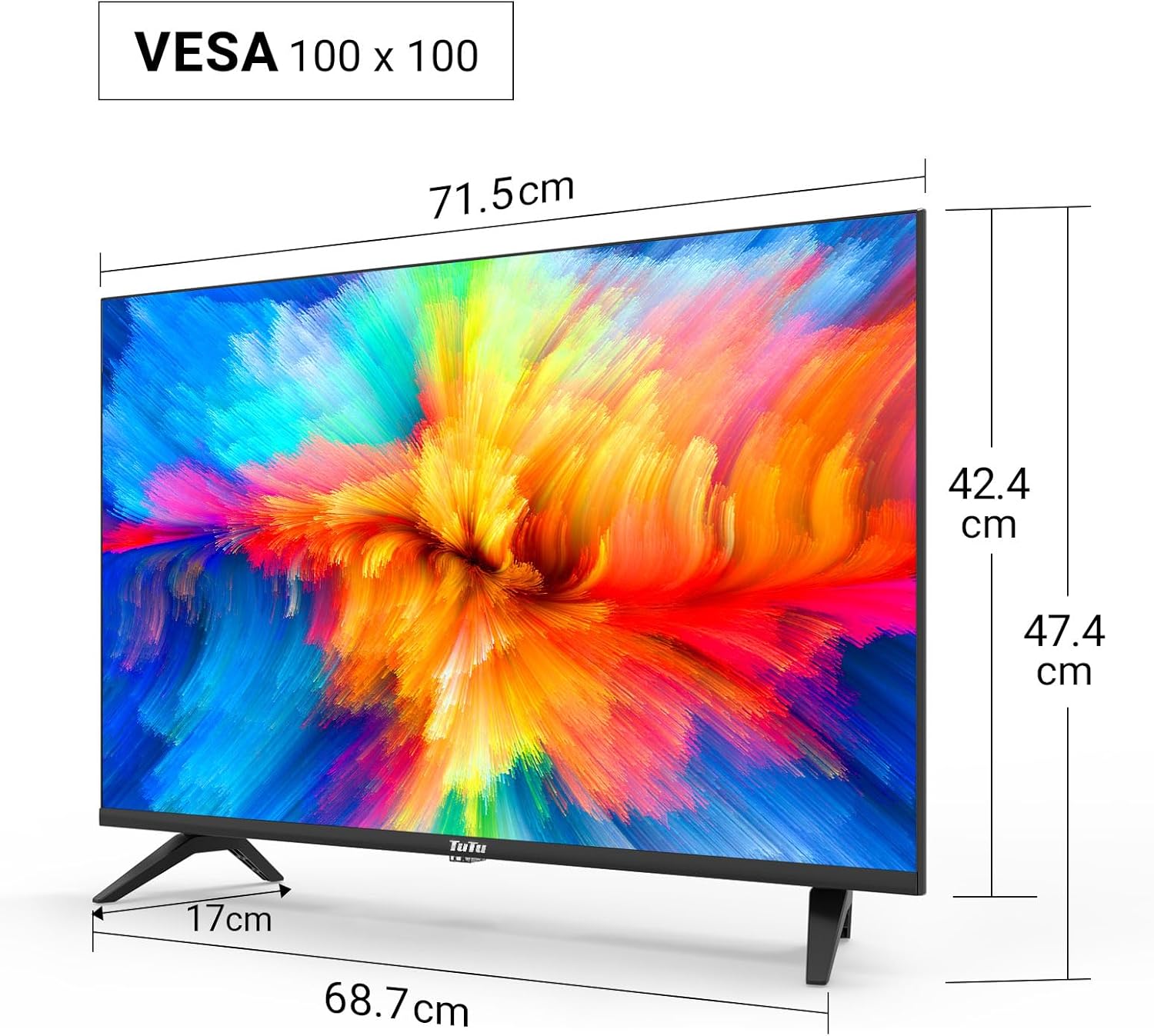
Technical drawing displaying the dimensions of the 32-inch TV, including screen width (71.5cm), height with stand (47.4cm), height without stand (42.4cm), and stand depth (17cm). VESA 100x100 compatibility is also indicated.
4.2. Connection Ports

Детаљно view of the TV's input/output ports, including SCART, Coaxial Out, LNB In, RF (Antenna), 2x HDMI, USB, CI+ Common Interface, Mini AV, Mini YPbPr, and Earphone Out.
The TV features a variety of ports for connecting external devices:
- HDMI (x2): For connecting high-definition devices like Blu-ray players, game consoles, or external streaming devices.
- УСБ 2.0 (к1): For media playback and recording from USB storage devices.
- CI/CI+ Slot (x1): For inserting a Common Interface module to access encrypted digital channels.
- РФ (антена): За повезивање земаљске или кабловске антене.
- LNB In: За повезивање сателитске антене.
- СЦАРТ: За повезивање старијих аналогних уређаја.
- Коаксијални излаз: За дигитални аудио излаз.
- Mini AV / Mini YPbPr: For analog video and audio input (adapters may be required).
- Излаз за слушалице: За повезивање слушалица.
5. Подешавање
5.1. Склоп штанда
Да бисте саставили ТВ постоље:
- Пажљиво поставите телевизор лицем надоле на меку, равну површину како бисте спречили оштећење екрана.
- Поравнајте постоље са отворима за монтажу на дну телевизора.
- Причврстите постоље помоћу приложених вијака.
5.2. Монтажа на зид
The TV supports VESA 100x100 wall mounts. Wall mount brackets are sold separately. Follow the instructions provided with your wall mount kit for proper installation.
5.3. Повезивање периферних уређаја
Connect your antenna, satellite dish, or cable to the appropriate RF or LNB IN port. Use HDMI cables for high-definition devices. Insert USB drives into the USB port for media access.

Illustration of the TV's triple tuner capabilities, showing connections for DVB-S/S2 (satellite), DVB-C (cable), and DVB-T/T2 (terrestrial) reception.
5.4. First-Time Power On & Channel Scan
After connecting the power cable and antenna/satellite, press the power button on the remote control or TV. The TV will guide you through the initial setup, including language selection and automatic channel scanning for DVB-T/T2, DVB-C, and DVB-S/S2 signals.
6. Упутство за употребу
6.1. Функције даљинског управљача
Refer to the remote control diagram in your printed manual for specific button layouts. Common functions include Power, Volume Up/Down, Channel Up/Down, Input Source, Menu, and Navigation buttons.
6.2. Избор извора улаза
Press the 'Source' button on your remote to switch between connected devices (e.g., HDMI 1, HDMI 2, USB, DVB-T, DVB-S).
6.3. USB Media Playback and Recording
Insert a USB storage device into the USB port. The TV's media player will allow you to browse and play video, image, and music files. The TV also supports recording digital broadcasts to a connected USB device.

Image demonstrating the USB media player and recorder function, allowing playback of video, images, and music from a USB drive or external hard disk. The 'REC' indicator shows recording capability.
6.4. CI/CI+ Module Installation
To access encrypted channels, insert your CI/CI+ module (with smart card) into the CI slot on the side or rear of the TV. Ensure the module is inserted correctly according to its instructions.
6.5. Hotel Mode Configuration
The Hotel Mode feature allows for customized settings ideal for hospitality environments. This includes limiting volume range, creating custom channel lists, locking sources, and batch processing TV settings via USB.

Screenshot of the Hotel Mode menu, illustrating features such as limited volume range, custom channel list creation, source locking, and batch processing of TV settings via USB.
7. Одржавање
To maintain your TV in optimal condition:
- Чишћење екрана: Нежно обришите екран меком крпом која не оставља влакна. За тврдокорне мрље користите средство за чишћење екрана посебно дизајнирано за телевизоре, нанесено на крпу, а не директно на екран.
- Чишћење кабинета: Користите меку, суву крпу за брисање кућишта телевизора. Не користите абразивна средства за чишћење или раствараче.
- вентилација: Уверите се да вентилациони отвори на задњој страни телевизора нису блокирани како бисте спречили прегревање.
КСНУМКС. Решавање проблема
Ако наиђете на проблеме са телевизором, погледајте следеће уобичајене проблеме и решења:
| Проблем | Могуће решење |
|---|---|
| Нема струје | Проверите да ли је кабл за напајање добро прикључен у телевизор и зидну утичницу. Покушајте са другом утичницом. |
| Нема слике, али је звук присутан | Уверите се да је изабран исправан улазни извор. Проверите кабловске везе са спољним уређајима. |
| Нема звука, али је слика присутна | Check the volume level and mute status. Verify audio cable connections. |
| Cannot find channels | Ensure the antenna/satellite cable is properly connected. Perform an automatic channel scan again. Check antenna signal strength. |
| Даљински управљач не ради | Замените батерије. Уверите се да нема препрека између даљинског управљача и инфрацрвеног сензора телевизора. |
9. Спецификације
Here are the technical specifications for the TuTu TUB32HN1N TV:
| Феатуре | Спецификација |
|---|---|
| Бранд | TuTu |
| Модел | TUB32HN1N |
| Величина екрана | 32 инча (80 цм) |
| Дисплаи Тецхнологи | LED (Direct LED Display) |
| Резолуција | HD Ready (1366x768p) |
| Аспецт Ратио | 16:9 |
| Рефресх Рате | 60 Хз |
| Технологија тјунера | DVB-T/T2 (Terrestrial), DVB-C (Cable), DVB-S/S2 (Satellite) |
| ХДМИ портови | 2 |
| УСБ портови | 1 (УСБ 2.0) |
| CI/CI+ Slot | 1 |
| Режим аудио излаза | Stereo (Dolby Digital) |
| Потрошња енергије (SDR) | 27.0 В |
| Класа енергетске ефикасности | F |
| Димензије производа (са постољем) | 79.6 к 12.8 к 50.5 цм |
| Тежина | 5.04 кг |
| ВЕСА компатибилност | 100 к 100 мм |

The EU energy label for the TuTu TUB32HN1N TV, showing an energy efficiency class of F and energy consumption of 27 kWh/1000h.

A detailed product information sheet (PRODUCT INFORMATION SHEET) providing technical parameters and compliance details for the TuTu TUB32HN1N TV. For more details, visit the official EPREL database: https://eprel.ec.europa.eu/qr/1589506
10. Гаранција и подршка
TuTu offers a two-year warranty policy for this product. For warranty claims, technical support, or any inquiries, please refer to the contact information provided in your purchase documentation or visit the official TuTu webсајту.