
1. Увод
Thank you for choosing the T-DAGGER TGK-303 Mechanical Gaming Keyboard. This manual provides essential information for setting up, operating, and maintaining your keyboard to ensure a reliable and enjoyable user experience. Please read this manual thoroughly before using the product.
2. Производ је готовview
The T-DAGGER TGK-303 is a full-sized mechanical gaming keyboard designed for performance and durability. It features OUTEMU mechanical switches and a single-color running backlight for an enhanced gaming and typing experience.
Кључне карактеристике:
- OUTEMU Mechanical Switches: Provides tactile feedback and durability for consistent performance.
- Single-Color Running Backlight: Enhances visibility and aesthetics with dynamic lighting effects.
- Изглед у пуној величини: 104 keys for comprehensive functionality.
- УСБ повезивање: Ensures reliable and fast connection to your device.
Слике производа:
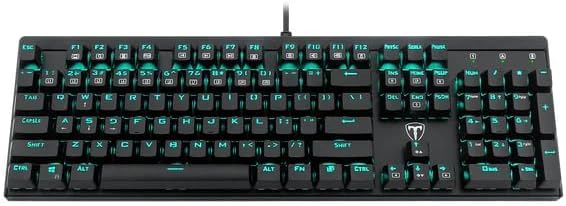
Слика 2.1: Одозго надоле view of the T-DAGGER TGK-303 mechanical gaming keyboard, showcasing its full 104-key layout and single-color backlighting.

Слика 2.2: Англед view of the T-DAGGER TGK-303 keyboard, highlighting its ergonomic design and keycap profile.

Слика 2.3: Цлосе-уп view of the OUTEMU mechanical switches and keycaps on the T-DAGGER TGK-303 keyboard, demonstrating the switch mechanism.
3. Подешавање
- Распакујте тастатуру: Carefully remove the T-DAGGER TGK-303 keyboard from its packaging.
- Повежите се са рачунаром: Locate an available USB port on your computer. Plug the USB connector of the keyboard into the USB port.
- Инсталација драјвера: Тастатура је „plug-and-play“. Ваш оперативни систем би требало аутоматски да детектује и инсталира потребне драјвере. Обично није потребна инсталација додатног софтвера.
- Проверите функционалност: Once connected, test the keyboard by typing in a text editor or browser to ensure all keys are responsive.
4. Упутство за употребу
Basic Keyboard Functions:
The T-DAGGER TGK-303 functions as a standard 104-key keyboard. All keys perform their labeled functions directly.
Контрола позадинског осветљења:
The keyboard features a single-color running backlight. Control functions are typically accessed using the Fn тастер у комбинацији са другим тастерима.
- Fn + Scroll Lock: Toggles backlight modes or effects. Press repeatedly to cycle through available modes.
- Fn + стрелица нагоре: Повећава осветљеност позадинског осветљења.
- Fn + стрелица надоле: Смањује осветљеност позадинског осветљења.
- Fn + стрелица лево/десно: Adjusts backlight speed or direction for running effects (if applicable).
Note: Specific key combinations for backlight control may vary slightly. Refer to the keyboard's keycap legends for exact markings if available.
5. Одржавање
Правилно одржавање осигурава дуготрајност и перформансе ваше тастатуре.
- Чишћење:
- Искључите тастатуру из рачунара пре чишћења.
- Користите меку крпу која не оставља длачицеampводом или благим раствором за чишћење да бисте обрисали капице тастера и површину.
- За прашину и остатке између тастера користите компримовани ваздух.
- Избегавајте употребу јаких хемикалија, абразива или растварача.
- Складиштење: Store the keyboard in a dry, cool environment away from direct sunlight and extreme temperatures.
- Руковање: Avoid dropping the keyboard or exposing it to excessive force, which can damage the mechanical switches or internal components.
КСНУМКС. Решавање проблема
If you encounter issues with your T-DAGGER TGK-303 keyboard, refer to the following common solutions:
| Проблем | Решење |
|---|---|
| Тастатура не реагује |
|
| Позадинско осветљење не ради или је заглављено |
|
| Одређени тастери не раде |
|
7. Спецификације
| Феатуре | Детаљ |
|---|---|
| Бранд | Т-ДАГГЕР |
| Модел | TGK-303 |
| Технологија повезивања | УСБ |
| Опис тастатуре | Механички |
| Механички прекидачи | ОУТЕМУ |
| Препоручена употреба | Гаминг |
| Посебне карактеристике | Позадинско осветљење |
| Backlighting Color Support | Single Color (Running Backlight) |
| Стиле | Модерна |
| Оријентација руке | Амбидектроус |
| Количина дугмета | 104 |
| Димензије производа | 43.4 к 13.4 к 3.7 цм |
| Тежина артикла | 350 г |
8. Гаранција и подршка
T-DAGGER products are designed for quality and reliability. For warranty information, technical support, or service inquiries, please refer to the warranty card included with your product or visit the official T-DAGGER webсајт. Сачувајте рачун као доказ о куповини за потребе гаранције.
For further assistance, you may contact your retailer or the T-DAGGER customer support team.