
1. Увод
Thank you for choosing the EZVIZ RE4 Plus Robot Vacuum and Mop. This device is designed to provide an efficient and automated cleaning experience for your home, combining powerful vacuuming with effective mopping. Featuring advanced LiDAR navigation and an automatic dust emptying station, the RE4 Plus minimizes manual intervention, allowing you to enjoy a cleaner home with ease. Please read this manual thoroughly before using the product to ensure proper operation and maintenance.
2. Безбедносне информације
Always follow basic safety precautions when using electrical appliances to reduce the risk of fire, electric shock, and personal injury. This appliance is not intended for use by persons (including children) with reduced physical, sensory, or mental capabilities, or lack of experience and knowledge, unless they have been given supervision or instruction concerning use of the appliance by a person responsible for their safety.
- Не користите робота у влажним срединама или близу воде.
- Држите косу, широку одећу, прсте и све делове тела даље од отвора и покретних делова.
- Не користите робота за усисавање великих предмета, оштрих предмета или запаљених/димећих материјала.
- Ensure the charging station is placed on a level surface against a wall, with adequate clear space around it.
- Only use the original power adapter and charging station provided by EZVIZ.
3. Производ је готовview
Кључне карактеристике
- Аутоматско пражњење прашине: The robot automatically empties its dustbin into the 4-liter collection bag in the station, providing up to 90 days of hands-free cleaning.
- 2-у-1 усисивач и моп: Equipped with both vacuuming and mopping capabilities, featuring 4000 Pa suction power and a 300 ml water tank for thorough cleaning.
- ЛиДАР навигација: Advanced LDS LiDAR technology and infrared sensors enable precise mapping, obstacle avoidance, and efficient route planning.
- Контрола паметне апликације: Customize cleaning plans, set no-go zones, and manage floor maps via the EZVIZ app.
- Дуг век трајања батерије: A 4930 mAh Li-ion battery provides up to 240 minutes of cleaning in silent mode, covering approximately 300 m².
- Детекција тепиха: Automatically increases suction power when detecting carpets for deeper cleaning.
- Интеграција паметне куће: Compatible with third-party voice assistants like Amazon Alexa and Google Assistant.

Слика 3.1: Завршеноview of EZVIZ RE4 Plus features and components.
Укључене компоненте
- EZVIZ RE4 Plus Robot Vacuum and Mop
- Аутоматска станица за пражњење прашине
- Бочна четка
- Филтер
- Упутство за употребу
- Повер Адаптер
4. Подешавање
4.1 Распакивање и постављање
- Пажљиво уклоните све компоненте из паковања.
- Choose a suitable location for the automatic dust emptying station. It should be placed against a wall on a hard, level surface, with at least 0.5 meters of clear space on both sides and 1.5 meters in front. Ensure there are no obstacles that could block the robot's return path.
- Plug the power adapter into the station and connect it to a power outlet. Ensure the station is powered on.
4.2 Почетно пуњење
Place the robot onto the charging contacts of the station. The robot will automatically align and begin charging. For first-time use, fully charge the robot before operation. The indicator light on the robot will show charging status.
4.3 Повезивање апликације
- Преузмите апликацију EZVIZ из продавнице апликација за ваш паметни телефон (iOS или Android).
- Направите EZVIZ налог или се пријавите ако га већ имате.
- Додирните икону „+“ у апликацији да бисте додали нови уређај.
- Scan the QR code located on the robot or the instruction manual.
- Пратите упутства на екрану у апликацији да повежете робота са кућном Ви-Фи мрежом.
5. Упутство за употребу
5.1 First-Time Mapping
After initial setup, the robot will perform a quick scan of your home to create a map. Ensure all doors are open to allow the robot to access all areas you wish to clean. This map will be saved in the EZVIZ app for future use and customization.

Figure 5.1: The robot utilizing its integrated LDS LiDAR for obstacle avoidance and mapping.
5.2 Режими чишћења
The RE4 Plus offers various cleaning modes accessible via the EZVIZ app:
- Аутоматско чишћење: Робот интелигентно чисти целокупно мапирано подручје.
- Чишћење зоне: Изаберите одређена подручја на мапи која ће робот чистити.
- Чишћење места: Усмерите робота да очисти малу, концентрисану површину.
- Само вакуум: For dry debris removal.
- Само моп: For wet cleaning (ensure water tank is filled).
- Усисивач и брисање: Истовремено усисавање и брисање подова.

Figure 5.2: The 2-in-1 vacuum and mop system of the RE4 Plus.

Figure 5.3: Detailed cleaning actions including powerful suction, consistent mopping, and carpet boost.
5.3 Customizing Cleaning Plans
Using the EZVIZ app, you can:
- Edit Maps: Divide, merge, or rename rooms.
- Поставите зоне забрањеног приступа: Draw virtual boundaries or no-mop zones to restrict the robot from certain areas.
- Закажите чишћење: Set specific times for the robot to clean selected areas or the entire home.
- Adjust Suction/Water Level: Customize cleaning intensity for different rooms or floor types.

Figure 5.4: Customizing your floor plan and cleaning tasks via the EZVIZ app.
5.4 Управљање гласом
The RE4 Plus supports voice control through Amazon Alexa and Google Assistant. Link your EZVIZ account to your smart home assistant app and use commands like "Alexa, turn on the RE5 Plus" to start cleaning.

Figure 5.5: Integrating the RE4 Plus with smart home voice assistants.
6. Одржавање
Regular maintenance ensures optimal performance and extends the lifespan of your robot vacuum. Always power off the robot before performing any maintenance.
6.1 Automatic Dust Emptying Station
The station's 4-liter dust bag typically needs replacement every 90 days, depending on usage. The app will notify you when the bag is full.
- Open the lid of the dust emptying station.
- Carefully remove the full dust bag. The self-sealing design prevents dust leakage.
- Dispose of the old bag and insert a new EZVIZ replacement dust bag.
- Добро затворите поклопац.
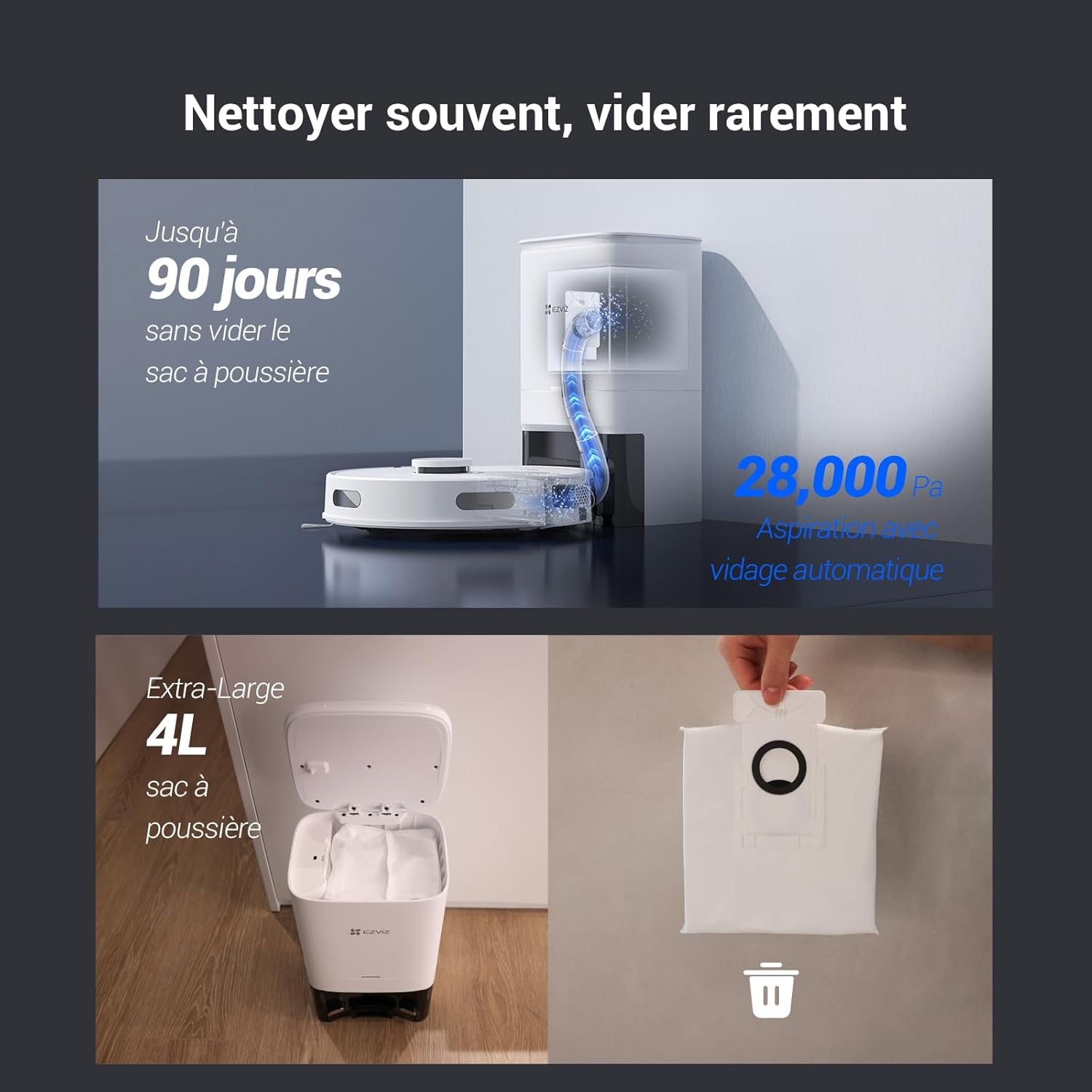
Figure 6.1: Automatic dust emptying process and replacement of the 4-liter dust bag.
6.2 Роботска канта за прашину и филтер
Although the robot automatically empties its internal dustbin, it's recommended to periodically check and clean it, along with the filter.
- Извадите канту за прашину из робота.
- Empty any remaining debris.
- Remove the filter and tap it gently to dislodge dust. Rinse the filter with water if necessary, but ensure it is completely dry before reinserting.
- Reassemble the dustbin and filter, then place it back into the robot.
6.3 Water Tank and Mopping Pad
For optimal mopping performance:
- Након сваког чишћења подова, извадите резервоар за воду и испразните преосталу воду.
- Detach the mopping pad, rinse it thoroughly, and allow it to air dry.
- Periodically clean the water tank to prevent mold or blockages.
6.4 Brushes and Sensors
- Главна четка: Скините поклопац главне четке и очистите замршену длаку или остатке са четке и њених лежајева. Користите приложени алат за чишћење.
- Бочне четке: Check side brushes for wear or damage. Replace if necessary. Remove any hair or debris.
- Сензори: Wipe the cliff sensors, wall sensors, and charging contacts on both the robot and the station with a clean, dry cloth.
КСНУМКС. Решавање проблема
If you encounter issues with your EZVIZ RE4 Plus, refer to the following common problems and solutions:
| Проблем | Могући узрок | Решење |
|---|---|---|
| Робот се не укључује | Low battery; Power button not pressed; Robot stuck. | Charge the robot; Press and hold the power button; Check for obstructions. |
| Робот не може да се пуни | Charging contacts dirty; Charging station unplugged; Robot not properly docked. | Clean charging contacts; Ensure station is powered; Re-dock the robot. |
| Лоше перформансе чишћења | Dustbin full; Filter clogged; Brushes tangled; Water tank empty (for mopping). | Empty dustbin/replace bag; Clean/replace filter; Clean brushes; Fill water tank. |
| Робот се често заглављује | Too many obstacles; Cliff sensors dirty; Robot on dark-colored carpet. | Clear obstacles; Clean sensors; Use no-go zones for problematic areas. |
| Проблеми са везом апликације | Incorrect Wi-Fi password; Robot too far from router; Router issues. | Verify Wi-Fi credentials; Move robot closer to router; Restart router/robot. |
If the problem persists, please contact EZVIZ customer support.
8. Спецификације
| Феатуре | Детаљ |
|---|---|
| Бранд | ЕЗВИЗ |
| Назив модела | РЕ4 Плус |
| Број модела | CS-RE4P |
| Боја | Re4p (White) |
| Capacity (Dust Bag) | 4 литара |
| Волtage | 14.76 Волтс |
| Трајање батерије | До 240 минута (4 сати) |
| Тежина артикла | 9.81 килограма |
| Тип батерије | 1 литијум-јонска (укључена) |
| Произвођач | ЕЗВИЗ |
| Препорука за површину | Тепих, тврди подови |
| Димензије производа | 18Д к 38В к 22Х центиметара |
| Тип контролера | Контрола апликација |
| Тип филтера | Пена |
| Посебне карактеристике | 90-day hands-free dust emptying, LDS LiDAR navigation, 4000 Pa suction, Auto-return & charging, App control & route customization, Automatic dustbin emptying, Obstacle avoidance, Fall detection, Carpet detection, Google Assistant & Amazon Alexa integration |
9. Гаранција и подршка
For warranty information, please refer to the warranty card included in your product packaging or visit the official EZVIZ website. For technical support, troubleshooting assistance, or to purchase replacement parts, please contact EZVIZ customer service through their official channels. Spare parts availability information is not provided in this manual; please check the EZVIZ website or contact support for details.