
Увод
Thank you for choosing the BENWIS Touch iPad Keyboard Case. This manual provides detailed instructions for setting up, operating, and maintaining your keyboard case to ensure optimal performance and longevity. This case is designed to enhance your iPad experience by offering versatile viewing modes, a responsive keyboard, and a multi-touch trackpad.

Image: BENWIS Touch iPad Keyboard Case with an iPad installed, showcasinг његов елегантан дизајн.
Карактеристике производа
- 360° ротирајући дизајн: Омогућава флексибилно viewing angles in both portrait and landscape orientations.
- 180° Foldable Modes: Supports various configurations including laptop, tent, stand, share, and tablet modes.
- Тастатура са 7 боја позадинског осветљења: Adjustable backlight with 3 brightness levels for comfortable typing in any lighting condition.
- Detachable Case: The iPad case can be easily detached from the keyboard for standalone tablet use.
- Мулти-тач тракпед: Integrated trackpad with support for iPadOS gestures for precise navigation.
- Integrated Apple Pencil Slot: Securely holds your Apple Pencil for convenient storage and charging.
- iOS Shortcut Keys: Dedicated keys for quick access to iPad functions.

Image: The keyboard case supports 7 unique modes, including tent, laptop, tablet, protect, share, and stand modes, offering versatile usage.

Image: The case allows for 2-direction 180-degree flip and 360-degree swivel for adjustable viewинг углова.

Image: The detachable design allows the iPad to be separated from the keyboard for tablet-only use.

Слика: Оверview highlighting features like protective case, Apple Pencil slot, 2-way 180-degree flip, magnetic adhesion, 360-degree rotation, 3-level brightness, 7-color backlight, iOS shortcuts, and multi-touch trackpad.

Image: The keyboard features 7 colors of backlighting with 3 adjustable bright modes for enhanced visibility.
Компатибилност
This BENWIS Touch iPad Keyboard Case is compatible with the following iPad models:
- iPad Pro 11 inch: 2nd Gen (2020), 3rd Gen (2021), 4th Gen (2022)
- iPad Air 10.9 inch: 4. генерација (2020), 5. генерација (2022)
- iPad 10th Gen: 10.9 инча (2022)
To verify your iPad's model number:
- 1. метод: Check the back of your iPad for the model number (e.g., A2757).
- 2. метод: Go to iPad Settings App > General > About, then tap on Model Number to display it.
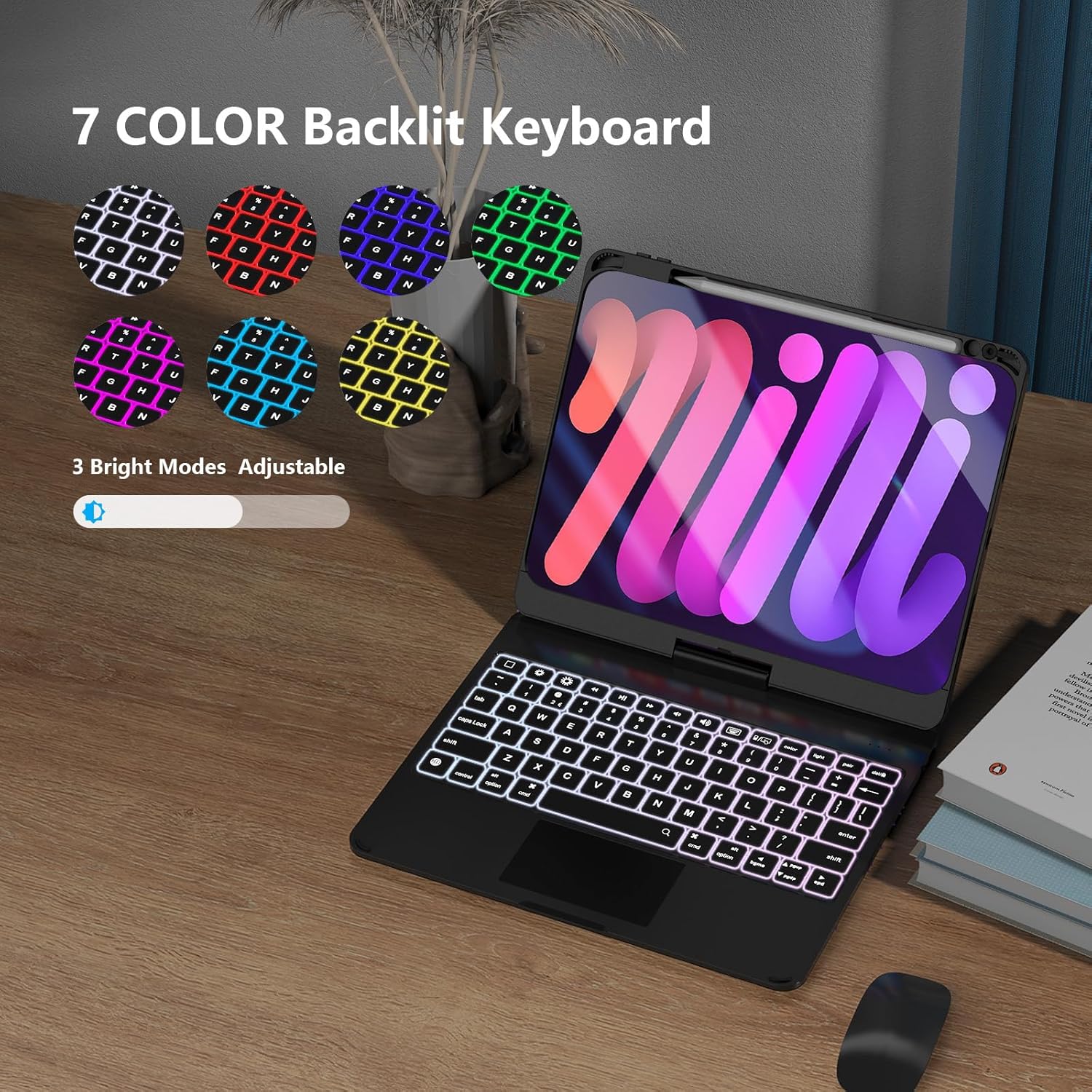
Image: A chart showing compatible iPad models and two methods to verify your iPad's model number.
Сетуп
1. Installing Your iPad into the Case
- Ensure the keyboard is open and flat.
- Align your iPad with the protective case section.
- Gently press the iPad into the case, ensuring all edges are securely fitted.
2. Removing Your iPad from the Case
- To remove the Apple Pencil, pop it forcefully with your finger through the hole in the case.
- To remove the iPad, pop the iPad with your finger over the camera part of the case.
- Use one hand to hold down the keyboard and the other to pull out the iPad.
- If necessary, pick out the rubber with a pencil to loosen the iPad.
Video: Demonstrates how to install and remove the iPad and Apple Pencil from the keyboard case.
3. Блуетоотх упаривање
- Turn on the keyboard by sliding the power switch. The indicator light will flash.
- On your iPad, go to Settings > Bluetooth.
- Turn on Bluetooth and select "BENWIS Keyboard" from the list of available devices.
- Once paired, the indicator light on the keyboard will turn off.
Упутство за употребу
1. Подешавање Viewинг Англес
- Ротација за 360°: The iPad screen can be rotated 360 degrees horizontally while attached to the keyboard base.
- Преокрет од 180°: The screen can be flipped 180 degrees vertically, allowing for various modes like tent or tablet.
2. Using the Multi-Touch Trackpad
The integrated trackpad supports standard iPadOS gestures for navigation and interaction. Refer to your iPad's settings for a full list of supported gestures.
3. Контрола позадинског осветљења
Притисните тастер Сијалица key to cycle through 7 different backlight colors. Use the Осветљеност keys (usually F5/F6 or dedicated keys) to adjust the 3 brightness levels.
4. Detaching the iPad Case
To use your iPad as a standalone tablet, gently pull the iPad case upwards from the magnetic hinge. The case will detach, allowing you to use the iPad independently while still protected.
Video: Demonstrates the 180-degree flip, 360-degree rotation, trackpad usage, Apple Pencil functionality, and the detachable feature of the keyboard case.
Одржавање
- Чишћење: Користите меку, дamp крпу за чишћење спољашњости кућишта и тастатуре. Избегавајте јаке хемикалије или абразивне материјале.
- Пуњење: Connect the provided USB cable to the keyboard's charging port and a power source. The charging indicator light will illuminate.
- Складиштење: When not in use for extended periods, ensure the keyboard is fully charged and stored in a cool, dry place.
Решавање проблема
| Иссуе | Решење |
|---|---|
| Тастатура се не повезује преко Блутут-а | Ensure the keyboard is charged and turned on. Forget the device in iPad Bluetooth settings and re-pair. |
| Трекпед не реагује | Check Bluetooth connection. Ensure iPadOS is updated. Restart both iPad and keyboard. |
| Позадинско осветљење не ради | Press the backlight key to activate. Ensure the keyboard is sufficiently charged. |
| Тастери не реагују | Recharge the keyboard. Re-establish Bluetooth connection. |
Спецификације
| Феатуре | Детаљ |
|---|---|
| Бранд | БЕНВИС |
| Компатибилни уређаји | iPad Pro 11 (2nd, 3rd, 4th Gen), iPad Air 10.9 (4th, 5th Gen), iPad 10th Gen 10.9 |
| Технологија повезивања | Блутут, УСБ (за пуњење) |
| Опис тастатуре | Integrated, Foldable, Backlit (7 colors, 3 brightness levels) |
| Распоред тастатуре | КВЕРТИ |
| Материјал | Акрилонитрил бутадиен стирен |
| Укључене компоненте | УСБ кабл |
| Извор напајања | УСБ напајање |
| Оријентација руке | Амбидектроус |
Гаранција и подршка
For warranty information and customer support, please refer to the product packaging or contact BENWIS customer service directly. Keep your purchase receipt for warranty claims.